4255 comments found.

Hi, Valenti in the Google developers page speed tool has a very low score … this problem will be fixed in the next version?
Hey Samanpes,
The theme does actually load fast, the Google page speed tool isn’t actually a measure of site loading speed! You should read this for more info on this: https://wp-rocket.me/blog/the-truth-about-google-pagespeed-insights/
But yes, the theme’s overall performance is getting a huge boost in v5.6 and in iterative updates closely after too. You should look at the overall score so of our Zeen theme to see the type of performance Valenti will get.
P.s in case you don’t have time to test Zeen – most demos from that theme score between 95 and 100 out of 100 (Yes some demos score 100/100) 
Codetipi
Hi codetipi, i’ve been using your valenti since 2013 now, i love it but i have the same problem coming over again and again. I wonder if you could help me out with it.
I have exceeded the maximum number of files authorized by my host.
when I upload an image into an article, it creates 9 thumbnails to allow the theme to display optimized images. My question is : Why does the theme not only generate thumbnails for the featured image rather than generate thumbnails for all of the images uploaded to the article?
this will display the optimized version of the featured image in the menus, in the grids … without generating unnecessary thumbnails for all the images downloaded on the article, right?
thanks for your answer ! Have a great day
Hi there,
Love that you still love it
You have to have multiple thumbnails for each image, this is 1000% necessary to have great/modern performance and responsiveness.
9 thumbnails is very few though, most modern themes use many, many more. In fact, Valenti v5.6+ will add new ones to be extra responsive and perform fast.
I 100% recommend you change hosts, as it sounds like you’re on a really cheap (which unfortunately usually means not good) hosting.
By having thumbnails of different sizes, the theme can use the exact size necessary. If you load the original 500kbs file for a tiny 80×80 pixels image space, then your site would be extremely, extremely slow to load = users would leave site = Google would drop you in the rankings.
Hope this info helps.
Coedetipi
I purchased this theme in January with the understanding that it would be updated soon. I decided to wait until the update to install the theme and build my site. I visit this stream regularly and see ongoing comments that the update is coming but never a firm date. When can we expect the update? I’m down to 2 months support before I’ve even installed the theme.
Hey Forestwoods,
Thanks for choosing Valenti. The v5.6 is still in beta testing and we could do with more Valenti beta testers. Would you be interested in helping test it? As you have valid support, all you need to do is open a ticket titled “Valenti beta testing” in http://codetipi.ticksy.com and share the url of your staging site where you’d test it. The more beta testers, the quicker it can reach the final stable release version
Thanks in advance!
Codetipi
Happy to help. Can you give me some idea of what testing entails?
Great news! All it involves is installing the beta version on your staging site and thoroughly checking it all. Then you’d need to report back any errors/problems/unexpected things you encounter, and any suggestions/overall feedback too.
Hello I bought your theme and its great, but I have one big problem, Main menu doesnt show up on mobile devices and tablets.
Please help..
Hey Zzzileee,
Thanks for choosing Valenti and for the kind words
For maximum user control, the mobile menu is a separate option in Appearance > Menus. You can create a unique menu for it or if you want to use the main menu there, just assign the main menu to the mobile menu (small screen device navigation) location.
Hope this helps.
Codetipi
Thanks, new things, great things…
You’re welcome
Hi, I’m waiting for the update … I have one question, does this theme using schema.org/BreadcrumbList? because data-vocabulary.org schema was deprecated… anyway I can help you in beta testing
Hi Samanpes,
Yes, the Valenti v5.6 update does indeed come with the latest breadcrumb schema 
We could do with more Valenti beta testers, so that’s great news! Please open a ticket at http://codetipi.ticksy.com titled “Valenti beta test” and the url where you’d be able to test it on.
Thanks.
Codetipi
Hi, When you are planning to update this theme
Hi Basheernaik,
The next update is practically ready, it just needs beta testing to ensure a smooth transition for the 10k+ Valenti users. As soon as it passes the beta testing it will be released
Codetipi
Hi, great theme! But I noticed that from the PageSpeed Insights tools from Google the mobile speed can be improved a lot as it shows less than 50%. Could you work on it?
Hey Stefnapico,
Thanks for the kind words and for choosing Valenti
The theme is really fast, but there are things that themes don’t control that affect score (images, cache, plugins, etc). Pagespeed isn’t a great source of information (and the scores don’t actually mean much for a WordPress site), try running your site here: https://gtmetrix.com/ that will give you more detailed information of what is causing the slowdowns and how to improve it.
Hope this helps.
Codetipi
Hello - Is your theme compatible with wordpress 5.4 ? - Is there a French translation available
Hey Leyugo,
Thanks for checking out Valenti
The current latest version of Valenti is compatible with WP 5.4 if you use the Classic Editor plugin (free). The upcoming Valenti v5.6 update (currently undergoing beta testing) will be 100% compatible with everything – WordPress 5.4, Gutenberg, all latest PHP versions, etc, etc
And yes, Valenti comes with the French translation included.
Hope this helps.
Codetipi
Thank you for your response, I look forward to the release of version 5.6. How to know when it will be ready.
You’re welcome It all depends on how quickly the beta testers are able to test the theme and report back any potential issues. The aim is to release as soon as possible though!
Hello, i know that you are working on new update,, but when i add twitter URL into post, look what is happening https://ibb.co/GnPDHv4 there any quick solution for this ?
sorry it was custom CSS problem
Hey there,
Happy to hear you got it sorted
Codetipi
Something went wrong with the plugin API.
Do you know why I get this when trying to install sidekick?
Hi Chronicrd,
The Sidebar plugin company actually sold to another company and the new company discontinued Sidekick, which is why it doesn’t work any more. It has been removed in the upcoming v5.6 update, but for now you can just dismiss the installation notice and it won’t appear again.
Also, are you able to help beta test the v5.6 update? We now only have 1 active beta tester and we really need more to speed the testing stage up and be able to release it.
If you can help, please open a ticket at http://codetipi.ticksy.com titled “Valenti Beta Test” and share the url where you will test it (ideally it’s a staging site).
Thanks in advance.
Codetipi
Hi! I am using your theme for years (since 2016) and I am still happy with it, thanks! But now I can’t figure out how I can style my shop page (https://www.zutphenspersbureau.nl/winkel/). I see in your preview three products in a row, in our website I have two and one in a row. How can I present the products in rows like in yours? Hopefully you can help me.
Thanks, Fiona.
Hey Fiona,
Really happy to hear that There is an option to change the layout in the Theme options > WooCommerce, have you tried that yet?
Codetipi
Hi Codetipi, thanks for your reply. I think have I tried everything.
In Theme options > WooCommerce I only see three options: - WooCommerce Global Color - WooCommerce Style (Sidebar, Sidebar, No Sidebar: I have changed my shop page in ‘No Sidebar’ than it seems okay, but with a sidebar it I see a row with two product, a row with one product, a row with two products… – instead of only rows with three products) - WooCommerce Background Image
Is there another option?
Fiona.
Hey Fiona,
I had a look at your url again, and I can see 4 columns, is it all okay now?
Codetipi
I have chosen 4 columns vwithout the sidebar as an alternative, because three columns with a sidebar doesn’t working correctly. It’s okay for now, but I love to hear how I can use three columns, with three products in a row, with a sidebar. When I do this, I still see 1 row with two products and a space, than 1 row with one product en more space, than row three wit two product and a space… I can’t figure out how I can change that.
Fiona.
Hey Fiona,
Ah okay, the WooCommerce implementation in Valenti has been re-written in the upcoming v5.6 update, so I think the best thing to do is to update to it when it comes out and check again, as I think it should all be 100% working automatically there.
Hope this helps.
Codetipi
Thanks a lot! I will try this. Have a good day, Fiona.
No problem and you too
Hola guys, I am a happy Valenti user since end of 2015. Unfortunately I still see that the theme uses the titles of other posts for H2 and H3 provided in carrousels or sliders. I am really using the headings like I should and it’s so frustrating when I see in Screaming Frog that all my H2 and H3 titles do not match with the titles I used for a blog. What do I wrong? Kind regards!
Hey Digitaldanique,
Happy to hear you’ve been happy with Valenti for so long
I’m not 100% sure I understand what you mean though! Post titles should 100% always be headings. If they are in sidebars or the homepage they should use H2/H3’s depending on the structure. Why do you think they shouldn’t be headings?
Codetipi
Hi Codetipi,
I mean that if I check in the Moztoolbar my travelblog about for example Brazil.
In this post I used several H2 and H3 headings, but when I use the MozTool bar and Screaming frog, I don’t see the H2 and H3 headings I used in the blog. So it seems like, Google doesn’t index the H2 headings in my blogs.
Instead the theme shows this for H2 headings of this blog (see the green H2 below and the words on the right side):
H2 Backpacken in Brazilië • Waarom ben ik gaan wonen in Barcelona? • De leukste bezienswaardigheden in Ericeira • Surfen in Ericeira als beginner • Vegetarische Nasi Goreng • Mexicaanse Chili Sin Carne • Indische pasteitjes vegan • Vegan chocoladetaart • De ultieme gids voor vegan restaurants in Barcelona 2019 • Hummusbar Tbilisi in Georgië • Waar kun je vegan eten in Porto? • Elements Beach Bar ‘s Gravenzande • Kickboksen op nationaal niveau in Peru • Effectief thuiswerken, hoe doe je dat? • Reizigersdilemma: duurzaam reizen • Treinkaartjes kopen naar Barcelona • Waarom ben ik gaan wonen in Barcelona? • Spaanse vegan tortilla • De ultieme gids voor vegan restaurants in Barcelona 2019 • Roadtrip Costa Brava: hoe haal je alles eruit? • Treinkaartjes kopen naar Barcelona • Met de trein naar Barcelona, Spanje: ben je gek ofzo? • Backpacken in Brazilië 3 weken • Onze reisroute voor Brazilië in 3 weken: • Voorbereiden is het halve werk • Paklijst voor backpacken in Brazilië in de zomer • Tip voor Brazilië # 1 reis essential: je bikini • Is Brazilië veilig om te reizen? • Wat zijn de kosten om te backpacken in Brazilië? • Verdeling kosten 3 weken reizen Brazilië 1,171
—> These are all names blogposts that are in widgets or below the end of the blog….Could you explain me how this is possible and why the theme doesn’t show the H2/H3 headings?
Have a great day!
Thank you so much
Saludos, Danique
Hi Danique,
The theme does show your H2/H3 headings. In fact, that isn’t something the theme can control! If you add H2/H3 headings to an article, that is literally what will come out, themes can’t change that.
Share a post url example, and I’ll look at the HTML to see what headings are outputting.
Codetipi
Hi Codetipi, I always write H2 and if necessary H3 headings in a blog post. But when I run Screaming Frog and check the H2 tags per blogpost, they don’t show. So that’s why I find it very weird. It looks like the theme overtake the titles of the blogposts mentioned in sidebars or widgets on the page of the blog. For example this post: https://vegantravellife.com/reizen/backpacken-in-brazilie/. Hope you can clarify this…Thanks!
You see them in the html, but I find it so weird that Screaming Frog and Moz toolbar don’t see them….
I had a look and the H2/H3 are definitely outputting fine! I think the issue is with Screaming Frog/Moz Toolbar though. Google would 1000% read the h2/h3 properly.
Perhaps Screaming Frog and Moz have problems reading special characters, as your headings have (Brazilië) with that “ë”, or it could be because your headings are bold, which means the HTML is this:
<h2><strong>Backpacken in Brazilië 3 weken </strong></h2>
Maybe the strong (bold) html is making them think there’s nothing in them or similar.
Either way, you can see that Google detects them fine, check this out:
https://search.google.com/structured-data/testing-tool#url=https%3A%2F%2Fvegantravellife.com%2Freizen%2Fbackpacken-in-brazilie%2FHope this helps.
Codetipi
Hello, Im really intrested in purchasing this theme. Ive got a couple of questons – how many color layout options are in the theme? And is it possible to place user rating on the thumbnail of a post? I can see editors ratings placed on the thumbnail of the posts in the demo preview but adding user rating next to it is a really important feature for me. Also, it`d be cool to have a best rated by users and bes rated by editors widgets on the home page.
Hey Sealion27,
Thanks for the interest in Valenti
1- What color layout options are you asking about exactly? Do you mean the unique color for categories? If so, each category can be set to any color you want.
2- Currently the score is the editor score, is your site going to be heavily about reviews? Because in that case, may I also suggest you take a look at our Zeen theme, which comes with Let’s Review plugin for free. Zeen + Let’s Review allows you to set user ratings only reviews, and that score will appear on post thumbnails outside of the post itself. Let’s Review is the most powerful review system anywhere in the WordPress world: https://themeforest.net/item/zeen-next-generation-magazine-wordpress-theme/22709856
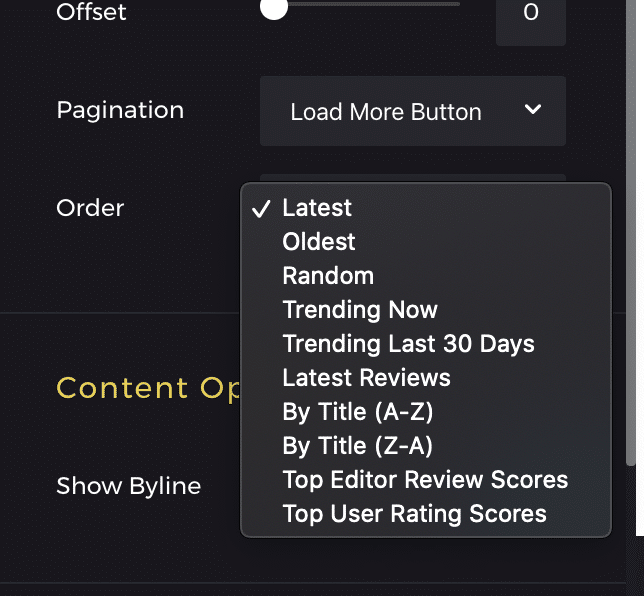
3- Zeen also has the Tipi Builder which is a powerful layout builder, each post block can be set to different filters, including “Top User Rating Scores”, so you can easily show the top scores wherever you want (and in whatever block design you want). You can see a screenshot of the filter options blocks have here: https://demos.codetipi.com/zeen/wp-content/uploads/sites/2/2020/04/Screenshot-2020-04-10-at-10.19.24.png
Hope this helps.
Codetipi
Thank you for a quick reply! Zeen looks great but I think I`ll still go with Valenti because I lke the overall design of it more and it seems more ambient. Yes, I am planning to make a site that`s gonna be rather hard about reviews – I need both user and editor reviews and I am pretty much satisfied with everything about Valenti when it comes to reviews but adding user score next to editor score in the thumbnail would be a cherry on top as well as being able to use a top user widget. So are these features not anyhow included in Valenti?
You’re welcome In that case, Valenti does have the Let’s Review API code already integrated so they work perfectly together automatically, and if you set the Let’s Review reviews to “user rating”, they will show that score in post thumbnails. So you can achieve that, but it does require both Valenti + Let’s Review. Here is the link to the plugin for you to check it out in more detail: https://codecanyon.net/item/lets-review-wordpress-review-plugin-with-affiliate-options/15956777
Hope this helps
Codetipi
could you please specify – so i can switch between user rating and score rating in the thumbnail or can have both of them in it?
Currently you can set the review type “Editor only/Visitor only/Editor and visitor”, if you set the Visitor Only option, then the score in the post thumbnails will be that score. If you choose “Editor Only” or “Editor and visitor”, then post thumbnails show the Editor score.
Showing both editor + visitor scores in the post thumbnail might be added via a plugin update, however, if you have access to a developer, he/she could help you do it with some custom PHP code, as Valenti’s implementation can be easily filtered via the functions.php of a child theme.
Hope this info helps.
Codetipi
Thank you very much! Your replies are very helpful Buying today!
You’re welcome, happy I could help
Hello, I just want to know how do you make image larger than the text like in this page: https://preview.themeforest.net/item/valenti-wordpress-hd-review-magazine-news-theme/full_screen_preview/5888961
Thank you, Regards, Gaspard
Hey Gaspard,
You need to set the post layout to not have a sidebar, and then when you do that you’ll see an on/off option to make the embeds bigger than the content. Then simply set the embeds to center alignment and ensure they are the “full size” image size, and that will happen.
Hope this helps.
Codetipi
Hello,
I don’t find this on/off option. Is it in a different menu? https://www.underlined.fr/wp-content/uploads/2020/04/capture-decran-2020-04-10-a-11-28-12.pngHave a good day,
Gaspard
Ah my apologies I got confused! I think you only need to set the embeds to be “center” alignment and use the “full size” option to make this possible. In the upcoming Valenti v5.6 the theme is fully compatible with Gutenberg so you’ll be able to use the new alignments to achieve this too.
When is the update coming? Seems this theme doesn’t support the latest php 7.3 ? Should update ASAP
Hi Tiny18g,
Valenti v5.6 is in beta right now and it’s shaping out to be a very big update, particularly framework wise. It’s a HUGE re-write and modernisation of lots of code. The performance is much better, the practises are even cleaner and the theme is now even compatible with PHP 7.4
However, we currently only have 2 beta testers helping beta test it, the more beta testers testing it, the more broad/quicker the feedback will be.
The latest beta version is due out very soon, so if you can help beta test it would be very helpful to Valenti as a product. If you can, please open a private ticket at http://codetipi.ticksy.com titled “Valenti beta test” and include the url where you can test it – ideally it’s a staging site.
Codetipi
Hi, are you still updating this theme? Because i see the latest update was in january 2019. That’s a bit worrying.
Hey Kasp,
Yeah, Valenti is getting multiple big updates in the near future. The next update (v5.6) is in beta right now and as soon as the beta testers report back that it’s ready to go, it’ll be launched.
Stay tuned
Codetipi
.wp-caption { background: #fff; }
.wp-caption .wp-caption-text {   background: #fff;   padding: 3px 10px 0px;   color: #171717; }
I don’t manage to have normal captions (like in your demo site) below images.
In addition, when I want to centre small images, the only thing which changes is that the width of the text becomes smaller
I’m disappointed of this bug and of the time you take to make a new version.
I hope it will be fixed.
Regards, Gaspard
Hi Gaspard,
Caption have been working fine in the theme for a long time, you don’t need any custom css, but can you share your post url to look at the html?
The theme’s next update is currently in beta and there are currently only 2 beta testers testing it. The more beta testers that help – the quicker the next update will be able to be released.
Are you willing to help beta test the next update? If so, please open a private ticket at http://codetipi.ticksy.com with the title “Valenti beta testing” and include the url where you can test it (Ideally you have a staging site).
Thanks.
Codetipi
Hello,
Thank you for your prompt response. You can find the article here. I tried to disable all my extensions and custom CSS but nothing changed :
https://www.underlined.fr/2020/03/etre-jeune-noble-en-2020/Can I beta test the next version even if I don’t have support anymore?
Kind regards, Gaspard
Hey Gaspard,
No worries! I had a look and that is actually to do with Gutenberg’s image block. Valenti will be officially compatible with Gutenberg from he v5.6 update.
You do indeed need valid support to open a ticket, and the beta testing is all done there. It would be great if you could become a beta tester though, as it should fix the issue you’re having (and if not, it can be investigated for the v5.6 update).
Codetipi.
Okay, thank you. I’ll just keep using the old text editor then.
I don’t understand what you’re getting at. Can I beta test or do I have to wait?
Regards, Gaspard
No worries!
Without support you can’t be a beta tester, if you do decide you can help and extend support, you can then open a private ticket at http://codetipi.ticksy.com and include the url where you’d test it on – hopefully you have a staging site to do it on.
Thanks.
Codetipi
i would love to beta test but don’t have support, and not gonna buy for testing your theme thats the only reason i need support for
Hi Pie123,
Hm, but you will always need valid support for all theme questions/support, this is how all of Themeforest works. Unless we get enough beta testers to be able to test the new update thoroughly, the theme update can’t come out, as there are too many Valenti users to just launch without proper testing :/
Codetipi
Well i never need support, but i bought support now, will open ticket
Great news, thanks for joining the beta testing group
Hi, I understand testing betas takes time but is there any news on the new 5.6 update to Valenti? It seems it was due early January but now we are almost in March and there are various errors in the Google Webmasters Console (eg. “item does not support reviews schema”) which I understand the new update will fix. Thanks again for the theme and your hard work!
Hi MacHow2,
The 5.6 update is ready, but needs more beta testers. If you’re able to do it please open a ticket up at http://codetipi.ticksy.com with the title “Valenti Beta Test” and include the url where you can test it. Until a few people can beta test it, it can’t come out unfortunately :/
Codetipi
Hello hello! Hope you are doing wonderfully well
Valenti v5.6 update is now in beta and Codetipi needs new beta testers to ensure a smooth release.
If you’d like to help and be a beta tester for these updates, you simply need to:
1- Have a valid Valenti license with active support. 2- Have a real site running Valenti that you can clone (staging site) to install the update on or are happy to test it on the live site. 3. Report back with feedback as well as point out any issues discovered.
To apply you simply need to send an email via the contact form here: https://themeforest.net/user/codetipi – You must do this via the account that purchased the theme and has active support.
Thanks
Codetipi

This item was featured on ThemeForest

Power Elite Author
Contact the Envato Market Help Team