12000 comments found.

I have tried auto update as well as manual. Both of them giving trouble. Listing wizard stuck at start
Hi omtechies,
Please try some different browser or check in browser private window that is just your cache issue 
Thanks
Hello guys! Buy your theme a few minutes ago and it’s already installed. But I think it will take me a long time to develop my idea with this theme. Do you offer help with this? I want to make this topic look like offerup.com. It is possible to do it, right?
Thanks for purchasing ListingPro. Do you just want the site to look like offerup or do you even want it to function like offerup. Because offerup is a CLASSIFIED site and not a DIRECTORY.
Please read this https://docs.listingprowp.com/faq/can-i-use-listingpro-to-build-a-classified-site/
To customize to fit your exact needs please kindly fill out this form to get a free quote from our recommended partner. click here
We also highly recommend you to get a second quote outside as well so to compare and make sure you are getting the best deal.
Do you have any idea when the Classified Theme you are working on will be finished? I bought Listing-Pro because I thought I could adapt it to a Classified Theme, but it would take me a long time to adjust it to a Classified Theme.
Sorry there is no ETA.
More work needs to be done to improve google page insights and loading times on this theme. It’s terrible! Adding more plugins is not the solution. More development and time needs to be taken to bring this theme into the year 2020.
A lot of times users ask us why is your page speed slow (page load time).
Most of the time people who are asking this question are most likely basing it on testing one of our LIVE DEMOS (Example: classic.listingprowp.com) on PageSpeed Insights or GTmetrix. Live demos are for the purpose of the demo only.
We do not optimize our demos for page speed. Page load time has little to do with the theme and a lot to do with the hosting option, content, images, etc. For more details read the following articles.
Please checkout the following articles https://docs.listingprowp.com/faq/why-is-the-page-speed-slow https://docs.listingprowp.com/knowledgebase/what-should-i-do-to-improve-my-site-speedSorry, but that’s simply not true. The developers who focus on optimisation get optimisation.
I have been on ThemeForest for 11 years now and have purchased quite a few themes during that time.
Rather than suggesting there is no problem, may I suggest that you consider the end-user experience and modernise your work.
You have a wonderful project going that I see is of excellent value and probably the best directory listing theme (feature-wise). But page speed and loading times are something that you should work to improve because it is in the realms of your responsibility as a coder.
Yes, hosting, CDN’s, pre-caching, TTL all play a significant part of course, so does the foundation of your theme.
Thanks for your feedback. Yes there is always room for improvement and we are always improving and optimizing the product performance. With 2.5 release there was a lot of improvement. Next release will also have improvements related to performance. But we also stand by that no matter what we do individual site optimization is extremely crucial for users. Thanks!
Hi, could you kindly help me please? 1. I would like to translate the fields within the Pricing Plan to my own language using Loco Translate, but i couldn’t do it. 2. My country’s currency is not available in the theme. How can I add it? 3. In Pricing Plan, how to insert a comma in thousands. For example: I want the pricing plan to display 100,000; but its’ current format shows 100000 (without a comma) Thank you so much in advance, great theme!
Please kindly post your question in this ticket. https://help.listingprowp.com/ticket/22247
Hi, just letting you know that I posted a the question in the ticket Looking forward to hear from you.
Hi again, I still haven’t heard from you.
Hi Nara, henry have responded to you two days ago. Please check thanks!
Hi, I am thinking of buying the theme. Do you offer 30 days money back guarantee? Thanks in advance.
Sorry we have to comply with Envato policy and there is no such policy Envato permits so we cannot offer such money back guarantee.
Hope you can understand. Thanks!
Does it support Apple Pay and Google Pay?
The following Payment Gateways are supported as of now:
- PayPal Express (Recurring Supported) - Stripe (Recurring Supported) - 2Checkout - [New] PayStack (Separate add-on)
Apple Pay or Google Pay is not supported.
Thanks!
Hello! Does this theme support such a email subscription idea as Saved Search on attributes (for products which not in sell at this time, but can be add in future)? Thanks.
Hi Frantishek,
We are reviewing your comment. Please checkout our Pre-Sale Help center for FAQs, Live-Demos, Real-Examples, Demo Access and more.
Best Regards,
Natyra from Cridio
Customer Success Ninja
sorry i am unable to understand your question. Can you please give more details and even example if possible.
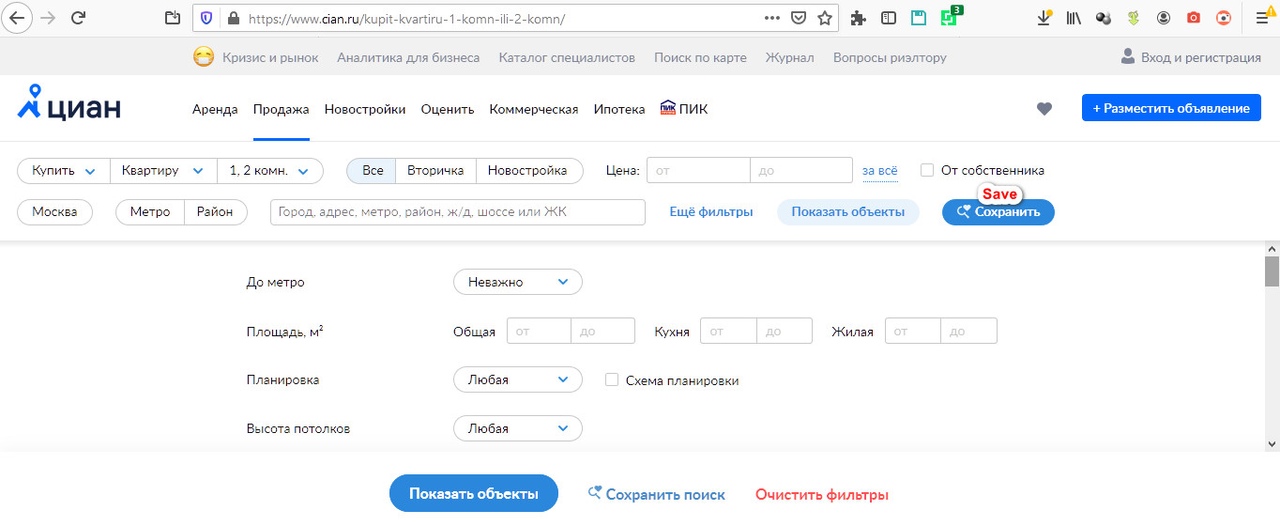
I’ll clarify with examples (sites in another language, but I will comment) Example 1. Real estate. a lot of options. after the parameters are set, you can click the Save button – https://sun9-8.userapi.com/c855632/v855632211/23a9dd/id-qHFs8kKA.jpg Further, the system will offer a number of aditional options (for convenience): – frequency of notifications by mail; – push notification option https://sun9-51.userapi.com/c855632/v855632211/23a9d3/jaA_DVaD4s4.jpg
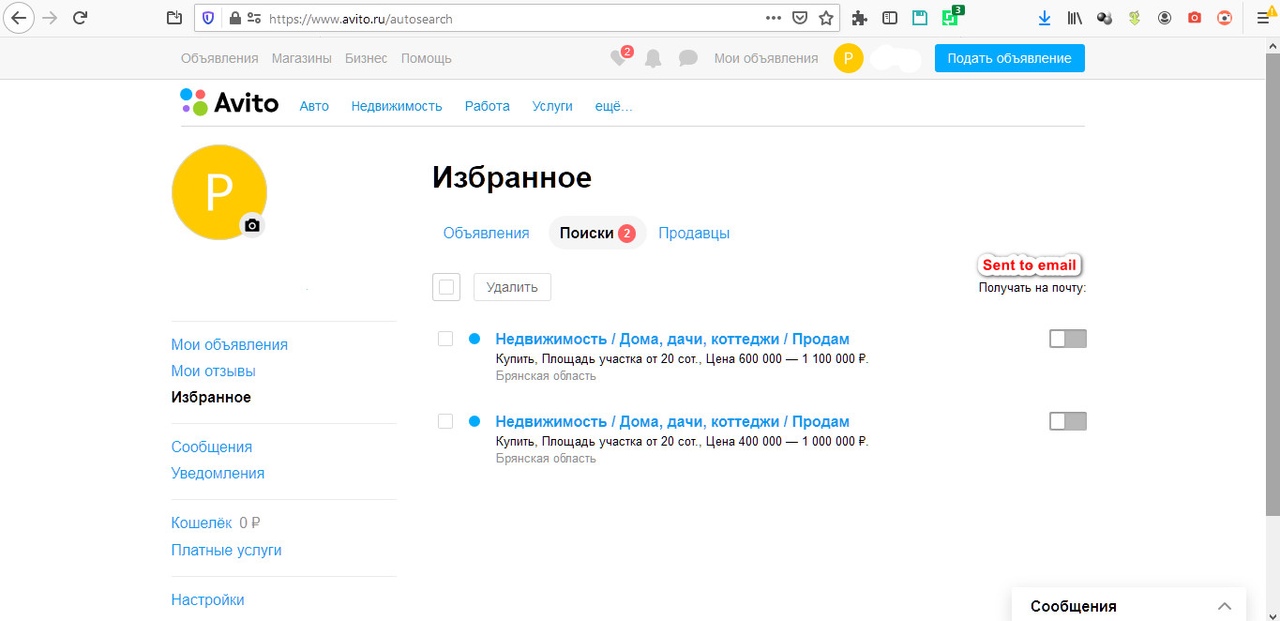
Example 2. Bulletin board you can save the search at any step of refining parameters (category depth, filtering depth) https://sun9-28.userapi.com/c855632/v855632211/23a9f1/ZGsN_-nyQ3s.jpg sometimes, such a search still allows you to select a fragment on the map, and also save it as a geo filter further in your account you can manage this as a subscriptions: – allow / prohibit sending notifications by email; – delete https://sun9-69.userapi.com/c855632/v855632211/23a9e7/ShH2f8DkTiA.jpg
is it possible?
Sorry currently this is not possible.
For customization please kindly fill out this form to get a free quote from our recommended partner. click here
We also highly recommend you to get a second quote outside as well so to compare and make sure you are getting the best deal.
Had a real problem today and Sean Godmon in support came through like he had an S on on chest.
Thanks a lot tim1692,
If you’re willing to rate him with a 5-star review go here.
Best Regards,
Natyra from Cridio
Customer Success Ninja
Thanks a lot for your awesome way of describing your experience with our SUPERstar support teammate, Sean.
What level of nesting do locations have? For Example, Europe-Italy-Tuscany-Florence? or only Italy-Florence? and is it configured in the drop-down filter on the main page? after all, if we want to include all the cities in Europe-there will be a huge list…
If you choose location by Admin (Not Google API) you can have sub-locations up-to 3 Levels.
Example:
1. United States (primary)
2. – California (sub – level 1)
3. —San Jose (sub – level 2)
4. - 11111 (sub – level 3)
Hope this helps clarifies.
Hi, We have installed Loco translate but unfortunely we cannot see how to translate some texts like : Most Viewed, Near Me … Could you advise. Regrads
Hi Nabil59,
Check this article regarding your matter https://docs.listingprowp.com/knowledgebase/how-to-translate-listingpro.
Best Regards,
Natyra from Cridio
Customer Success Ninja
Hi, Please don ’ send the same link again and again. I already installed LocoTranslate and started my translation but unfortunely there are many Texts i cannot find.
For example : we cannot see how to translate some texts like : Most Viewed, Near Me …
Please, can you tell me how to translate missing texts in locotranslate
Tkanks
I ve attached a screensh ot you can see where is the issue : https://prnt.sc/slclww
Hi Nabil59,
I am sorry there are too many people who comment here and I cannot remember all of them  . One of our guys will reply to you shortly
Best Regards,
Natyra from Cridio
Customer Success Ninja
Thks, solved
Hi, I have a customer who has purchased ListingPro and asked me to migrate from another system to yours.
I have a query, the previous system handled countries, states and cities. Is there a way to enable that option to filter the listings and what would be the steps?
Hi renzoster,
We are reviewing your comment. Please checkout our Pre-Sale Help center for FAQs, Live-Demos, Real-Examples, Demo Access and more.
Best Regards,
Natyra from Cridio
Customer Success Ninja
If you choose location by Admin (Not Google API) you can have sub-locations up-to 3 Levels.
Example:
United States (primary)
1. – California (State – level 1)
2. —San Jose (City – level 2)
3. - 11111 (Zip – level 3)
Additional Filters in row, I have created Additional filters but they display in row and not column as like your demo or pictures . Could you tell us how to make them appear in Column. Regards
Please can someone respond as I have had no feedback at all?
Please can someone respond as I have had no feedback at all?
Sorry for the delay. Thanks for opening a ticket regarding this matter. One of our support engineers will get back to you soon. Please kindly update your ticket with your website information or at least screenshot to avoid any delays. Thanks for your patience.
For when the language in Spanish to install easily in the theme?
Hi calpejym,
You can translate the theme with https://wordpress.org/plugins/loco-translate.
Here are the steps https://docs.listingprowp.com/knowledgebase/how-to-translate-listingpro/
Best Regards,
Natyra from Cridio
Customer Success Ninja
Hello, Having some trouble with Mapbox – despite having an API set up, no locations are displaying on the map. Can you please advise?
Hi nhoward332,
Thanks for choosing ListingPro!
For tech-support please Open a Ticket.
Best Regards,
Natyra from Cridio
Customer Success Ninja
Dear, i want try the booking option but it no work in live demo, is very important for me this feature
Hi tinocura,
We are reviewing your comment. Please checkout our Pre-Sale Help center for FAQs, Live-Demos, Real-Examples, Demo Access and more.
Best Regards,
Natyra from Cridio
Customer Success Ninja
Visit the following page and search or scroll down to BACKEND DEMO ACCESS Link: https://listingprowp.com/support
I have download the recent version and installed but i did not find this Next-Gen UX. Please advise.
Hi priyababuusa,
Please reply to your ticket #20071 regarding this.
Best Regards,
Natyra from Cridio
Customer Success Ninja
Next-Gen UX means Next-Generation User Experience. It’s an over experience of our features not just a specific feature.
Hi. Still at the early stages of building my site. I updated the submit listing page with a ‘submit listing’ widget from elementor. I tried to add a new listing as a different user, but when I click the ‘save and preview’ button the page just reloads, and listing doesn’t get added. Please help out. Thanks!
Hi jkw_ksg,
Thanks for choosing ListingPro!
For tech-support please Open a Ticket.
Best Regards,
Natyra from Cridio
Customer Success Ninja
Hi I would like to have the information before purchasing the theme: Can I view the state / city and then access the categories and subcategories? Does it support categories and subcategories in visualization? Can other taxonomies be added to differentiate the entry fields? Many thanks
Hi pcapriglione,
We are reviewing your comment. Please checkout our Pre-Sale Help center for FAQs, Live-Demos, Real-Examples, Demo Access and more.
Best Regards,
Natyra from Cridio
Customer Success Ninja
Sorry I do not fully understand the question so please I highly recommend you to kindly review how our search works first.
https://docs.listingprowp.com/knowledgebase/how-does-listingpro-search-worksYou can have Categories and Sub-Categories. You can create CUSTOM FIELDS that are category specific.
Let us know if you need further clarification.
Hello! in what time you think to use wpml compatible?) thx a lot!
If I’m running version 1.2.5 and child theme 1.0 – What php can I run? Above 7.0?
Hi gclark72,
We are reviewing your comment. Please checkout our Post-Sale Help center for FAQs, Docs, Video Tuts, Community and more. For tech-support please Open a Ticket.
Best Regards,
Natyra from Cridio
Customer Success Ninja
I did that. I was hoping to get the answer a bit quicker.

This item was featured on ThemeForest

Power Elite Author
Contact the Envato Market Help Team