423 comments found.

Hi! Is it possible to import posts to your theme? I have already been using Echo Knowledge Base for a knowledge base system currently, but are more fond of your theme and whish to move into that.
Thanks in advance!
Hi,
theoretically yes. It depends on in what format are your existing KB posts, but I assume they are either standard posts or a custom post type. There are 3rd party plugins which allows you to change the post type, so you should be able to change it to the custom post type used by Lore. This is actually something you will have to deal with when switching to any other KB theme or KB plugin.
Lubos
Hi there, i using „Category Order and Taxonomy Terms Order”-Plugin to sort my Knowledgebase articles. Since the last update of your theme this doesnt work anymore. Is there a fix for this?
Best regards, PhL
Hi,
try to use “Intuitive Custom Post Order” plugin instead.
Lubos
Does your theme support multi language? For instance if I would like to make En / De support and allow users to switch between the languages on the page? If no, can you suggest the plugin that can work for me with your theme?
Hi,
you need a plugin for that. For example Polylang or WPML.
Lubos
Hello. i have one question about site speed my site speed is strangely low… all needed plugins for theme are installed and Lore-child is active theme i talked with my Host manager and he said the problem is not for Host
Hi,
if you are using the caching plugin and still think your site is slow then it must only be the hosting issue or something wrong with your site config. Just take a look at theme demo site and you will see it is pretty fast so the theme certainly is not the issue https://preview.lsvr.sk/lore/
Feel free to share your URL so I can take a look.
Lubos
Yeah, it takes forever to load, but this is hardly a theme issue. Feel free to switch theme to a default one like TwentyTwenty and you will see it will be the same. Your main domain works fine so it is weird. Try to use some online speed analytics like gtmetrix.com, as they can give you some hints what may be wrong.
Hello,
I have activated multiple languages on my site, when I’m on a secondary language the all search functions don’t work (the header, the side search). It throws me an error saying:
Page Not Found The server can’t find the page you requested. The page has either been moved to a different location or deleted, or you may have mistyped the URL.
The link of the search is changed to have “FR” because it is french, and it is not finding the page: https://help.b2wise.com/fr/knowledge-base-francais/?s=adu&search-filter%5B0%5D=anyHi,
you URL doesn’t work for me, it requires log in. Have you created your language switcher using WPML or separate sites?
Lubos
Hello,
I have a cookie authentication on the site, I have used the polylang plugin to create the second language,
Luis
I guess I found the solution. Go to your Admin / Languages / Settings / URL modifications settings and enable “The front page url contains the language code instead of the page name or page id” option (right column).
Hello,
That worked perfectly, many thanks for the support and swift reply,
Best Regards, Luis
Glad it worked!
If you like the theme then please take a minute and leave a review (under your ThemeForest account / Downloads). It helps a lot. Thanks!
Hi. i have problem with change sitemap icons in front page…. how could i change them? i tried put icon class into article category but didn’t work!!! please help me. tnx
i tried for example “icon-search” in article category, field category icon. but not work…
Hi,
I’ve replied to your PM, please check your email. For the record, make sure you are adding it in a way described in the documentation (first image of the Front Page chapter.) http://docs.lsvr.sk/lore.wp/#front-page
Lubos
Tnx . i checked . i changed the class in wrong place. but still have problem. my menu has not any place to put icon class… here is the screenshot https://help.filmgardi.com/wp-content/uploads/2020/07/Screenshot-from-2020-07-10-17-26-20.png
oh. its work… let me explain for other friends that has my problem. in Appearance / Menus / should enable description for menus. from page setting top part… should check Description for work… Tnk you LSVRthemes
Right, that is actually mentioned in the documentation as well.
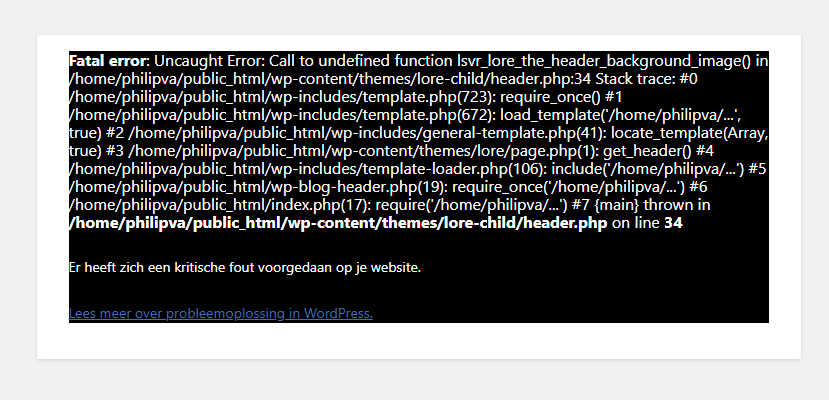
Theme update results in FATAL ERROR! Beware! Screenshot: https://snipboard.io/KBvU3V.jpg This is very unprofessional!
Hi,
what version have you updated from? It seems you’ve made some customizations in your child theme. For example, you are using a deprecated function over there. However, if you’ve updated from 1.x version then please nota that 1.x is not compatible with 2.x and newer. Please read the complete changelog.Lubos
Yes. But if I remove the child theme and activate the main theme, I lose all my child theme customizations. What is the point of having a child theme when it wouldn’t allow the main theme to get updated? I just switched to the main theme and indeed: all the customizations are gone. So I can’t do that. I will have to find another way.
I am not telling you to remove the child theme, just fix all the customizations which are causing those issues. But you still haven’t told me what version have you updated from. Hard to help without this important information.
Hi, it was indeed a 1.x theme and now I wanted just to have the latest updates. For security i think that’s important. If I read the changelog well, I will never be able to update the theme again, right?
You can update, but it will be a lot of work. The biggest hurdle is that your KB and FAQ post won’t work on 2.x, but there are plugins (like this) which can partially help with this.
However, even the 1.x should still work well with the latest WordPress version, so security should not be an issue if you don’t update the theme.
I am sorry but it was simply not possible to make such a huge update with maintaining the compatibility. I understand you are not happy about it, but unfortunately, it was either that, or let theme slowly die, since it was not possible to move forward without such a radical change in the code.
Great theme thus far. Can you recommend “related posts” plugin for me? Especially a free one. I am trying to improve the bounce rate by keeping readers on the blog.
Hi,
I am sorry but I can’t recommend anything specific. Any plugin with the support for custom post types should work.
Lubos
how to edit the icons on the front page sitemap block?
nevermind i figured it out
Hi,
glad you’ve sorted it out!
Lubos
Hi, I was wondering if I could match the menu/header to my new website easily http://dev2.amstradinggroup.com/ or what are the option for that? Thank you! Regards, Niels
Hi,
the main difference is that the “Free Trial” menu item would require some small custom CSS to have a border like that and there are no options for a “WE HELP ORDER FLOW TRADERS MAKE BETTER DECISIONS WITH DELTAPRINT” title, nor the “START YOUR 14-DAY TRIAL NOW” button in this theme, so all this will have to be custom coded.
Lubos
Okay thanks! I do have WPBakery, so that should make it easier right?
Nope, the header is not editable via WPBakery or any other page builder. This has to be custom coded.
Ah got it, okay thanks! I will let you know soon if I want to go ahead with that… Many thanks for the fast response, Niels
Hi, bought the theme but was wondering how I can sort the Titles and subtitles… the Base category seems alphabetical, the sub articles I cannot find out how they are sorted.. how do I do that? Thx!
Hi, you can use this plugin to sort any posts or categories.
And do you perhaps know what this means; “u003cstrongu003eLSVR Knowledge Baseu003c/strongu003e plugin has to be installed and active for this feature to work.”
I am sorry but you can’t move categories under articles.
Where exactly do you see that message?
It’s within some of the demo articles… Not sure what it was supposed to show… Not a big issue though, I’ll just remove it  Thx!
Thx!
That is just a part of the demo content, I mean the demo content is basically a documentation.
Hi. It’s stated that in the new version of the theme there’s a toogle button even for active categories, but this is not the case: https://prnt.sc/suejaa
Hi,
have you updated all the LSVR plugins as well? If yes, then make sure it is not just a caching issue.
Lubos
As I can see right now, only the theme itself got an update. Plugins are shown as ‘up to date’
There must be something wrong then. Try to remove them and follow the prompt to install them again from the admin.
I can’t find how to get rid of the default sidebar, like an existing option, shall I edit the theme and your example of the website doesn’t show any sidebar , I need help removing it .
Hi,
where exactly you want to remove it? For post archives or post detail pages it is done under Appearance / Customize / [post type]. For regular pages it is done by editing the page, in the right sidebar under Page Attributes change the page template.
Lubos
Hi,
For some reason after setting up WPML, if i select the flag images to display in the menu, they don’t appear. I just want to check if is something with the theme or the plugin itself.
The website is dapucpr.org
Hi,
I can’t access your site, it ask for a password. However, you should set your language switcher via Appearance / Customize / Languages.
Lubos
Hi Lubos,
Thanks for the response. I disable the coming soon plugin. I did what you told me and it work.
One quick question, where i can edit how the labels of the language display? they’re in lower case
Either edit them in your WPML settings (please refer to the WPML documentation if not sure where to look) or add this to your custom CSS:
.header-languages__item-link { text-transform: uppercase; }
Hello,
Hi,
I want to change the URL in the site logo to another URL. Now if you click on the site logo it goes to the home url. I want the url in the logo to point to a certain page on my site.
Hope you can help me.
Many thanks
Hi,
copy the template-parts/header/branding.php file to your child theme (preserve the relative path), edit it and on line 13 replace the value of href attribute with your desired absolute URL.
Lubos
Hi,
Didn’t work in the child, did work in Lore. So its good for now. Will this later be a problem?
You probably haven’t copied the file into the correct folder. It must be the same relative path (template-parts/header). If you keep it in the parent theme then you will lost it on the next theme update.
I dont see the same path in the childtheme though.. That’s why I updatet the parenttheme. Did I do something wrong?
off-topic question: How can I remove ‘home’ from the breadcrumbs (or otherwise when not possible, remove all the breadcrumbs)? Thankyou
You need to create those folders in your child theme via FTP.
Use this CSS to hide breadcrumbs:
.breadcrumbs { display: none; }
Thanks for your quick answer again, both worked!
Hello,
I want to show the searchbar in the header on every page except on the homepage. How can I exclude pages, in stead of the standard options: Disable Display Everywhere Knowledge Base and Front Page Only Front Page Only Knowledge Base Only
Would like to hear from you, many thanks.
Hi,
the only way would be to hide it via CSS. Enable it for every page and then add this custom CSS:
.home .header--has-large-search .header-search { display: none; }
Lubos
Thanks for your support, it works! +1
I’m interested to buy your theme, but I’m new to this. I have 2 questions: 1. If we test installing the theme in my local computer as a test, then I deploy it later to a host. Will my license still workable? 2. How many levels deep can I have for the category in Knowledge base?
Hi,
1.) yes, of course
2.) four, I mean you can have more but some widgets may won’t display properly more than four.
Lubos
Hi Lubos,
sorry for bothering you again. Hopefully you can help me a last time.
I dont know if its a bug, or a feature, but i need those navigation arrows also in the active categories in the Navigation Widget. They disappear on a click deeper in the category-tree. See screenshot below.
https://gottesdienstinstitut.digitaldeck.de/wp-content/uploads/2020/05/Bildschirmfoto-2020-05-13-um-12.14.54.pngIs this fixable?
Thank you very much!
Hi,
please update the theme to the latest version. http://docs.lsvr.sk/lore.wp/#how-to-update-theme
Lubos
Ah, i forgot to update the plugins! Thank you very much!
Hello – if I want to change the permalink structure so that knowledge base articles contain their categories in the URL – is this possible?
Thanks,
A
Hi,
I am sorry but that is not possible without some custom coding or a plugin. Check out this one for example (I haven’t tested it, so I can’t guarantee it works tough).
Lubos
Thanks – what would be the equivalent of / % category % / for knowledge base category to appear in the URL?
lsvr_kba_cat
Perfect – that worked great.
Sorry – now I’ve encountered another challenge. Some Knowledge base articles are assigned to two categories – a parent and a child – this causes the URL to generate a not found error. Is there a way around this so that knowledge base articles can be assigned to more than 1 category.
I am sorry but you should aim this question at the author of that plugin. The theme has nothing to do with it.
Hello,
How can I exclude KB categories from the sidebarwidget LSVR Knowledge Base?
Many thanks.
Hi,
I am sorry but there is no such option.
Lubos
Hi there,
i would like to show the search results not in the narrow template. Could you please give me a hint where i can change this to the standard wide layout with sidebar?
Thanks a lot!
Hi,
add this to your custom CSS:
.c-search-form__input { max-width: 1200px; }
and add this to your child theme’s functions.php file:
add_filter( 'lsvr_lore_narrow_layout_enable', 'lsvr_lore_child_narrow_search_results_layout_disable', 20 );
if ( ! function_exists( 'lsvr_lore_child_narrow_search_results_layout_disable' ) ) {
    function lsvr_lore_child_narrow_search_results_layout_disable( $enable ) {

        if ( is_search() ) {
            return false;
        }

        return $enable;

    }
}
Lubos
Thanks a lot! How can i display the Sidebar within this template?
Add this to you child theme’s functions.php
add_filter( 'lsvr_lore_sidebar_position', 'lsvr_lore_child_search_results_sidebar_position', 20 );
if ( ! function_exists( 'lsvr_lore_child_search_results_sidebar_position' ) ) {
    function lsvr_lore_child_search_results_sidebar_position( $sidebar_position ) {

        if ( is_search() ) {
            return 'left';
        }

        return $sidebar_position;

    }
}

add_filter( 'lsvr_lore_sidebar_id', 'lsvr_lore_child_search_results_sidebar_id' );
if ( ! function_exists( 'lsvr_lore_child_search_results_sidebar_id' ) ) {
    function lsvr_lore_child_search_results_sidebar_id( $sidebar_id ) {

        if ( is_search() ) {
            return 'lsvr-lore-default-sidebar';
        }

        return ! empty( $sidebar_id ) ? $sidebar_id : 'lsvr-lore-default-sidebar';

    }
}
Awesome! Thank you very much! The Sidebar IDs are in the database? Need to replace the default by a specific one.
You can create sidebars under Appearance / Custom Sidebars. Then follow this to determine its ID: For custom sidebars it is lsvr-lore-custom-sidebar-X where X stands for the sidebar number. You will get this custom sidebar number by visiting Appearance / Customizer / Custom Sidebars and mousing over the “sidebar remove” button for a few seconds. Omit the # sign, so the final custom sidebar ID should look like lsvr-lore-custom-sidebar-3 for example.
You should change only the first occurrence of “lsvr-lore-default-sidebar” to your custom ID in the code from my previous reply.
so this should be it right?:
add_filter( ‘lsvr_lore_sidebar_id’, ‘lsvr_lore_child_search_results_sidebar_id’ ); if ( ! function_exists( ‘lsvr_lore_child_search_results_sidebar_id’ ) ) { function lsvr_lore_child_search_results_sidebar_id( $sidebar_id ) { if ( is_search() ) { return ‘lsvr-lore-custom-sidebar-1’; } return ! empty( $sidebar_id ) ? $sidebar_id : ‘lsvr-lore-default-sidebar’; } }
It loads the default sidebar, got four different sidebars, tried all IDs. What am i doin wrong?
Replace line with “add_filter” with this:
add_filter( 'lsvr_lore_sidebar_id', 'lsvr_lore_child_search_results_sidebar_id', 20 );
Awesome!!!! Five stars for support! Thank you very much and have a nice day!
Thank you. I will probably add an option for this in the next update, so keep an eye on changelog for any mentions of this functionality, then remove this custom code to prevent any conflicts.
Sounds great! Will keep an eye on it.