8781 comments found.

I have just upgraded to elementor pro to enable mobile menu on desktop view however i cannot seem to find anything in the settings to allow this, can you please assist?
Hi, the theme doesn’t require Elementor Pro (just the free version) its also not used for the header or mobile navigation.
Did you purchase the theme on another account? I’m not seeing your purchase or supported badges?
It was purchased through my other account, ‘davidmclaren’ I admit our support has expired, but would really appreciate if you can tell me how to change the menu on desktop to a hamburger menu. Thank you in advance
You’d need to hide the normal desktop menu and show the mobile menu icon, can try adding this to your Real Estate 7 Options > Custom CSS:
https://gist.github.com/contempoinc/7e768e981c70d7a8cf5abdfb2c94b147That’s about all I can supply, hope you understand.
Hi,
Having an insane time getting our own imported listings to show as published in the listing grid. The only time it works is if we go back and hit ‘publish’ again on the listing after we’ve imported. We’re using WP All Import to map the fields.
Any known conflict or issue? Also, noticed the theme uses a post type field called “Status”. Does this in anyway conflict with the WP status field?
Thanks, Ryan.
Morning, sounds like the settings for the import is set to add them as “Draft” or “Pending” which is why you have to manually hit publish in the backend. The “Status” field is for the listing “For Sale”. “For Rent”, etc…
I’d check the import settings and change it to publish refer to https://www.wpallimport.com/documentation/getting-started/importing-an-xml-or-csv-file/
Thanks but doesn’t seem as simple as that. The listings are set as published, do show in the back-end as ‘published’ and they are viewable individually but for some reason they are not visible in the listing grid unless you go back to the listing and re-hit ‘publish’.
Odd, yeah there’s no known issues with WP All Import they actually maintain the the official add-on plugin as well https://wordpress.org/plugins/wp-pro-real-estate-7-xml-csv-property-listings-import/ I’d reach out to their support there see if an update maybe needs to be made.
So we finally figured out the field _ct_brokerage is getting added to the postmeta data in order for a property to show up as published the first time it’s uploaded through WP All Import. I assume this means we need to have that field mapped in our import file? Did we just miss that field or is that a known required field?
Ryan.
The brokerage isn’t a required field, the listings don’t actually have any required fields or validation needed to pass for publishing. So I’m not entirely sure why WP All Import is requiring it, but if that works you could just pass a default value.
Hi, I have my grid set to Minimal. Is there any way to display the listings in two columns instead of three? There’s no option for this and I can’t seem to find the template file associated with this grid. Thanks in advance.
Morning, it’s specifically designed for 3 columns, it could be changed but requires modifications via the child theme.
Did you purchase on another account I’m not seeing your purchased or supported badges?
Yes, my client bought the theme through his account. Any way you could point me in the right direction with these modifications?
The themes built on a 12 column grid, you’ll notice span_X on the items that relates the column width, you’ll need to do everything via the child theme refer to https://contempothemes.com/wp-real-estate-7/docs/child-themes/
In depth modifications like this are outside the scope of my normal support, hope you understand.
I understand! I’m aware of the span_X, I just can’t figure out what file to customize. Can’t do it all through to CSS. I guess I’ll just try to convince my client that he’s better off with the three column layout, I think it looks better anyway.
The listing grid output is designed specifically for that 3 column style, changing it to two as you know would be a bit awkward, in that case you should just use the single column “List” layout style. I’d recommend your client choose from the options available as well.
That may be true but you did include a two-column preset (nr 4) in the page builder and it looks pretty good! It’s just not really useable because it only displays four listings. Could you give me a price quote on this modification, just in case my client does insist on it?
Correct, but those options aren’t suited for use in the search results since you’re talking about devices from Desktop to Mobile, the grid will accommodate and display the best column width for the view, you’ll notice they do go from 3 to 2 to 1 depending.
Open a live chat with me on http://contempothemes.com/wp-real-estate-7/ (bottom right corner) and I can provide you a quote.
You’re absolutely right and my client agrees as well, just spoke to him. So we’re sticking with the three-column grid. Thanks for now, appreciate your quick response.
Sure thing, always glad to help.
Hi, After last update, I do not know how, Menu for Mobile version, has disapeared. Any suggestions? Thanks a lot
Morning. This affects a very small amount of installs but add this to your child themes functions.php https://gist.github.com/contempoinc/dac5654ad5cd00213b05ca10e52fefe6
Then go into Appearance > Menus > you’ll find a new “Mobile” location create and set that then test and you’ll be good to go.
Just a heads up your support is expired and you’ll need to purchase an extended pack, thanks!
hello
its been a couple of months since i bought this item.. i had gotten into a bad accident and i am almost recovered (ankle fracture, yeah ! ouch ) and been out of action for more than a year now.. it is just now that i am retaking some of my routine work and this project i never got to fully get into it.. i realize i am out of support but i was wondering if you can help me finish installing the theme.. i tried to do this myself tonight July 13-2020 and watching your video tutorial its been almost 9 hours for the import content (multi demo 3) and i see the cimputer still at 0% it is a complete new install as i have also bring my chores upto date with godaddy servers so its a clean install.. so i was wondering if i did or am doing something wrong…
Hi. Its due to your server timing out on the demo import process, keep in mind my demos have a TON of very large images which take some time to download depending on the server resources. Did you make sure to check https://contempothemes.com/wp-real-estate-7/docs/installation-demo-import/#theme-requirements before running the wizard, you’ll need to make sure your PHP settings are correct as outlined in the documentation.
Once you’ve done that the easiest way to get it back is to use the WordPress Reset plugin https://wordpress.org/plugins/wordpress-reset/, sets you back to WordPress default database then just reactivate my Real Estate 7 theme and you’ll be directed to the setup wizard then just follow the steps and make sure to select and import a demo on step 4, as outlined in my narrated instructional video https://contempothemes.com/wp-real-estate-7/docs/installation-demo-import/
It’s not required but I recommend getting https://www.siteground.com/go/ct-wordpress-hosting and their GoGeek plan, have a ton of buyers using them, really fast, optimized for WordPress, excellent customer service and works great with my theme.
Another recommendation is Cloudways its excellent, easily scalable if needed, super-fast, free migration and great customer support also works great with my theme and you can spin up a 1GB server from them starting at $10/month https://www.cloudways.com/en/?id=128386
when i add submit listing then , in image section drag and drop upload javascript not work. and sometimes error with wordpress and said : template edit listing.php erron on line 284 ” https://ibb.co/wQpPWk0
Morning. The Places API is used for the Location step and if that’s throwing an error all the rest of the scripts will as well including the image upload, etc…which will cause the image upload to fail.
Just a heads up your support is expired and you’ll need to purchase an extended pack, thanks!
Hi There, Anytime I update this theme every translation/language in Loco Translate got lost and I have to translate it again. Is there any solution to that? Thank you for your support.
Morning, you’ll need to create your own language files that’ll save to the child theme, if you’re editing the included parent language files those will be overwritten every time you update.
You can copy any of them from realestate-7 > languages then go to your child and create a “languages” folder, then use Loco Translate from there, do make sure the settings are proper as well have a look at https://localise.biz/wordpress/plugin/child-themes
Just a heads up your support is expired and you’ll need to purchase an extended pack, thanks!
Hi,
The header search by type of property doesn´t work. The state, city or state works but not type of property.
You can see at https://ventalquilerdeconfianza.es/
Morning, this was sorted a few updates ago but grab the latest version of the theme https://contempothemes.com/wp-real-estate-7/changelog/ and you’ll be all set.
Hello again, we have installed the latest version and the problem continues.
Ah, that’s something else but a simple fix, you have “Property Type” enabled for both the Global and Header Search — screenshot https://share.getcloudapp.com/2Nu5Qr9q
Essentially what that does is the second field overwrites the first and sends a “blank” parameter to the search and you end up showing All Results. You’ll need to go into Real Estate 7 Options > Advanced Search and make your change by dragging it to the Disabled column > Save Settings, do this for any fields you have enabled under Header Search and you’ll be all set.
Thank you, it´s fix !
Not a problem, glad to help. If you haven’t already please be sure to rate the theme and my support in your https://themeforest.net/downloads area, 5 stars is always very, very much appreciated and helps immensely!
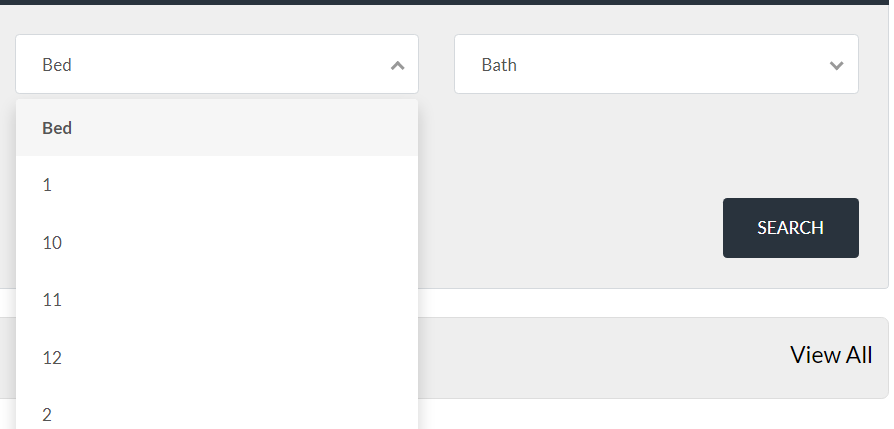
Hey there, Thanks for the great theme and support. We are having a small bug from the theme output. On our website, we have options to “filter the search by number of beds’.
But when we click the “Beds” option from Search Field the numbering is little awkward, it goes like 1, 10, 11, 12, 2, 3 while we expect it to be like 1, 2, 3, ...
Here is the screenshot for better understanding: https://img.virtubox.net/images/2020/07/13/beds.png
Hi, recommend using the “Beds +” and “Baths +” fields instead, make sure your theme is up to date, go into Real Estate 7 Options > Advanced Search & Header Search sub panel.
Just a heads up your support is expired and you’ll need to purchase an extended pack, thanks!
Hi Chris,
My mobile menu is not showing up. When I click the menu, it opens but there are no links to other pages of the website. The menu for desktop version is working.
Do you know how I can display the pages from my menu on mobile navigation.
Thanks, Steve
Hi. Go into Appearance > Menus > Manage Locations > set all the Primary and you’ll be all set.
Ok. So i just checked they’re all set to primary but when I go to mobile responsive, both pad and phone version, none of the links come up.
Sounds like a possible script conflict, but try adding this to your child themes functions.php https://gist.github.com/contempoinc/dac5654ad5cd00213b05ca10e52fefe6
Then go into Appearance > Menus > you’ll find a new “Mobile” location create and set that, then test.
Hi Chris,
Im unsure where to locate the child theme functions.php to add the code you sent in last response.
There are two ways one is through Appearance > Theme Editor (not recommended) and the other is with FTP which if you’re not familiar with your hosting provider can help out, they might be able to just paste the code for you.
I hear you, I just renewed the service for an extra 6 months, it was an additional $41 because I needed to fix this. Otherwise when people visit my website on their phone or pad, they won’t be able to navigate. Do you think you can try to fix for me? It was working and all of a sudden stopped.
Open a live chat with me on http://contempothemes.com/wp-real-estate-7/ (bottom right corner) with your WordPress admin login and the FTP details (get that from your hosting provider) and I’ll get the snippet added.
Hey man, Im not currently on support but as you can see, Ive had this problem in the past, Ive just spent about 2 hours figuring out how to update this theme via Filezilla and It says its updated now…I created a new child theme but for some reason, the menu is not showing up on mobile. I was thinking that the mobile responsiveness problem ( that i asked about a few days ago ) with menu would be fixed but now Im back to this issue from 7 months.
Hi, you just need to set the Mobile menu location, refer to https://contempothemes.com/wp-real-estate-7/docs/mobile-menu-isnt-showing/
For anything moving forward you’ll need to purchase an extended pack, thanks!
Hello,
I have a issue with the icons on the gallery slider. have you ran into this issue before?
https://www.andrewnl.com/fivestar-realestate/listings/escada-apartments/I also wanted to know if I could search communities instead of suburbs on my homepage.
https://www.andrewnl.com/fivestar-realestate/Hi, you’ll need to update to the latest version this was fixed back in v3.0.1
https://contempothemes.com/wp-real-estate-7/changelog/Updated, New Features!
7/11/2020 View complete changelog here, also see this KB article how to update your theme to the latest version.
- New Feature! Major UI/UX changes for Header Search on Mobile to provide the best possible user experience video preview or live demo
- New Feature! Added Webhooks for Zapier, boost your productivity and easily send registered users/leads as well as agent & listing contact forms to all sorts of applications like your CRM of choice admin screenshot, can be found in Real Estate 7 Options > Zapier, also refer to the documentation
- New Feature! Added “CT Listings Carousel” module for Elementor, screenshot, admin screenshot, admin screenshot can be found with the rest of the modules under “Real Estate 7” in Elementor. Requires updating Contempo Real Estate Custom Posts plugin to v2.6.9, to apply go into Appearance > Install Plugins > Update Available.
- New Feature! Added “CT Listings Table” module for Elementor, screenshot, when using “Type” parameter for “Commercial” the “Beds” & “Baths” columns are automatically removed. Requires updating Contempo Real Estate Custom Posts plugin to v2.7.3, to apply go into Appearance > Install Plugins > Update Available.
- Fixed Listings Featured Image “srcset @2x” Bug when using the “Image Not Available” Placeholder
- Fixed Listings Single “Virtual Tour” not showing when using the Tabbed or Accordion options
- Fixed “Header Layout for Style One” options no longer show when you’ve chosen Header Style Two or Three
- Fixed Typo for ct_walkscore_svg()
- Updated Added “Year Built” to top level listing info screenshot, applies to manually entered and CT IDX Pro listings.
- Updated Changed “Listing courtesy of Brokerage Name” to “Offered by Brokerage Name” labeling for all MLS listings when using our CT IDX Pro listings.
- Updated Added “Industrial” & “Retail” so when used like “Commercial” for the Property Type, beds and baths are automatically removed from front end display.
- Updated Icons for Contact Info
-
Updated Code refactoring and improvements for “CT Agents Other Listings” & “CT Listings” widgets
- File affected: realestate-7 > includes > widgets > ct-widget-agentsotherlistings.php
- File affected: realestate-7 > includes > widgets > ct-widget-listings.php
- Updated Single Lisitng styling tweaks for mobile
- Updated Code refactoring and improvements for agents search
- Updated Code refactoring and improvements for mobile navigation
- Updated Code refactoring and improvements for various functions
- Updated Cleaned up WeCashUp PHP notices for Membership & Packages plugin, requires update to v1.3.4, to apply go into Appearance > Install Plugins > Update Available.
- Updated Updated Slider Revolution plugin to latest version, v6.2.15, to apply go into Appearance > Install Plugins > Update Available
- Updated Updated version number
Hi, I’m aware my support has expired but I’m not sure if this could be a generic thing which may throw up problems. When taking stripe payments via your payment gateways I get a non 3D secure report. As of 2019 anyone taking payments online in the EU should be using 3D secure for processing or it causes a high percentage of card declines. I think it’s probably a case of adding coding which allows the bank to verify a 2 step verification before accepting the payment. If you have any ideas on how to sort this that would be great. Thanks x
Morning, thanks for the heads up I’ll make a note to check that out and get an update for membership and packages plugin released if needed
No worries thank you 
When creating posts I get “ipsum” or dummy text instead of the content I entered. The first post is fine but any posts after that isn’t showing the content I entered.
Hi. The theme itself doesn’t do any content creation other than the demo content that’s imported, which you can delete via your WordPress admin > Posts panel, same applies to the listings and pages.
How do you deactivated the child theme
Hi, although I suggest keeping the child theme active, in order to deactivate it you’ll need to activate another theme other than Real Estate 7, then go back and activate Real Estate 7 again (parent theme) once you’ve done that you’ll get a “Expired error page” then just go to your main admin URL and you’ll have the parent only activated.
Did you purchase the theme on another account I’m not seeing your purchased or supported badges?
Hi,
I just purchased this theme for a client’s WP website. I’m having issues switching the theme over and did not download the demos in the initial setup install wizard. When I activated the new theme nothing switched over because the old theme was customized with bakery page builder and it’s a painfully difficult to customize theme.
How should I go about making this change? Is it best to start from scratch on WP? I don’t want to lose my client’s website info and data. What is the usual protocol for changing themes? Do most people use maintenance mode?
To get access to the demo content for Real Estate 7 do I have to completely uninstall and reinstall?
Please advise.
Morning, the easiest way to get it back is to use the WordPress Reset plugin https://wordpress.org/plugins/wordpress-reset/ go to (WordPress Admin > Plugins > Add New > search for “WordPress Reset” > install and activate > go to Tools > Reset), sets you back to WordPress default database then just reactivate my Real Estate 7 theme and you’ll be directed to the setup wizard then just follow the steps and make sure to select and import a demo on step 4, as outlined in my narrated instructional video https://contempothemes.com/wp-real-estate-7/docs/installation-demo-import/
Will I lose everything on the current WP site if I use the reset plugin? I don’t want to lose the current content
Yes, if you have have current content you’ll need to export it either with Tools > Export or use a plugin like WP All Export for more control, then import that back once you’ve run the wizard.
Is there any way to change to this theme without doing that? Or is the demo content needed?
The demo content is 100% optional, but just gives you a nice base to start from, see how everything works. etc…
Ok so I followed your instructions and reset Wordpress and uploaded the theme and clicked activate. I’m logged in as an admin and its taking me to a page that says ‘Sorry, you are not allowed to access this page’
And everything did not import back to my original theme… SOS
Sounds like you didn’t actually run the reset as its trying to forward you into the setup wizard but you’ve technically still already have ran it from previous, reason for seeing that page on theme activation.
You need to go Tools > Reset, follow the steps then once that’s ran, go to Appearance > Themes > activate WP Pro Real Estate 7 run through the wizard.
how do I change the word “more” from the search to the + sign?
Hi. Since its a text string, easiest is to use the free Loco Translate plugin create an English “translation” file or use your language file then you’ll be able to change any of the themes strings to whatever you’d like. Similar to how I do the same thing in this screencast with another string “Community” to “Airport” https://share.getcloudapp.com/jkuKPdNJ also go into Loco Translate > Settings > Skip files larger than > set to 300K https://cl.ly/0W1u101I3b1d
Another option is to copy includes > header-advanced-search.php to your child theme and modify it how you see fit.
https://contempothemes.com/wp-real-estate-7/docs/child-themes/Thank you worked
Excellent, glad to help.
Hi, i bought your wordpress Theme and installed on my website www.oikade.it.
But something is going wrong: 1) The site is terribly slowly 2) I have an php warning (at the moment php debug is disable)
Can you help me? Thank You Manuel
Morning, replied to your live chat.
For the “Featured” section on the front page. Are there certain words that can be displayed with featured. My client want to add “Coming Soon” along with “Featured” which won’t display but will if I add “For Sale” and it displays as “Coming Soon For Sale”. Is there a way for it just to display “Coming Soon”?
You’ll need to use “Featured” along with any other Status like Coming Soon or For Sale. but that module in particular requires “Featured” to be tagged in order for them to display.
However you can use the CT Listings Elementor modules to display anything you’d like refer to https://contempothemes.com/wp-real-estate-7/docs/elementor/#3-toc-title
The “Featured” tag is there. I can give you access to the site if needed. This is being done in the listing and where I type in the text.
Its not needed but suggest using the CT Listings Elementor module and set it to display whatever you’d like.
I’m following the instructions on the video but when right clicking I only get “Edit Text Editor”. Not “Edit CT Listing”.
You need to add the CT Listings Module to the page you’re working on, from the sounds of it you’ve added a “Text Editor” block.
That is on the “Edit Listing” page but the “Coming Soon” is being added on the “Listing” and none of those options are available when trying to edit with Elementor. There is no right click on the “Listing”. This would go a lot quicker if you can see what it is I’m talking about.
You need to create a page > add the CT Listings Elementor module > then set your parameters per the video, or add it to your Homepage.
If you imported one of the old WP Bakery “Multi” demos, go into Real Estate 7 Options > Homepage > Page Builder > that will show what pages are assigned to each section then go back to Pages > find the one you want > Click Edit or the Page Name > then modify it however you’d like with WP Bakery (aka Visual Composer) https://contempothemes.com/wp-real-estate-7/docs/wpbakery-page-builder-aka-visual-composer/ or use https://contempothemes.com/wp-real-estate-7/docs/elementor/
This is for the Homepage and it’s using the Layout Manager. Is there a way to modify the “Featued Listing” so that it will display “Coming Soon”? If not how can I add the page I created to the listing on the layout manager so it can?
Copy includes > featured-listings.php to your child theme and modify it however you see fit, https://contempothemes.com/wp-real-estate-7/docs/child-themes/
3f30b510-a3ea-4595-a95c-0131444e1495 – 2 Jul 2020
Morning, I’ve some problems with Front End Section.
1. Login: Dosn’t works, when I click on the button “Registration/Login” from the “Edit Profile” page, nothing appen..
2. When I try to instert a new listing or modify I receive a PHP error: Fatal error: Uncaught Error: Call to undefined function mime_content_type() in C:\Users\mkrol\Local Sites\rustiko\app\public\wp-content\themes\realestate-7\template-edit-listing.php on line 183 ( ! ) Error: Call to undefined function mime_content_type() in C:\Users\mkrol\Local Sites\rustiko\app\public\wp-content\themes\realestate-7\template-edit-listing.php on line 183
What’s wrong? :/
Morning,
1. Make sure to create a terms and conditions page if you haven’t already then go into Real Estate 7 Options > Front End Login & Registration > Terms & Conditions > search and set your page there screenshot https://cl.ly/bb88b158b8b0
Then check the “I agree to…” when registering that user in the front end before clicking “Submit” and you should be good to go.
2. That’s due to your server configuration you’ll need to contact your host and make sure the “mime_type” module for PHP is enabled.
Everything done with Front End Login, but dosn’t work anymore. Actually I’m working to my website in local with a PHP simulator program for database.
Could this cause this problems?
Gotcha, yeah that can definitely be the issue. If it was working but now isn’t you’ll need to backtrack what’s changed and diagnose.
The website is totally new, so.. I’m working in local because now on the host there is the old website active. When I’ll terminate the set up of the new website I’ll go to transfer it online.
I think the last test will be on the first days the site will be effectivelly online.
Good morning,
so.. finally I’ve transfered the site on a online hosting. Something is giong better but other things already don’t works:
1. The login/registration botton for frontpage area dosn’t works. When I click on it nothing happen.
2. Another problem with front end: when I’ve insert a new listing and I’m going to save it the website go – correctly – to the “my listings” page BUT the new record is not saved. There is no trace anywhere.
1. Use right-click > inspect > then click the Console tab and check for any red errors.
2. Same as number 1, sounds like there are errors or conflicts which aren’t allowing things to work properly.
Done, this is the result:
Uncaught TypeError: Cannot set property ‘onclick’ of null at HTMLDocument.<anonymous> (ct.mobile.menu.js?ver=1.0:25) at i (jquery.js?ver=1.12.4-wp:2) at Object.fireWith [as resolveWith] (jquery.js?ver=1.12.4-wp:2) at Function.ready (jquery.js?ver=1.12.4-wp:2) at HTMLDocument.J (jquery.js?ver=1.12.4-wp:2)
Uncaught TypeError: Cannot read property ‘prototype’ of undefined at common.js:122 at js?key=AIzaSyD2L9ty4S-sQ9_1KO1MZcu1wW7dfkF5VJk&v=3.40&ver=1.0.2:198 at js?key=AIzaSyD2L9ty4S-sQ9_1KO1MZcu1wW7dfkF5VJk&v=3.40&ver=1.0.2:80 at js?key=AIzaSyD2L9ty4S-sQ9_1KO1MZcu1wW7dfkF5VJk&v=3.40&ver=1.0.2:198 at zf (js?key=AIzaSyD2L9ty4S-sQ9_1KO1MZcu1wW7dfkF5VJk&v=3.40&ver=1.0.2:80) at vf.Dd (js?key=AIzaSyD2L9ty4S-sQ9_1KO1MZcu1wW7dfkF5VJk&v=3.40&ver=1.0.2:198) at common.js:1 util.js:217 Uncaught TypeError: _.ta is not a function at util.js:217 at js?key=AIzaSyD2L9ty4S-sQ9_1KO1MZcu1wW7dfkF5VJk&v=3.40&ver=1.0.2:198 at Object.<anonymous> (js?key=AIzaSyD2L9ty4S-sQ9_1KO1MZcu1wW7dfkF5VJk&v=3.40&ver=1.0.2:80) at js?key=AIzaSyD2L9ty4S-sQ9_1KO1MZcu1wW7dfkF5VJk&v=3.40&ver=1.0.2:198 at js?key=AIzaSyD2L9ty4S-sQ9_1KO1MZcu1wW7dfkF5VJk&v=3.40&ver=1.0.2:80 at js?key=AIzaSyD2L9ty4S-sQ9_1KO1MZcu1wW7dfkF5VJk&v=3.40&ver=1.0.2:198 at zf (js?key=AIzaSyD2L9ty4S-sQ9_1KO1MZcu1wW7dfkF5VJk&v=3.40&ver=1.0.2:80) at vf.Dd (js?key=AIzaSyD2L9ty4S-sQ9_1KO1MZcu1wW7dfkF5VJk&v=3.40&ver=1.0.2:198) at common.js:1
The first is related to the mobile menu but is being caused by a script conflict, the second isn’t a script that’s included with the theme and is most likely coming from a plugin that’s been added. You’ll need to deactivate any non-required and test.
Ok, I’ve found the problem for the second error and deactivate plug in, but the result don’t change: nothing happen when I click on the button for login/registration.
I haven’t send you that in the previous message:
(index):1298 Uncaught ReferenceError: Onnextload is not defined at HTMLAnchorElement.onclick ((index):1298)
Same deal its a script conflict the login/register modal relies on some JS to popup, you’ll need to sort those errors out.
the last one error reported is not from the login/registration page but from the instert listing page (front end)
In the listing/registration page there is only the error relative to the mobile menu. But I don’t know what determine that..
There isn’t a physical login/register page included with the theme itself, it just uses a modal for both functions, its also a global piece accessible from the upper right of the site “Login/Register” depending on which header style you’re using.
I don’t use the header style of the theme, but one done by me with elementor.
Then you’re also not using the themes login/register modal, in that case you would have to build out your own. Unfortunately, in-depth modifications like this are outside the scope of my support. Hope you understand.

This item was featured on ThemeForest

Power Elite Author
Contact the Envato Market Help Team