8251 comments found.

Hello, I’m using youe theme Warehouse (1.7) and have found a bug – on firefox mobile add to cart does’t work. After clicking add to cart, cart is empty. It’s only apear on real Firefox mobile not mobile view on desktop Firefox. Chrome works fine. I have checked it on your demo site and the issue is also there. Best regards SH
After clicking add to cart, cart is empty. It’s only apear on real Firefox mobile not mobile view on desktop Firefox
sorry I;m confused what you mean exatly, it does not work on mobile emualtor on desktop?
yes, mobile view = mobile emulator
Hi, we have problems with elementor and revolution slider when we active smart cache for Javascript.
- Revolution sliders generates errors on mobile (the slider doesn’t wants to appear) - Revolution slider hooks doesn’t look like working anymore - Elementor doesn’t shows up extended content on categorie pages
Our support ended, what should we do ?
Anyone here ?
This is not typical/commont bug. it is seems like somethign related to your setup. Contact with support platform https://iqitcommerce.ticksy.com/ with creenshots, exact steps how to reproduce and access data
Good morning:
I have detected a failure or change of operation in “Image Carousel”, before when you saw images in VERSION MOBIL in carousel they were enlarged, now they are not and they look very small and it is difficult to see them.
any solution?
Thank you.
Prestashop 1.7.6.7 and Warehouse 4.3.4
not sure what you mean, please show on screenshot
I need to remove the text, “(Tax excl.)” from the order confirmation page.
I have tried translations, order-confirmation-table.tpl and many other things with no success. It’s driving me crazy!
Taxes are disabled on my shop, so I don’t know why it is showing this text.
Thanks.
show me on screenshot which text you mean exatly,
you can also try in countries settins in prestashop
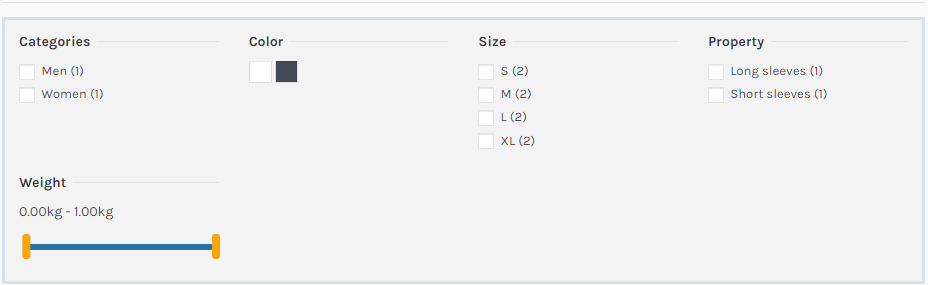
What is the best way to hide some attribute in the facedet filter? I want to hide the weight. like this example: https://i.postimg.cc/sDX7HrpF/facedet.png
EDIT: Ok I’m supprised why does it display the weight instead of price? If I defined a weight for a product, it display the weight. I think this is a bug? Can you confirm ?
OK I noticed also the price range is missing.
facated search is prestahsop core feature not theme, you configure how your filter tempalte look inside ps_facetedseach module configuraiton
Unfortunately, our support has expired and after that time we found an error that prevents the shop from working properly on the Warehouse template. The problem was detected when we started using the blog with ELEMENTOR module.
Elementor does not save pages (blog, cms page,) that contain more than 11 sections with the H2 tag itself. Even pages with fewer sections but more content at some point lose the ability to save changes.
It’s as if the ELEMENTOR has a limit on how much data is written into the database. This limit is about 80 000 characters / about 80kb, which should not be a problem for the CONTENT field in the table ps_simpleblog_post_lang, which is “longtext” type and should in principle be able to hold 4 000 000 characters.
Do you have any suggestions for php settings ? What could cause this problem ?
Environment:
Warehouse 3.4.3, Prestashop 1.7.6.7 (in test shop, on working site Warehouse 3.4.2, Prestashop 1.7.6.5 – same problem)
PHP Version 7.2.31
max_input_time: 120
max_input_vars: 1000
memory_limit: 512M
I’m having problem create ticket on your system. I have new project and Intagram widget in elementor won’t show posts from instagram. I have latest version of your theme and PrestaShop
latest version of theme instagram must works fine, if yuou upgraded recently clear browser cache, also if you were upgrading make sure you used correct upgrade package, maybe you have theme 4.3.2 and you used upgrad from 4.3.3
Thank you, I missed disable overriden settings. Now It dispalyed correctly
Hello, where can i find in prestashop 1.7 panel, the list users list newsletter subscription by your module ps_emailsubscription in your template. Thanks
ps_emailsubscription is not mine module, it is prestashop core one, and you can export lsit in module configuraiton
Hello friends, I have been told that your staff is very good. I need to ask something since I am about to buy with 1 year support.
I know you use elementor, my doubts are.
1. What version of prestashop do you recommend to use the template?
2. I have to make a site similar to this Www.greenweez.com Mainly, the header is required to be fixed. But I would also like to do something similar with the menu.
With this template and its support and support, I can achieve something similar.
Thank you!1. latst 1.7.6.7 and latesdt theme version 4.3.4 2. there is build in option to have fixed header as on example you send
After upgrade in last version of warehouse i have in my console : Uncaught TypeError: (0 , s.default)(...).tooltip is not a function at HTMLDocument.<anonymous> (bottom-541cfa954.js:233) at u (bottom-541cfa954.js:39) at Object.fireWith [as resolveWith] (bottom-541cfa954.js:39) at Function.ready (bottom-541cfa954.js:39) at HTMLDocument.H (bottom-541cfa954.js:39) Do you ahave solution Best regards
1. start from clearing brower both prestashop and browser cache 2. if not helps i measn that not all files of upgrade were uploaded to server(replaced old one)/ or you use child template so you need to compare you child tempalte files with the one from upgrade package
Thank’s for your reply, but the problèm appear just on pc brooser and work perfect on mobile I dont know why because i have cleared
all the cache
The bug appear on the module use lazy load for image galery
Thank’s for your help
i really like the floating cart on mobile that is a good feature.
Hi Marcin,
Can you help for visual composer module work with your theme (prestashop 1.7)? Since we upgrade from 1.6 and many cms use visual composer.
Appreciate if you can help or give a guide to get it work.
Thank you,
Dzień dobry,
Sklep działa na Prestashop 1.7.6.4 oraz PHP 7.3.
Mam problem z serią ostrzeżeń. Jak je wyeliminować?
Warning: count(): Parameter must be an array or an object that implements Countable in /home/click360/public_html/namur/override/classes/Cart.php on line 56 Warning: count(): Parameter must be an array or an object that implements Countable in /home/click360/public_html/namur/override/classes/Cart.php on line 56 Warning: count(): Parameter must be an array or an object that implements Countable in /home/click360/public_html/namur/override/classes/Cart.php on line 56 Warning: count(): Parameter must be an array or an object that implements Countable in /home/click360/public_html/namur/override/classes/Cart.php on line 56 Warning: count(): Parameter must be an array or an object that implements Countable in /home/click360/public_html/namur/override/classes/Cart.php on line 56 Warning: count(): Parameter must be an array or an object that implements Countable in /home/click360/public_html/namur/override/classes/Cart.php on line 56 Warning: count(): Parameter must be an array or an object that implements Countable in /home/click360/public_html/namur/override/classes/Cart.php on line 56 Warning: count(): Parameter must be an array or an object that implements Countable in /home/click360/public_html/namur/override/classes/Cart.php on line 56 Warning: count(): Parameter must be an array or an object that implements Countable in /home/click360/public_html/namur/override/classes/Cart.php on line 56 Warning: count(): Parameter must be an array or an object that implements Countable in /home/click360/public_html/namur/override/classes/Cart.php on line 56 Warning: count(): Parameter must be an array or an object that implements Countable in /home/click360/public_html/namur/override/classes/Cart.php on line 56 Warning: count(): Parameter must be an array or an object that implements Countable in /home/click360/public_html/namur/override/classes/Cart.php on line 56 Warning: count(): Parameter must be an array or an object that implements Countable in /home/click360/public_html/namur/override/classes/Cart.php on line 56 Warning: count(): Parameter must be an array or an object that implements Countable in /home/click360/public_html/namur/override/classes/Cart.php on line 56 Warning: count(): Parameter must be an array or an object that implements Countable in /home/click360/public_html/namur/override/classes/Cart.php on line 56 Warning: count(): Parameter must be an array or an object that implements Countable in /home/click360/public_html/namur/override/classes/Cart.php on line 56 Warning: “continue” targeting switch is equivalent to “break”. Did you mean to use “continue 2”? in /home/click360/public_html/namur/modules/revsliderprestashop/includes/operations.class.php on line 2889 Warning: “continue” targeting switch is equivalent to “break”. Did you mean to use “continue 2”? in /home/click360/public_html/namur/modules/revsliderprestashop/includes/operations.class.php on line 2893 Warning: “continue” targeting switch is equivalent to “break”. Did you mean to use “continue 2”? in /home/click360/public_html/namur/modules/revsliderprestashop/includes/output.class.php on line 3700 Warning: “continue” targeting switch is equivalent to “break”. Did you mean to use “continue 2”? in /home/click360/public_html/namur/modules/iqitthemeeditor/iqitthemeeditor.php on line 901
Do tego przy zmianie ilości produktów, na danym towarze ekran zawiesza się (mieli cały czas to zadanie, pojawia się półprzezroczysta biała nakładka ). Znika po odświeżeniu ekranu.
zmienic na php 7.2, wspracie dla php 7.3 w presciie i szablonie bedzie od wersji 1.7.7
Dziękuje za szybką odpowiedź. Zmieniłem na PHP 7.2. Niestety część błędów została. Pojawiają się po dodaniu produktu do koszyka. Dodawanie produktu nadal się zawiesza (mieli długo) i trzeba odświeżyć.
Warning: count(): Parameter must be an array or an object that implements Countable in /home/click360/public_html/namur/override/classes/Cart.php on line 56 Warning: count(): Parameter must be an array or an object that implements Countable in /home/click360/public_html/namur/override/classes/Cart.php on line 56 Warning: count(): Parameter must be an array or an object that implements Countable in /home/click360/public_html/namur/override/classes/Cart.php on line 56 Warning: count(): Parameter must be an array or an object that implements Countable in /home/click360/public_html/namur/override/classes/Cart.php on line 56 Warning: count(): Parameter must be an array or an object that implements Countable in /home/click360/public_html/namur/override/classes/Cart.php on line 56 Warning: count(): Parameter must be an array or an object that implements Countable in /home/click360/public_html/namur/override/classes/Cart.php on line 56 Warning: count(): Parameter must be an array or an object that implements Countable in /home/click360/public_html/namur/override/classes/Cart.php on line 56 Warning: count(): Parameter must be an array or an object that implements Countable in /home/click360/public_html/namur/override/classes/Cart.php on line 56 Warning: count(): Parameter must be an array or an object that implements Countable in /home/click360/public_html/namur/override/classes/Cart.php on line 56 Warning: count(): Parameter must be an array or an object that implements Countable in /home/click360/public_html/namur/override/classes/Cart.php on line 56 Warning: count(): Parameter must be an array or an object that implements Countable in /home/click360/public_html/namur/override/classes/Cart.php on line 56 Warning: count(): Parameter must be an array or an object that implements Countable in /home/click360/public_html/namur/override/classes/Cart.php on line 56 Warning: count(): Parameter must be an array or an object that implements Countable in /home/click360/public_html/namur/override/classes/Cart.php on line 56 Warning: count(): Parameter must be an array or an object that implements Countable in /home/click360/public_html/namur/override/classes/Cart.php on line 56 Warning: count(): Parameter must be an array or an object that implements Countable in /home/click360/public_html/namur/override/classes/Cart.php on line 56 Warning: count(): Parameter must be an array or an object that implements Countable in /home/click360/public_html/namur/override/classes/Cart.php on line 56
1. do supportu ptosze uzwac platformy https://iqitcommerce.ticksy.com/ nie komentarzy 2. to nie jest zwaizane z szablonem “namur/override/classes/Cart.php”
szablon nie posiada zadnych ovveridow, ten plik pochodzi z jakoiegos innego modulu
Dzięki! Racja, to inny moduł. Po deaktywacji wszystko działa. Gdyby były jakieś problemy napiszę następnym razem przez platformę.
Problem with the social facebook login, when customer logged using facebook, I think he shouldn’t be able to change password field even the fields are enable, I couldn’t change the password. So make the profile page uneditable. Due to this problem, may I know if there is an authentication variable that can be used to check if fb is logged. Currently the template is using {if $logged}
it’s ok I got it.
The add to cart popup is a module?
it ps ps_shoppingcart module, but type of confirmation you select in themeditor > options > cart
if ajax cart do not working to you check following article https://iqitcommerce.ticksy.com/article/12281/Hi,
I have seen at Warehouse manual that you can use the Elementor pagebuilder module to create CMS pages on Prestashop 1.7…
However when I enter on CMS and start a new page, there is no “Edit with page builder elementor” option to use that module…
So at that point…How can I create the pagebuilder module on CMS?
thanks
I will answer myself… I just have to go to:
- CMS pages -> create new page -> SAVE page
After saving the page I am allowed to use pagebuilder on it 
Hi. We want to use the elementor editor in the categories. When we use the widget (products list / sliders) to show a category it does not show the products of the subcategories. What could be the problem?
widget show only products which are assigned to selected category,, there is no option to also show product from subcategires,
if you want productc from subcategories you need to use default product lsit not elementor together with enable ps_facetedsearch
Any way to show search bar always visible in mobile? (Now you should click on search icon and it would be easier to have the search bar always available)
you need do to with custom css
example
#search-widget-mobile{
transform: scale(1);
    opacity: 1;
    visibility: visible;
}
Hi, in the 4.3.4 update there’s option in the category page to show first part of description before images and the remaining after images? Thank you
There was never such option, you can show defult categoru description above and elementor cateogty description below or elementor above and default below
this is Marcin answer at same question: “Will by such option with next upgrade”
yes and such option is added becous I was mean to show category desription defult and category descirption created in elementor in two diffrent places and it is now possible,
[Prestashop 1.7.6.7, Warehouse 4.3.4, warehouse child theme] Hi, I have few questions: 1) After the last upadate, the greater than sign is showed before the envelope symbol in the newsletter subscription button. Can you check why? 2) Is it possible to add Google Tag Manager? If not, can you think about to add this option in the next update? 3) Did you also make the IQITREVIEWS module compatible with the official PrestaShop 1.7 free GDPR module (chekbox + text in the review form)? Thank you!
I will check your request with next theme upgrrade which wil lbe relased shortly after ps 1.7.7 realase
Thank you, but how I can remove the the greater than sign (>) showed before the envelope symbol in the newsletter subscription button? You can see it also in all your demo (e.g. https://iqit-commerce.com/ps17/en/)
edit themes/warehouse/modules/ps_emailsubscription/views/templates/hook/ps_emailsubscription.tpl
Thank you. Will you correct it in the next update?