38438 comments found.
Thanks in advance!
Hernan B.
Hey Hernan,
Those strings are in the default salient text domain. Alternatively, you could add the following into a child theme functions.php file to override the wording as desired: https://pastebin.com/bPPwzXez
Cheers

Hello. Love the Theme!
I just have a question regarding the drop down navigation. Is there a way to style it the same as the nav above with the animated underline effect?
I have tried to do it my changing the css in the style sheet but I am unsure how to create the animated effect and only have the border span the width of the word. The border also moves the text below when the rollover effect is activated which isn’t ideal.
Please preview the page here.
https://www.protocol-ps.com/Thanks
Hey alexbirks!
Remove your existing snippet that’s adding the border and add this instead:
#header-outer .sf-menu li ul li a {
    display: inline-block;
}
#header-outer .sf-menu li ul li a:after {
    transition: transform .3s ease-out,border-color .3s ease-out;
    position: absolute;
    transform-origin: left;
    display: block;
    bottom: 2px;
    left: 0;
    width: 100%;
    transform: scaleX(0);
    border-top: 2px solid #ec1557;
    content: '';
}
#header-outer .sf-menu li ul li a:hover:after {
  transform: scaleX(1);
}
Cheers
Perfect. Thank you very much!
You’re welcome alexbirks 
Good day. Tell me please, is it possible to create internal pages with your own top menu within the site, like a landing page? Or do I need to install WordPress separately and customize the theme for such pages?
Hey djoosstas,
To make use of Salient, WordPress will need to be active in the setup. If you wish to hide the Salient header to make your own for specific page, you could use the “No Header” page template, available in the right-hand sidebar section when editing a page in the “page attributes” metabox.
Hi Nectar, How far out are you from your next release? We have a bunch of tweaks to do in the child theme, so don’t want to have to redo them again if you are about to release. Please advise. Thanks for the great work!
Hey hingedigital!
The next release won’t go public for at least a month. There should not be any breaking changes, so I wouldn’t worry. However, if you’d like to get on the beta list to test when it’s available, just shoot me an email
Hey segurihost,
That link will lead to the destination which you specify in the Salient options panel > portfolio > functionality tab, via the option labeled “Main Portfolio Page URL”
Cheers
There’s no main page. I have 4 pages (every page loads a different portfolio category) so I need that every project goes back to their category page. Could you tell me what php file can I edit? just the file name. thank you
Hey segurihost,
In the project configuration metabox (available when creating/editing any project), there’s an option to override the default parent portfolio link. The option is labeled “Parent Portfolio Override”.
If you’d still rather edit the file, you can find it at wp-content/plugins/salient-portfolio/includes/frontend/helpers.php
and the relevant function inside that is “nectar_project_single_control”
Hi, I have a menu button in the header using button extra color 1. How can I change the text color to be white all the time, including active and hover states? Thanks!
Hey asandage!
Could you kindly share your URL in regards so that I can take a look why that’s not the case in your setup?
Thanks,
I will probably need to create a ticket, because the site is under development and it is password protected at the moment
I just renewed support but it won’t let me submit a ticket through Ticksy. Hello – can you please advise the CSS to change the button hover color for both the Nectar Slider and regular “Learn More” buttons I have lower on the page?https://tinyurl.com/y597dkdd
Hey erostad, ticksy can take up to an hour to refresh the license. Could you kindly allow me to bypass the password protection you have on that URL?
Thanks in advance
Hey there!
Is it possible to display category/tag descriptions? I understand that index.php is used for all archive pages and that there is no specific category.php these days, but is there some sort of header I can edit so I can display category descriptions?
Thanks!
Hey sitdowndisco!
The blog category archives should already display the description if one is set. Are you using Salient v11+? The next release will also be adding the tag description by default. If you’d like to get on the beta list, please reach out via the contact form on my author page https://themeforest.net/user/themenectar
Cheers
Hi, thank you for the great theme, I followed your instruction for another user to enable quick view on mobile devices.
@media only screen and (max-width: 1000px) { body .products li.product .nectar_quick_view { display: inline-block!important; } }
It shows Quick View, but the popup is cut off on both sides, would it be possible to show image and other product information on one column. Please check that on your demo to duplicate the issue I am experiencing.
Thank you for your help and support.
Hey frankapp,
Unfortunately there’s not a quick snippet of CSS I can provide for this. It would require a good amount of CSS, and attention to make a mobile layout for that as the sizing involves many aspects calculated by javascript, and don’t take a mobile display into account. I’ve noted your +1 for the idea on the wishlist though
Cheers
Thanks, hope you can add it soon! I know you can do it since you are a genius!
Hi Is there any option to make only single page password protected page Which i have tried to adding Raw HTML , js and CSS file I am getting an error Password function is not working
Here is all code which I am trying If anyone can help me Thanks in advance
Vip Dental
logo
This is a Password protected page. Therefore, we provide only limited access.
<input type=”text” class=”passwordField” placeholder=”Enter password”>
<input type=”submit” class=”submitButton” value=”Unlock”>
Click Here to see Pricebook a.visited { background-color: #f44336; padding: 10px 25px; text-align center; display: inline block; font-size:2rem; display: block ; cursor:pointer; }
.authenticateForm { display: ; font-size:2rem; margin: 0 auto; text-align: center; max-width: 600px;
}
.protectedContent { height: ; width:100% ;
display: none; width: 100%; margin: 0 auto; background: lightpink; padding: 15px 20px; border-radius: 1px; text color: white; font-size: 3rem; text-align:center; font-weight: 500; transition: all 0.2s ease; letter-spacing: 0.018em; line-height: normal; display: inline block; outline: 0; }
.submitButton { width: 70%; margin: 0 auto; background: #ff7a09; padding: 15px 20px; border-radius: 2px; color: white; font-size: 2rem; font-weight: 900; transition: all 0.2s ease; letter-spacing: 0.018em; line-height: normal; display: inline block; outline: 0; border: none !important; }
.submitButton:hover { cursor: pointer; outline: 0; width: 70%; }
.passwordField {
width: 100%; margin: 0 auto; background: #ff7a09; padding: 5px 90px; border-radius: 1px; color: white; font-size: 2rem; font-weight: 500; letter-spacing: 0.018em; transition: all 0.2s ease; line-height: normal; display: inline block; outline: 0;
}
.passwordField:hover { border-bottom: solid #ff7a09;
cursor:pointer; outline:0; }
.errorMessage { margin: 15px auto; font-weight:600; font:bold; font-size:2rem; line-height: normal; max-width: 400px; color: #ff7573; }
.ndeMessage { font-size: 2rem; font-weight:700; margin: 15px auto; line-height: normal; text-align: center;
}
Hey vipdental,
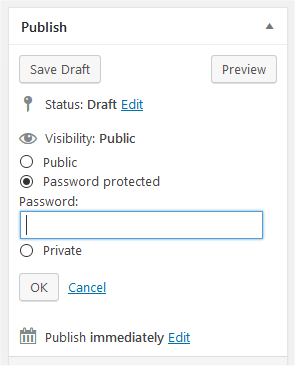
Is there any reason you’re not using the default WordPress functionality for password protecting pages? https://i1.wp.com/wordpress.org/support/files/2019/02/protected_edit.png?w=295&ssl=1
Thank you for your replay When I refresh the browser page is not asking any more password I feel that option is not secure. And another queestion can i put calculator table in the page?
Hey vipdental,
You could use a plugin to extend the WP functionality. For example, this plugin allows you to control the cookie duration: https://wordpress.org/plugins/password-protect-page/Salient does not have a calculator element built-in, that would require the use of a plugin or a custom embed.
Hi. I found that parallax with our theme has an issue like this https://youtu.be/ZYBw111XcEg. It’s annoying thing. How can we solve it? I know my support has expired, but this is the only problem we have with your theme. Please help. http://chillrussia.ru
Hey orangereya, I’m not seeing that occur on your website: https://www.dropbox.com/s/tijp1tmnfdedxqd/2020-07-25%2008-53-15.mp4?dl=0
What browser/OS are you experiencing that on?
Hm. Looks really smooth. Im using Mac Os Safari & mobile Safari (iPhone 7), Mac Os Chrome (v84) on Catalina. It happens sometimes with low FPS on parallax blocks.
Hey orangereya,
Taking a look through the Chrome developer tools > performance tab, it looks like a third party scrip that you’re including in your site is attaching a scroll event that’s using up more resources than the parallax effect.
The script I’m referring to is: https://mc.yandex.ru/metrika/tag.js and the breakdown of the two competing events are here: https://ibb.co/p0ccJJG the parallax calculations are highlighted in red, the yandex is in blue. If that could be removed, I’m sure it would help with performance on all devices.
I’ve just updated to the latest version. I’m having some issues. All plugins have been updated, all cache and browser cache have been deleted refreshed. I’m using the older same child theme of salient, but even activating the main salient theme issue still persists. My existing portfolio items, the backend editor of them, there is no “page builder” or option to choose it like normal. Also, my VC shortcodes and code typically found there has now been moved to the “extra content” section. How can I get this up and running again? Here’s a screen: https://prnt.sc/to3n4m Here’s my site if it helps: https://www.kylebaxter.co – Thank you!
nvm. it was a plugin conflict with an outdated Yoast SEO plugin
Hey SiteTonight,
I’m glad that you were able to figure it out – older version of Yoast can cause a JS error with WPBakery, resulting in the editor not properly initializing.
Have a good weekend
Hello, Is There a way to stop view single products page on click ? i just want the popup Quick view ?
Thnaks
Hey xploodsa,
Which product style are you using? Alternatively if you share your URL in regards that would help.
Cheers
I’m working with elements inside of a tabbed section, and this line of code:
body .tabbed div { padding: 0px; margin-bottom: 0px; background-color: transparent;} in: salient/css/elements/element-tabbed-section.css
is making it so all div’s that I put inside of a tabbed section have these attributes. Shouldn’t it be something like body .tabbed > div ? I keep having to !important my styles cause they’re being overwritten by this line. Please fix in a future release.
Hey veggie_89, thanks for pointing that out. Yes, a direct child selector will be added
Cheers
Hello, I have 3 columns with text-blocks and equal height but I need the buttons to be all aligned below because the titles are sometimes different in height.
Hey alejotrigo,
That would require the use of custom CSS. Could you share the page URL in regards so that I can provide an example snippet?
Thanks in advance
thanks, https://alejotrigo.com.ar/gracias/ at the bottom, 3 cols with 3 buttons “Más información”
Thanks alejotrigo,
add this into the custom css box located in the Salient options panel > general settings > css/script related tab:
.home .hola .wpb_wrapper {
    display: flex;
    flex-direction: column;
    height: 100%;
}

.home .hola .wpb_wrapper .nectar-button {
   margin-top: auto;
   width: 148px;
}
Cheers
thank you!!
You’re welcome alejotrigo
Hi guys, just a short question – i woud like to use a gallery with hover effect but disable link to lightbox or large image. How can I solve this. Thanks.
Hey SCHROTT,
add this into the custom css box located in the Salient options panel > general settings > css/script related tab:
.wpb_gallery .portfolio-items a {
  pointer-events: none;
}
Cheers
Hello! I’m noticing that the full screen dot navigation is skipping sections and overall performing unexpectedly – is there any solve for this? http://52.15.239.49/theory-cares
Hey Liyte!
Scrolling of two sections instead of one can occur when using a device that adds smooth scrolling, like a macbook trackpad. You can correct this by changing the “Animation Speed” to medium or slow rather than fast.
Cheers
I have it set to slow and it still seems to skipping a bit :/
Hey Liyte,
Have you noticed any change is the amount that it’s skipping on your end since altering the speed to slow? Please also confirm the device you’re using so that I can test accordingly.
Thanks in advance
UX Issue: In the Salient Product Demo (http://themenectar.com/demo/salient-product), the menu section sliding from the right side works fine on desktop, however, on mobile there are some issues. When we open the menu on mobile, to close it, I have to click on the “Hamburger button”. If I swipe with touch, or if I touch the page outside the menu, the menu doesn’t close. Please try to address this soon. Additionally, it would be great to have a small footer section on the sliding menu itself.
UI Bug: The “Call to Action” element of the style “See Through Button” works fine on desktop, but gets misaligned on mobile.
Hey nipunn12,
1. If you switch the Off canvas menu style to “Slide out from right” in the Salient options panel > off canvas menu tab, this functionality will be present. I’ve noted the idea on the wishlist to also add it in for the “Slide out from right hover triggered” style.
2. Can you please share your actual URL where the issue with the CTA can be observed?
Thanks in advance
Bug Report: In the Salient Product Demo (http://themenectar.com/demo/salient-product), OR, whenever we activate “Full Screen Rows” for any page, we often face issues with scrolling. The mouse scroll wheel AND two-finger scroll on trackpad get disabled (undetected). This happens when we at times interact with other elements on the row or when we change browser tabs and return to the tab. Once the scroll stops working, the only options are to either use the “Dot Navigation”, or to refresh the page. I’ve verified this issue on multiple installations and multiple pages. Please try to fix this error ASAP.
Hey nipunn12,
I responded to your other username (mohammadaz) with the same comment yesterday
I haven’t been able to replicate this yet. Does it occur when changing tabs for you at a high enough frequency where you can replicate it every time quickly? Please also provide the browser/OS you’re using.
Hi there!
I’m using the blog functionality as an agenda with some adjustments. To show the blog items in the page I’m using the “Recent Posts” module from the VC. Could you please guide me how I could use an ACF (custom field) to be used for sorting the posts? By adding a snippet to functions.php?
It currently shows the option to sort on Date/Author/Title/ etc. and I would like to have it sort on Event Date, which is created by using the date picker variable within ACF.
Many thanks! Reijer
Hey Reijer!
There’s no filter to modify the Orderby param via a child. However, in the upcoming update the “Post Grid” element is getting the option to create a custom query which should allow for this. If you’d like early access, please reach out via the contact form on my author page https://themeforest.net/user/themenectar
Thanks! Wrote you a message 
Thanks reijerstevens
Hi!
Somehow I still haven’t found how to achieve this. Could you pls. give me some indication how to do this? I am using the latest version 12.1.6.
Another question: would it be possible to show only posts that have a present Event Date filled out in in the ACF date picker. In other words: I’m trying to automatically hide posts with a past date filled out in that ACF.
Thanks! Reijer
Hey Reijer!
The option to use a custom query via the post grid element is still only in the beta version, not the current live 12.1.6. If you’d like the latest version of the beta, feel free to reach out again via the contact form as more changes and fixes have been added since the last time you reached out.
Querying posts based on a specific field such as a date would still require some custom modding though.
Thanks ThemeNectar! Will ask for early access again
Regarding querying posts based on a custom field: could you help me out there..?
Hey reijerstevens,
Unfortunately the custom development needed for that change would be above the scope of what I can provide here. However, as a starting point, you’d need to override the nectar_post_grid.php template file in your child theme to be able to modify the query: http://themenectar.com/docs/salient/overriding-salient-wpbakery-element-template-files-through-a-child-theme/