483 comments found.

my webside is https://celavie.website/ Why i buy tickit cany’t put in CART EVENT?
Hi, Please check the ticket in our support forum . Thanks!
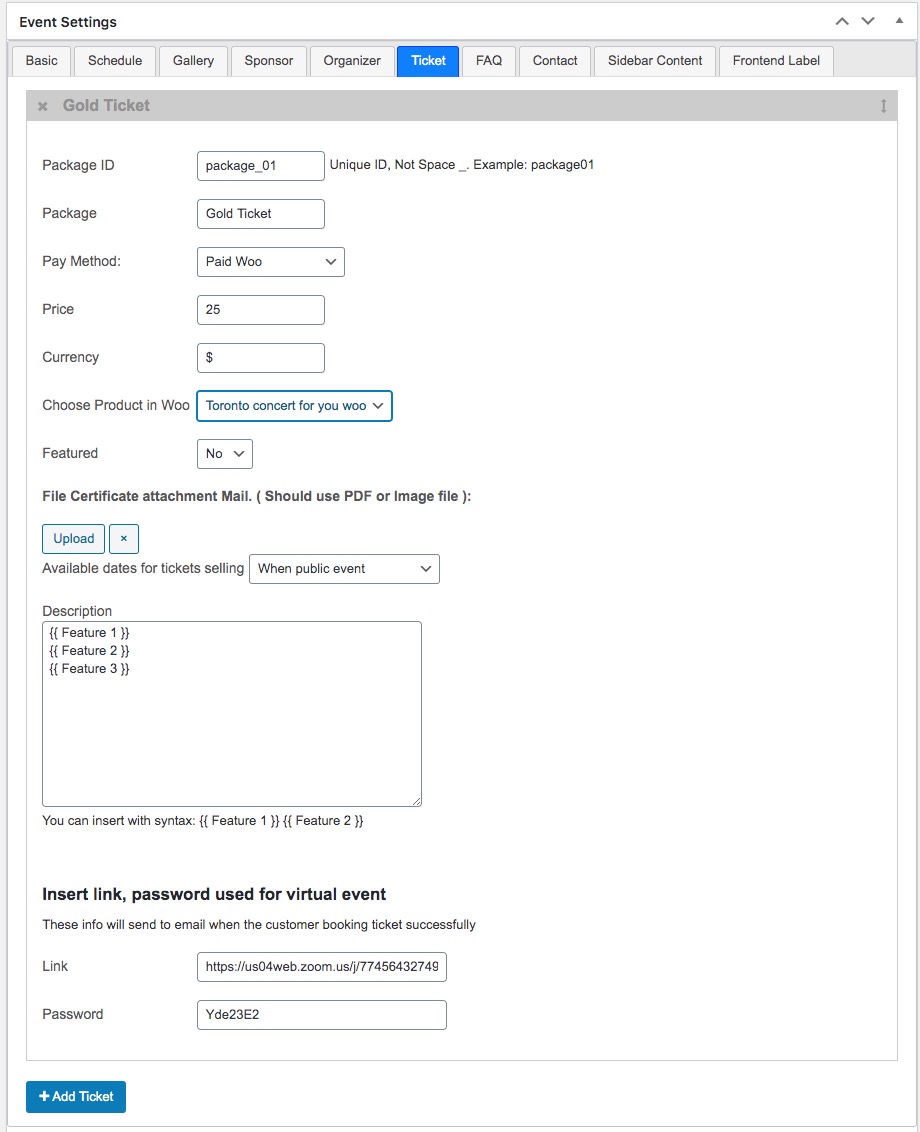
Hey. Are there plans to introduce ticket sales for virtual events? That is, webinars, guided virtual tours, and so on. So that you can sell a ticket, and the person later received a link to the event and could watch it directly from my website.
Hi,
The theme support add Link video, password but doesn’t support watch it directly from website.
Is it possible to make sure that the user does not go to a third-party site, such as zoom, but can view the video, for example, in a pop-up window? Is it possible for third-party developers to do this?
Hi, You only can insert link like zoom to ticket and the user will received that link when buy ticket. The theme doesn’t intergrate other platform (zoom) to site. see here http://demo.ovathemes.com/documentation/em4u/e24.jpg
Hi there,
I hope you are safe .. can we have a changelog for the latest update ?
Best Regards
Hi, Yes, I will make it now.
Hi Admin,
Thank you .. you are great!
We are facing little css bug viusal issue which can be solved easily with a line of code from you: https://snipboard.io/EPxtvp.jpg
At the checkout of woocommerce when we enabled the coupon module as you see in the checkout we just changed the coupon code button color and even before changing its color it doesn’t display well in tablets & mobiles it goes out the edge of the browser so how can we make this “apply coupon “button to display under the coupon text field input ? https://snipboard.io/EPxtvp.jpg
We will appreciate this help as its on a production website 
Thank you so much for help
Hi, We will update this problem soon.
Hi, as reported by Wordfence, last tuesday a medium-risk security vulnerability was discovered in the WPBakery Page Builder Plugin: i’d like to know when new update of the embedded plugin will be available to us to install.
Hi, We will have an update today.
Hello. I would like to add some fields to the checkout. Now i add this at the checkout.php and i can see it at the frontend. Can you tell me where i add this to get it in the email and ticket-system?
Hi, If you bought theme from themeforest, please make a ticket here https://ovatheme.ticksy.com/
Hi,
I hope you are safe & fine for you & your family
2 Bugs in the latest update in the ova-events-manager plugin:
1. few Lines spaces added by default to all woocommerce emails, on-hold, cancelled .. all emails .. this happens only when we activate the latest version of ova-events-manager .. so if its deactivated the lines spaces are removed Screenshot: https://snipboard.io/cfZkIi.jpg
2. https://snipboard.io/xjg4pJ.jpg .. the step time here doesnt’t reflect to work, we still have the event start date picker hourly no 30 minutes, only, 9:00, 10:00 .. no 9:30
Stay Safe & Best Regards
Hi,
1: This is default mail in WooCommerce, so you can find some solution in WooCommerce plugin.
2: It works in my demo. Please delete browser cache and check again.
Thanks
Hi ovatheme,
1. Sorry but this is not the normal the normal spacing when decativating the specific ova-events-manager plugin is: https://snipboard.io/wAcOmM.jpg while if we activated ova events manager plugin there is extra space added only when this plugin is activated: https://snipboard.io/cfZkIi.jpg
2. Yes you are right sir, its our fault its working perfectly
3. A little issue there caused by the update of ova-events-manager plugin:
We use wordpress 5.4.2, https://snipboard.io/1zpmHs.jpg .. this error is not there in our staging environment which uses ova 1.3.4
Please update wordpress to latest version and test again. Also please buy extra support package and make a ticket here https://ovatheme.ticksy.com/
Thanks
We will do the support in the beginning of the month shortly, but what about the
1. few Lines spaces added by default to all woocommerce emails, on-hold, cancelled .. all emails .. this happens only when we activate the latest version of ova-events-manager .. so if its deactivated the lines spaces are removed Screenshot: https://snipboard.io/cfZkIi.jpg
its not related to wordpress version
Hi,
It only br tag in mail that used for some case. We will remove it in next version.
Thanks!
Thank you so much will test it out in the immediate update you pushed we really appreciate the quick response
Slider revolution is not working when i have ovatheme events manager active
Hi,
Which Slider Revolution Version do you use ?
6.2.22
Hi, Please check again your site. I checked Revolution Slider with theme and it works.
Thanks!
Presale question: Is there any way I can connect the theme’s data to an iOS application making the website and application interconnected. Thanks!
Hi, Sorry the theme doesn’t support this. You have to write Rest API in wordpress for this feature.
Hi, The theme doesn’t support menu like your demo. You have to customize to get the menu.
Thanks
can u help me to enable mobile menu or hamburger menu for all screen size?
Hi, The theme doesn’t support menu mobile menu or hamburger menu. You have to custom work it.
Thanks!
theme has mobile menu option for tablet and mobile display size. isn’t it possible to enable that mobile menu for desktop screen size?
Hi, We build menu template with Bootstrap 3, so you can customize it with bootstrap https://getbootstrap.com/docs/3.3/components/#navbar
Hi Everyone,
From Version 1.3.6 you can customize template of PDF Ticket in child theme, so you can add field, remove field, style for ticket.
Thank you!
can I change the menu style and position? like a hamburger menu in the right corner of the page?
Hi, You can customize menu style by yourself. Also you can customize header template in child theme.
Thanks
Could you please quote me for adding an FAQ tab to event details section between “Speaker” and “Ticket & Price”; and also a main FAQ page with search? Thank you.
Hi,
FAQ: We will add FAQ tab after “Ticket & Price” tab in next version. It is FAQ for per event.
We doesn’t add FAQ page.
Thanks
OK thanks thats great re: FAQ tab. I will purchase soon.
Please consider adding a searchable FAQ page, I am surprised that so many templates overlook this. I suppose I can pay someone to add that later. If you change your mind send me a message, happy to pay you for it. 
Hi, For FAQ page: I think you can use some available plugin, so we will doesn’t develop it.
Yes there are many FAQ plugins but all of them require development to make the page look right and also to setup search functions. That’s why we need a developer to create it. Cheers.
We are happy to pay you to develop the FAQ page and then you can add it to your theme for free. Otherwise we will pay someone on Elance to do it ahd no one else benefits. It’s up to you but please let us know soon. Thank you.
Hi,
Please contact me via this form: https://themeforest.net/user/ovatheme#contact . Describe more about FAQ page feature. I will consider to custom work help you.
Thanks
(posted on official support)
Which template should I use for em4u-child and ovaem-events-manager? Translation are not showing up. Thanks!
Hi, Please check my reply here https://ovatheme.ticksy.com/ticket/2495180
Thanks
Thank you for your answers. Looks like a great theme, lots of functionality yet nice and clear. Well done.
Hi,
1: We will have an update for customize PDF ticket in child theme, so you can customize layout, field easily in child theme.
2: Yes, you will see number of ticket change at frontend. The ticket only display 0 when sold out.
3: No I can’t.
4: Yes
5: We will consider this feature soon.
Thanks
Thank you for your prompt response. Are you able to quote me for adding the FAQ tab and FAQ page with search? Thank you.
Could you please respond to my question. Thanks.
Hi,
FAQ: We will add FAQ tab after “Ticket & Price” tab in next version. It is FAQ for per event.
We doesn’t add FAQ page.
Thanks
Hi, We added FAQ Tab feature. You can buy and use it now.
Is it possible to translate the theme with Poe/Moe files instead than Loco Translate? I tried translating plugin language as suggested but it didn’t work.
Yes it is because purpose when use Loco translate to make Poe/Moe file.
hi sir i download this theme from envato elements but its v1.3.4! can u check it please
Hi, Don’t worry about it. Version 1.3.5 only change in Event Manager plugin.
We will update again style.css file of theme in next version.
Hey there,
We bought this template and use it for our new ticket shop. But we have one problem. If the customer is paying via Paypal everything is fine, because the tickets are send to him right after paying. (We chose “verify ticket when order status is processing”) But if the customer is paying via bank transfer and we set the order status manually to “Processed”, the tickets won’t be send to the customer and we have to send every single ticket manually and it takes a lot of time. Is there a solution for this problem?
Thank you
Hi, If you buy theme from envato.elements, you can’t get support.
If you bought theme in themeforest, please make a ticket here https://ovatheme.ticksy.com/ , we will assign supporter help you.
Thanks
Can I use only Paypal and Stripe as payment methods? I want to use razorpay.
Hi,
you can use WooCommerce for booking, so you can use razorpay gateway if it supports WooCommerce. Read here to know make a ticket with woocommerce: http://demo.ovathemes.com/documentation/em4u/#paid_ticket_woo
Great theme. Is there a way to edit some of the text in the back-end. For example I need to do 2 things: 1. On an event page I need to change “Organizer” to “Organiser” – the English spelling. 2. Can I change the entire section ‘Speaker’ to something else, e.g. ‘Lecturer’ or ‘Player’ Thank you
Hi, yes you can chang all these text. Thanks