16332 comments found.

Opencart 3.0.3.6 does not fully support PHP 7.4.1 version!
Hi, yes, Opencart 3 does not yet fully support PHP 7.4, we suggest you use PHP 7.3.
Best Regards.
when downgrade PHP version 7.3, website stooped working no thing display we can’t login to admin page also. so please guide me which updated version i use OC, PHP and Journals for working properly this time.
Hi, Journal works fine with php 7.3, php 7.4 is not supported by Opencart so it’s recommended to use php 7.3 with latest Journal and Opencart versions, please file a ticket on our support page if you need further assistance.
Best Regards.
Disable the add button to the cart if the quantity is zero ( out of stock )
The add to cart button can be hidden based on stock from the product grid style in Journal > Styles > Product Grid > [Active Style] > Buttons Group > Add to Cart > Out of Stock Visibility.
Best Regards.
Hi, I am about to buy your theme. But I have some requirements in mind. 1. I want to create a new videos page where all the videos will be shown sorted with product category. People can search videos there. When they click the video thumbnail it will open a page where the video will be shown and undet that video “products shown in this video” will be listed. Visitors can go to the product page from there.
2. In the product page a custom tab will be shown as video, when they open that , same way the products shown in this video will be shown underneath.
Possible?
Hi,
1. You can create custom pages with custom blocks (containing videos, images, etc) and have each linked to a different category page where in turn you have the same video up top and the product listing below, however the initial custom page with videos cannot be searchable, the search feature only searches through products.
2. This may be possible with some manual work. You can create custom tabs for any individual products (one or more per different product) via the Extra Modules, which is essentially a page builder within the product page itself. In this builder you can add the same image from your video listing page, pointing to the category page. However, the products cannot be displayed automatically from that particular category page, you’d have to create custom Products modules to load those products and add the modules in the extra modules builder, underneath the video placeholder.
Best Regards.
Thanks for your prompt reply.
I may have mixed up the product category thing. But the search issue is clear now.. its not possible.
Im again clarifying the idea. There will be a menu named Videos. Under that menu, the submenues will be Dress, Jewellery and so on. Under the submenues there may be some third level menues (for example shirts, trousers). A visitor may click on videos menu and then dress and then may be Shirts. Then the visitor will be shown a list of videos. When they click on one video, they may be directed to another page where the video will be on top and then a listing of products with a header “product shown in this video”
And in an individual product page, this whole video page will be shown under a custom tab along with that “product shown in this video” thing.
Hope I have clarified my requirement better.
Yeah but there aren’t automatic ways of doing this, although I believe it can be done with some modules.
1. Menus will just basically point to some custom pages where there are grids of banners or blocks (thumbnails of videos).
2. Each video thumb points to an actual Opencart category page which is created in Opencart > Catalog > Categories. In the description of each category you add a video (youtube I presume) and below that list the products belonging to that category.
3. In each product page, although you can have custom tabs with other custom modules…you can’t load a category listing of products. You can add custom Products modules that in turn load those products and have that module in the content bottom of each product…but this requires manually creating one products module per category, and on tab (extra module builder) per product, in order to have them appear on each product page.
So the 3rd step is unclear, because you can’t automatically load all the products from a category inside an individual product page (it’s possible by manually creating modules but it can be laborious, depending on how many categories/products you have).
Hello, I will take a one licence but i have 4 website for marketing. I can use one licence to 4 site and more? Or 1 site 1 licence?
Hi, the license only covers a single end-product, which in this case means a domain so please purchase one regular license per store.
Best Regards.
Dear Team, I am planning to use demo 1 of your theme, but the full width of the theme is 1280px, so leaving empty spaces on left and right, how can i increasing it like max-width: 1400px, is it customizable..?
Hi, you can change the site width from Journal > Styles > Page Layout > [Active Style] > Site Container > Max Width…
Best Regards.
My purchase code is receiving an error that it is invalid when trying to export the demo. I can’t use Journal support because it says the same thing. Please advise what I should do.
Hi, demo export works fine for everyone with a valid purchase code, just make sure you add the codes in their appropriate fields in our demo admin panel.
Best Regards.
I have a valid code but I still have the error: https://prnt.sc/ug1gf4
That looks like a support page error. Your support is expired so that’s why you get it. You can renew your support here on Themeforest.
However, exporting demos from our demo admins do not require valid support, just a valid purchase license. Try again and make sure you input them in the proper fields.
Please understand it is not working https://prnt.sc/ug3fdr
I have just tested the demo export and it’s working fine. Make sure the purchase code is the correct one and it matches your username.
You should re-download the license code from your Journal purchase on your Themeforest downloads page.
Then paste the user and purchase code in the appropriate fields in a demo admin in Journal > System > Import/Export.
It does not work. Please see screenshot https://prnt.sc/ug3fdr
Please send us a private message via the contact form on our profile page with your username and purchase code so we can verify.
Best Regards.
How to disable the add to cart button and not hide the product if the product quantity is zero is not available out of stock
Hi, for zero price options look in Journal > Skins > Edit > Product Listing > Zero Price.
Best Regards.
when i choose Journal > Skins > Edit > Product Listing > Zero Price. to on customer can add to cart
Sorry, the add to cart button can be hidden based on stock from the product grid style in Journal > Styles > Product Grid > [Active Style] > Buttons Group > Add to Cart > Out of Stock Visibility.
there is a bug in quick checkout with the stripe payment when you confirm the order and if the card is wrong it will do this loading loop for ever – https://prnt.sc/ueddlc
Hi, that’s not a bug, either enable your payment method in Journal > Skin > Checkout > Journal > Advanced or consult with its developers for more information about how to trigger loading off when a payment error is occurred (like invalid card data).
Best Regards.
Hi Journal Support Team, Can I use multi languages in URL (“Gallery”, Type in “Video”)? I just found one input in “Youtube Video Url”, but I have two languages
Thanks.
Hi, unfortunately there is no such option, urls cannot be multilanguage at this point.
Best Regards.
Hi Journal Support Team,
It will be nice to add in future update of the theme the option to clear emails with 1 click from :
Journal->System->Newsletter Journal->System->Form E-mails
Button for mass cleaning all the entries in these menus.
Thanks.
Hi, we will consider this for our future updates.
Best Regards.
Hi Team – Quick question regarding Google Analytics tracking code. Should be be putting the code in the custom code section of Journal, or in the Analytics extension of OpenCart? What is your suggestion?
Hi, it should be in the Opencart system settings. You can consult more about this with our developers on our support page.
Best Regards.
Hello, I have a question about ‘required options Popup’ when click ‘Add to Cart’ Button in the product grid/listing. For example, the prodcut has four sizes options. One of them is out of stock. The ‘Available options’ window pops up when click ‘Add to Cart’ button in the product listing. The stock status is not displayed when I select a option. I have checked the admin->Journal>Skins->Product lisitng->Required Options Popup. But there is no option to disable/enable the stock status.
Can anyone tell me where the file of ‘Required Optons Popup’ is located. I would like to custom code to display stcok status.
Hi, Opencart does not show out of stock options if subtract stock is enabled, you may have to edit catalog/controller/product/product.php in order to change this behaviour.
Best Regards.
Hi, I just uploaded a mockup to explain my request. It will be easy to get my question. Please click the link to check the image. http://higoworld.com/image/stock%20status.jpg
Hi, files responsible for popup are product page Opencart files (catalog/controller/product/product.php and catalog/view/theme/journal3/template/product/product.twig).
Best Regards.
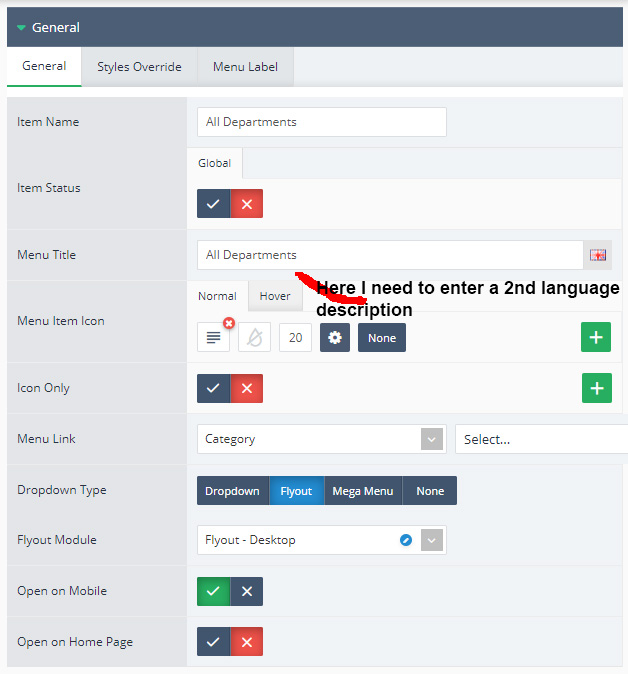
I have to use multiple languages in this theme I added a 2nd language. In the theme, only the English text field is opened in the admin panel. How do I enter description for 2nd language?
https://i.ibb.co/xFGttmx/ML-2.jpgHi, maybe language is not properly installed, please make sure additional language fields are shown in Opencart > Catalog > Products for example.
Best Regards.
Hi,After upgrading to 3.1.3, I entered a line of information on the quick checkout page and automatically refreshed the payment details once. How to solve this problem?
Hi, we need more details about your issue, please file a ticket on our support page so we can take a closer look at this.
Best Regards.
My license has expired. I cannot send tickets. But this problem should not be solved within the license. Can you email me?
You can send us a private message via the contact form on our profile page with temporary access to your setup so we can investigate whether this is a theme issue.
Best Regards.
Hi, How i could see full url address of popup and notification module that i could bypass it on cloudflare cache
Hi, not sure this is possible but please file a ticket on our support page and consult with our developers.
Best Regards.
Hello i have opercart 3.0.2.0 i want to take the theme my question is Work with other lunguages greek front & admin? ( i am installed in the default shop for front and admin if i take your theme is it ok ?)
Hi, Journal supports any language in the storefront, however the custom Journal admin interface is only in available in english, please see our docs: https://docs.journal-theme.com/docs/faqs/opencart/language
Best Regards.
Then in the Front i dont have any problem for the admin if i have translate the admin page to greek i will be ok or i have problem ?
We don’t recommend manually translating the custom admin interface since that may interfere with future theme updates.
Best Regards.
i dont do it custom i take it from other saler and it is work fine your theme effective something in admin page ?
We cannot vouch for other extensions unfortunately, and as far as we know there aren’t any Journal admin translations.
If i fix one demo site with translation can we test it ?
Modifying core files will interfere with future theme updates so it’s not recommended. Also a single hard-coded language is not the solution for all languages so at the moment we don’t have a solution for this.
I want to buy this theme for my purpletree multi-vendor Opencart site but first I would like to ask: 1) Do i still get free updates of this theme for version 3.x, 4.x and so on… even after the 6 months support expired ? Thank you,
Hi, yes updates are always free, and you’ll always have access to the latest version, only the support expires.
Best Regards.
I am using countdown for PROMO and I think I have a problem with timezone. The promo ENDS, but the counter still available on the product, but only on homepage. If I hit DELETE CACHE from Journal, it disappears…
Hi, countdown is relative to server timezone, please check your server timezone and please file a ticket on our support page if you need further assistance.
Best Regards.
Hey , Suddenly this error display on my website.
Fatal error: Uncaught Error: Class ‘WebPConvert\Convert\Exceptions\ConversionFailed\ConverterNotOperational\SystemRequirementsNotMetException’ not found in /home/customer/www/bazaree.app/public_html/system/library/journal3/vendor-composer/rosell-dk/webp-convert/src/Convert/Converters/Cwebp.php:713 Stack trace: #0 /home/customer/www/bazaree.app/public_html/system/library/journal3/vendor-composer/rosell-dk/webp-convert/src/Convert/Converters/ConverterTraits/EncodingAutoTrait.php(88): WebPConvert\Convert\Converters\Cwebp->doActualConvert() #1 /home/customer/www/bazaree.app/public_html/system/library/journal3/vendor-composer/rosell-dk/webp-convert/src/Convert/Converters/AbstractConverter.php(247): WebPConvert\Convert\Converters\Cwebp->runActualConvert() #2 /home/customer/www/bazaree.app/public_html/system/library/journal3/vendor-composer/rosell-dk/webp-convert/src/Convert/Converters/AbstractConverter.php(286): WebPConvert\Convert\Converters\AbstractConverter->doConvertImplementation() #3 /home/customer/www/bazaree.app/public_ in /home/customer/www/bazaree.app/public_html/system/library/journal3/vendor-composer/rosell-dk/webp-convert/src/Convert/Converters/Cwebp.php on line 713
Please help me , this is the theme issues.
Hi, please file a ticket on our support page and consult with our developers.
Best Regards.
Hello! I have a question! Demo 11. In Journal / Layouts / Category … disabling Filter … All products are listed one above the other … full width .. But with Filter enabled (in addition to seeing Filters) the products listed as I want appear next to each other. I mean … I want the products next to each other .. like this in demo 11, but WITHOUT Filter.
Thanks
Hi, you need to work with the Items per Row option. In this option you’ll be able to indicate how many items to display per row for various layout positions. For example you can have different items per row for layouts with 1 column or 2 columns and different ones for layouts with no side columns at all.
You can also change these for any resolution, just add breakpoint rules and apply desired items per row. For each rule there is also a spacing option so apply a spacing between the products as well. This spacing is a variable defined in Journal > Variables > Spacing, but you can also type a custom value in each field and click enter.
Products per row for the global product listing on category pages are set in Journal > Skins > Edit > Product Listing > Products per Row.
See our docs on Items per Row for more info: https://docs.journal-theme.com/docs/options/items-per-row/
Best Regards.

This item was featured on ThemeForest

Power Elite Author
Contact the Envato Market Help Team