995 comments found.
Hello,
Its compatible with WPML?
Thx
Yes. It works with WPML. The theme language switcher works with Loco translate and WPML too.
can i use elementor plugin please give me only revslider plugin licence just please.and wp bakary
how to use like a drag and drop not composer,
I’ve tried to explain that I can’t give you individual licenses for 3rd party bundled plugins. That’s not possible. You can get a license only if you buy the plugin directly from their developers.
You can use Elementor in the content area but some theme features for pages may not work. Specially the header options. Compatibility is going to be improved but the theme officially supports WP Bakery at the moment.
how can use like a page builder
You can use WP Bakery from the admin area to edit your pages. It’s disabled on the front end because it’s not compatible with 3rd party elements
how did’t edit within the front end or composer like a page edit
Hello , want to know how to change the logo size to 300×120 ? Please share the steps
Hi. Go the Customizer > Header > Logo to upload your logo and adjust the presentation size. At the bottom of that panel you’ll see a slider for the logo height. The image width is always automatic.
But I think an image 120px height it’s too tall to look fine on the theme header.
You can use a 300×120 image but it will be adjusted to the height you define in the customizer. So the presentation size will be smaller than the image size.
Thanks for your reply, got it , one more question does this theme have option to add bdifferent ackground images in different categories? Or pages
If yes please share the steps.. thanks
Hi,
to add background to categories first go to Customizer > Shop > Shop Header and select Hero Title > Main and Categories.
Then, go to Product > Categories. Edit your categories and under Goya Settings you’ll find the option to upload a header image.
For any page go the the metaboxes at the bottom of the page. In Page Settings > Page Title select Hero Title. Then add the featured image for that page.
If you are using WP Bakery page builder, then import one of the templates with background.
Please, send a support ticket to http://support.everthemes.com/ if you need specific help. Don’t forget to include your URL.
Thanks for your reply ,is there are only hero title background option?
A) if we want to put the image only in categories title bar than how is it possible?
B,) and one thing when add to cart from single product page is there is option to open mini cart slide ?
thanks in advance nice support and theme  (y)
(y)
and do you have same theme in OC also?
No. It’s just for WordPress
why you did’t give me within license revslider and wpbekary page builder, if i need to add more customize page , i can do it,or no
Hi Ryan, the bundled plugins don’t include individual licenses. They had some limitations to access the premium content though.
You can get a license key only if you buy the plugin directly at their normal price.
it’s to much expensive will you give me license how much you will be take
if plugin license i don’t put it’s going to problem anytime, or no
can i use other page builder by this theme..or no..?
I can’t give individual licenses on bundled items. Only by purchasing the plugin directly with the developers you will get a license code. That’s how the marketplace works.
Bundled plugins will work without problems and don’t require your own license. However, you won’t be able to access the premium content without that license.
The theme is optimized only for WP Bakery. You can use other page builders on the content area but they may have some glitches as they haven’t been fully tested with the theme.
Hello…
I see that an update was released… Do you have a changelog?
Thanks
Hi, this is the changelog https://goya.everthemes.com/help-center/changelog/ Regards
I’m interested in buying this theme. On the list of features it states,”Wishlist (with plugin)” – which plugin is required for this feature?
Hi, Thanks for your interest. The theme works with YITH WooCommerce Wishlist which is installed automatically by the theme setup wizard
Hi does the demo import everything exactly like the preview and with images? Thank you!
Hi, the installation wizard imports exactly what you see in the preview but with very low resolution images to do it faster.
In addition there’s a demo import with placeholder images only which is even faster https://goya.everthemes.com/demo-basic/
Hi there, I like demo 1.. however, is it possible to have just an image instead of the slider in that demo?
I want it fast for best SEO results. So, can I replace that slider with just one dynamic image?
The homepages were built using WP Bakery. You can replace the slider with a single banner if you want as shown in this example https://goya.everthemes.com/demo-decor/home-dark/
All those examples are included as templates that you can reuse in the page editor. However you must change the image manually. It won’t display a random image on every page load.
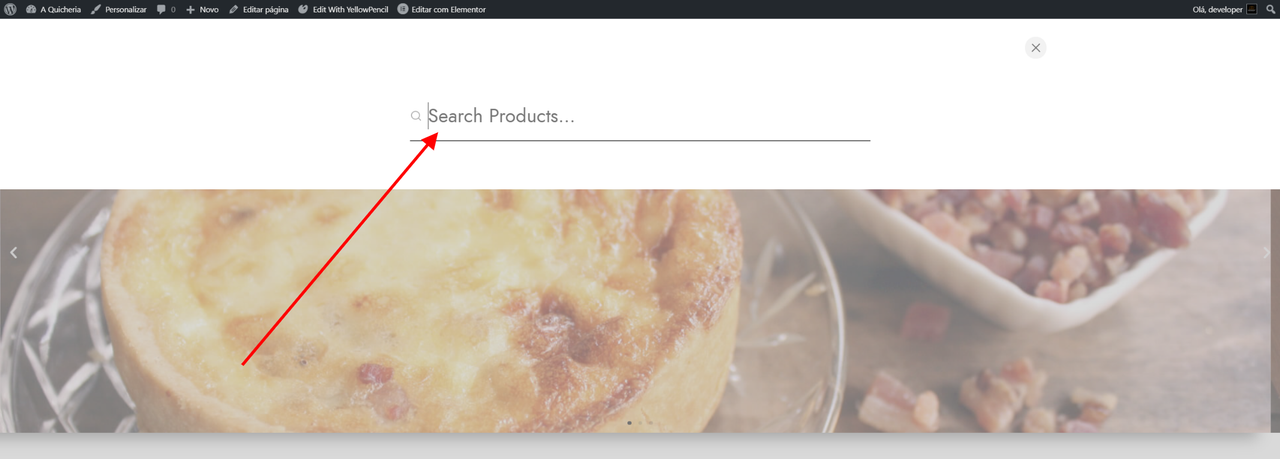
Please where do I find for translation? https://i.postimg.cc/xCj7TzCS/location.png
That string was missing. Please, get this updated language file https://bit.ly/3j12co5
If you’re using a translation plugin upload the file to wp-content/themes/goya/languages/ folder and sync again
Thank you!
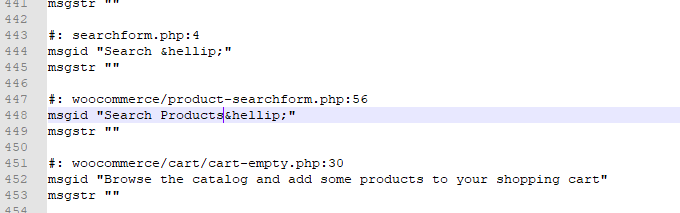
: woocommerce/product-searchform.php:56
msgid “Search Products …” msgstr ””
I did as you asked for more does not work
Please, get this one instead https://bit.ly/3mWhZY2 there’s also an updated product-searchform
For further assistance please add a support ticket at https://support.everthemes.com/ as you can share more details about your site
Beautiful theme, congratulations. Is your theme 100% compatible with elementor pro?
Thank you!
The theme is integrated with WP Bakery.
You can use Elementor in the content area but it’s not fully compatible yet. It’s in the roadmap but there’s not ETA at the moment.
If you have integration with elementor, I will buy your theme!
Very good.
Prepurchase questions:
1. Is it possible to have a big header image like used for one of the categories and have it appear on single product pages too?
2. Can we have the black top bar menu appear as a row underneath the logo and menu?
3. Possible to have a block appear for reviews at the bottom of the product page instead of hidden tabs?
4.Lastly what about categories with text descriptions (sometimes large blocks of text) added to them?
Thanks.
Hi,
Thanks for your interest
1. No. It’s possible to show the product title on top but no extra banners are supported on the product page https://ibb.co/8c6g072 and there’s no easy way to do with the current layouts.
2. It can’t be moved without a lot of coding. I think you want something like a news sticker but it’s not possible to repurpose the top bar.
3. With a little coding the reviews section can be moved below the tabs. It’s not that complex.
4. You can add custom content in the categories description. https://ibb.co/TrSw00y but it must be done with HTML. It’s the basic WooCommerce textarea but you could use the page builder to create your content on another page and then copy the HTML.
Regards.
Hello! this look like a great theme! Im looking to buy it, for now I just have one question.
If its possible to move the menu to the right? I mean only logo to the left and all the menu items to the right? Like this example https://ibb.co/2NBRL8M Thank you in advance!
Hi, thanks for your interest.
The theme includes some predefined header layouts but you can choose manually which elements you want on left | center | right sections https://ibb.co/y60NXfG
Those options appear in the WP Customizer.
Regards
hi, can I use this theme 1 (domain) for my client & 1 (domain) for my own use?
Hi, you need a license per domain.
It’s the same for all Themeforest items not just this theme. Check the details here https://themeforest.net/licenses/terms/regular
hi i want to buy this theme but i have one quiery can i add payment gateway like Razorpay, PayuMoney and CCAvenue.?
Hi, the theme is independent from payment gateways. If WooCommerce has support for those gateways then they will work with the theme.
For some reason, I can no longer access support. What the heck is going on?
It’s working. Other users have been using the system. Did you login with your envato account?
Yes I did, and it keeps giving me an error.
Anyway, I found a way to get back in, can you please respond to my ticket as my site is do to go live in a few hours? Thanx.
Any elementor integration in future?
Yes, it’s planned but I don’t have an ETA at the time.
I’ll try to port the more important elements and leverage the existing components from the core plugin to reduce the development time. But even then it will be a major update.
Thanks for your interest.
What dimensions of the logo would you suggest that goes well with the theme ? Which font are you using in the logo ?
The demo logo is 201×48px although the display size is 92×22. Your logo file may be bigger but you can control the presentation size in the Customizer > Header > Logo
Try what size works best for you because the theme can accommodate taller or wider logos.
Originally, the logo font was Gotham Medium Regular. But the G and A were modified.
@luisvelaz thank you
Nice Work Congratulations! Good Luck with Sale
Many thanks!
Very good theme but I encounter a problem with the official WooCommerce Products Add-Ons plugin. Also support portal tells me “Could not find this product in our supported products” – so this is the only place I have to get in contact with you
Is there a possibility to solve all this problems?
Hi, can you try again? The problem with the support system should be fixed now http://support.everthemes.com/
I’m already testing the plugin and it seems the checkboxes are hidden when the theme Floating Labels option is enabled. It will be solved soon.
Good luck!
Many thanks!