1960 comments found.
How to create modal in sober theme? I want to create a modal message when link to product detail page
Hello,
We’re afraid it is not possible. This theme has only one option for the newsletter popup.
Kind regards

Hello! Nice theme!! I just would like to change the text alignment on product description. I want left aligned text because I believe center align is tough to read, is there a way to change it? Thank you.
Hello,
You can use this CSS to change it:
.woocommerce div.product .woocommerce-product-details__short-description {
    text-align: left;
}
Please open a ticket on the support site if you need more assistance.
https://uix.ticksy.com/Thank you
It worked! Thanks
Many attributes, eg sizes and / or colors, are aesthetically ugly on the shop side bar. Would it be possible to see only 4/5 attributes, for example “red, white, green, yellow” and then the “SEE MORE” button to reveal the rest of the attributes?
Attach the link of zara website: https://www.zara.com/us/en/man-shoes-sneakers-l797.html?v1=1546897
All the best…!!!
Hello,
By default, this theme doesn’t support that style in the products filter. Please open a ticket on the support site, our supporters will help you check your website to see if it is possible to make it.
https://uix.ticksy.com/Thank you
Why the customization of the Headings Typography is not working at your theme? Brand new installation of both WP and theme.
Hello,
Please open a ticket on the support site and share your website admin login credentials. Our supporters will help you check it.
https://uix.ticksy.com/Thank you
How can i import only the 1 homepage? I did imported the content week ago but i like the homepage13 and i would to use on my homepage template.
Hello,
If you are using Elementor, you can insert the Home v13 template to your homepage. But if you are using WPBakery Page Builder, you have to import the demo data again to get the home v13.
Thank you
Can you give me the php code about the pop-up. After the demo, I didn’t see the correctly pop-up as like your demo website.
Hello,
You can find the PHP code of them in the theme folder. Please open a ticket on the support site, our supporters will help you.
https://uix.ticksy.com/Thank you
Hi! Where can I find or how can I get the “Contact Us v2”, “Coming soon”, “About Us v2” page templates? How do I use them?
And one more question, how to make the wishlist heart icon in the header not active when clicked? That is, I want the icon to visually remain, but not be a link. If this cannot be done, how can I remove the icon?
THX!
Hello,
At this moment, this theme just have templates for new pages in Elementor page builder. We will update the template library of WPBakery Page Builder in coming updates.
With the wishlist icon, you can’t change it. If you want to remove it, you just need to deactivate the Soo Wishlist plugin.
Thank you
I would like to purchase this theme but before purchasing I want to know will I be able to put a background colour in the entire site?
Hello,
Yes, you can use custom CSS to change the background color of your website.
Do you have Elementor demo?
Hello,
We’re setting up it. But it will look exactly like the current demos. You won’t see the differences between them.
Kind regards
Good afternoon, I am going to buy this item but I have some doubts.
Does the new version 4.5.2 of woocommerce affect the theme?
Also, the version of wordpress 5.5.1?
I appreciate your responses
Hello,
Yes, this theme was tested with the latest version of WordPress and WooCommerce.
Kind regards
Hi there, can you gelp on something. In the product page when i click on the product image the image slideshow ( photoswipe ) opens correctly, as soon as i click on the close, outside the image or scroll, the slider desapears ok…. but the pswp—open class doesn’t fet removed, making it impossible do click anything on the product.
Can you hemp on this matter ?
https://addpoint.pt?bypass=jellyBest regard
Hello,
As we checked, you copy the file script.js of the Sober theme to your child theme. It may conflict with the Sober theme and cause this issue. Please try to activate the Sober theme to test the problem. If it is solved, it means the problem comes from your child theme.
BTW, you shouldn’t copy all JS code from the Sober theme to the child theme. JS doesn’t work in this way. It is more complex to modify JS scripts. You should hire a developer to help you if you want to modify JS.
Kind regards
Hello.
I’m interested in purchasing the ‘Sober’ Woocommerce Wordpress theme. I just need to know do I have to purchase any extra plugins for it to work like the ‘Minimal’ demo and do I have to pay for Visual Composer. Thank you.
Regards
Hello,
You don’t need to purchase any extra plugins. We included Revolution Slider and WPBakery Page Builder plugins in this theme.
But if you want to setup multiple languages on your website, you need to purchase the WPML plugin. This plugin is not included in the theme.
Kind regards
Hi, thank you for your reply. So I can use the free version of ‘Visual Composer’ and create the same look as the ‘01 Minimal’ predefined homepage? Regards
Yes, of course. Actually, it is not a free version of Visual Composer. It is the plugin WPBakary Page Builder. You can check it here:
https://codecanyon.net/item/visual-composer-page-builder-for-wordpress/242431Great, thank you.
Also when you do the one-click install of ‘01 Minimal’ predefined homepage does it import the images/products like in your demo? Thanks
Yes, it will include demo images.
Hi, how can I put the products in one column at homepage in mobile version? Thanks.
Hello,
You can use this CSS to display one column of products on mobile:
@media (max-width: 767px) {
    .woocommerce ul.products li.product {
        width: 100%;
    }
}
Thank you
Hi, I tried changing the “Featured Badge” text Appearance > Customize. But the change does not apply. It still shows up as “HOT”.
Hello,
Thank you for your feedback. We will fix this issue in the next update.
Thank you
When is the next update? Thanks
We’re working on the next update and plan to release it in the next week.
Hello guys.
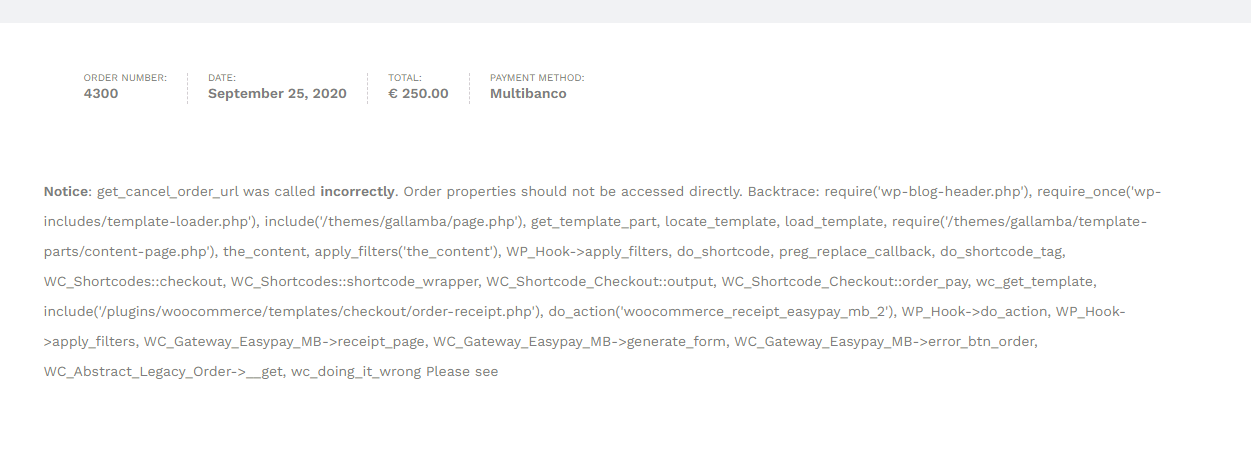
I’m trying to provide 2 additional payment methods via Easypay (Credit Card, Multibanco and MBWay).
I’ve configured everything and Easypay support guide me through and they are sure everything is fine on their side.
However, I got this error when I try to generate the payment reference: https://i.gyazo.com/1b7611e74c0a4381d9a6e124b3df281b.pngCan you help me identify what’s is causing the error?
Hello,
This problem relates to the Easypay gateway plugin. But you should disable the debug mode on your website. Without the debug mode, this notice will be removed and your website will work properly.
Thank you
Hello,
After upgrading to latest version 3.0.0, I noticed that Custom Heading element not work anymore.
It is still display on backend WPBakery but front end UI doesn’t.
Could you provide the fix for this?
Hello,
Thank you for your feedback. We tested on our website and it worked properly. Please share an URL of the page that has this issue. So we can test it and assist you better. Perhaps this is a conflict with a plugin on your website.
Thank you
Thanks for you quick reply. Here is a sample page that I place only Custom Heading element inside a Row.
https://artpuzzle.vn/sample-custom-heading/In the HTML of this page, we didn’t see the custom heading element.
http://prntscr.com/unfg7vPerhaps it conflicts with a plugin. Please try to deactivate plugins one by one to find what plugin cause this issue.
If you can share the admin login credentials, we can help you test this issue. You can mail us this credentials via our email: uixstore@gmail.com
Thank you
Update Sober Addons to latest version solve this problem
Thank you for your feedback.
Hello,
Would it be possible to add a sticky add to cart in the footer of my products pages when we scroll please ?
Thanks
Hello,
Unfortunately, this theme doesn’t have the option for sticky add-to-cart button yet. We’re finding a complete solution for it and will try to support it in coming updates.
Hello. Can you please update Revolution Slider and WP Bakery? I’m getting an error in dashboard:
Hello,
You can delete these plugins on your website then reinstall them under Appearance > Install Plugins menu to get the latest version.
Thank you
Thank you!
Hi,
Just one question. Would it be possible to add 5 columns to the footer? You are giving us the possibility of introducing 2, 3 or 4 but we need 5. Is that possible?
Thank you!
Hello,
We’re afraid it is not possible. At this time, the theme can support maximum 4 columns for the footer.
Kind regards
the photos embedded have stopped opening in lightbox, seems like prettyphoto from visual composer not working with theme now
Hello,
Please backup your website first, then update plugins and test the problem again. Perhaps your plugins are not compatible with WordPress 5.5.
You can also open a ticket on the support site and share the admin login credentials. Our supporters will help you check it.
Thank you
The theme is updated to latest version, also wordpress and all plugins, except for Visual Composer, it seems you haven’t updated to the latest version.
My support is expired but would’ve expected same functionality to keep working 
Hello,
You can delete the WPBakery Page Builder then reinstall it in Appearance > Install Plugins to get the latest version.
Thank you
I did that, everything is up to date now, wordpress, theme, plugins… However the issue still persists. Before, when I used a Visual Composer gallery and then clicked an image, it would display prettyphoto lightbox gallery of all images embedded on that page.
Now, each image links to the file URL. See example: https://mainsdevapeur.com/lightness-of-being/We tested on our website, this problem doesn’t happen.
On your website, we can see another plugin for prettyPhoto. It may conflicts with WPBakery Page Builder’s script. Please try deactivate other plugins, just keep this plugin activated to test the problem again. Then reactivate plugins one by one to find what plugin cause this problem.
Thank you