747 comments found.
Hi,
Is there a way to place the post year when showing archive pages? Right now it shows the day/month, but I would like day/month/year.
Also, I would like to know how to add a RSS icon to be displayed as icons for social share, so that it can be on my footer.
Thanks.
Hi there,
Thanks for writing in!
Please find below the answer for your questions:
1. Could you please specific the page where we can see the day/month so we can help to add year on it.
2. Please go to your Dashboard > Appearances > Customize > System > Custom Icons Font Classes (separated by commas), then you can add the code here: fa fa-rss
After that, please click on Save/Publish button and reload the customize page to see new icon. You can see more details in our FAQs page here (in Question 13) : http://www.themelogi.com/tickets/topic/faq/
Best regards, Danny
here is what I mean, please see the pic for showing the post date. It only shows the day/month, but no year. In this instance, I want to show day/month/year.
Hi there,
Thanks for your info!
In this case, please open up the content.php file in themes/roneous/templates/post folder, then replace the code in line 6 into this:
<div class="month"><?php echo get_the_time('M') . ' ' . get_the_time('Y') ?></div>
Hope this helps,
Danny
Thanks for the info.

Hi, I need for this theme HTML Files or full theme template in HTML can you please provide me.. ghai.gourav5, please contact me on skype..
Please can you provide me the HTML ?
Hi there,
Thanks for writing in!
Regretfully, our theme only available in WordPress version, but not HTML files.
Please let me know if you got any further questions!
Best regards,
Danny
Hello, How can I copy / paste a specific element to my page? I would like to copy the accordion autoclose from here http://demo.themelogi.com/roneous/elements/accordion-module/
Hi there,
Thanks for writing in!
You can also save a element as in the article here: https://kb.wpbakery.com/docs/learning-more/element-presets-my-elements/
Hope this helps, Danny
Thank you for your reply. But I don’t see how this can help me. Where to find the element to copy it?
Hi there,
If you have imported the demo content, you can go to the Accordion page in your Dashboard > Pages, and copy the element in there, or you can just copy any element you want in the demo imported pages.
Hope this helps, Danny
Sure, but how to do if have not imported all the demo content?
Hi there,
In case you don’t want to import all demo content, you can copy/paste the individual page you wish in the theme documentation here: http://www.themelogi.com/docs/roneous/ (in section 3: Import Demo > Indivdual Pages Import), and you can find the source code for all element pages here: http://www.themelogi.com/docs/roneous/assets/codes/elements.html
You can paste the code in “Text” mode of page editor, then you can switch back to WPBakery editor to edit/save the elements.
Best regards, Danny
Hi, This is exactly what I needed. Thank you!
Hi! You’re welcome. I’m glad to hear that!
Please feel free to let me know about any other doubt you could have.
Also, if you like our theme and the support, please consider to leave us a 5-star review rating for the theme via ThemeForest > Downloads section. It helps us a lot!
Have a great day!
Danny
Hi everyone,
I need support for the mobile banner on my homepage always shows kind of an overlay over the background image (the website is pridelandsfilms.com). It’s not on desktop and tablet, just on the mobile version.
Please let me know, how/if I can remove this overlay – maybe there is something wrong in the settings, but I cant seem to find it.
BR, Nicole
Hi there,
Thanks for writing in!
To resolve this issue, please add the code below to your Dashboard > Appearances > Customize > Addition CSS:
.header-single .background-content {opacity: 1!important;}
Hope this helps, Danny
Hi I sent a email, to you and still waitring for reply please. Thank you
Hi there,
Thanks for writing in!
I’ve already replied to your email, please check your inbox.
Best regards, Danny
Hi can you pls explain 2 things
1. I can’t update wpbakery keeps giving me error I can’t update automatically which I’m not I’m updating it trough plugins so how do I fix this
2. How can I add gallery using shortcode? 8 have shortcode for actual gallery but on my site it’s kinda infinite scroll as it only shows 1 image at the time. Is there way I can add grid gallery or something which is bit more organised?
Thanks
Hi there,
Please find below the answer for your questions:
1. To update your plugins, please update your theme to latest version as in the article here: http://www.themelogi.com/knowledge/#theme_update
When you’re done on updating the theme, please go to your Dashboard > Appearances > Install Plugins to update your plugins.
Also, please make sure you’ve activated the “TLG Framework” plugin after the theme update.
For your information, when you purchase a theme from ThemeForest that bundles WPBakery Page Builder, Slider Revolution or any other Premium plugins, you are free to use these Premium plugins with the theme.
However, your theme purchase does not give you individual Premium plugins licenses that allow you to activate or download these plugins as you wish. Activation Premium plugins doesn’t mean the plugin will not work but only that you cannot received direct updates. Please don’t worry if you see warning messages about the plugin license activation.
We’ll include latest version of the plugins each time we release a new version of the theme. It’s normally take a few days so we can test the plugins with the theme.
You can read more about bundled license in the article here: https://help.market.envato.com/hc/en-us/articles/213762463-Bundled-Plugins
2. About the gallery images, please have a look at the topic here (it’s for our other theme Roneous, but it would be the same with Navian theme) : http://www.themelogi.com/tickets/topic/image-gallery/#post-5935Best regards,
Danny
Hi, When we click on Description or Additional Information tab on Woocommerce Single Product page, it scrolls up instead of staying there. It also happens on your demo page. How can we prevent the page to scroll up when we click on product’s description tab or Additional Information tab.
Hi there,
Thanks for writing in!
To disable that scrolling in woocommerce tag, please open up the scripts.js file in themes/roneous/assets/js folder, find the code below (around line 85) :
jQuery(document).ready(function() { // READY EVENT
        "use strict";
... and change it into this:
jQuery(document).ready(function() { // READY EVENT
        "use strict";
        jQuery(document).on('click', '.woocommerce-tabs li > a', function(e) {
             $('html, body').stop();
        });
You may want to test it in private mode of your browser or remove history cache of the browser and check again.
Best regards, Danny
Hi,
I purchased your theme, and thus far it is good. But, I ran into issue with mobile. The sidebar widget doesn’t show on mobile. Also the scroll to top doesn’t show up on blog, and sometimes on page, this seems to be a bug.
Please let me know how I can have sidebar widget from blog/archives show on mobile.
Thanks.
Hi there,
Thanks for writing in!
To enable the sidebar and scroll to top button in mobile, please add the code below to your Dashboard > Appearances > Customize > Addition CSS:
@media (max-width: 768px) {#sidebar, .main-sidebar, .back-to-top { display: block!important;}}
Hope this helps, Danny
Hi,
While the code works, the view is not truly mobile, it kind of breaks. It is not fluid, and you have to scroll left. The page/post is scrollable right/left, this should not be for mobile.
Please let me know if I need to add other css somewhere else.
Thanks.
Hi there,
Thanks for your info!
In this case, please share us your site URL and the admin account of your site via the contact form at https://themeforest.net/user/themelogi so we can investigate your case and help you out. Also, please point to specific page where we can see the problem. Any screenshots would be welcomed! (you could upload your images into https://imgbb.com/ and share the link in there).
Best regards, Danny
Thanks Danny. I emailed you through the profile page and sent you a link to the webpage that shows the issue. Please let me know how to fix that.
Thanks again.
Hi there,
Thanks for your info!
I’ve replied to your email, please check your inbox.
Best regards, Danny
Thank you, your code worked.
Hi, how do I add an image of my products when I do a matching search? regards
Hi there,
Regretfully this isn’t a feature offered by the theme. It could be possible with custom development, but this would be outside the scope of support we can offer. We’ll consider to add this feature as an option in the next theme updates.
For the meantime, you can try to use the woocommerce search widget to add to your Shop sidebar.
Thanks for your understanding. Take care!
Danny
Thanks for your quick response, it is useful to me. Regards
You’re welcome!
Hi,
I like your theme and want to purchase, but I have a question. Does the sidebar menu such as shown here http://demo.themelogi.com/roneous/home/landing-conversation/ be static? What I mean is if this side menu can appear in all pages/post/archives. I like the sidebar menu, and like how the layout is.
When I click on a post from that demo, the sidebar menu is lost and shows me a completely different layout. So, I want to make sure that the sidebar is constant along all pages/post/archives, etc. Please let me know.
Thanks.
Hi there,
Thanks for writing in!
Yes, for your information, the theme comes with 2 theme options (“Appearances > Customize” & “Page options at bottom of the page/post”)
So in case you see the customize option doesn’t change as in “Appearances > Customize”, please just have a look at the “Page options at bottom of the page/post”.
It’s very simple indeed, just 2 points that you need to know to use our Theme Options.
1. There are global options that affect you entire site in “Appearances > Customize”.
2. There are individual options that affect only that page or post in “Page options at bottom of the page/post” (Screenshot: https://i.ibb.co/zS2J3j4/po.png)
If you want to use global options (1), please set those options as “default” in individual options (2).
To apply the side menu for all the pages, please go to your Dashboard > Appearances > Customize > Header, and change the Header Layout into “Left Vertical Dark” to be same as “Landing Conversation” demo page.
Best regards, Danny
Thanks for your fast answer. I forgot to also ask, since I couldn’t see in the demo with the sidebar vertical is how it looks with submenu. Do you have a demo with that?
Hi there,
Yes, you can see the demo of sidebar vertical with submenu in the link here: http://demo.themelogi.com/roneous/elements/?nav=left-vertical-dark
Hope this helps, Danny
Thanks.
Hi I sent you support ticket regards to some issues
Can you please give me your email for faster communication
Thank you
Hi there,
Thanks for writing in!
We’ve just replied your ticket in the topic here: http://www.themelogi.com/tickets/topic/theme-cant-set-up-and-need-help
In case you want to use email support, please use the contact form at https://themeforest.net/user/themelogi
Best regards, Danny
Hi Danny
I have submitted the ticket and sent you email and I’m still waiting on your reply.
Please update me once you have some time.
Thank you
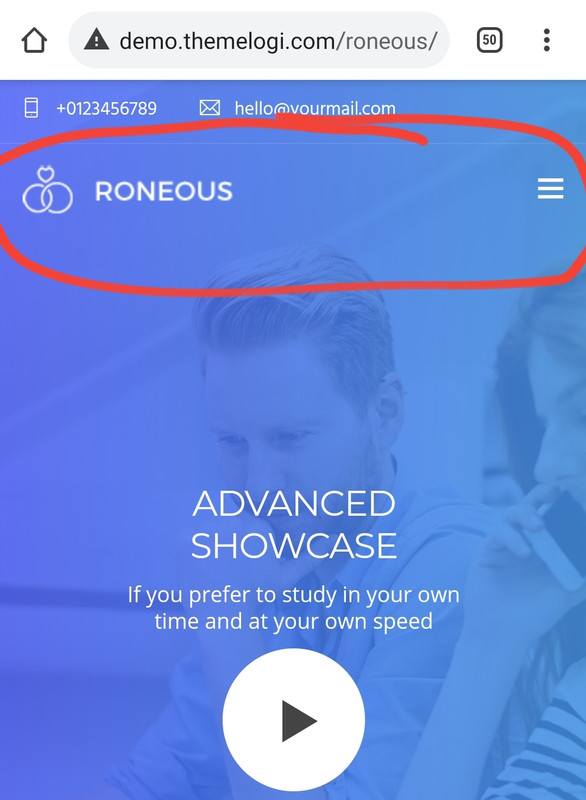
Can you please tell me how can I make my menu look like yours
Mime has white line and no logo
Yours in demo menu is actually inside the blue header
https://i.postimg.cc/kg8RJLHG/Screenshot-20210210-070619-Chrome.jpg https://i.postimg.cc/0NsMbcgf/Screenshot-20210210-070712-Chrome.jpgCan you tell me how can I make my menu to be in blue header also ?
Thank you
Hi there,
Thanks for your info!
In this case, you may need to change your header layout to transparent header instead of standard header.
For your information, the theme comes with 2 theme options (“Appearances > Customize” & “Page options at bottom of the page/post”).
It’s very simple indeed, just 2 points that you need to know to use our Theme Options.
1. There are global options that affect you entire site in “Appearances > Customize”.
2. There are individual options that affect only that page or post in “Page options at bottom of the page/post” (Screenshot: https://i.ibb.co/zS2J3j4/po.png)
If you want to use global options (1), please set those options as “default” in individual options (2).
Also, I’ve replied to your email, please check your inbox and follow the email support.
Best regards, Danny
Hi thanks for your help I sent you email waiting on your updates
Thank you
Hi there,
Yes, I’ve replied your email, please continue to follow in the email.
Best regards, Danny
Hi I sent you email again still waiting for reply. Thank you
Hi there,
Yes, I’ve replied your email, please check your inbox.
Best regards, Danny
Hello! when the logo is loaded via customization it displays however the alignment is off/ logo is not responsive for mobile so it covers the page name text. How can this be adjusted/rectified? Thank you
Hi there,
Thanks for writing in!
In this case, please share us your site URL and the admin account of your site via the contact form at https://themeforest.net/user/themelogi so we can investigate your case and help you out. Also, please point to specific page where we can see the problem. Any screenshots would be welcomed! (you could upload your images into https://imgbb.com/ and share the link in there).
P.S: I just see that you’ve leave us a bad review for the theme, but as we’ve note in our support forum here http://www.themelogi.com/tickets/ (screenshot: https://ibb.co/Z2kmgfx ) , in case you couldn’t login to submit ticket due to the browser cache, please use the contact form at our Themelogi profile page here https://themeforest.net/user/themelogi to submit your question. We’re always respond to every ticket within 6 – 12 hours even in the weekend. So could you please consider to update your review rating since it make impact to our sale much. If you can temporary update it to 5-stars, it helps us a lot!
And if we can’t help you out with your request, we’ll happy to return your money for the theme.
Looking forward to your response!
Best regards,
Danny
Hi Danny, I have updated the rating, thank you for assisting.
Just a heads up, the theme forest contact form is the only one working. The other option provided does not work…
I will leave a detailed description there now of the problem that I am experiencing. Thanks.
Hi there,
Thanks you so much for the review! I’ve just replied to the email, please check your inbox.
Best regards,
Danny
Hi! When opening a portfolio item, on desktop/ipads, the navigation buttons (next/prev) show up. But they are hidden on mobile. Is there a way we can enable them on mobile as well?
I believe we just need to remove the “mobile-hide” style from the buttons, but am not sure where to find it.
Sample: https://ibb.co/z6CGrvk
No worries – found it under templates/post/inc-pagination.php
Hi there,
Thanks for your info!
I’m glad you sorted it out!
Have a great day!
Hello, I have a problem with the installation:
Installing the theme from the uploaded file: themeforest-m1yS5qoF-roneous-creative-multipurpose-wordpress-theme.zip Unpacking parcels …
Installing a Theme …
The package could not be installed. Style.css is missing from the theme.
Theme installation failed.
Hi there,
Thanks for writing in!
This is a common issue that can occur when installing a WordPress theme. For the details of solution, please have a look at this article: https://help.market.envato.com/hc/en-us/articles/202821510-Theme-is-missing-the-style-css-stylesheet-error
Hope this helps, Danny
1.- this themplate comes with wp backery editor enabled? 2.- the themplate comes with demo content?
Hi there,
Thanks for writing in!
The theme come with WPBakery page builder for free. you can read more about bundled plugins license in the article here: https://help.market.envato.com/hc/en-us/articles/213762463-Bundled-Plugins
And yes, you can use the 1-click demo import all the pages as in our live demo.
If you need help to use the theme, please share us your site URL and the admin account of your site via the contact form at https://themeforest.net/user/themelogi so we can investigate your case and help you out. Any screenshots would be welcomed! (you could upload your images into https://imgbb.com/ and share the link in there).
Best regards, Danny
Hello, wondering if it’s safe to upgrade my site to WP 5.6?
Hi there,
Thanks for writing in!
Yes, the theme is compatible with latest WP version since we’re running latest version on our live demo too, but you could also backup your site before upgrade if needed.
If there is any issues, please share us your site URL and the admin account of your site via the contact form at https://themeforest.net/user/themelogi so we can investigate your case and help you out. Also, please point to specific page where we can see the problem. Any screenshots would be welcomed! (you could upload your images into https://imgbb.com/ and share the link in there).
Best regards, Danny
Hi! I’m having a strange mobile menu issue where a specific link works on desktop but not in mobile. It might have something to do with the fact that it is the only link where it has an anchor tag at the back ”#customisedtour” (as the other links all work).
On a mobile phone, please try clicking “360 Experiences” and then “Customised 360 Tours” at :
Page password: 360123 Page link: https://www.temporary-url.com/C0DD
Hi there,
Thanks for writing in!
About this issue, please share us your site URL and the admin account of your site via the contact form at https://themeforest.net/user/themelogi so we can investigate your case and help you out.
Best regards, Danny
Thanks Danny – have sent it in
Hi there,
Thanks for your info!
Yes, we’ll check it and get back to you via email once it’s done.
Best regards, Danny
I want to buy it but I have a questions is this can work with Wordpress themes
Hi there,
Thanks for writing in!
Yes, Roneous is a WordPress theme so you can install it in your WordPress site as you can see in the theme documentation here: http://www.themelogi.com/docs/roneous
Please let me know if you have any further questions.
Best regards, Danny
Thanks!, I have another questions, this theme have a landing page or is like the normal web sites. Thanks! 
Hi there,
Hope that you’re doing well!
Yes, the theme have many homepage demo which you can use for normal website or just a landing page.
Also, you can check our latest Navian theme for more options and features to creating your pages: http://demo.themelogi.com/navian/
Please let me know if you have any further questions!
Best regards, Danny
Thanks , yes I have navian to using in another website its amazing
That’s great! Thank you for using our themes for your projects!
If you have any further questions you are always welcome to contact us back anytime you need.
Have a great day!
Danny
Hello, I posted a support ticket more than 2 days ago but got no reply or notification of creating ticket. So I’m posting a comment here instead, hopefully I’m not awaiting for nothing
Hi there,
Thanks for writing in!
I’ve already replied to your topic here: http://www.themelogi.com/tickets/topic/site-layout-issues/
Could you please follow it in the ticket and share us your site URL and the admin account of your site via the contact form at https://themeforest.net/user/themelogi so we can investigate your case and help you out. Any screenshots would be welcomed! (you could upload your images into https://imgbb.com/).
Looking forward to your response!
Best regards, Danny
Got it, thanks. The issue is not getting notification emails from your side then only. Thanks will keep checking the ticket
Hi there,
It seems there is something wrong with the private reply, maybe there is cache issue in your browser so the private message doesn’t send to us.
In this case, could you please share us your site URL and the admin account of your site via the contact form at https://themeforest.net/user/themelogi so we can investigate your case and help you out. Any screenshots would be welcomed! (you could upload your images into https://imgbb.com/).
Looking forward to your response!
Best regards, Danny
Sent by contact form
Hi there,
Thanks for your info!
Yes, I’ve replied to your email, please check your inbox.
Best regards, Danny
Thanks for the fix Danny, All look fine now
You’re welcome! I’m glad to hear that!
Have a nice day!
Hi!
1) How do we align the “back to top” button/icon to the left of the screen?
2) How do we align buttons to the right (the only option is “centered or not”)? We used the “Advanced Button” option inside of Visual Composer .
Thanks
Hi there,
Thanks for writing in!
Please find below the answer for your questions:
1. Please add the code below to your Dashboard > Appearances > Customize > Addition CSS:
.back-to-top {bottom: 40px!important; right: auto; left: 40px;}
2. In this case, please follow the article here: http://www.themelogi.com/tickets/topic/center-button/ (then you can use the class named “text-right” instead of “text-center” in the Extra Class Name field in the second screenshot).
Hope this helps,
Danny
Thanks so much for the quick reply Danny. This does indeed help—but would it be possible to right align the button rather than all text in the column? The Advance Button settings unfortunately does not have a css class field in its settings.
Hi there,
Thanks for your info!
In this case, please open up the tlg_buttons.php file in wp-content/plugins/tlg_framework/includes/vc_shortcodes folder, and replace all the code in that file into the code in the link here: https://paste.ofcode.org/mcZHebbprjZyRaf946si62
Then reload the page editor, you’ll see new Extra Class Name field in the Advance Button setting, then you can add the CSS text-right into that button.
Hope this helps,
Danny
Thank you Danny! One other thing—the filters for portfolios dont appear on mobile screens. How do we enable that?
Hi there,
To enable the filter portfolio in mobile screen, please add the code below to your Dashboard > Appearances > Customize > Fonts & CSS > Custom CSS:
@media (max-width: 767px){.filters {display: block!important;}}
Hope this helps, Danny
Your support is incredible Danny. Everything works beautifully. If you have the time, I’d appreciate your advice on:
1) When we choose for the Page Header Layout to be “Transparent No TopBar”, the vertical alignment of our content moves around. Can we fix it so that it’s top? (instead of it just randomly aligning based on the amount of content). Is this possible? Screenshot to compare https://ibb.co/jGh8yqH and https://ibb.co/rpnFgXk
2) Heading shortcode in Visual Composer is also missing the Extra Class Name field. If you have the time, it’d be a huge help to have this added.
Hi there,
You’re welcome and hope you had a great weekend!
Please find below the answer for your questions:
1. Please share the specific page/URL where I can see your page header so I can help you out.
2. In this case, please open up the tlg_headings.php file in wp-content/plugins/tlg_framework/includes/vc_shortcodes folder, and replace all the code in that file into the code in the link here: https://paste.ofcode.org/eFhyzrYrpQDZn8murb293x
Then reload the page editor, you’ll see new Extra Class Name field in the Heading setting, then you can add the CSS you wish into that button.
Also, if you like our theme and the support, please consider to leave us a 5-star review rating for the theme via ThemeForest > Downloads section. It helps us a lot!
Best regards,
Danny
Hi Danny, Here you go  I cant seem to find a way to ensure all vertical alignment in the rows are to “top” instead of fluidly starting from the center.
1) https://www.temporary-url.com/9BAF 2) https://www.temporary-url.com/D6A2 3) https://www.temporary-url.com/EEBBF
Staging site pswd: 360123
Hi there,
Thanks for your info!
To resolve this issue, please add the code below to your Dashboard > Appearances > Customize > Addition CSS:
.vertical-alignment {
    top: 20%!important;
    transform: none!important;
}
Hope this helps,
Danny
Hi Danny, Your code worked but we found it was affecting other rows on the homepage (that contain iframes) as well… is there a way to limit it to just the first rows? I can add a css class to the first row called topheader.
Is there a way to edit it so that it then worked as follows? I already tried this but it doesn’t work yet.. so I believe I’m missing something.
.vertical-alignment .topheader { top: 20%!important; transform: none!important; }
Hi there,
Thanks for your info!
In this case, please change the code above into this:
#home + .vc_row .vertical-alignment{
    top: 20%!important;
    transform: none!important;
}
Hope this helps, Danny
hi i have a question 1. how can i change a color of navigation menu and head text ??
Hi there,
Thanks for writing in!
In this case, please share us your site URL and the admin account of your site via the contact form at https://themeforest.net/user/themelogi so we can help you out. Also, please point to specific page where we can see the text and color you want to change. Any screenshots would be welcomed! (you could upload your images into https://imgbb.com/ and share the link in there).
Best regards,
Danny



)