16332 comments found.

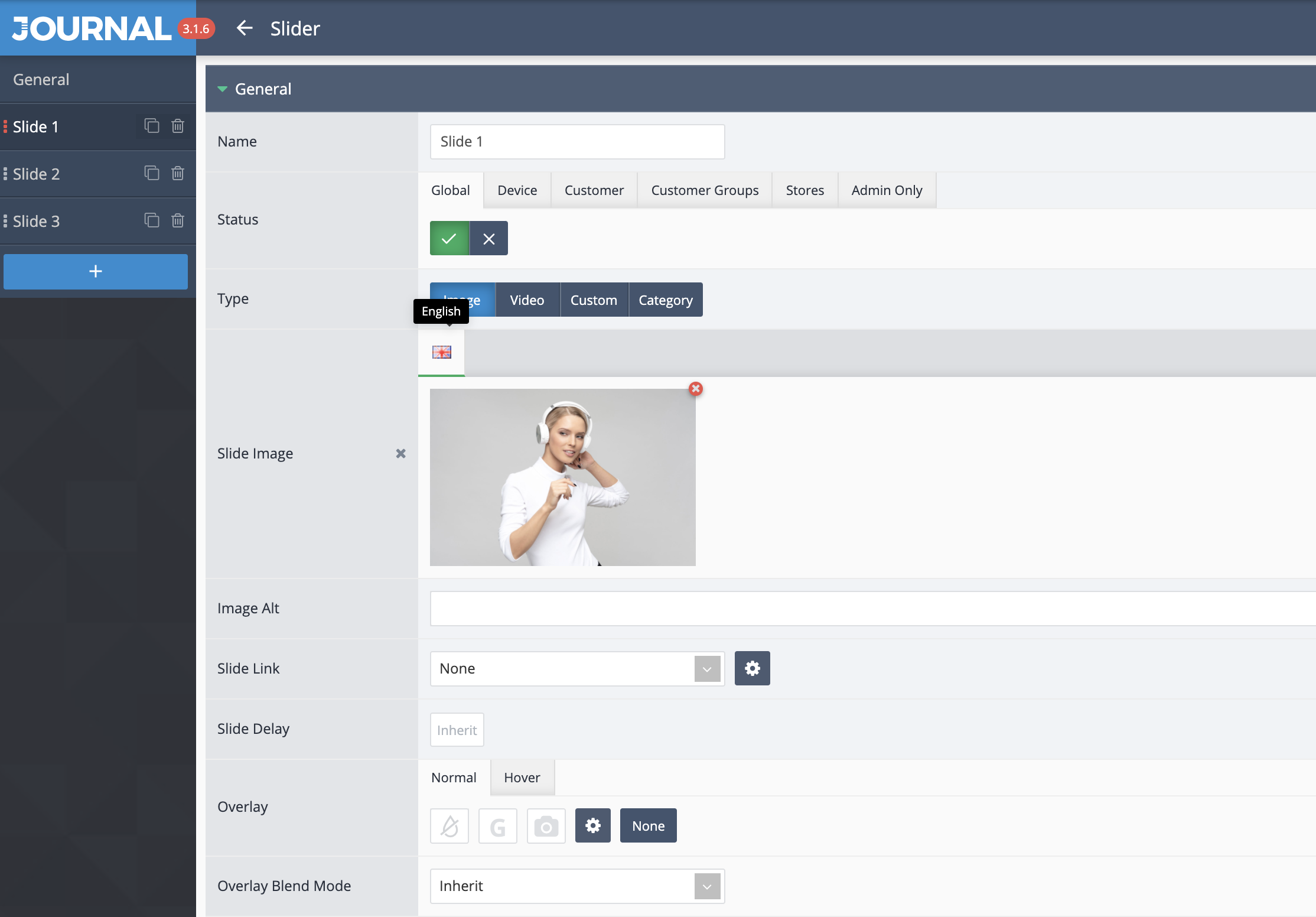
Hi, Slider and some other modules are only available in English. I want to add Turkish here. How can I do it? Opencart Turkish Language pack has been installed.
Demo – 4 https://i.hizliresim.com/YjVYcn.pngHi, text added in the custom Journal modules will need to be translated in those modules where you write it. In your image, there doesn’t appear to be any additional languages installed.
For more info please file a ticket on our support page and consult with our developers.
Best Regards.
I find 2 bugs in 3.1.7 in the one checkout page. Tested as logged in customer:
1. When you put text in the comments box and click on the button “confirm order”, it just spins a wheel for a second and stay on that page. After second click the order confirms.
2. When you order as customer (tested logged in) and don’t complete the order by going to a payment zone(when click confirm order) and go back, you can see as admin the missing order (go to order page and select Missing Orders in the status filter). Now when you see that order and delete the order, you must try as a customer to order again. Test it on bank-transfer (for example) and it will throw an error that The ‘orderNumber’ field is missing. This is then for all payments and you can’t order anymore as customer, unless you log out and log back in.
Hi, we cannot replicate your first issue, the comments box works fine on both guest customer and logged in customer, if you cannot replicate this issue on our demos then it is most likely something isolated on your store and you will have to file a ticket on our support page if you need assistance.
Regarding the second issue, this is how one page checkouts work, a new order will be created whenever accessing the checkout page and that order will be marked as missing order in Opencart backend until payment is processed.
This is not something related to our checkout system, all one page checkouts work this way. It’s important to understand that one page checkouts may not work well in all situations, consider using the default Opencart checkout if you one page checkout is not working on your specific setup.
Best Regards.
hi, i have a question: if i am to use this theme to actually sell products on my website, do i need the extended licence? the payment methods are in any way limited in regular licence?
Hi, no they aren’t limited, the regular license allows you to sell any products you want, except the theme itself Journal, of course.
Best Regards.
thank you very much for the fast answer.
Hi there. I purchase this theme and use it successfully for over a year. However, i tried this morning to update the theme based on your todays new updates, but unsuccessfully Can you please help – i will really appreciate this since my support was expired
Hi, the update process is really the same as just reinstalling the theme, but do follow these guides here, works fine for everyone: https://docs.journal-theme.com/docs/update/
Best Regards.
thank you for getting back to me – i have read this but i still do not have the knownlode how to do it – i do not have IT person at this stage – i m just a marketer  i will appreciate it if you help me please because the theme runs to slow and i hope with this update it will fix the issue
You’d have to file a ticket on our support page with temporary access to your setup and consult with our developers, we can’t help you here in the comments with the theme update.
Best Regards.
the thing is that my purchase code was expired few month ago buts why i m kindly requesting for your support in this issue from here where i know it is just a few mins for you!
We understand but we can’t provide such support here, our developers need to look at your setup. Since it’s working for everyone else it’s not something to fix and tell you what to do.
The update is working fine with the instructions here, please run through the steps once again and make sure you’ve completed each one.
If for some reasons there’s something on your end that prevents that we can’t possibly guess what it is so you need to consult with our developers and provide them temporary access to your setup so they can investigate on your end and see what the issue might be. It’s a process that can only be done on our support page.
Best Regards.
hi i know the process via the support page but as advised my Purchase Code was expired and i m not yet eligible to ask for your support This is the reason i m kindly asking you if you can assist me
We understand but you don’t understand the Envato support rules. People who need specialized assistance (something that requires investigation on their own stores) need to have valid support and this expires every 6 months.
Although you own the theme license for life, you don’t get technical support for like as well. You can’t expect technical assistance forever, support is a paid feature here on Themeforest Envato.
Everyone who needs special assistance renews a support package and files tickets.
We always monitor these public comments for bugs reported and other issues that are in the theme and are replicable by us, so that we can fix them in future updates so anyone can benefit from them for free.
But if you need personal assistance where our developers need to access your setup to see what’s going on and provide the guidance you need to consult them on our support page, I can’t help with this here in these comments, you need to privately reach them and provide temporary access to your setup.
I would suggest going through the installation again, making sure especially point 3 is done correctly: https://docs.journal-theme.com/docs/update
Thank you!
I certainly understand you but i think you are trying to give a different impression. I have never asked you for any customization or any specialised assistance. What i m asking you is very simple – I cannot update my theme with the latest BECAUSE i have NO IDEA how to do it – my eshop work perfectly. Anyway i do not want to spend more time discussing something so simple. Good luck!
I think I understand very well, but you don’t seem to understand that in order to help you you need to provide temporary access to your setup, and you can’t provide that here publicly.
How else do you expect us to help you update the theme, there are no magic steps other then the ones outlined here.
So all we can do is follow those same steps on your own server, what’s so hard to understand about this simple concept?
Not to mention that everyone who needs this sort of one-on-one assistance BUYS support – we can’t just ignore those people and assist you for free for something that is not even a theme issue.
Thank you for your understanding!
I m not stupid to provide any credentials publicly – the rest you mention ae not clear to me but anyway no reason to discuss it further if there is no understanding that many of your clients are not IT familiar individuals – and really i cannot understand why this “simple concept” could not be solved out by you so far. If you need still need access let me know how i can send the credentials to you since i via ticket is not allowed to me
People buy new support packages when they need support, that is the issue here. What you’re asking is to ignore those people and just assist you anyway.
Moreover, there’s nothing special that we can do in your case, except follow the same steps outlined in our documentation.
So if you just need us to look at your store setup and help you update the theme you will need valid support like everyone else.
If you have a bug to report, you can of course do so freely here in the comments. We always monitor bugs and fix them, but one-on-one assistance beyond bugs or issues with the theme requires valid support.
You can renew support from our main Themeforest page, the green Renew Support button: https://cln.sh/kTXTt2
You can then file a ticket and consult with our developers, tell them you can’t update the theme and need some assistance. Make sure to provide temp access to your setup.
Thanks again!
Same issue like digitalsat, I can’t set the font style with the cogwheel icon in admin.
It’s a perfect video from the problem. This is the same video that digitalstat also shared:
https://dosya.co/ff88plzhm46k/20210119_150409.mp4.htmlHi, we have just patched the current version with this fix, please redownload the theme now.
Best Regards.
Hello, changing text characters in the additional options section does not work with the mouse. https://prnt.sc/x7rj5s
Hi, we just tried this in our demo and it works fine, can you replicate this issue in one of our demo admins, try any font option: https://cln.sh/GPLAgX
Best Regards.
Sorry, I couldn’t tell, it doesn’t change when I make a selection with the mouse, please watch the video, https://dosya.co/ff88plzhm46k/20210119_150409.mp4.html
Ok, thanks for pointing that out, we’ll look into it right away.
I thank you, I found another problem but not sure then I’ll write you again. :)))
Hi, we have just patched the current version with this fix, please redownload the theme now.
Best Regards.
you are very fast thanks team, see you :)))
thanks worked now good work
Hello, OC 2.3.0.2 – I`ve just updated the theme to Journal 3.1.7 and a problem occured. In product page in the field for selecting qty (1, 2, 3…ect) before Add to cart there is no number. It says Notice Undefined variable: journal3_product_quantity in /home/user/domain/vqmod/vqcache/vq2-catalog_view_theme_journal3_template_product_product.tpl on line 4911
In general my store crushed with a lot of errors
Hi, make sure you always refresh Opencart modifications after new Journal files have been uploaded to your server and such issues should be solved after.
Best Regards.
Am thinking of getting this theme, Presently am using opencart Version 2.0.3.1 . Do I need to upgrade to 3… before I can use this theme?
Hi, yes the oldest Opencart version is 2.3x so you need to upgrade to either that or the latest v3.x in order to use Journal.
Best Regards.
Thanks for prompt response. Can you help in upgrading to v3.x?
Hi, the upgrade of Opencart itself is not theme related and doesn’t fall within our support, but you can check out this article: https://docs.opencart.com/upgrading/
Best Regards.
I am with journal v. 2.6.7-rc and opencart 1.5.6.1 I can’t find where in the Journal admin must be activated the super filter to be shown on mobile and tablet. Please help me with advice.
Hi, Journal v.2.6.7-rc may not have that option, you should update your theme to the latest Journal 2 version from https://www.journal-theme.com/v2/download/
Best Regards.
Hi is there any way to stop the home page popup from popping up on every page…everytime I go to a page on my website the homepage popup keeps coming up? it is effecting my ads
Hi, yes just add the special module in the Current Layout in Journal > Layouts > Home, as opposed to All Layouts, see points 2a and 2b here: https://docs.journal-theme.com/docs/layouts/layouts/
Best Regards.
Hi I want to report issue that Journal quick checkout comment not working in 3.1.6. I look forward for fix file soon
Hi, please file a ticket on our support page and consult with our developers.
Best Regards.
I have open tickate J16-DEH-UVDJ
Ok, we’ll get back to you soon.
Best Regards.
Hi Team, just letting you know that there is a problem with the latest update 3.1.6, once installed our site broke. We could only access admin by disabling /storage/modifications. We had to load an earlier backup to restore. This has never happened with previous updates. Furthermore, we are using OC 3.0.3.3. I hope this helps.
Hi, make sure all theme files have been uploaded to your server, then refresh Opencart modifications and clear Opencart template cache from the blue right button in Opencart admin dashboard and it should work. Please file a ticket on our support page if you need assistance.
Best Regards.
Yes we did all of that as we always do with updates, just this one was different.
Hi, please download the very latest Journal version and let us know if your issue is still not solved after.
Best Regards.
Hi there in my error log I see
PHP Notice: Undefined variable: setting_info in —-—-——/system/storage/modification/catalog/controller/journal3/layout.php on line 302
2.3.0.2 – oc 3.1.4 – J
Hi, that error seems related to a third party extension you have installed, check your installed extensions first.
Best Regards.
New Bug in Journal 3.1.6 – create a popup newsletter. Its not possible to add by the background image center top and cover for the size.
In the database entry is the information background-size also missing. When i modify by hand it works and is showing also later in the admin menu.
I can work with that – I need not more then one POPUP Newsletter, but I needed hours to found this solution.
Hi, it’s not clear how can we help you, please provide more details like screenshots or links to your store so we can see what you are referring to.
Best Regards.
Think its fixed now – was the same issue what a ohter user showed in a video.
Theme 1 is not exporting Layouts. I tested the other themes and it’s normal. I need to use the theme 1
Hi, we checked that and it’s working fine, make sure you input the purchase code and username and in their corresponding fields, sometimes it’s easier to paste the code in the user field and vice-versa.
Best Regards.
Hi, I don’t need support. Just want to add a new bug report on the 3.1.6 update. On the One Page Checkout, the google Captcha code only works with “Static Assets Url” – “OFF”. When On it gives error: api.js:1 Failed to load resource: the server responded with a status of 404 (Not Found) Best regards
Hi, thank you for pointing that out, we will include a fix for this issue in our next update.
Best Regards.
Hi I want to inform you that Title setting style & addtitional option not working well in Journal 3.1.6 update Please see tthe images https://imgur.com/undefined
Hi, please file a ticket on our support page and consult with our developers so they can investigate this.
Best Regards.
Hi, im trying to install klarna in opencart 3.0.3.6 and journal3 theme its all set up but when i go to the checkout klarna is blank and it leave a error message in the error log .. error below
Fatal error: Uncaught TypeError: Argument 3 passed to GuzzleHttp\Client::request() must be of the type array, string given, called in /home/xxxxx/xxxxxx/system/library/journal3/vendor-composer/guzzlehttp/guzzle/src/Client.php on line 95 and defined in /home/xxxxx/xxxxxxxx/system/library/journal3/vendor-composer/guzzlehttp/guzzle/src/Client.php:179 Stack trace: #0 /home/xxxxxx/xxxxxx/system/library/journal3/vendor-composer/guzzlehttp/guzzle/src/Client.php(95): GuzzleHttp\Client->request(‘createRequest’, ‘POST’, ’/checkout/v3/or…’) #1 /home/xxxxxx/xxxxxx/vendor/klarna/kco_rest/src/Klarna/Rest/Transport/Connector.php(107): GuzzleHttp\Client->__call(‘createRequest’, Array) #2 /home/xxxxxx/xxxxxx/vendor/klarna/kco_rest/src/Klarna/Rest/Resource.php(141): Klarna\Rest\Transport\Connector->createRequest(’/checkout/v3/or…’, ‘POST’, Array) #3 /home/xxxxxxx/xxxxxxxe/vendor/klarna/kco_rest/src/Klarna/Rest/Resource.php(198): Kla in /home/xxxxxxx/xxxxxxx/system/library/journal3/vendor-composer/guzzlehttp/guzzle/src/Client.php on line 179
Its to do with the journal theme.. any idea to a fix.. any info you could give me plz
Hi, please file a ticket on our support page so we can take a closer look at this.
Best Regards.
After Update to 3.1.6 -> when I create a new color. After clear cache I have on all Journal admin pages a white page 
When i change the color of a old one – it have no effekt.
vendor.js?v=5ae9d849:1 TypeError: Cannot read property ‘get’ of undefined at n.value (main.js?v=5ae9d849:1) at ur (vendor.js?v=5ae9d849:1) at cr (vendor.js?v=5ae9d849:1) at Au (vendor.js?v=5ae9d849:1) at to (vendor.js?v=5ae9d849:1) at Zr (vendor.js?v=5ae9d849:1) at Br (vendor.js?v=5ae9d849:1) at vendor.js?v=5ae9d849:1 at t.unstable_runWithPriority (vendor.js?v=5ae9d849:1) at Bt (vendor.js?v=5ae9d849:1)
main.js?v=5ae9d849:1 Uncaught (in promise) TypeError: Cannot read property ‘get’ of undefined at n.value (main.js?v=5ae9d849:1) at ur (vendor.js?v=5ae9d849:1) at cr (vendor.js?v=5ae9d849:1) at Au (vendor.js?v=5ae9d849:1) at to (vendor.js?v=5ae9d849:1) at Zr (vendor.js?v=5ae9d849:1) at Br (vendor.js?v=5ae9d849:1) at vendor.js?v=5ae9d849:1 at t.unstable_runWithPriority (vendor.js?v=5ae9d849:1) at Bt (vendor.js?v=5ae9d849:1)
maybe that helps to fix the bug
Same Problem with Fonts :((
I am not sure.. I have a Litespeed Enterprice Server with the Litespeed Cache Module.. after purge cache i have the blank page…
Hi, we cannot replicate this issue on our end, please make sure all files have been properly uploaded to your server and all systems caches have been cleared after and it should work.
Best Regards.
Hi, thanks for answer on sunday – I am surprized
Well, all files are on the server and all permissions are correct. It looks like a session or cookie problem.
When I add a new color and refresh and purge all cache, I see a white blank page when i go back to the >variable>color. But when i close the browser and login after again it works.
I checked now on a totaly new system with other server configuration – same behavor…
TypeError: Cannot read property 'get' of undefined
    at n.value (main.js?v=5ae9d849:1)
    at ur (vendor.js?v=5ae9d849:1)
    at cr (vendor.js?v=5ae9d849:1)
    at Au (vendor.js?v=5ae9d849:1)
    at to (vendor.js?v=5ae9d849:1)
    at Zr (vendor.js?v=5ae9d849:1)
    at Br (vendor.js?v=5ae9d849:1)
    at vendor.js?v=5ae9d849:1
    at t.unstable_runWithPriority (vendor.js?v=5ae9d849:1)
    at Bt (vendor.js?v=5ae9d849:1)
My main server have a Litespeed Enterprice webserver, the test machine was a debian box with nginx.
Unfortunately, we still cannot replicate this issue on our end, if there is an issue which we will be able to replicate on our end, we’ll surely fix it.
Other than that, if you need personalised assistance, please file a ticket on our support page and discuss it with our developers.
Thank you!
How do I add content to the Register page > Privacy Policy pop up. The popup just has a title called Privacy Policy with no content. Note I already have a privacy policy page.
Hi, you can do that from Opencart > Catalog > Information > Privacy Policy.
Best Regards.

This item was featured on ThemeForest

Power Elite Author
Contact the Envato Market Help Team