900 comments found.

Last question. I would like to build projects and use Portfolio Masonry Isotope. After choosing a project I would like to have a page opened like Project Single 1. Is that possible?
Hello,
Yes, it’s possible. Like shown in this image, make sure the project’s template is selected as “Horizontal”.
Next, by using the page builder, create a container, full width column, and add “Project Showcase” element.
It would be so much easier and faster if you import the demo content and edit the imported pages as you like.
Regards.
I use the demo content, but I still can’t figure it out.
In this case I would like to add project “Lovely Creatures” (not creatures-2!) to page Portfolio Masonry Isotope Filters. But after editing this page the project does not appear. What am I doing wrong?
Can you give us a link to the page? We’ll check it out.
test.vd-linden.nl
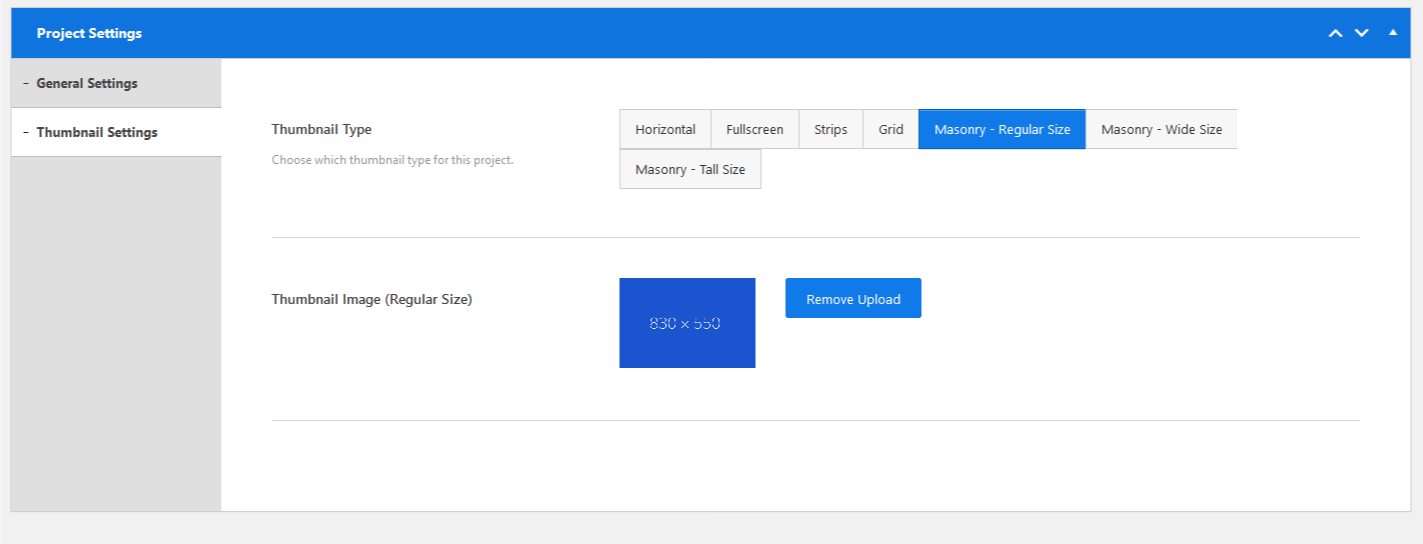
The project is there but it doesn’t have a thumbnail. Make sure you add a thumbnail to the project as shown here.
If you want to show a project in a “Portfolio Masonry” page, the project’s thumbnail type must have “masonry” type selected.
That worked! I’m beginning to understand your systematics. Thanks.
Further: in this specific project we have textblocs (City of London, Fusion models, etc.) but I can only find the Project Showcase in the container. Where did you add these infoboxes?
They are inside the “Project Showcase” element. Click on edit element, then you can edit any slide on the left. Slides accept 2 types “Info” or “Image”.
Smart! Thanks 
While testing in the ‘Demo Download’ I found out that you mixed up Portfolio Grid Isotope vs Portfolio Masonry Isotope. Can you please take a look at it?
Hello,
Could you please explain further so we can understand.
Regards.
Never mind. I guess I got lost in a page, container, element and added projects or so … Sorry.
No problem. Happy to help.
Your updated theme crashed my entire Wordpress as well. Great.
Hello,
Could you please explain with more details what the problem so we can help you?
Regards.
I couldn’t log into Wordpress. My web site and Wordpress had an error page. I had to restore it.
What kind of error, could you please give us more details?
ParseError thrown syntax error, unexpected ‘)’
You’ll have to make a new fresh WordPress installation and make you have the latest theme version installed along with its plugins.
theme causes critical wordpress error and total crash
Hello,
Could you please tell us what kind of error is happening so we could fix it. Copy the error line and paste it here or take a screenshot and send it.
Regards.
it blows up the complete wordpress! our hosting service had to remove the theme so wordpress admin would work again
Please send you your WordPress credentials at codesymbol@gmail.com. We’ll have a look. Thanks.
again with the demo content and your editor! no content showing in editor backend- just a weird symbol showing content blocks not loading! when you change anything in your editor then press update it redirects you to an error page instead of updating the page! this even happens when you update page title or permalink. never seen such a confused theme
Please contact your host’s support team and ask them to upgrade MySQL version to v8.0.18 or v5.7.23 at least.
We’ve checked everything and couldn’t find the cause of the problem. The last resort is removing your WordPress installation and install a new fresh one. Please do that and get back to us, and we’ll do the rest.
Thanks.
Hello
I have purchased a licence for UNO (2017-01-04) and I never used it on my website. Today, as I receive a message about an update, I want to try it on a local website with wampserver. The Theme Registration displays “Wrong/Invalid purchase code”. I don’t understand. Can you tell me what is going on ? Thank you for your assistance regarding this matter.
Pierre (from France)
Hello,
Please follow the steps explained in the documentation.
Feel free to contact us if you are still having problems.
Regards.
Hi, there are gray squares after WordPress update. After updating the theme, there is an error: .../uno/framework/dashboard/dashboard-init.php on line 39 Can you help me?
Please send us your WordPress login credentials through our profile page. We need to have a loot at your website.
Hi, I installed the Envato plug-in, can you assure me that updating via the plug-in will not break anything on my current site ? Thx you for your reply.
Hello,
The theme structure has been changed completely, the old plugins have been removed and replaced with new ones. You’ll have to build some pages/projects manually as the old data won’t be accepted in the new page builder.
Regards.
Hello, I’m not very good with wordpress, I’m too scared of breaking my site. I have already spent hours to understand your theme and be able to use it. It’s not an update if we all have to resume
You shouldn’t be scared. We are here to help, and we’ve made a documentation to assist you in this regard.
Also you can switch back to the old version if you can’t use the new one.
Regards.
hello
i have issue with license :/
registreed your theme on my page, then i have few issues so i restore it and then trying register theme again :/ and it is not working  it is possible to delete registered license so i can use it again on the same page ?
Hello,
Please send us your username and purchase code through our profile page. We’ll de-register the old installation for you.
Regards.
V2.0: Codesymbol Page Builder is missing!
Edit: never mind. It was added as .RAR instead of .ZIP.
Just download the latest update, this issue has been fixed.
Downloaded and reinstalled. But there’s one other issue. Installing the Child-theme does not work well. Wordpress says: inclomplete, because there’s no main theme available. (But ofcourse there is…!)
The parent theme “Uno” must be installed first in order to be able to use the child theme.
That’s absolutely right, and that is what I did. I already said: But of course there is…! In the mean time I found a third party plugin (Child Theme Configurator) which did the job for me. That should not be the solution.
Hello,
We apologize for the long delay. The theme has been updated. We’ve fixed all the known errors, and have added a lot of new features.
Please take the time to study the new features. Also we’ve updated the documentation to reflect the new update. Feel free to contact us if you are having any problem.
Regards.
Hello, thanx, but i think the new theme still has bucks… i.E. “codesymbol-page-builder.rar” is in the package but WP wants to install it from a .zip file. Also after i upgraded to WP 5.6.1 and PHP 7.4, in the new theme there where no more landing pages or portfolio pages… so i went back downgrading and reinstalling everything… Maybe you could check what is from with the installation file(s)? thanx.
Just download the latest update, this issue has been fixed.
Landing pages have been moved to the page builder now.
as far as i could test, also the project / portfolio concept seems to be changed and needs to adapted? Is there any chance to update an old project with the v2 version without redoing everything manually? thank you.
Yes, the theme structure has been changed completely. You can import demo content and with few edits you’ll have the website just as it was. The page builder is so easy to use. Thanks.
hello, ok i am about to redo my page. now i struggle with landing page and portfolio page… if i set the landing page as main page in the cusomizer, i always get back to the landing page, when i click on the logo. if i set the portfolio page as main page, i am surpassing the landig page when entering the url for the site radiant-darkness.de… how are the landing pages meant to work in this theme?
edit: the fullscreen slideshow landing page seems to have this issue, the landing page with 2-4 pages works.
We’ll push an update which adds a custom link option so that the logo can link to a custom page which you can choose. Regards.
Great! Thanks!
i am coming here everyday to have some news..please can you tell us when it’s coming (or if it’s not). thank you 
Hello,
We apologize for the long delay. The theme has been updated. We’ve fixed all the known errors, and have added a lot of new features.
Please take the time to study the new features. Also we’ve updated the documentation to reflect the new update. Feel free to contact us if you are having any problem.
Regards.
i download it, and my website is all black now.. i don’t know where to find my licensing code, can you halp me pleasE ? (i bought your theme in 2016 ) thank you +
it’s ok sory i found it :)))
theme is installed.. but all my galleries are gone. i don’t understand how to build it again. this elements do not appears on my screen : http://www.codesymbol.com/themes/uno/documentation/#portfolio (arggggggggg)
i have “pins” in my menu (portfolio, gallery…) nothing work
Remove the old plugins, and make sure you install the new plugins, as stated in the documentation. Regards.
It’s been a month and we’re still waiting for an update. Can you please respond when exactly we can expect it? Hopefully soon as it’s for a business site. Thank You
Hello,
We apologize for the long delay. The theme has been updated. We’ve fixed all the known errors, and have added a lot of new features.
Please take the time to study the new features. Also we’ve updated the documentation to reflect the new update. Feel free to contact us if you are having any problem.
Regards.
Me to. Please, do something
Hello,
We apologize for the long delay. The theme has been updated. We’ve fixed all the known errors, and have added a lot of new features.
Please take the time to study the new features. Also we’ve updated the documentation to reflect the new update. Feel free to contact us if you are having any problem.
Regards.
Please when is coming the update ?? I am a photographer..without pictures on my website :’’’((
Hello,
We apologize for the long delay. The theme has been updated. We’ve fixed all the known errors, and have added a lot of new features.
Please take the time to study the new features. Also we’ve updated the documentation to reflect the new update. Feel free to contact us if you are having any problem.
Regards.
Hello, Will you support WordPress 5.x? Thanks in advance
Hello,
The theme has been updated, supporting the latest version of WordPress v5.6.1
Regards.
Hello,
I’ve been having issues recently with the theme showing up gray boxes instead of pictures. I know that you’re planning on a big update, do you have a date in mind for the release of that update ? I’m starting to consider to move to another theme because of the lack of updates on your side.
Have a good day
Hello,
We apologize for the long delay. The theme has been updated. We’ve fixed all the known errors, and have added a lot of new features.
Please take the time to study the new features. Also we’ve updated the documentation to reflect the new update. Feel free to contact us if you are having any problem.
Regards.
After wordpress updated all the posts are showing gray featured images. I can’t do any changes to the post page as well. Debug shows: Fatal error: Uncaught Error: Call to undefined function CoSy_get_post() public_html/wp-content/themes/uno/cosy-framework/shortcodes/shortcodes-processing.php on line 170 Please advise.
Thanks
Hello,
We apologize for the long delay. The theme has been updated. We’ve fixed all the known errors, and have added a lot of new features.
Please take the time to study the new features. Also we’ve updated the documentation to reflect the new update. Feel free to contact us if you are having any problem.
Regards.
Is there an update on when we can expect to get the update for the gray squares issue?
Hello,
We apologize for the long delay. The theme has been updated. We’ve fixed all the known errors, and have added a lot of new features.
Please take the time to study the new features. Also we’ve updated the documentation to reflect the new update. Feel free to contact us if you are having any problem.
Regards.
src=”data:image/png;base64,iVBORw0KGgoAAAANSUhEUgAAAAEAAAABCAYAAAAfFcSJAAAAAXNSR0IArs4c6QAAAARnQU1BAACxjwv8YQUAAAAJcEhZcwAADsQAAA7EAZUrDhsAAAANSURBVBhXYzh8+PB/AAffA0nNPuCLAAAAAElFTkSuQmCC” style=”height: 319.9px;”>
i als have since a few days only grey sqaures instead of photos. src=”data:image/png;base64 shows intrinsic: 1×1 pixels
how can i change this
Hello,
An update is coming soon with a fix to this issue.
Regards.
Hi, I have a problem. The albums are not visible, only grey squares. Everything was fine before. Wp was updated 2 days ago. What could be the problem?
Hello,
An update is coming soon with a fix to this issue.
Regards.
Hello, thank you for the update, I’ve try to use it, but it is a problem in my page: dashboard-init.php file 39 row E_PARSE causes a type of error. Message: syntax error, unexpected Could you help me, what is the problem, please?
Please send us your WordPress login credentials through our profile page. We need to have a look at your website.
Thank you, I’ve sent it.
We’ve replied to your message. Please check your mail. Regards.