5515 comments found.

Hi Team, I’ve purchased in past your beautiful theme, and the version of my theme is 1.20. If I buy a new license for the theme version 3.2.1 – could I update my theme without problem? Or could I update my theme from 1 to 2 version and from 2 to 3?
Hi. Thank you for the message.
Since you wish to update from such an older version would require to follow some specific steps. When updating from an older version than 2.01 must read these notes carefully: In Version 2.01 released in September 2018 – we made a major theme update (we moved to Core Functionality theme custom elements – at Envato Requirements) and we switched our theme options to Redux Framework. You can see here the full change log https://help.wprentals.org/article/wp-rentals-1-20-change-log/ We will guide you on how to do it on our support system. If you wish my assistance to register in support please send a message from here with the buyer account – https://themeforest.net/user/wpestate
Thank you
Dears, I have this warning message after a search from the serachbox in home page: Warning: Invalid argument supplied for foreach() in /home/customer/www/booknowelba.it/public_html/wp-content/themes/wprentals/classes/rentalsSearch.php on line 247
Hi. You are missing a variable, but we need to see what is the setup (maybe it is a text label, but I cannot be sure)]
Please use our client support http://support.wpestate.org/ to help. This is also a private support where you can send us your site details (url and wp-admin access). Our standard office hours are Monday – Friday, 9AM-5PM Europe timezone. If you wish my assistance to register in support please send a message from here – https://themeforest.net/user/wpestate
Thank you
Hello, I’ve just tried your demo theme inside Wordpress dashboard. I have other three questions:
- As admin, how do I modify the listing informations created by owners (not my listings)? - Where do I see all the invoices sent, and pending bookings between guests and owners? - Where do I look all the messages sent between owners and guests?
Thanks again.
Hi Matt, Thank you for the message
As admin you go admin- listings – and you can edit major information from there, but some details like extra booking options, ical feed, custm booked periods added by owner cannot be changed form admin.
Invoices are in wp-admin -> invoices
Bookings are in wp-admin-> bookings
Messages are in wp-admin-> messages
Admin can set to get separate notifications – https://help.wprentals.org/article/duplicate-email/
Thank you
i just notice is missing a number in the decimal is only one? Balance remaining: € 842.8 it should be (842.80) how do i fix that?
Hi. I think the number format function we use automatically does not show if it is 0, so prices like 842 do not show 842.00 – and it was asked to work like this intentionally by our clients for sure. IYou can open a ticket in support to double-check with support team this question to manually force decimals on all numbers as custom code.
Thank you
i see but in the bank world is wrong. i think we should follow the international rule.
Hi, I understand, and we will save the suggestion, but for sure we were asked to show the price without .00 decimals in the past as well, so we know not everyone wants to see 98.00 if there are no decimals after price. Thank you
hi thx, ok got it but it should be universal decimal classification two decimals .00 what is more than 90% in the world. And if using woocommerce where is two decimals so is bit confusing?
my message is only suggestions guys, as i have worked with tourism and websites for 20 years 
Hi Birken, I have noted this and will check. I cannot make any promise at this point, but I do value your feedback and experience. Thank you for sharing.
Is it possible to do nightly rates as opposed to by periods?
Hello anapaola14, Thank you for the message. We have price per night as default price https://help.wprentals.org/article/1-20-submit-price-details/
Please use our client support http://support.wpestate.org/ if you need further help. This is also a private support where you can send us your site details (url and wp-admin access). Our standard office hours are Monday – Friday, 9AM-5PM Europe timezone. If you wish my assistance to register in support please send a message from here – https://themeforest.net/user/wpestate
Thank you
Hello, i am trying to edit the homepage of the theme but i can’t edit the section above the header(the banner with image of a boat) despite i have downloaded the elementor pro. i also notice that in all pages come the same problem. please help me out asap. thank you in advance.
You can use ibiza style demo and disable the theme hero header as well. We can help import just the ibiza homepage or show you how to simulate the same with your existing demo if you need further help.
Please use our client support http://support.wpestate.org/ if you need further help. This is also a private support where you can send us your site details (url and wp-admin access). Our standard office hours are Monday – Friday, 9AM-5PM Europe timezone. If you wish my assistance to register in support please send a message from here – https://themeforest.net/user/wpestate
Thank you
Hello, I am looking for a vacation rental theme that includes the ability to list bed distribution. For example a three bedroom home might have Bedroom 1 with 1 King Bed, Bedroom 2 with two full beds and Bedroom 3 with two bunkbeds. Is this possible with this theme or with another of your themes?
Hello. Thank you for the message. You can manage the bed descripion/distribution – https://help.wprentals.org/article/how-to-manage-bed-types-section/ We allow owner to describe the bedrooms, but the property will be rented as single listing (no matter how many bedrooms it has).
If you need further help please let me know.
Thank you
Hi, i don’t understand to add a limit on extra guest? How do i add 1 extra guest only on a listing. as it cant be unlimited extra guests!
Hi, We do not limit extra guests I am afraid – we have here a help for this https://help.wprentals.org/article/how-to-work-with-extra-guest-option/ If you wish to control the guests allowed in booking automatically, only the default guest value will be considered when booking.
Thank you
i don’t understand so a vacation rental cant have unlimited extra guests?
Disregard previous message!
if Vacation Rental Villa has possibilities to add some extra guest. for example they have 4 beds but want to charge extra for 2 extra guests.
So i enable allow extra guest and renter go to listing and chose 6 guest what is fine but the next guest add 20 what is not existing for this listing. So some where it should be a message that is only aloud 2 extra guest os they cant book or request?
Hi Birken, I understand but that option (limit max extra guests) does not exist. If extra guests check is enabled, than there is no limit for extra guests. I understand the suggestion and I added it to wishlist, but now it does not exist I am afraid. Thank you
thx for your answer guys you have the best support,
The logic is of course that a rental vacation CANNOT have unlimited guests! ex. if a villa, apart or any property has 3 bedrooms it mean they can have 6 sleeps normally.
So lets say they can have extra guests!
How many extra guest do you think they can manage to get in there?
Where is the logic to have unlimited guest please explain to me as i am confused . Warm regards Birken
Hi Birken, Unfortunately I do not have the discussion history for the request. This was implemented years ago. I saved your suggestion to wishlist to review this in the future. Thank you
hi guys,
i want to be able on one listing to rent out entire villa + guest house so price will be 400+100
Guest house available only with Villa and not not rented separately.
how can set this up please, as is very normal thing with vacation rentals.
Hi. I am not sure what is a guest house – is it a separate property you have on the site? In a single listing you can add extra booking options https://help.wprentals.org/article/1-20-add-extra-options-in-booking-form/ and if guest house is just an extra option, you can add this as extra booking option. Thank you
Extra booking option is great but is not possible add it to the dates. for example i need extra option for low season so the price is lower then. how can i mange that?
Hi Birken, That is not possible. Extra booking options are global. There is no method to condition when extra booking show. You can remove or add them manually if you wish at any time, but they cannot be automatically displayed by a specific date selected. It has not been asked before, and it may not be technically possible, I will add to wishlist for further review. Thank you
Hi, your theme seems great, and I would like to purchase your wp rentals theme, but I have few questions: 1 Is it possible to change settings depending on periods in the calendar? For instance is it possible to set a minimum of 5 days for high season, and a minimum of 2 days for low season in the calendar? If not, is it possible to modify or add this feature? 2. Is it possible to adjust the listing submit form, and the listing page? Add some features, or hide some others? 3. Concerning the translation, will I have to use poedit to translate some parts of your theme, or will wpml will be enough?
Thanks in advance,
Regards,
Alex
Hi Alex,
1. You can change minimum days for custom period prices – https://help.wprentals.org/article/how-to-choose-different-prices-for-different-dates/ – https://prnt.sc/10c3nk6 And you can have a default min days set.
2. You can manage which fields to show, but sections are set in code – help https://help.wprentals.org/article/1-30-how-to-manage-submit-form-fields-and-mandatory-fields/
3. WPMl and translation are 2 separate things. WPML is for multi language, and that means you have a default language and other languages. WPML works, but needs you to translate manually everything. The theme .po can be set for the labels that come from po and we may have the languages you need, but you must confirm which are these.
For 1 language, you do not need WPML. You can use directly wordpress language options. The theme has specific .po you can translate for the theme and core plugin. Some .po may already exist and you can edit them in your language.
If you need further info or want to test our theme, please send a message from here https://themeforest.net/user/wpestate
thank you
in my country with dont have Yelp, can you give me an advice how to show nearby local amenities on listing page please.
Hi. We only have YELP support. If you are aware of another 3rd part similar to YELP, please let me know. I will add to wishlist ot check their documentation to see if we can integrate a different platform. YELP is done through API and they have specific documentation for this integration. Thank you
ok i just want to add manually for example NEARBY:
airport – 5km
shops -100m
Beach – 200m
and so on… how will i add these?
+.
Hi, I am not sure what is the best way to do this – You may need to create a custom section through code to separate these details in a new section. The theme supports custom fields, but these would show in Property details section – that may be a different way to add these details https://help.wprentals.org/article/property-custom-fields/
Thank you Anna
Hi, yes to use custom fields is fine but all of them is on listing details. they maybe should be possible to add them to new area or location as is a nearby amenities like restaurants, airports this is a very import part and many countries don’t use yelp.
any other ideas please?
Hi Birken, Since we do not have a theme admin way to create a new section, this would have to be done with code. I do not see any other way . So far the clients have not recommended anything then yelp, so we can check other similar options if they have the api support, but i do not see any other way.
Or you can use the description area and I can guide how to allow html in description area if you wish to add there html and manually type this.
Thank you
hi guys, i have small issue sometimes is not possible to book it keep saying that is “sending request” is on the instant booking and pay without login. i did try on your demo also seem to be the same issue please see here https://www.loom.com/share/2472d00527fa4ee5b6a2f3ac315ee3b2
Hi. On our demo it may be just cache, but I need to understand on your site to help. I checked the last open tickets and now you have maintanence on for prestige…. website and I could not test. Please open a ticket for this, with the maintenance off, and I will do a test from my end to see what are the messages returned when not logged in.
Thank you Anna
Pre-purchase Q: Is it possible to change the “City & neighborhood” in “Add new listing” to Dropdown or restrict it to just one default location?
Hello wiglenet, Thank you for the comment. Yes, we have this option. Please send a message from here https://themeforest.net/user/wpestate and I will enable this to test.
Thank you
I notice that is not possible to sort bookings in user-dashboard as i am going to use your plugin administrate over 100 properties and bookings etc… it will be very difficult if is not possible to sort by paid, pending, date etc… is something you can recommend how best manage all of these?
Hi, Thank you for the comment. We have not had this request before, but I will add it to the wishlist, Please send an example if you already know the exact details you wish to have as sort to check further with development team. Thank you
what is the best practise for 1 administrator to handle over 100 properties, bookings, payments and so on. Do you have any advice please as abit confusing. i am using woocomerce also, i have asked this question before but longer i work with the system i get more confused, the plugin is amazing is just me that need some advice please.
Hi. I know you wish to use offline cc to process payments, and that may be more difficult. Our clients use the all in one calendar to monitor the bookings for listings and then look for the booking they need in My Boookings by name. Only confirmed bookings are monitored, and confirmed bookings happen automatically with the theme default options.
If you need new features, and send us the details, we can add to wishlist for future review. But it is important to understand the feature first, that is why the more details you can send the better.
Thank you
hi guys,
where do zoom in so the map only show my country? please see here how it is for me now https://ibb.co/2hbgbq1
Hi. The map works like this
1. It auto-zooms based on pins on map to include all. You can see which pin may not have the correct lat and long, edit it and then the map will auto-zoom – help https://help.wprentals.org/article/how-to-set-the-location-of-a-property-on-the-map/
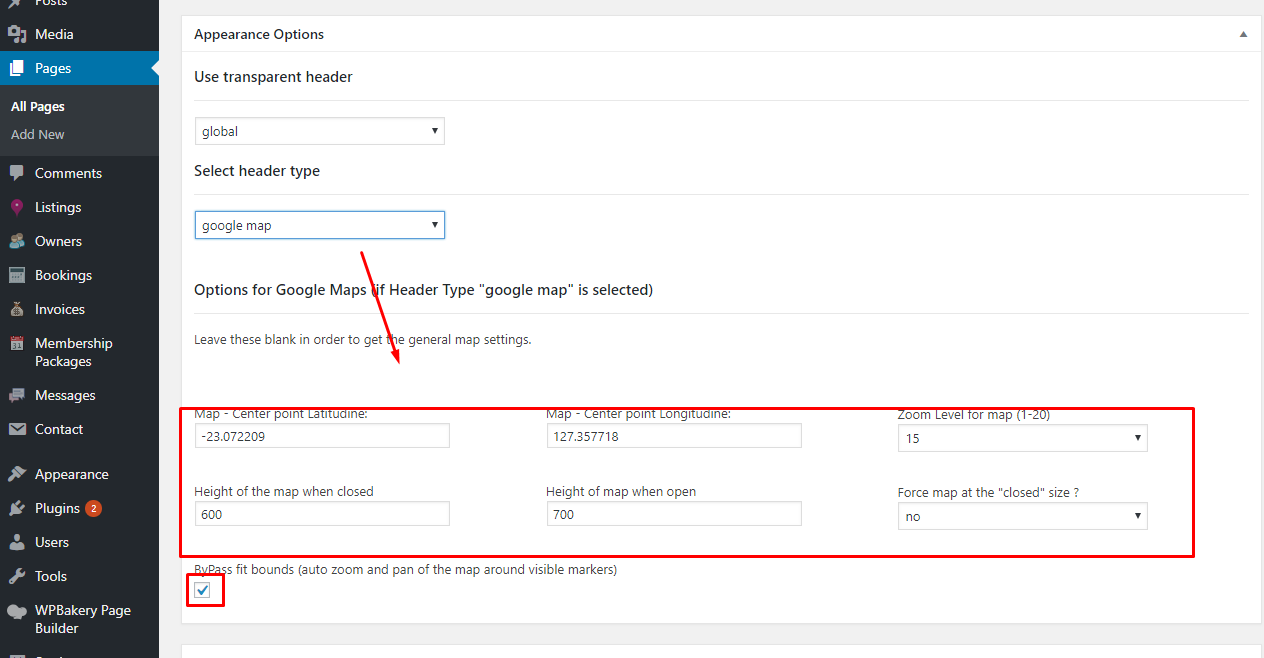
2. Or custom cutom header from edit page – and it will be the zoom you set in custom header if you check the option to bypass the auto -zoom as in this help https://help.wprentals.org/wp-content/uploads/2015/10/map-custom-header.png
Thank you
all the pins is in one country as you can see on screenshot, but it show the whole world double and also a big empty grey area on top?
Hi. I see in the screenshot one pin outside – https://prnt.sc/10b48j1
Send me the url in support or by email to confirm because the answer is for sure correct, but i need ot check the url to give specific directions. Thank you
that pin is on the same country the map is has doubled up!
i have sent you a link in this ticket #196906
Hi, I answered. Thank you
Hello, I’d like to ask you a few questions before buying your theme.
1. Can guests upload their documents / ID’s / images on their profile page?
2. Is there an option which guests can set their informations on their profile? (for example, it’s mandatory for them to set if they are workers, students, why they want to rent the house, etc.). This way the admin or the owners can look guests’ informations without having to ask them (easier for filtering guests). Kinda like HousingAnywhere.
Thank you in advance.
Hello, Thank you for the interest.
1. We have the following option to verify owner https://help.wprentals.org/article/1-20-5-verify-owner/
2. We do not have mandatory fields in My profile, and any new field besides what is showcased in demo needs to be added through custom development.
Thank you
Hi, I see. Thanks for the reply. Is the option for ID verification available on guests profile too? (not only owners). If not available, can it be added through custom development?
I have other two questions:
1. Is there a limit on how many guests can sign up and create their profile on WP Rentals? (For example, max. registered users is 1000)
2. Can I see the messages sent between owners and guests, in my back-end?
Thanks!
Hi Mattcosta, If you let all users have the same rights to add listings then all can have that option. But all will have an owner profile too.
We do not have a way to limit guests. Admin can see messages in wp-admin. I can share a test domain to check if you wish – please send a message from here for that – https://themeforest.net/user/wpestate
Thank you
Ok I understand. I sent you a message for having a look at your test domain, thanks.
Hi. I replied. Thank you
Hi guys,
how can i lock a currency to a listin, if i have listing that the owner is from UK they only want to get paid in £ so when renter going to pay for that property it will only be in the currency that owner wants the money for. the reason is if i manage villas and renter pay deposit today and then after many month they paying rest of the amount the rate could be very different so me that manage the villa could actually lose money!
Hi. The currency you set here https://prnt.sc/10a5cm1 is the default currency for display and the currency set in your method to pay is the default currency to pay. So you as admin control the default currency which you can set from the beginning. Thank you
sorry for bad explanation.
some listing i want to be paid in pounds and some in euros but for example the they will no be possible for user to change the base currency for that listing.
I am afraid we do not have 2 currencies. For payments only one can be set as default currency.. The multi-currency widgets display can use auto-exchange to display prices n other currencies, but the transactions are done in one currency, the one you set as default – help https://help.wprentals.org/article/multiple-currency-widget/
Thank you
Pre-purchase Questions;
i) For multi-owner listings.. how can they manage their booking earnings, receive payment? I can only see that only the super admin can setting up payment gateways and receive funds but no workable solution for multi owners to manage & receive funds directly. Please advise.
ii) Is their a way to customize the booking confirmation message on the listing page (not email confirmation)?
iii) Is the register page customization? Can more input fields be added?
Hello wiglenet, Thank you for the message.
1. Owners cannot get payment. This is not an option we support
2. Booking message that shows is a general one, It is a text that can be edited in code, but will be the same message for all bookings
3. Register form fields are default set in code. More fields required doing custom development.
Thank you
Hello, I only have 2 different rooms for renting on my website. Is it possible to display both of them on the same page, and have a way for users to choose a date and advance to the payment without having to first individually click the room to see the calendar? Thanks in advance.
Hi. You can use the booking shortcode 2 times for each property in the same page. Help – https://help.wprentals.org/article/how-to-add-booking-form-on-a-page/
Please use our client support http://support.wpestate.org/ if you need further help. This is also a private support where you can send us your site details (url and wp-admin access). Our standard office hours are Monday – Friday, 9AM-5PM Europe timezone. If you wish my assistance to register in support please send a message from here – https://themeforest.net/user/wpestate
Thank you
Hi there,
when I go into my listings in the front end, and press edit listing, nothing happens. It keeps reloading the my listings page.
Also, When I try to create a new listing from the front end, I fill out the first page and click continue and again, it wont continue. It just creates a new listing with the data from the first form.
Hi. Thank you for the comment. You do not seem to have the edit listing page in wp-admin->pages. Add it manually and re-try – screenshot for how it should be https://prnt.sc/107jo8r
Please use our client support http://support.wpestate.org/ if you need further help. This is also a private support where you can send us your site details (url and wp-admin access). Our standard office hours are Monday – Friday, 9AM-5PM Europe timezone. If you wish my assistance to register in support please send a message from here – https://themeforest.net/user/wpestate
Thank you
Thank you for your answer
My Page name is Add New Listing, not Add/Edit as in your screenshot. I did change the parameters there. now the Edit function is working, but when I try to make a new Listing, the page is blank
https://prnt.sc/107k1ofYou must have a 2nd page for edit listing as in the screenshot. Keep the one you have and add a new one . Thank you