87 comments found.

Hello. I have my license attached to a domain that does not use this theme. How do I change it to another domain.
Please contact our support https://themeforest.net/item/sayara-auto-parts-store-woocommerce-wordpress-theme/27017723/support
Hi. I wanna buy this theme but i only have 1 question that is it possible to increase number of product columns here from 3 to 4 or 6 etc where there is category menu as a widget on the left and 3 products on the right. i need to knw if i can increase the number of products . Thankyou
Yes it is possible to increase the number of product columns from 3 to 4 or 6
and yes you can specify by the category
Hi, thank you for your comment.
Can i have your purchase code please?
Regards
5D80-8BA6-5FF4-8004-C79F
Please send it to our support team support@themebing.com They will verify and provide you necessary support
No answer
First, uninstall and delete sayara-element plugin then reinstall and activate it
Try, not help
i fix manual this problem https://forum.elementor.com/development-24/fatal-error-class-elementor-scheme-color-not-found-15404?postid=47330#post47330
anyway, the page loads with voids https://prnt.sc/2e5yq2LaM6dFPlease follow this tutorial for that https://www.youtube.com/watch?v=pqmnY3kGBjI&list=PLq6tEowgs-7T6b4uJ_AKxKQJgETe7Deoe&index=6
Ok, thanks. How i may auto update theme?
Another problem. I want use three cols in footer, not four. I delete last from footer widget. But another cols have class “col-xl-3”(for 4 cols), but must “col-xl-4”(for 3 cols). What am I doing wrong?
Can i have your purchase code or you are a null user?
5D80-8BA6-5FF4-8004-C79F
Do not share your purchse code plublic.. plaese send here support@themebing.com
Can you please provide a technical support e-mail address ? as we have a couple of questions and associated screenshots that showcase the observed issues. And we would like to avoid filling a whole comments page with convoluted explanations instead of succinct points and pictures. Thanks.
Sure here it is support@themebing.com
Hello, is there any way to reactivate my license with a different domain? Thank you
Yes plaese contact our support
Hi. I am trying to install the theme but it saids “The theme is missing style.css stylesheet.” Where can i locate this? Thanks
Hi, Missing style sheet error when installing the theme
A common issue that can occur with users new to installing WordPress themes is a “Broken theme and/or stylesheets missing” error message being displayed when trying to upload or activate the theme. This error message does not mean that the theme you have purchased is broken, it simply means it has been uploaded incorrectly. Luckily, there is a very easy fix.
https://help.market.envato.com/hc/en-us/articles/202821510Hi, thanks for that. Now my website won’t load at all. It goes to the loading graphic but it doesn’t load into the webpage. Please help. Thanks!
Hello, yesterday the formatting of the home page was disappeared, I don’t know what caused it: https://oil-standart.net/ I can’t restore the home page view (template home 1) I tried to reinstall the theme on the subdomain (https://demo.oil-standart.net), and the to import demo content – did not work, because it is already installed on the main domain.
How could I get only the initial temple in Elementor for the home page only?
You cannot import demo until your theme is activated
Let us know your WP credentials here https://themeforest.net/item/sayara-auto-parts-store-woocommerce-wordpress-theme/27017723/support
Is it possible to have only one category displayed in the first search box? We have several categories but we only want it to search for a specific category and its daughters. Example: http://nurocar.es/pantallazo.jpg Thank you.
Hi It is possible go sayara-element/inc/elementor/widgets/widget-banner.php (plugin)
and modify code $product_taxonomy = get_terms(array( ‘taxonomy’ => ‘product_cat’, ‘hide_empty’ => true, ‘parent’ => 0 ));
Resources for you https://developer.wordpress.org/reference/functions/get_terms/Hi,
i am interested in the Theme and I just want to know, if it is easy possible to customize the header, so there is only one row with the logo, menu, the login and the shopping cart?
Best regards, Sebastian
regards
Hi team, I tried to add one product with 3 attributes, but when I filter it by the 1st attribute I see the search method is showing all the products registered in 2nd attribute, not sure if it helps but I’m attaching a link with PDF where I put all the screen shots step by step, can you help please? https://files.fm/f/gyze8ng8r
Hi,
Please make sure to check this https://prnt.sc/1qgzse1
Yes, I did it but error persist, please see the step by step above https://files.fm/f/edcnsujz5
Please watch this tutorial
https://www.youtube.com/watch?v=i-YR64RlXB0&list=PLq6tEowgs-7T6b4uJ_AKxKQJgETe7Deoe&index=5if still having issues please let us know your login detail.
Regards
ok, just sent login detail through Support page
Thanks
my purchase code in not valid for Sayara | Auto Parts Store WooCommerce WordPress Theme that i already buying from themeforest.
Hi, thank you for contacting us.
Can I have your purchase code, please? https://themeforest.net/item/sayara-auto-parts-store-woocommerce-wordpress-theme/27017723/supportRegards
hello,
i try to use Variation Swatches for WooCommerce but dont work .
can you help me
thinks
it ok thinks
Alright Thanks
Hello,
how to change the name of the block, ad banner is deactivated on browsers, with the ads block.
how to change the name, so that the ad blocker displays them
thank you
Hi, thank you for contacting us.
You can change class name of that widget go to sayara-elemet > inc > elementor >widgets> ad banner.php
Regards
Hello
the widgets page is displayed empty, do you have a solution?
please change the domain name for my purshed. code
thinks
wp-admin/widgets.php
is empty!!! i cant edit footer
Please install required plugin
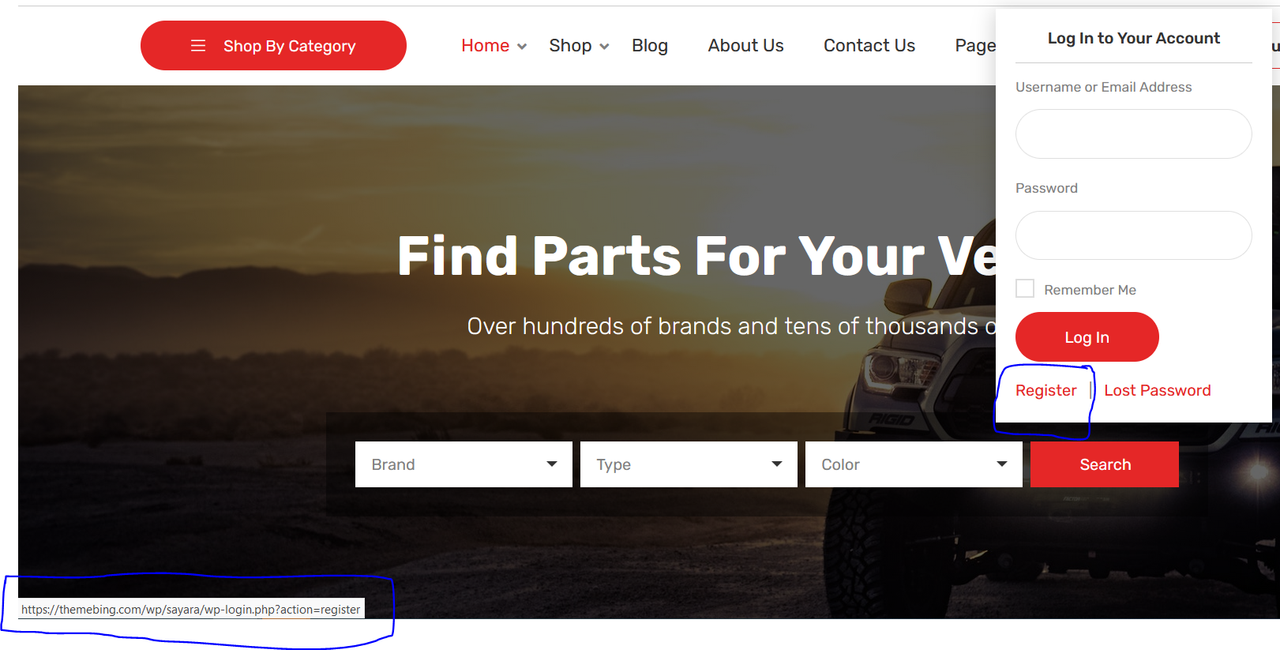
Hello, I am trying to change the “Register” link on My Account menu but I can’t find where I need to change. When I click on “Register” it’s going to “https://my-site.com/wp-login.php?action=register” like the image above. Can you advise where I can change it please
Hi, thank you for contacting us.
You can modify code from header.php
Regards
ok thanks
Please send your credentials here https://themeforest.net/item/sayara-auto-parts-store-woocommerce-wordpress-theme/27017723/support
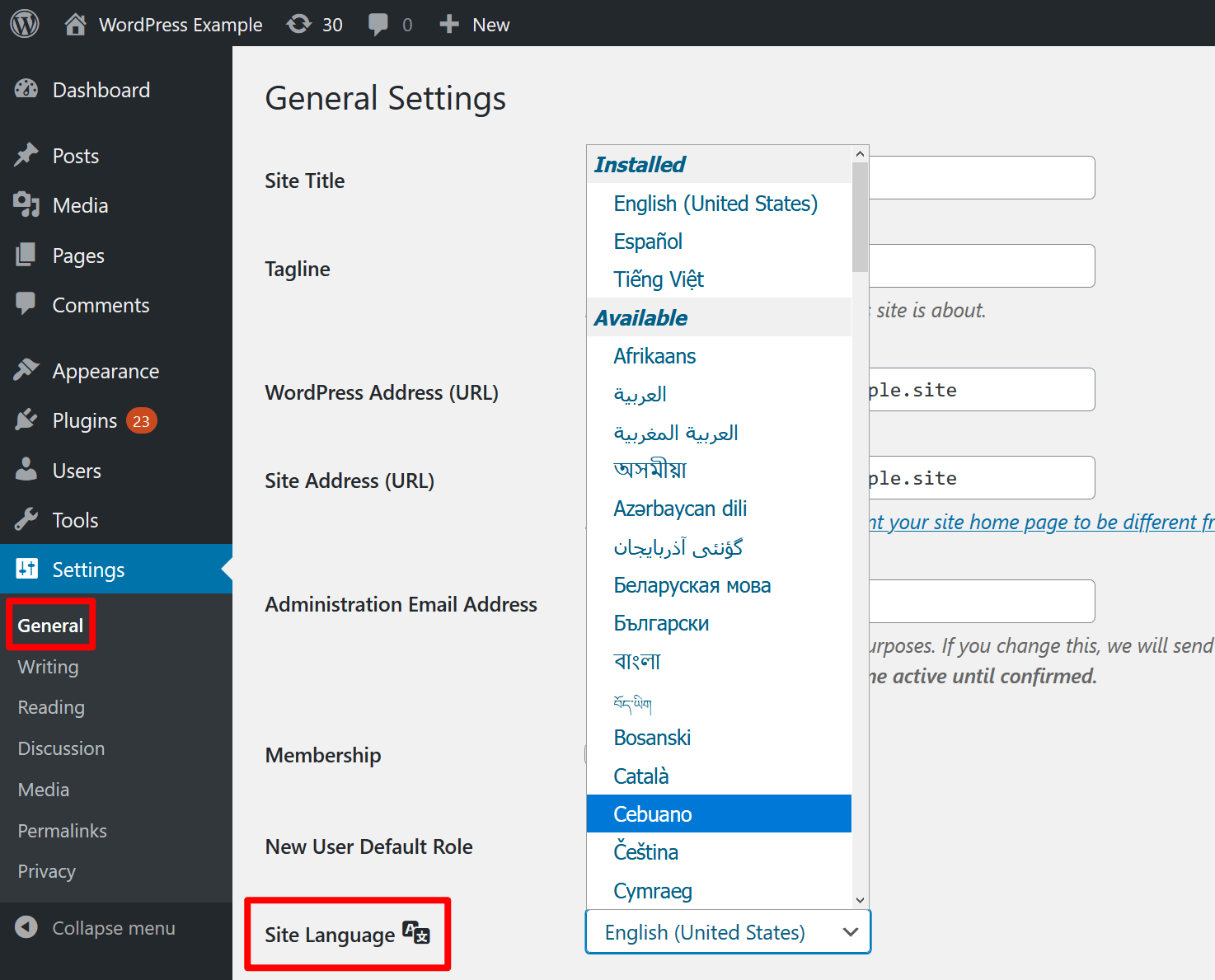
Hi, I have installed this theme but I can’t find the option to change the theme language, could you help please?
Hi, thank you for contacting us.
- to change language please follow this step https://translatepress.com/wp-content/uploads/2020/06/change-wordpress-language-1.png
- to translate theme use this plugin https://wordpress.org/plugins/loco-translate/
Regards
Thanks, I got it.
Now I am trying to set up a “Register” page, is there any function for that? like the one we have for “My Account” page ([woocommerce_my_account])
nevermind, I figured it out. Thanks
glad to hear it!
i am checking the theme to buy however i dont see any option to find items using part number
Hi, Thank you for your comment.
Yes you can use as part number as well or anything else. just required to make an attribute or a category.
watch for more detail https://www.youtube.com/watch?v=i-YR64RlXB0&list=PLq6tEowgs-7T6b4uJ_AKxKQJgETe7Deoe&index=5
Regards
hi, would like to know if this theme support WCFM multivendor plugin?
how do i change the logo in the header and footer without using HTML? also how do i change the header and footer color?
Thank you for your comment,
To change your site title from the customizer:
Go to Appearance >> Customizer.
Expand the Site Identity section by clicking on it.
Change the Site Title.
Hit the Publish button.
how do i change the footer logo, and how do i change the color of the header and footer?
i figured it out, thanks.
You are welcome!
Hello I have problems with the template, when importing the demo, not all the information is loaded and it presents design errors. We have tried several times to install it following the instructions but it always shows the same error. I send the link of the test site https://repuesto.jlmac.com/ Also when I want to add the license code it tells me that it is invalid.
Please check your email. we have replied there
I don’t think the one you indicate in the mail is a good answer. “Sometimes it can happen when servers load high. Can you please try again?” ... it does not help me at all with the problem I have, I am telling them that I have tried the installation a few times and it continues to give an error, change the version of the WP to 5.5 and 5.6, and nothing follows the error. Try another server and the problem persists. Apparently there is a problem with the theme, but if they do not give me an answer to solve it, I prefer the return of the money and not continue wasting time.
Thank you. Unfortunaly, we do not provide any support in the comment section. please contact us here https://themeforest.net/item/sayara-auto-parts-store-woocommerce-wordpress-theme/27017723/support
Hi, I installed the demo shop but lost it. How can I get the shop page with left sidebar? What do I need to add? Thanks!
Thank you for your comment pleas watch this tutorial https://youtube.com/playlist?list=PLq6tEowgs-7T6b4uJ_AKxKQJgETe7Deoe