1617 comments found.
I am looking at your theme for a restaurant that has been forced to providing online order because of the pandemic.
I love what I see, but I have some concerns about Responsiveness on mobile phone. Especially with woocommerce pages. The shop, cart and checkout pages.
See screenshot.
Cart page https://prnt.sc/12vxmnc Checkout http://prnt.sc/12vxpz6Hi,
Thank you for interesting and your feed back.
We will check and release the update very soon.

Hello. Before buying I would like to know. Can it be introduced that the client pay when making a reservation?
Hi,
Thank you for interesting and your feed back.
We will add this feature to the next theme update.
Hello, I bought your theme. Now I’ve installed it, but it won’t let me download the demo contect. See the following screenshots: https://paste.pics/CG6UA & https://paste.pics/CG6UB Thanks!
Hi,
Thank you for purchasing.
Please register your Envato Access Token via Theme Setting > Registration then you should be able to download all demos.
It works now, very complicated to register! Now with the update, i had to paste the purchase code in not the token…
1. I added the background on the home page. But it is not displayed. 2. How can I change the content of the top bar? 3. And how do I switch off the preloader?
Please find attached screenshots: https://paste.pics/CHBND https://paste.pics/CHBNI https://paste.pics/CHBNO Thank you
1, 2 Please submit your question on https://themegoods.ticksy.com/ Please also add a link to your site as well as the login credentials when opening the ticket, so we can take a look at your site.
3. You can disable the plugin name “LoftLoader Lite”.
I‘ve checked 1 and 3, just need to clear my browser cache. But can you please just tell me quick how I can change topbar content?? Thanks
Could you please provide URL of your site please? So I can point you to the right direction.
Yes, it is: http://delhi-roma.de/site/ Thanks
Please navigate to Appearance > Customize > Menu > General > Default Transparent Header Content. Then please remember the header you selected there.
Then open WordPress Dashboard > Header and edit the on you selected using Elementor. You should be able to change header content using Elementor there.
Hi Author, I have a real quick question i like your theme its good. i want to know if i can use this theme on the 3 different brands that i have in my only restaurant with different domains. I want to promote my brands with different domain all under one restaurant. I want to just buy this theme once and use it on the 3 different domains. can i do that ??
Hi,
Thank you for interesting.
We can use 1 regular license per 1 domain so you will need 3 license for all of your sites.
The theme overall is pretty and nice! Unfortunately, I have font weight issues since the latest update.
Hi,
Thank you for purchasing.
Please submit your question on https://themegoods.ticksy.com/ Please also add a link to your site as well as the login credentials when opening the ticket, so we can take a look at your site.
after updating the theme, can’t load elementor… deactivated all plugins didn’t works, cleared cache didn’t work, change to default wordpress them works perfectly, back to grand theme stop working again… please give me any quick solution, can’t wait for the support.
now it’s suddenly working.
Ok thank you for updating and glad you got it solved.
Hello, I am trying to improve the google speed ranking after one customer noticed that the rank was low (mobile). Any way to improve that? I noticed also the demo have a low scores on mobile device. Thanks.
I installed the theme but lucks of a lot of functionality.
The DEMO content is only for wordpress part. In Woocommerce no content is included. So when you import the demo content and you click ORDER button it is taking you to https://themes.themegoods.com/grandrestaurant/demo1
Also the menu shown in the menu pages are just content that is not generated by Woocommerce….so basically even if you create your own products in Woocommerce the menu page will not update automatically!!!
It is like we have a Woocommerce site but the products in a Woocommerce category has to be created manually in a Wordpress page !!!!
There are also problems editing the menu pages too, as you can see in these screenshot
https://kalada.gr/new/our-menu-grid/ https://prnt.sc/12cvyyz https://prnt.sc/12cw03y https://prnt.sc/12cvzhwGenerally I believe this is a very hollow theme and I don’t suggest you buying.
Hi,
Thank you for purchasing.
Please submit your question on https://themegoods.ticksy.com/ Please also add a link to your site as well as the login credentials when opening the ticket, so we can take a look at your site.
Hello, is it possible to remove the RESERVATION button from the template? When I analyze the loading speed I get that script-reservation-form.php takes over 2.56s to load. Is that the reservation button in the home page? Thanks.
Hi,
Thank you for purchasing.
Yes just remove reservation email setting in Theme Setting. It will remove this button.
Hello, the RESERVATION form seems not to work. When I click the book now button nothing happen. Any idea what’s the problem? thanks.
Please submit your question on https://themegoods.ticksy.com/ Please also add a link to your site as well as the login credentials when opening the ticket, so we can take a look at your site.
Hello, how is it possible to create a banner image that is clickable and redirect to another link? Thanks!
This was solved, please ignore it. Thanks!
Ok glad you got it sorted! 
Hi, does your theme works with B2BKing Plugin for wholesale purposes? Thank you
Hi,
Thank you for interesting.
Yes it should be working fine our theme because it’s working with WooCommerce plugin.
Pre-sale question when hover on menu the menuinformation comes up just wondering if that can be change to say image of the food? thanks.
Hi,
Thank you for interesting.
Technically you can add image there too.
Can you work in Spanish with this theme? Is elementor pro necessary for this theme? Does this theme have its own builder? Is it easy to install the available designs?
I have to make a website for a restaurant and looking at designs, this theme is the one I like the most, but my decision will depend on the builder, if it is visual or not, if it is mandatory to use elementor pro, etc.
Hi,
Thank you for interesting.
1. Yes you can translate theme into any languages including Spanish.
2. In order to create all pages you saw on demo sites. Elementor pro is not required. We are using basic version of Elementor as well.
3. We are using Elementor to create all demo pages.
4. Yes you can import demo apge through Elementor templates option.
This theme is totally broken and riddle with problems now, one problem after another. I just updated to version 6.1.4
- The 3 column classic menu is still not fixed on mobile. - The 3 column gallery does not show on desktop but works on mobile.
Check here: https://tinyurl.com/gr-fail/
Hi,
Thank you for purchasing.
This is the screenshot of your provided URL on my mobile https://tinyurl.com/yzlpjp3t
It seems to be working fine. Am I missing something?
Yes the menu now seems to be working. However the mobile simulator link you have posted is not accurate. The 3 column image gallery is not working for desktop, however it is showing on my phone, see screenshot:
https://i.ibb.co/JQq62Mm/Screenshot-20210421-052748-Chrome.jpgIt’s working on my desktop as well. Please see screenshot here https://tinyurl.com/yjty4vf9
You have not understood what i am saying.
I am not referring to the menu, below the menu there is a 3 column image gallery. You need to scroll down and view 3 images. They are not showing on desktop whilst it shows on mobile.
Refer to my screenshot from my mobile phone again and see if you can see three ‘TG’ logos at the footer.
https://i.ibb.co/JQq62Mm/Screenshot-20210421-052748-Chrome.jpgOn mobile devices. It has tiny screen size. So all columns gallery grid displays in single column list. It’s standard for modern web responsive design practice.
I understand how mobile devices work and how single column work. I don’t think you have understood anything i have said.
Why do the logos not appear on desktop? But they appear on mobile device? It is missing on desktop version why?
Why do the logos not appear on desktop? But they appear on mobile device? It is missing on desktop version why? A: Because you miss understand about the new header builder using Elementor. So currently on your site, you selected Elementor as main header builder instead of default one but you haven’t added any.
In our theme, there are 2 ways to build header contents. Please see What’s different between header creator options using “General Menu Layout” and “Elementor” here https://docs.themegoods.com/docs/grand-restaurant/header/whats-different-between-header-creator-options-using-general-menu-layout-and-elementor/
So in our demo, you can customise header using Elementor. You can also find detailed instruction about “Setting up header & navigation menu using Elementor” here https://docs.themegoods.com/docs/grand-restaurant/header/setting-up-header-navigation-menu-using-elementor/
This is not theme issue but the lack of user understanding issue.
Just downloaded this today and there are many bugs after installing Demo 6. Do you have a JIRA setup to document the bugs so I may submit them in an orderly fashion?
e.g. The most basic of customisation doesn’t work. Cannot change Grand Restaurant Logo or header content like address/phone number on saving.
Hi,
Thank you for purchasing.
In our theme, there are 2 ways to build header contents. Please see What’s different between header creator options using “General Menu Layout” and “Elementor” here https://docs.themegoods.com/docs/grand-restaurant/header/whats-different-between-header-creator-options-using-general-menu-layout-and-elementor/
So in our demo, you can customise header using Elementor. You can also find detailed instruction about “Setting up header & navigation menu using Elementor” here https://docs.themegoods.com/docs/grand-restaurant/header/setting-up-header-navigation-menu-using-elementor/
If you still couldn’t change the logo. Please submit your question on https://themegoods.ticksy.com/ Please also add a link to your site as well as the login credentials when opening the ticket, so we can take a look at your site.
Literally every change I try to make doesn’t work. Is it due to using Demo 6? Would it be better if I used the default demo/template? It seems like it’s not been tested at all. I’ve just changed the background image and saved using Elementor, and the whole layout broke.. Not a great experience so far.
Please submit your question on https://themegoods.ticksy.com/ Please also add a link to your site as well as the login credentials when opening the ticket, so we can take a look at your site.
ok, I have done that yesterday. Thanks
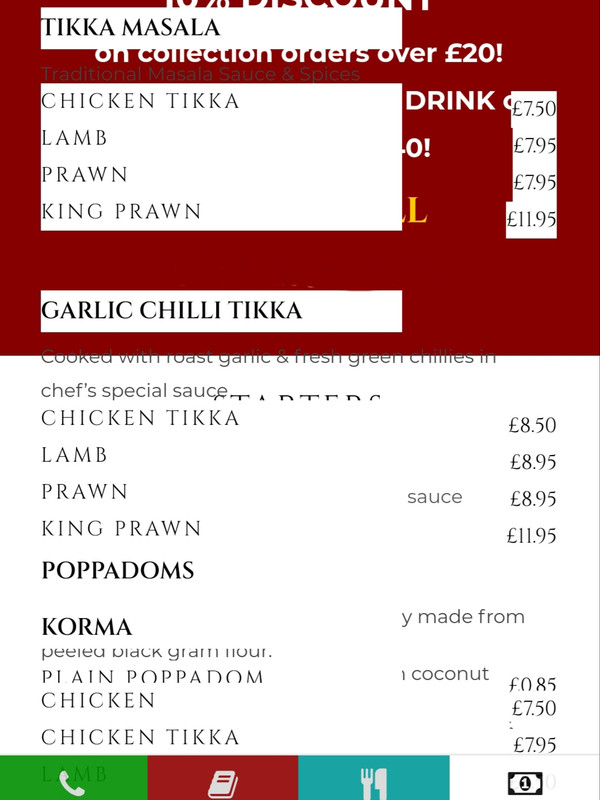
A lot of people are having issues with the food menu.
My food menu on my mobile phone is appearing strange all of a sudden, i even installed the demo and it is showing same error.
Please provide a fix, this is not support issue this is a problem with your existing template on fresh install.
See attached link
https://i.postimg.cc/CKX5b4pZ/20210416-052908.jpgThe issue is when the classic menu is set to 3 coloumns and 2 coloumns, it becomes squashed.
Hi,
Thank you for purchasing.
We will look for the solution and release the update soon. Thank you for your patience.
Thank you for your response.
When do you think there will be a fix to this? It is crucial as my customers cannot see my menu affecting my business today.
Nobody tested this whether it is compatible with wordpress 5.7.1
Hi there, for some reason on some of the modules that are built into the theme the images are stretched. I have submitted a ticket and have yet to hear anything back. Can you please help? Thank you!
Hi,
Thank you for purchasing.
Please submit your question on https://themegoods.ticksy.com/ Please also add a link to your site as well as the login credentials when opening the ticket, so we can take a look at your site.
Hello,
I have an issue with google chrome and my site which i use your theme. In the menu page, all are broken.I paste some links to understand what i mean
https://prnt.sc/117c3ig https://prnt.sc/117c47nHow can i find solution?? Thank you
Hi,
Thank you for purchasing.
Could you please go to Appearance > Customize > Additional CSS and add below code.
@media only screen and (max-width: 767px) {
  .one_half, .one_half.last {
    float: none;
  }
}
Hello, I noticed that the menu for the shop items is out of the layout. Here is the link: https://www.kohoutekresto.cz/product/somoto-cafe-race-400/
Any idea what was the reason?
Hi,
Thank you for purchasing.
Please submit your question on https://themegoods.ticksy.com/ Please also add a link to your site as well as the login credentials when opening the ticket, so we can take a look at your site.
Well I try to create the ticket, but it is not possible.
Please extend your support so we can continue providing support for you. Thank you for your understanding.
Hello, I would like to know if it is possible to have a custom menu for e-commerce product (i am using woocommerce ) or to remove the main menu from single product page. Any suggestion to achieve that?
Hi,
Thank you for purchasing.
Please submit your question on https://themegoods.ticksy.com/ Please also add a link to your site as well as the login credentials when opening the ticket, so we can take a look at your site.