557 comments found.

Hi,
Can you please send me the EPS / AI of PSD of the image that you can see in the header demo for the “Human Resources” demo. I mean the round circels, not the girl in the image of course. I want to change this with stock images that i have purchased. I also need this for the other images that are made up of the rounds / circels.
Because i have been sick for a very long time, i just got started with my purchase but the support time is apparatnly over so i cant submit a ticket with my purchase code. Can you please email it to ray@sabee.nl please?
I gave you 5 stars rating.
Kind regards and thanks, Ray Sabee
p.s. i see that you saved a lot of PSD’s to the WeTranfer website but they are too old to download of course, but it would be great if you can do that for me also. Just the “Human Resources” shapes would be absolutely awesome! Thanks in advance.
Hi,
Sure, please find the available HR related psd files here:
https://we.tl/t-YA8mGMZs9QKind regards,
BoldThemes team
hello i try to send ticket but something is wrong my problem in demo i can’t complete install the marking consulting demo , it stopped in 97%
Hi,
Thanks for the purchase. Our Support portal was down for several hours due to technical problems.
We are truly sorry for the inconvenience – for the support portal hosting we depend on the third party service provider and it was out of our hands 
Can you please try to submit the ticket once more, together with the wp-admin credentials and the site url again and our support team will take a closer look.
Thanks in advance.
Kind regards,
BoldThemes team
thanks for help i sent today another ticket can you help me
hello bold theme why you take many time to answer ticket
Hi,
As stated on our support portal – http://boldthemes.ticksy.com/, note that on work days tickets are processed within 24 hrs (exceptionally 48 hrs). If submitted on non-working days expect the answer the following business day. Note that we are located in GMT+1.
Since you have submitted the ticket on Friday after EOB, it should be processed today by EOB.
Thanks for understanding.
Kind regards,
BoldThemes team
Per Order: can we use this for multiple domain?
Hi,
Thanks for contacting us. The regular envato license allows you to use the theme for one project – which usually means one end domain – https://themeforest.net/licenses/terms/regular . The exception is if you have a development domain and then you transfer the site to the final, production domain – that is allowed
If you want to use the theme on multiple domains for different clients / sites you need to purchase a separate license for each site.
Kind regards,
BoldThemes team
Problems with Google Tag Manager I install a plugin to insert a scrpt for GTM but the script does not appear in the , just in <header>. I even insert it with the editor theme and put it before the , in the <scripst> area.
Hi,
We are not sure, what you are trying to do, since the Themeforest does not display the tags you have placed in the comment above.
Anyhow, we are successfully using https://wordpress.org/plugins/duracelltomi-google-tag-manager/ for Google Tag Manager snippet placement. Just use Codeless injection option and it should be placed properly on the pages.
Kind regards,
BoldThemes team
Is it compatible with elementor
Hi,
Thanks for contacting us.
Avantage is not compatible with Elementor.
Kind regards,
BoldThemes team
Hello,
I am interested in the theme: http://avantage.bold-themes.com/management/
Our clients visual identity is rather in the blue nuances. Is possible to easily change the dominant red color to a light blue for example?
Thank you in advance
Hello, yes it should be relatively easy to do that (some color settings are global, some are not, e.g. to change section background color, you need to edit the section).
Hi Bold themes
I get email whenever you update theme. Is there any way that I can automatically update theme from my wordpress..?
Also, I am using your theme directly on my website without child theme. I has contents. Can I now create a child theme..? Do you have any link of documentation of it please..?
Hi,
You can use this plugin to update the theme automatically: https://envato.com/market-plugin/
Child theme is included – when downloading from ThemeForest, just select “All files & documentation” and you will find avantage-child.zip within downloaded archive.
Hi
Does your avantage theme support elementor free version ?
Hi, it is not supported.
Dear Bold-themes,
Your theme is really good. Now, I am facing a small issue that I have an external URL like https://www.google.com that I want to show in my Avantage Business consulting theme seamlessly.
I used Advanced iframe plugin. The integration was successful. However, the target webpage contains its own header, menu and footer.
The issue is : I am getting the header of my website and footer of my website also displayed in the page. Therefore, double header, double footer (one my website and another target website page) is shown.
Is there any way to create a new page disabling header and footer of my website only for a specific one page please.
thanks a ton, continue the great work, yesbee
Yes, you can create page template without header and footer (remove get_header and get_footer functions), e.g. page-{slug}.php as described here: https://developer.wordpress.org/themes/template-files-section/page-template-files/
Hi Bold themes,
Thank you for the reply. I could get the page done well. But when I call the target page from the URL (I tried with iframe and div both), the page displays but the menus in the page are not displayed.
Like I am trying to bring the target page https://www.secureserver.net/?prog_id=580743 under the menu of https://www.riseval.com (menu item services > hosting services)
Since it was not working, I just de-linked them now and made as a separate Custom link as of now.
Is there any thing like additional CSS we need to do to get the menus as well.
Thanks a ton for excellent support. yesbee.
Menu is part of the header, so you can create modified header template (starting from header.php), e.g. header-special.php and require it in your new page template as get_header( ‘special’ );
Hi, how can I add the linkedin Pixel to my site? Is there any way to do it without a third plugin? Thanks!!!
Hi, please submit a ticket here, our support team will be able to help you with that: https://boldthemes.ticksy.com/
In the price list, within a service there is an element called icon which has a set of icons in categories. I would like to change this with my own icon (which i have in a png). How can i replace this with my own icon?
There is no such option but it could be done with some custom CSS – e.g. using background-image(your-png-url). If you need help with this, please submit a ticket here and include your site URL: https://boldthemes.ticksy.com/
Hi, after the recent Bold Builder update, the blog index (list of latest articles) page loads very slowly , I am using the Consulting Demo.
Please advise on how to disable the lazy load animation for individual blog pictures and text excerpts on the blog index page, since now my viewers literally have to wait for 5 seconds till an article shows up on an empty screen.
N.B. There is no such settings to adjust on the Blog page in Wordpress backend, and also I was not able to find the template for it in Theme Editor.
Thank you,
Mark
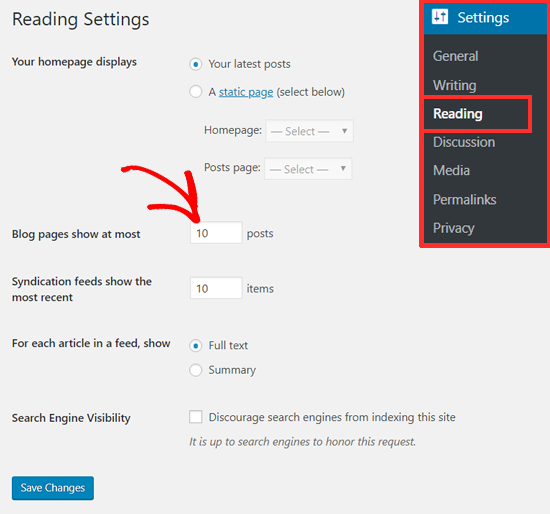
Hi, we are aware of the animation delay which we hope to fix very soon (in the next Bold Builder update). Delay is considerably less than 5 seconds, at least for the first several articles so we can recommend to temporary reduce number of posts per page (e.g. to 5): https://www.wpbeginner.com/wp-content/uploads/2019/03/changenumberofpostsonblogpagewp.png
Could i Drag and drop elements while i design? what metodology do you use?
Hi,
Thanks for contacting us.
The theme uses Bold Page Builder – https://wordpress.org/plugins/bold-page-builder/
You can take a look at the instructional and presentational videos related to Bold Builder interface on our YouTube channel as well: https://www.youtube.com/channel/UCPL5LgX32KsbQ1i9nV-xiKA
Kind regards,
BoldThemes team
Where can I change the text of the button in the blog overview “continue reading” that leads to the single-post view? Thank you
Hi,
Thanks for the purchase.
The Continue reading label can be “translated” using provided theme language file – please refer to the theme documentation for details – http://documentation.bold-themes.com/avantage/theme-customization/ section 09 Translation.
Should you need additional help in the process, please submit a ticket at our support site – http://boldthemes.ticksy.com/ and our support team will be glad to assist you.
Kind regards,
BoldThemes team
Hi, i´m working with timeline plugin, but I need some assistance from their support, but I need the purchase code, but I only have the purchase code of the theme, and doesn´t work to other items. How can I do to access to their support?
thanks!!!!!
Hi,
Thanks for the purchase.
Please register on our support site – https://boldthemes.ticksy.com/ with the theme purchase code which you have and our support team will be glad to assist you with questions related to the packaged timeline plugin as well.
Kind regards,
BoldThemes team
Hi, i´m working on a section, and I need to put 2 blocks with a blank space in the middle, but i’m not making it. Take a look at this screenshot: https://snipboard.io/wjUz0v.jpg In the first case the raw layout is 2 columns, but I don´t know how to separate them. In the second line, the raw layout is 3 columns, but I need to change the width of the middle column, it is possible?
Thanks!!!!
Hi,
There is more than one way to implement what you want.
The easiest is to edit the row layout and enter (type with the keyboard in the desktop layout field) 5/12 + 2/12 + 5/12
If that still does not create the desirable space, you can add respective classes to your two columns and add the right margin / padding to the left one and left margin / padding to the right one using CSS (this will give you the most control over the layout since you can set the padding in pixels).
Anyhow, should you need additional assistance in the process, please submit a ticket at our support site – https://boldthemes.ticksy.com/ and our support team will be glad to assist you.
Kind regards,
BoldThemes team
hello, are there psd files available? can we supply
Hi,
Thanks for contacting us.
We can provide psd files of hero section of demo home pages (containing the shapes which you can use to create your own images throughout the site.
But we can not provide the psd of entire theme design.
Kind regards,
BoldThemes team
Hi, purchased theme & it has been set up. But it doesnt import the demo. It’s just stuck at a certain % forever
Thank you – your support team has been helpful!
Thanks for the purchase!
Hello, I purchased this theme, first I had used this theme on my test server, it was running smoothly, But I installed the same theme on my live server, only home page is working on live server and other pages are not working. I have even Deleted everything in my test server. Please help to get all the files on my Live server. Thanks and Regards, Amit Kushwaha
Hi,
Thanks for the purchase.
Can you please submit the ticket at our support site – https://boldthemes.ticksy.com/ with the site url and wp-admin credentials and our support team will be glad to take a closer look at the issue.
Thanks in advance.
Kind regards,
BoldThemes team
Hi, I managed to translate the whole site (built on Avantage) using POEdit, as per the translation instructions to the theme.
I also was able to translate the WooCommerce plugin texts without a problem.
However – there are portions of my site that still remain un-translated = namely, the parts that are built using your CALCULATOR plugin.
There is no reference in your theme manual on how to actually translate the Calculator plugin. Its texts are not part of the Wordpress .PO files.
Please let me know how to translate on-page texts (forms, including navigation buttons) that are built using the Calculator plugin
- please send in a step-by-step manual or reference, if possible.
Thank you
Hi,
Thanks for the purchase.
Cost Calculator is a separate plugin (packaged with the theme) and it comes with its own set of translation files. Please find the description of the translation procedure in the plugin documentation – http://documentation.bold-themes.com/cost-calculator/using-cost-calculator/#translate
Of course, besides uploading .mo file to /wp-content/plugins/bt_cost_calculator/languages/ you can also upload it to \wp-content\languages\plugins
Should you need additional help in the process, please submit a ticket at our support site – https://boldthemes.ticksy.com/ and our support team will be glad to assist you.
Kind regards,
BoldThemes team
Hello,
We are trying to add the language switcher beside the website logo while the menu is close as you can see in the image.
https://ibb.co/M1yk9MP waiting for your response. Best wishes!Hi,
Unfortunately, this is not possible with out of the box functionality. Perhaps you can reposition the element using custom JavaScript code and/or custom CSS, but it needs to be done on your side
Kind regards,
BoldThemes team

This item was featured on ThemeForest

Power Elite Author
Contact the Envato Market Help Team