208 comments found.

Hello can you please provide a link that contains the reference for the animated icons library? I saw in other comments that you are using icomoon but I still could not find the one’s used in the theme. Thanks!
Good day,
Please, how do I apply the cursor hover focus?
In your demo when you hover on a button or a link, the cursor blinks.
I have switched between all the styles but none give the same result.
Presently, I am using style 2.
Thank you
Hello eoriaifo,
to change cursor style, please go to Appearance -> theme options -> general -> mouse cursor -> style 2. If the problem still of cursor exists even after that, please send me via our email support@motivoweb.com Link to your site .so we can take a closer look! Thanks.
Best regards
Good day,
I know how to change the cursor. What I am talking about is the cursor animation.
I did a screenshot video and sent it via email.
Thank you
I send you an email now. 
Great Support. Thank you
You are welcome any time and if you still need any help just let me know, you are welcome, have an awesome day
Good day,
I noticed the Menu Right Edit panel for V2 was not displaying, because the display set to none. I had to add the below code in css for it to display:
tr.fold.hide { display: block !important; }
Thank you
Hello eoriaifo, Thanks for using teba theme,
There is option in Appearance -> theme options -> main menu -> menu header v2 -> sidepanel, To active sidepanel in header v2.
Best regards
I am unable to view or import demo website of Teba. Can you please assist.
Hi, Thanks for using Teba theme,
please send me via our email support@motivoweb.com your login credentials ( Link to your site, WordPress Admin username/password) .so we can help you! Thanks.
Best regardsWhy does the scroll id of slider revolution do its job and then reload the page?
Hi,
Thanks for use teba theme
please send me via our email support@motivoweb.com your login credentials, so we can take a closer look and a screenshot would be helpful. Thanks.
Best regards
Good day,
Really lovely theme. Considering purchasing it for a client.
Can I change the icons of the particles background?
Also, can I change the page preloader text or use a different preloader?
Thank you
Hi eoriaifo, Thanks for your interested Teba theme.
- Unfortunately, there is no option to change the icons of the particles background. - There is option to deactivate the preloader.
Best regards
Good day,
I was able to use Loco Translate to change the text for the Preloader.
Thank you
Happy that is working fine with you now. Thanks for your feedback
add_filter('redux/teba_options/field/typography/custom_fonts', function ( $array ) {
        return array(
                'Custom Fonts' => array(
                        'uni-neue' => 'UniNeue'
                )
        );
});
The font is already available via custom CSS. I only need to apply the CSS to all `font-family` options.
// edit: just fixed it myself. it was my local browser cache…
Hi, Thanks for using Teba theme,
Please add your font name in teba_core/admin/redux-framework/inc/fields/typography/field_typography.php find line and add https://ibb.co/wcX0cgF
Then you could select your font family from Appearance -> theme options -> typography -> H1, H2, H3…font option -> font family.
and if you still need any help just let me know, you are welcome
Best regards
Notice: Trying to access array offset on value of type null in /var/www/html/softwaredevs.in/wp-content/themes/teba/framework/shortcodes/icon_box/icon_box.php on line 30
Please help me to fix this issue
Hi,
Thanks for use my theme
please send me via our email support@motivoweb.com your login credentials ( Link to your site, WordPress Admin username / password ) .so we can take a closer look ! Thanks.
Best regards
Notice: Trying to access array offset on value of type null in /var/www/html/softwaredevs.in/wp-content/themes/teba/framework/shortcodes/icon_box/icon_box.php on line 30
Hi,
Thanks for use my theme
please send me via our email support@motivoweb.com your login credentials ( Link to your site, WordPress Admin username / password ) .so we can take a closer look ! Thanks.
Best regards
Hello I need to know what filter you applied on the Title photos?
I need the same red filter to my custom photos.
Hi, Thanks for using Teba theme,
We add a filter to the portfolio grid element. https://ibb.co/HhmSZ8N you could add a plugin to create another filter gallery such as https://bit.ly/3uboCYS, https://bit.ly/3bMGNxn
Best regards
Hi, you might not understand my query. You have added background images in the demo “about us” page title. Photo is not exactly the black & white, what filter you applied on the photos to make it black/white?
Hi,
we used fiiter CSS to add grayscale effect with dark overly layer.
-webkit-filter: grayscale(90%); filter: grayscale(90%);
and if you still need any please contact us via our email support@motivoweb.com and we will be glad if you attach some screenshots.
Best regards
Hi, sent you an email. Please check and support. Thanks
Hi, I send you an email now
Does the theme teba have any updates? In woocommerce they are in need of updates on the theme
Hi, Thanks for using Teba theme,
Please make sure that you have the latest update of teba theme v1.2 – 21 April 21 which including update WooCommerce files.
If you have any more question please do not hesitate to contact us via our email support@motivoweb.com
Best regards
Hi, is there any way to modify title bar height? Now it’s taking to much of the screen.
Hi, Thanks for using Teba theme,
you could add custom CSS to change titlebar height, please go to Appearance -> Customize -> Additional CSS
.page-header .mo-title-bar-wrap{height:400px !important;}
and if you still need send me via our email support@motivoweb.co , you are welcome, have an awesome day
Best regards
How can I remove all links to your domain ‘motivoweb.com’ It creates some issues in our Google Ads. (Domain Blacklisted)
Hi, Thanks for using Teba theme, - please make sure that all image upload from your host not our domain.
Best regards
Hi, can you please assist us, we had trouble installing the theme to start, but got it right eventually, now our theme is live and I have edited our logo in the footer and header but it wont update with our logo. Please can you assist me in checking why its not updating?
thanks.
Hi, Thanks for using Teba theme,
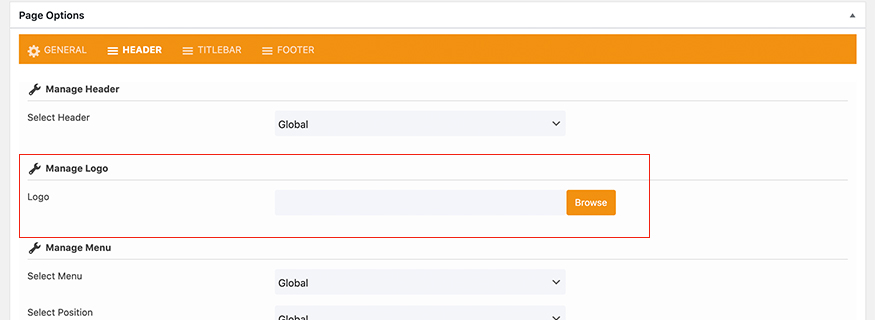
- To change the logo, please go to Appearance -> theme options -> logo. https://motivoweb.com/teba/documentation/#logo-options And to change logo for each page please go to your page (ex:homepage) -> scroll to page option section -> Header tab -> logo https://motivoweb.com/teba/documentation/images/wp-page-options4.jpg- you could edit the footer in the theme from widgets, please go to Appearance > Widgets -> footer widget1,2,3,4.. https://prnt.sc/12lfgum
If you have any more questions please do not hesitate to contact us via our email support@motivoweb.com, so we can help you
.
Best regards
HI, thanks for the response, however, what we are saying is that after editing the logo in the header and footer its not updating on our template. I think there was an issue with our installation and it wont update when we upload images. Please can you check and see why the images are not updating. If you need admin access please let me know. But we have already tried the above and it its NOT updating the logos. thanks.
please send me via our email support@motivoweb.com your login credentials ( Link to your site, WordPress Admin username /password ), so we can help you. Best regards
Having issue with parent page. option to choose doesn’t appear in on backend, right column. Also, tried via quick edit to choose a parent, but it’s not there either
Hi, Thanks for using Teba theme,
please send me via our email support@motivoweb.com some screenshots of your issue as we do not understand
Best regards
I delete the page and now i can select. Not sure what it was
if the problem still exist, please send me via our email support@motivoweb.com. you are welcome, have a nice day
Pls be advised tt I couldnt install woocommerce. Need your kind assistance. Thanks in advance.
domain: https://www.tesla-ups.com/Hi, Thanks for using teba theme,
please send me via our email support@motivoweb.com your login credentials ( Link to your site, WordPress Admin username /password ), so we can help you to install woocommerce plugin and we will be glad if you attach some screenshots to your issue with woocommerce.
Best regards
Hi Support I am waiting for your reply for logo issue.
Mansoor
Hi Mansoor, please send me via our email support@motivoweb.com your login credentials. Best regards
Hi Support I purchased the theme and installed it on client hosting. I am unable to put the logo on homepage, however logo file has been uploaded to all possible areas where it can be. url is
www.aamanto.com
Although I can see logo on other page http://aamanto.com/company/about-us/ Cannot see it on homepage Please share some help link so that I can configure this too. regards MansoorHi, Thanks for using Teba theme,
Please make sure that the logo option in the page option is empty. Go to your page (ex:homepage) -> scroll to page option section -> Header tab -> logo https://motivoweb.com/teba/documentation/#logo-options
and if you still need any help just let me know, you are welcome, have an awesome day :)
Best regards
I have already done that, but still unable to see logo at home page, I have selected home page 4. Can you please send me an email to inobox, I will share admin password and you can fix. My email address is mansoorsadiq@gmail.com
please send me via our email support@motivoweb.com your login credentials ( Link to your site, WordPress Admin username /password ), so we can help you.
Hello There
for some reason when someone share the link the website is not able to be viewed and is loading https://teamtech.nz/
Thanks for using Teba theme,
Can you therefore please try again after temporarily deactivating all other plugins and after switching to a WordPress default theme like Twenty Sixteen? That way, we can find what’s causing this issue. If the problem still exists even after that, please send me via our email support@motivoweb.com Thank you!
Hello,
Fancy heading seems to not be working on version 1.2. Could you please check it out. Also it’s not working on demo site.
Thanks
Hi Isatis_Sarajevo,
Thanks for your feedback
Please install the latest update 1.2.1 of the theme. We worked to update the theme to fix this issue.
Best regards.