12890 comments found.

Good day!
Could you write a list (* required plugins) that need to be purchased additionally, without which the work of the template is impossible. Thank you!
Hello,
Thank you for contacting us!
You don’t need to purchase anything extra. All plugins you can see on our demo are included with the theme and will be installed automatically during our setup wizard process.
Kind Regards
I have a problem with the alignment of my products in the store overview and in product sliders. This is probably due to the different size of images.
But I also know that in woocommerce you have a function that makes all thumbnails the same size (costumizer – woocommerce – product images, but this doesn’t work for me. Whatever ratio I try, it doesn’t want to keep the same image size.
What else can I possibly do. Of course it helps if I keep all the images I upload the same size, but there are already so many images in there. Maybe you know something else?
Hi,
Could you please send us a link to your website where we can see this issue? Use the contact form on our profile page here https://themeforest.net/user/xtemos
Kind Regards
Hi, guys. There is still some deprecated jQuery in theme:
- jQuery.isArray is deprecated in woodmart/inc/admin/assets/js/wp-color-picker-alpha.js
- jQuery.isFunction() is deprecated in woodmart/inc/admin/assets/js/wp-color-picker-alpha.js
- jQuery.expr[\’:\’] is deprecated in woodmart/inc/admin/assets/js/wp-color-picker-alpha.js
- jQuery.fn.bind() is deprecated in woodmart/inc/modules/nav-menu-images/inc/nmi.js
- jQuery.fn.change() event shorthand is deprecated in woodmart/inc/modules/nav-menu-images/inc/nmi.js
- jQuery.event.props are deprecated and removed: state in woodmart\js\libs\pjax.js
- jQuery.event.props are deprecated and removed: state in woodmart\js\libs\combine.js
Most probably Wordpress will remove all deprecated jQuery from core by next release, so it’s a right time to get rid of it.
Hello,
Color picker errors come from WordPress core files. We don’t know why they are indicated to be in our theme file. You can check it by searching the “isArray” function in our theme file. Other problems we will fix in our future releases.
Kind Regards
My bad. You’re absolutely right about no deprecated code in wp-color-picker-alpha.js. Thanks a lot.
No problem. Anyway thank you for your feedback.
Hola amigos, no funcionas las variaciones de producto, se configura pero no se muestra dichas variaciones, espero su ayuda
Hello,
Could you please disable all plugins that are not related to our theme and provide us your admin access so we can check it? Use the contact form on our profile page here https://themeforest.net/user/xtemos
Thank you in advance
He desactivado todos los plugins y de igual manera no se muestran las variaciones
Please disable all plugins that are not related to our theme and provide us your admin access so we can check it. Find the contact form on our profile page here https://themeforest.net/user/xtemos
Hi, I was looking for a tutorial but I can’t find it so I’m writing here. I need to add a background video to the web that will play automatically. There will only be a video in the row. The problem is that even if I don’t show it on the phone, it still shows up.
I used the video player element but I don’t know how to set up autoplay.
Thanks for help
Hi,
Please, create a topic on our support forum and provide us all the necessary details about the request with some screenshots and including your admin access so we can help you https://xtemos.com/forums/forum/woodmart-premium-template/ If your support is already expired then you need to extend it on ThemeForest first.
Regards
My website is not loading properly on mobile. Please help. (Solved)
We are glad that you sorted it out. Let me know if you need any further assistance.
Have a nice day!
How to change Quantity in cart from 1,2,3… to 1.1, 1.2 …. ? Thank you
Hi,
Sorry, but there is no such option in our theme and WooCommerce by default. It may require additional code customization or extra plugin but we don’t have an instruction for this. It is out of our theme support scope.
Regards
Hello, Maybe my question doesn’t clear, please check this: I also use B2BKing that can allow me to add quality as I want:
https://1drv.ms/u/s!AhI1D2Bn4Cisg88aRgpUA6EZnhgObQ?e=Wza4wrYes, we understand your question. But there is no such option in WooCommerce by default, unfortunately.
Hi,
I have a question as is it possible to have your live search allowing to search products by attributes (color, size,etc.) other than keywords and also to display in list table format instead of only in thumbnail image with name? Please see the screenshot here https://bit.ly/30BRaBH on exactly what I am looking for. If yes, please guide me how to set up that way. Thank you,
Hi,
Please, create a topic on our support forum and provide us all the necessary details about the request with some screenshots and including your admin access so we can help you https://xtemos.com/forums/forum/woodmart-premium-template/ If your support is already expired then you need to extend it on ThemeForest first.
Regards
I don’t mind renewing my support however before doing so I need to know first if this is doable thing with your theme and can help me with that. Thank you
Sorry, but there is no such functionality in our theme, unfortunately.
Header editor > Element Categories (dropdown) How I change the text? its shows “BROWSE CATEGORIES”
Hi,
Please, create a topic on our support forum and provide us all the necessary details about the request with some screenshots and including your admin access so we can help you https://xtemos.com/forums/forum/woodmart-premium-template/
Regards
Hey, the header> Menu element > no option for hover background/text color? Active button (background/text) ?
Hi,
Please, create a topic on our support forum and provide us all the necessary details about the request with some screenshots and including your admin access so we can help you https://xtemos.com/forums/forum/woodmart-premium-template/
Regards
I like this below Review system found on some other’s Woo Theme on Themeforest. Is this available in WoodMart. Can we achieve this, somehow-
https://i2.paste.pics/F0AE9.png
Whereby, the Reviews can be viewed using filters like Image or Video or ALL. As well as, Like, Dislike options at bottom of each Review.
Average or Aggregate rating option box too.
This looks like somewhat of Professional ecommerce sites
Also, upon clicking Submit review button from this site, this opens the Hidden Sidebar, just like Cart Sidebar that opens up in your theme.
You can check here – https://bit.ly/3oAuFoZ
2 – Can we display upto 3 labels on thumbnails in shop or anywhere, at a time, like below with Custom text on each product, post thumbnail separately.
https://bit.ly/3Dqrc2A
And not, just the Hot or Sale label, that is commonly available in most of the themes.
3 – Do theme has Sales promotional pop-up feature, within Theme itself. Means, without the use of 3rd Party plugin. If not, are you thinking to add this feature.
And above 2 features, if those are not available too.
Thanks
Hello,
Thank you for contacting us!
1. We don’t have additional features like that for the reviews system. But we will consider it as a feature request for our future updates.
2. Yes, you can create as many labels as you wish using Product attributes.
3. Yes, our theme has a promo popup functionality built in.
Kind Regards
Hello,
1. Yes, please, consider it. This really makes it close to a professional look, for Reviews. Thank you
2. Wanted to make sure, can we show different labels for each different product separately.
And can we have 3 labels, AT-a-Time for each single product to be displayed on an image, to be visible in Shop, Archive and Single product pages.
3. Great 
Thanks
2. Yes, exactly. Our labels system is based on Product attributes. So you can create any number of attributes and terms for your product labels. And then assign them individually for particular products.
Hello,
This is interesting
One thing, I tried to use Facebook and Google login options from your Demo, but it shows error sort of face like thing. Nothing worked.
Has that been disabled or not configured from backend.
Are those intended to work really. If so, can you please enable and make them work, so that we can see how it works
Regards
Currently, our APPs on Google and Facebook are not active and require further verifications. But both features are 100% workable and used by most of our customers.
Hello,
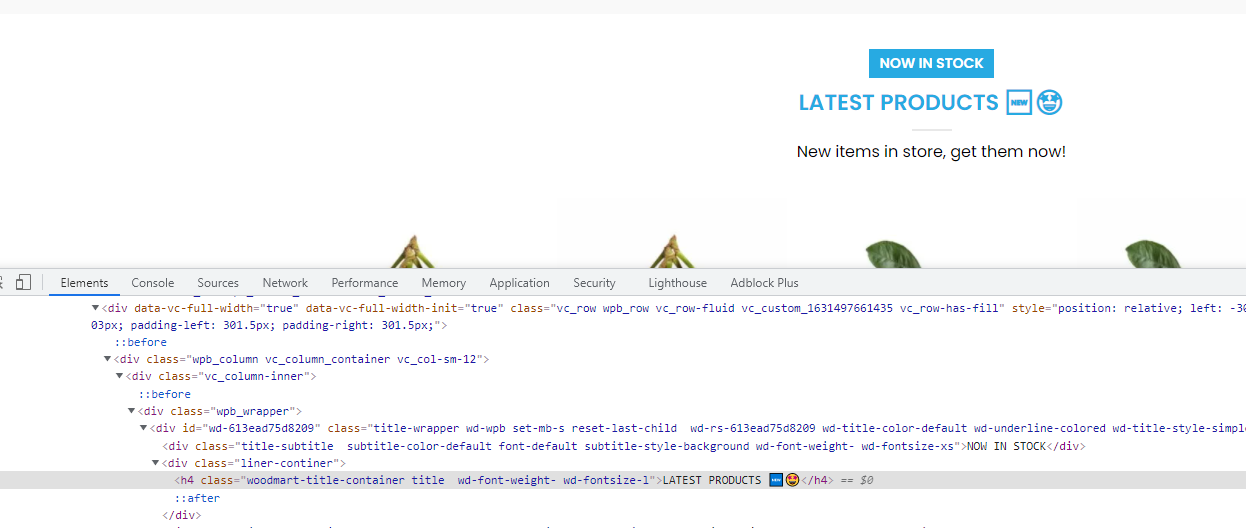
6.2.3 has made all emojis the same colour as the text. Here is one example, as can be seen: https://i.gyazo.com/e4cd974312d7350396ea6c792bfd54aa.png
The text should be blue, but the emojis should be red (heart) and orange (fire) – and not all blue like the text.
Didn’t have this issue with 6.2.2 or prior.
Hi,
Could you please send us a link to your website where we can see this issue?
Kind Regards
The .h4 class titles on the homepage have emojis as you scroll down, and they are all blue instead of their normal colours – even on uncached versions: https://myeliquidsupplies.com/
It was like how you can see in Inspect, before the latest theme version, and not all blue: https://i.gyazo.com/a2ab8f5b019cb074f93c36541a77127d.png
Here is how it looks for us https://gyazo.com/30c4ddd22c73d6ded4a93d15f11a8321
Do your theme have inbuilt support of Rich Snippets like of Brands, MPN for product pages, so as not to throw such Warning errors by Google Search Console
https://i2.paste.pics/F07XF.png
Regards
Hello,
Thank you for contacting us!
Yes, we will add support for our brand functionality there. As for the second warning, it is not related to the theme. Here is an article that will help you to solve this https://yoast.com/help/fix-missing-schema-property-no-global-identifier-provided/
Kind Regards
I was looking at documentation before making a purchase to see whether we can set different Swatch images for same Attribute term or not. Here-
https://bit.ly/3kNGB5w
But it looks like that, from your Theme, we will not be able to set different Swatch image, for the same attribute term, say “Blue” term for the Attribute – “Color”.
Why I am asking this-
We will be selling Different Category items like Watches, bags, Tshirts and so on. And it is quite practical, that we do not want to set the same swatch image for Blue colors that will be available in each of the different Category items.
Means, if we set Swatch image (for blue color) for Watches first. Then obviously we want different swatch image for Blue colored Bag or T-shirt (for the same Blue Attribute Term), to be displayed separately for that Product from different Category
I just set an example to be used for Color term. We may want to use different Swatch images for some other Attribute terms, like for these attributes – Fabric, Pattern or some other.
From documentation, it looks like as if, the Global swatch image can only be defined, and not separately for Per-product basis. or Per-Category basis.
Is it so.
If so, can you please make this available, if this feature is not present, as of now.
Regards
Hello,
Thank you for contacting us!
Besides global swatch images or colors, you can also use our special option called “Use images from product variations”. Swatches buttons will be filled with images chosen for product variations and not with images uploaded to attribute terms. https://gyazo.com/27eb90731c43cf28c32c7e17e2798778
Kind Regards
I think, I may not be able to get your point or there seems some confusion.
For each product, one is allowed to upload only One Variation image from Product data section, as can be seen from below-
https://i2.paste.pics/F0MFD.png
So just not sure, how come this is possible.
Means, if we have 3 attributes of any Product say Pattern, Fabric and Color. And if we Enable the option as per above screenshot you shared. Then,
For which Attribute, that swatch image will be shown for.
2ndly, the above Screenshot, looks like a Global option. So once enabled, will it affect every other product also. Even if we do not want to display variation image as Swatch for other products. If so, this won’t be beneficial.
3rdly, And, if it so, then showing the same Variation image as a Swatch image for all of the Product Attributes won’t look good too, say, for Fabric, Pattern, Color.
This will surely not be a good idea. If this is how it actually works.
I think I am able to explain my point and basic requirement.
Can you please clarify bit more, on how it actually works, with few more details
Regards
Swatches images will be taken from one attribute only. And you can specify this attribute in Theme Settings too.
HI, I bought your thema, but in mobile is not possible to choose subcategories! why so? nartiss.digizoom.lv thank you
Hi,
Please, create a topic on our support forum and provide us all the necessary details about the request with some screenshots and including your admin access so we can help you https://xtemos.com/forums/forum/woodmart-premium-template/
Regards
The new update didn’t fix the swatch issue. When you have multiple swatches for example color and size, you can only select one option. When you select the other the previous one will be deselected and you are unable to add anything to the cart.
It’s strange because it seems to be the issue on phones not desktop.
The mobile menu also seems to be unresponsive.
Hello,
Could you please disable all plugins that are not related to our theme and provide us your admin access so we can check it? Use the contact form on our profile page here https://themeforest.net/user/xtemos
Thank you in advance
Good day,
could we pls kindly ask where is the vertical ”more categories” option in the menu element that would be extandable, so we can say up to 10, or 12 categoriers and then expand?
Thank you.
Hello,
You can find this option for the Categories element in the header builder. Check the screenshot https://gyazo.com/b51e5de37b1f3bf4c038b1ec9ebcb745
Kind Regards
Great Thanks! 
You are welcome!
can we change the “Area after mobile menu” to before ? thanks
Hello,
Yes, of course, you can move the “Area after mobile menu” to the top, try to add this PHP code to the functions.php file in your child theme.
if ( ! function_exists( 'woodmart_mobile_menu' ) ) {
    function woodmart_mobile_menu() {

        $menu_locations = get_nav_menu_locations();

        $location = apply_filters( 'woodmart_main_menu_location', 'main-menu' );

        $menu_link = get_admin_url( null, 'nav-menus.php' );

        $search_args = array();
        $nav_classes = '';
        $tab_classes = '';
        $settings = whb_get_settings();

        $toolbar_fields = woodmart_get_opt( 'sticky_toolbar_fields' ) ? woodmart_get_opt( 'sticky_toolbar_fields' ) : array();

        if ( isset( $settings['search'] ) ) {
            $search_args['post_type'] = $settings['search']['post_type'];
            $search_args['ajax']      = $settings['search']['ajax'];
        }

        if ( isset( $settings['burger'] ) || in_array( 'mobile', $toolbar_fields ) || in_array( 'search_args', $toolbar_fields ) ) {
            $mobile_categories      = isset( $settings['burger']['categories_menu'] ) ? $settings['burger']['categories_menu'] : false;
            $search_form            = isset( $settings['burger']['search_form'] ) ? $settings['burger']['search_form'] : true;
            $position               = isset( $settings['burger']['position'] ) ? $settings['burger']['position'] : 'left';
            $mobile_categories_menu = ( $mobile_categories ) ? $settings['burger']['menu_id'] : '';
        } else {
            return '';
        }

        $nav_classes .= ' wd-' . $position;
        $nav_classes .= woodmart_get_old_classes( ' wd-' . $position );

        if ( 'light' === whb_get_dropdowns_color() ) {
            $nav_classes .= ' color-scheme-light';
        }

        $pages_active      = ' wd-active';
        $categories_active = '';

        if ( isset( $settings['burger']['tabs_swap'] ) && $settings['burger']['tabs_swap'] ) {
            $pages_active       = '';
            $categories_active .= ' wd-active';
            $tab_classes       .= ' wd-swap';
        }

        woodmart_enqueue_js_script( 'mobile-navigation' );

        echo '<div class="mobile-nav wd-side-hidden' . esc_attr( $nav_classes ) . '">';

        if ( $search_form ) {
            woodmart_search_form( $search_args );
        }

        $tab_classes .= woodmart_get_old_classes( ' mobile-menu-tab mobile-nav-tabs' );

        if ( $mobile_categories ) {
            ?>
            <ul class="wd-nav wd-nav-mob-tab wd-style-underline<?php echo esc_attr( $tab_classes ); ?>">
                <li class="mobile-tab-title mobile-pages-title <?php echo esc_attr( $pages_active ); ?>" data-menu="pages"><a href="#" rel="nofollow noopener"><span class="nav-link-text"><?php esc_html_e( 'Menu', 'woodmart' ); ?></span></a></li>
                <li class="mobile-tab-title mobile-categories-title <?php echo esc_attr( $categories_active ); ?>" data-menu="categories"><a href="#" rel="nofollow noopener"><span class="nav-link-text"><?php esc_html_e( 'Categories', 'woodmart' ); ?></span></a></li>
            </ul>
            <?php
            if ( ! empty( $mobile_categories_menu ) ) {
                wp_nav_menu(
                    array(
                        'container'  => '',
                        'menu'       => $mobile_categories_menu,
                        'menu_class' => 'mobile-categories-menu wd-nav wd-nav-mobile' . $categories_active . woodmart_get_old_classes( ' site-mobile-menu' ),
                        'walker'     => new WOODMART_Mega_Menu_Walker(),
                    )
                );
            } else {
                ?>
                <div class="create-nav-msg"><?php esc_html_e( 'Set your categories menu in Theme Settings -> Header -> Menu -> Mobile menu (categories)', 'woodmart' ); ?></div>
                <?php
            }
        }

        if ( isset( $menu_locations['mobile-menu'] ) && $menu_locations['mobile-menu'] != 0 ) {
            $location = 'mobile-menu';
        }
        ?>

        <?php if ( is_active_sidebar( 'mobile-menu-widgets' ) ) : ?>
            <div class="widgetarea-mobile">
                <?php dynamic_sidebar( 'mobile-menu-widgets' ); ?>
            </div>
        <?php
        endif;

        if ( has_nav_menu( $location ) ) {
            wp_nav_menu(
                array(
                    'container'      => '',
                    'theme_location' => $location,
                    'menu_class'     => 'mobile-pages-menu wd-nav wd-nav-mobile' . $pages_active . woodmart_get_old_classes( ' site-mobile-menu' ),
                    'walker'         => new WOODMART_Mega_Menu_Walker(),
                )
            );
        } else {
            ?>
            <div class="create-nav-msg">
                <?php
                printf(
                    wp_kses(
                        __( 'Create your first <a href="%s"><strong>navigation menu here</strong></a>', 'woodmart' ),
                        array(
                            'a' => array(
                                'href' => array(),
                            ),
                        )
                    ),
                    $menu_link
                );
                ?>
            </div>
            <?php
        }

        echo '</div><!--END MOBILE-NAV-->';
    }

    add_action( 'woodmart_before_wp_footer', 'woodmart_mobile_menu', 130 );

}
Kind Regards
Thank you so much Sir, you are the best one A TEAM
I am very sorry sir
I have another small question, can I add a close button to let customer click the button, to close the mobile menu?
like add a X button to close the opening mobile menu?
Thank you very much
Hello,
Sorry but the mobile menu doesn’t allow such an option. We also don’t have a custom code for that.
Kind Regards
Thank you
Hello,
Let us know if there’s anything else we can do for you! You can always reach us at any time.
Wish you a wonderful day!
Kind Regards
Is there a way to make the categories on the Shop page work as checkboxes like the attributes?
Hi,
Sorry, but there is no such option in our theme and WooCommerce by default. It may require additional code customization or extra plugin but we don’t have an instruction for this. It is out of our theme support scope.
Regards
Interesting theme
a. Do your theme have Display Conditional System and its feature like this-
https://bit.ly/3kDB69F
If so, how many out of these are available. Or you have got more. Where can I see from the Demo. Can you please share link from Demo. And screenshots from backend.
b. Can we show 3 ore more attribute filters like this, including custom image for any attribute. With your theme on Single product page. As per below image –
https://i2.paste.pics/EYPT2.png
c. Similarly, if product has 3 attributes, then will All those be visible in Product Grid on Shop page, Slider or Grid elements, once after clicking Select options (Ajax pop up for selection).
Here on your site-
https://i2.paste.pics/EYPYT.png
Regards
Hello,
Thank you for contacting us!
a. We don’t have such functionality at the moment. We are working on our layouts builder for shop and product pages and hope to introduce them in our next update.
b. Yes, you can display any number of attributes with swatches on the product page.
c. Yes, they will be shown on the shop page too.
Kind Regards