944 comments found.

Hi,
Just bought yout theme. Install done. But when i try to install the demo data, i have this error : Error500. I use the One Clic demo Import Plug’in for this, Thank you for your help
Emmanuel
Hi,
please make sure your server is running PHP 5.4 or newer. If you do and still no change, then please enable the WP debug mode which will show the actual error message and share that message here: https://codex.wordpress.org/WP_DEBUG
Lubos
I have updated js_composer from the latest ver within my account as well as the latest theme – site is BROKEN -all [lsvr_pressville_widgets sidebar_id=”lsvr-pressville-custom-sidebar-12″ columns_count=”1″] show as code when updating latest WP ver, PHP etc. also all LSVR plugins are updated. This has been an issue for this client for long time, very disappointing / frustrating for a paid theme. HELP ? redesign entirely with G/Blocks?
also – now site has the following error when trying to save/create new: Warning: preg_match_all(): Compilation failed: invalid range in character class at offset 11 in /home/pineplainsny/www/www/wp-content/plugins/js_composer/include/autoload/hook-vc-grid.php on line 163
Warning: preg_match_all(): Compilation failed: invalid range in character class at offset 11 in /home/pineplainsny/www/www/wp-content/plugins/js_composer/include/autoload/hook-vc-grid.php on line 163
Warning: Cannot modify header information – headers already sent by (output started at /home/pineplainsny/www/www/wp-content/plugins/js_composer/include/autoload/hook-vc-grid.php:163) in /home/pineplainsny/www/www/wp-admin/post.php on line 231
Warning: Cannot modify header information – headers already sent by (output started at /home/pineplainsny/www/www/wp-content/plugins/js_composer/include/autoload/hook-vc-grid.php:163) in /home/pineplainsny/www/www/wp-includes/pluggable.php on line 1340
Warning: Cannot modify header information – headers already sent by (output started at /home/pineplainsny/www/www/wp-content/plugins/js_composer/include/autoload/hook-vc-grid.php:163) in /home/pineplainsny/www/www/wp-includes/pluggable.php on line 1343
i see that this is deprecated from comments – however when i change to “lsvr_pressville_sidebar id=”....in database all widget custom sidebar sections have reverted to default sidebar – this is NOT GOOD – this site had dozens and dozens of sidebars/sections setup.
theme only compatible with 7.2 PHP (obsolete)
Hi,
make sure you are using the latest version of the theme (2.6.5) with all the LSVR plugins updated. And the latest version of WPBakery Page Builder bundled with the theme (6.7.0). The theme works fine with PHP 7.4, even with PHP 8.
You are adding the sidebar shortcode wrong. Sidebar ID should be added via “sidebar_id” attribute not via “id”. Please read the documentation: http://docs.lsvr.sk/pressville.wp/#shortcode-lsvr_pressville_sidebar (if you will copy the shortcode from documentation, remove all linebreaks)
Please note that your support is expired, you will have to renew it under your account / Downlaods if you need additional assistance. Thank you.
Lubos
Hello, good morning, how can I add the Telegram icon in the footer icons of social networks? Because Telegram is not on the list of social media icons in the footer.
thank you very much
How can I do to include the one from Telegram, thanks.
Hi,
first make sure you are using the latest version of the theme (2.6.5). Then you can add custom social icons under Appearance / Customize / Social Links. Since the Telegram icon in not part of the bundled icons, you will need some sort of 3rd party plugin which includes it, for example Font Awesome.
Please note that your support is expired. You will have to extend it (under your ThemeForest account / Downloads) if you need additional assistance. Thank you.
Lubos
OK thanks 
hi, good evening sir, the theme i bought here was very nice and good, so want to design another website so my question is do you have a theme that suitable judiciary instititute? yours faithfully Goud
Hi,
I do not have a theme specifically for that, but please take a look at my latest theme – Wordbench, maybe it will suit your needs: https://themeforest.net/item/wordbench-municipality-wordpress-theme/31833964
Lubos
I currently have Pressville version 2.6.4, am I able to do an easy update to the newest version or has there been any major changes to the theme that requires starting over with the latest version? Just want to make sure before I get ready to update it. Thanks so much!!
Hi,
2.6.4 is the latest version of Pressville so you are using the newest version already.
Lubos
Hello. Thank you fior a nice Theme. WPBakery Page Builder needs an update. Do you have an update available for me? Thank you Rgds Theresa
Hi,
please read this: https://themeforest.net/item/pressville-municipal-wordpress-theme/19949423/faqs/32830
Lubos
Hi, I bought your template, followed all the instructions but I’m not able to load the demo as it is in Themeforest. We know that images don’t load due to copyright, but many of the structure elements didn’t load either. For example, the footer is different, there are no Bars & Restaurants with the map and the highlights. We need your support service.
Hi,
some items have to be manually set up after the demo import. As for the footer, you just need to go to Appearance / Widgets, expand Footer Widgets sidebar and choose menus for the Navigation Menu widgets (set it to Footer Menu 1, 2, 3).
Lubos
Hi!
I just bought the Pressville Theme. Is there a demo installer with it?
Hi,
yes there is, please read about it in the documentation: http://docs.lsvr.sk/pressville.wp/#demo-import
Lubos
Hi i recently buy pressvile theme so i don’t understand how install social icons i could help for that? by sending me guidelines thank you
Hi,
you can add social icons under Appearance / Customize / Social Links. Please make sure to read through the documentation http://docs.lsvr.sk/pressville.wp/#quick-overview
Lubos
Hi, I need that when Creo Directory I can also associate events related to that directory tab.
Is it possible to get it?
The user creates the directory tab and by creating the event it can be included in the Directory, so as to view the events related to that tab.
And on the events associate the directory that created the event.
Hi,
you can link event locations to directory listings (just edit the location udner Event / Event Locations to see the selectbox), but that is only for the purposes of locating the event location on map. Anything beyond that would require some advanced code customization.
Lubos
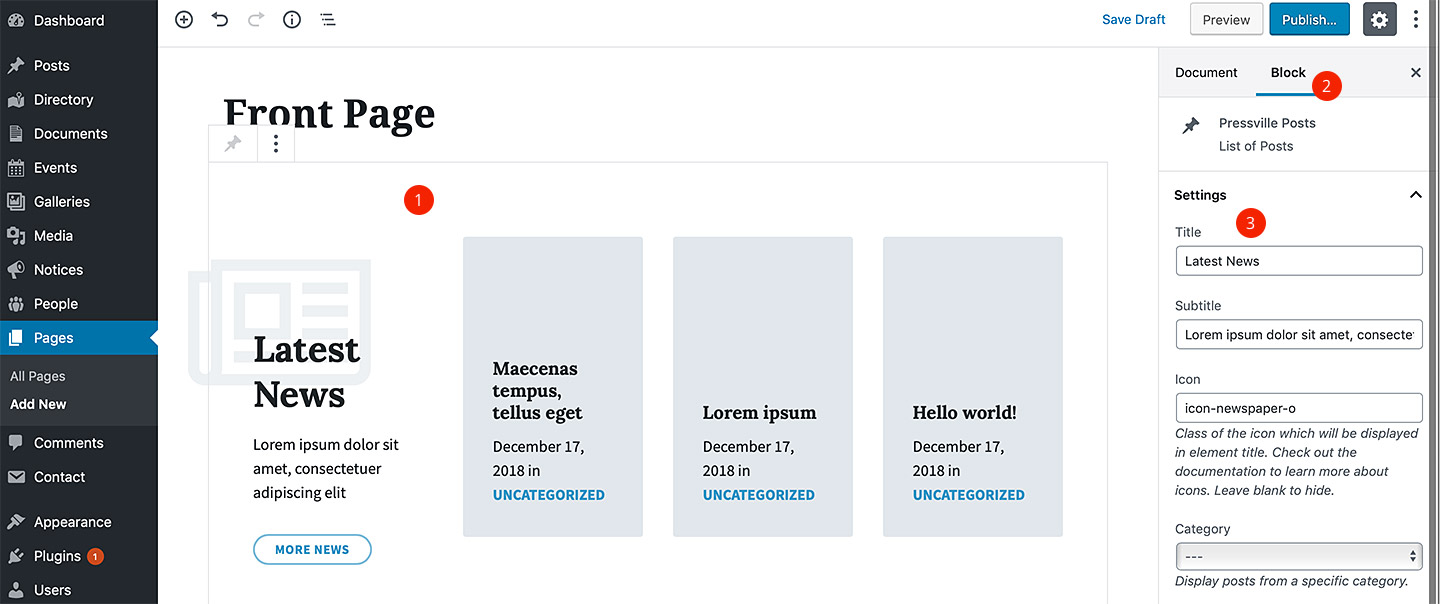
Cannot edit content.
I’m trying to edit the front page and the contact page and I cannot edit anything. I cannot do that in wordpress editor, cannot do that in elementor editor.
In wordpress I can only select the block and delete it. If i right click and edit as HTML, I can see no content?
Help me to edit the content please
Hi,
are you referring to the demo content? Or are you not even able to add a content from scratch?
Lubos
Yes, demo content
The demo content was created via WordPress block editor, so it can only be edited via this editor. When you click on a block, for example, on the front page, you should see a editable block setting in the right panel like on this screenshot http://docs.lsvr.sk/pressville.wp/content/front-page-40.jpg If you see something else then please share a screenshot.
Hello, I uploaded a lotie file to the front page of my Pressville site. Every time the file runs the page changes to draft, which makes it non-functional. When I replace the lotie file with a static image the page works just fine. The website is https://rnajc.org and it’s only got the static “Welcome” image on it now. The lotie file I was trying to use was from the lotie files website so I know there is no issue with the file itself. Thank you, Jocelyn
Hi,
this must be something to do with the server. The theme has no effect on things like that.
Lubos
Hi! Great theme. Can you tell me this theme compatible with Polylang plugin? Or another multi language plugin?
Hi,
it is compatible with WPML, but it should work with Polylang too (haven’t tested it with it though).
Lubos
Is the language selection menu or something compatible? Can you try?
Yes, there is a language menu as you can se on the demo page, you can add custom URLs there.
Hi,
There are some issues ith the theme, here is the website: khemisset.org 1- I need to change the color of text in menu to white 2- The icons don’t show up (arrows, social media icons, up and down icon) 3- margins too tight
Hi,
please share your URL where I can see those issues.
Lubos
1.) you’ve already did some customization on your header, but you can try this CSS:
body .header-menu-primary__item-link header-menu-primary__item-link--level-0 { color: #FFF; )
2.) which icons exactly don’t who up? They seems to work fine on my end
3.) I am sorry but you are using some very custom layout, try to use a non-fullwidd page template (edit the page and change the template in the right/left sidebar).
Hi,
Is that possible to integrate a wysiwyg zone between title and list of custom-post-type like gallery or events for exemple? What if i want to create a page “project” working as the news page? with its own Custom-post-type (like for archive: with possibilities to add a new one, add categories etc..). can i find a way to duplicate one of the plugin for example?
Thanks
Hi,
I am sorry but this sounds like something which will need more advanced code customization and you will have to hire a developer for that.
Lubos
Hi,
I changed the location of main menu to secondary menu but the problem is that the menu shows just the first level and doesn’t show the dropdown list of each item in the menu even if you hover over it. I need also to center the menu and a way to extend the length and adjust margin of menu Thanks
Hi,
I am sorry but the secondary menu support only the first level of navigation.
As for the centering the menu, please share your URL where I can see it.
Lubos
Hi, Thank you for your reply. Here is the link: http://khemisset.org/ I need to : 1- Center the main menu 2- remove the search 3- Change menu color
1.) use this CSS:
.header-menu-primary { float: none; max-width: 100%; text-align: center; }
.header-menu-primary__submenu { text-align: left; }
2.) Go to Appearance / Customize / Header and uncheck “Enable Header Search” option.
3.) Please be more specific which colors exactly you want to change. The whole menu bar background, or submenu dropdowns background, or text colors? Please also note that there is an option to create your own color scheme – under Appearance / Customize / Colors.
Hello We can’t find how to translate into french somes sentences into home page, for instance : Interesting Places Featured Galleries Latest Documents MORE LISTINGS MORE GALLERIES MORE DOCUMENTS in at All-day event … We tried with locotranslate but didn’t found these sentences… please help us our website : https://www.moulins-sur-tardoire.fr/ thanks
Hi,
please note that many strings are found in the LSVR plugins, you should translate those as well. However, strings in “Interesting Places”, “Featured Galleries” etc. section can be translated in the admin under Appearance / Widgets. Just edit the respective widgets to change those labels.
Lubos
hello, in widget we can’t translate anything …
Hi, I am sorry but what do you mean you can’t translate anything? You don’t see those strings when you edit a widget, or changes do not appear on your website? Please be more descriptive, feel free to share screenshots as well.
please contact me by email I need to send you some screenshots, I can’t translate these sentenses : Interesting Places MORE LISTINGS Featured Galleries MORE GALLERIES Latest Documents MORE DOCUMENTS Address (into listing)
Please send me a PM and I will reply to your email.
BTW, all those strings you’ve mentioned can be changed directly in the admin. Just go to Appearance / Widgets find the particular sidebar and edit fields in the widget settings.
no we can’t ! those widgets aren’t editable ! I haven’t any fields to edit content of them ! Please contact me by mail I want to send you screenshots ! thanks
I’ve just replied to your PM.
Hello! Dear friends, I can`t find any info in the manual concerning Multilanguage version of the site. Namely, how to switch on header languages menu you have in demo version (class=”header-languages”) and also I want to implement Polylingvo plugin in this switcher. Do you have any extra manual showing how to tackle this issue?
Hi,
the language switcher menu can be enabled under Appearance / Customize / Languages. Set it to Custom Links and add your language URLs and language codes.
Lubos
ok, thanks
Hi,
I am using the events widget, however the events & most meta information appear in English while my site language is set in Dutch (admin menu shows the event section in English though).
The mix of languages looks sloppy, but I can’t figure out how to make it all Dutch. Hope u can help, thanks in advance!
Cheers, Jessica
Hi,
you need to translate the theme and LSVR plugins you are using, please follow this tutorial: http://docs.lsvr.sk/pressville.wp/#translation
Lubos
I want my home page to only display documents. What is the custom code to do this. Exemple : <!- wp:lsvr-pressville-toolkit/documents {title} /->
Hi,
there is no dedicated frontend element for this, but you can use LSVR Documents Widget block or LSVR Document Attachments Widget block. Just add it via block editor interface.
Or redirect your front page directly to yoursite.com/documents page, but helping with this is outside of the theme support, but there are 3rd party plugins for that.
Lubos