952 comments found.
Hi is it compatible with buddypress? I am asking because there are some plugins for ads and they are working with buddypress data.
Or can I somehow extend the user profiles information. That the user can add preferred games, hobbies, location, address, etc.
Hello,
1/ Currently, VidMov does not support BuddyPress plugin.
2/ If members want to introduce more about themselves, they can access their profile and add information here: https://ibb.co/9VQmGVT ( About Tab: https://vm.beeteam368.net/channel/channel-id/1/channel-tab/about/ )
Thanks!
Hi, can I somehow add a twitch live stream for a user? I disabled all with pay subscription and so on. But how can I remove/disable the transfer history in the user menu? Thanks
Hi,
1/ Twitch: It does not have that feature, users need to copy the embed code of the video and paste it in the setup area of the video post.
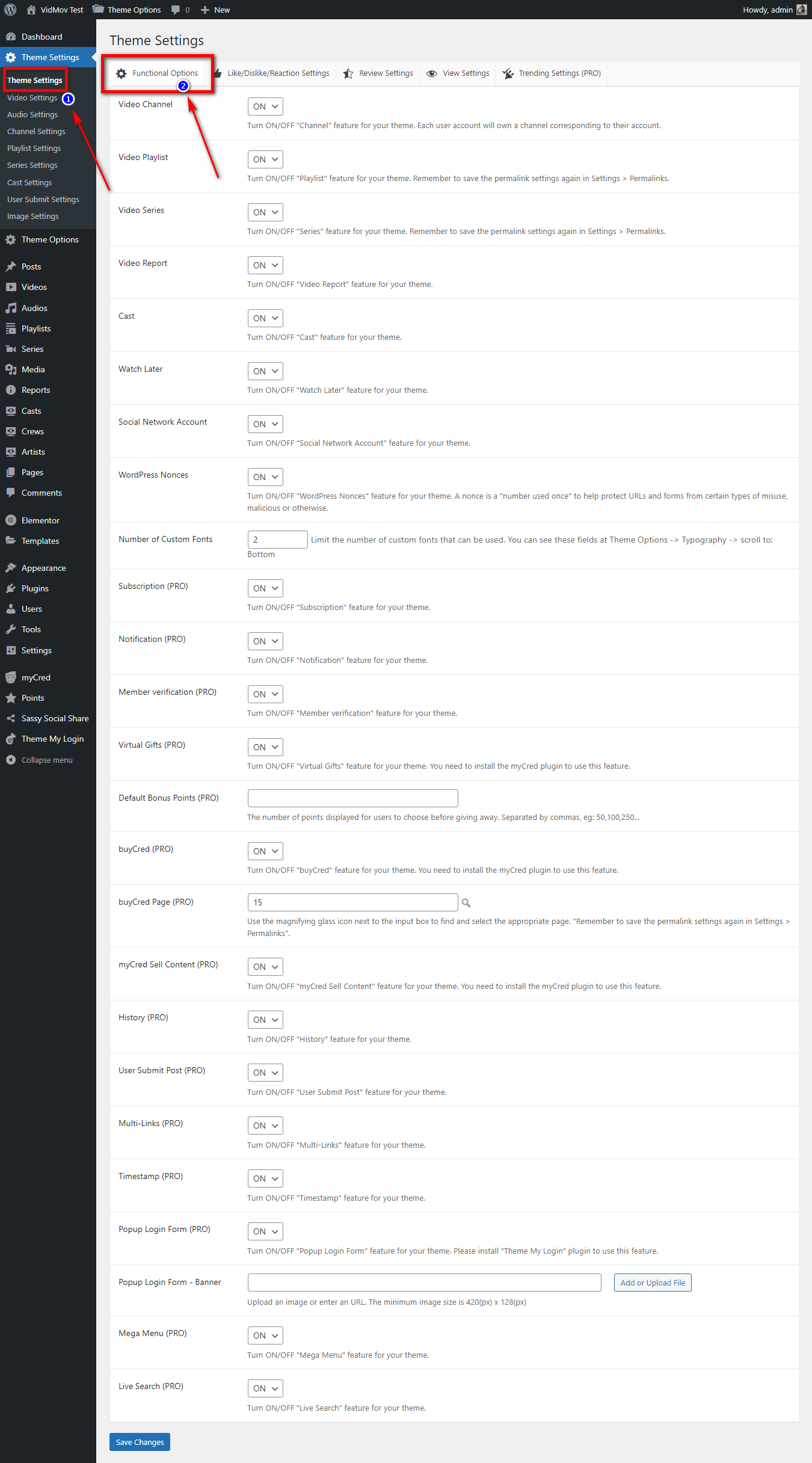
2/ If you don’t use myCred’s features, turn them off here:
A/ WordPress Dashboard -> Theme Settings -> scroll to: Virtual Gifts (PRO)
B/ WordPress Dashboard -> Theme Settings -> scroll to: buyCred (PRO)
C/ WordPress Dashboard -> Theme Settings -> scroll to: myCred Sell Content (PRO)
Thanks!

hi can you also add a live video from youtube when someone is live
and is it possible, if you embed a youtube video that it takes automatic title, tags, and thumbnail from youtube?
Hi,
These features are already available in our VidoRev ( https://themeforest.net/item/vidorev-video-wordpress-theme/21798615 ) project. However, we are optimizing the libraries to upgrade some other features and utilities.
It will be available soon this February. Surely these are worthwhile changes and bring high use value.
Thanks!
Hi. Nice theme. I am wondering if I can use s3 storage with this? Also is it possible to encode video to multiple resolutions?
Hi Hawkwing,
Thank you for contacting us!
1/ S3 storage: You can use links from S3 with VidMov.
2/ Encode video to multiple resolutions: To do this, you need a dedicated server. You need to contact our technical support for job details: https://themeforest.net/item/vidmov-video-wordpress-theme/35542187/support – This is custom work, so it will charge a fee. Most hosting services for WordPress and PHP itself cannot do this by itself.
Regards!
I want to buy the theme, but I need to know if when a user uploads a video, the thumbnail is automatically generated. Is this possible?
Hello Xatired,
You need to have a dedicated server with the FFPMEG library pre-installed.
If you already have a dedicated server or VPS with the FFPMEG library pre-installed, we will help you with this for free.
Because it is related to video processing and not related to WordPress. Normally, with VidoRev we charge $200 for one time doing this.
Our task was to implement a custom plug-in that supports FFMPEG, and then install it on a WordPress website to process images for videos after upload.
Remember that video processing consumes a lot of server resources, usually cheap hosting services will not be able to do this.
If you want to understand better, please contact our technical support through the support tab.
Because if you don’t have a dedicated server or a VPS that already has FFMPEG, we won’t be able to develop this feature.
Regards!
Hello, we have a VPS with the PHP-FFMPEG library, installed through Plesk and Composer in the directory: videoswar.com/httpdocs/Vendor/php-ffmpeg
Would this be possible?
I think it’s possible, but you need to send hosting admin information to our technician. They will check it: https://themeforest.net/item/vidmov-video-wordpress-theme/35542187/support
Thanks!
Hi, I wrote an email per contact form. Please check it. Thanks.
We are in business hours.
Try checking your email for any responses!
I’m not at the office right now so I can only send messages to my team.
Thanks!
Thanks. great job. I will setup the site but I also used your previous theme and it was ok. ... Support is nice.
Is there any email confirmation once a user uploads a video or creates account? That is quite important for us to buy this theme. Please suggest and confirm.
Hi Ad_animate,
1/ It only has email notifications when a user creates an account.
2/ We can support the update to send email notifications when users upload videos because it is quite easy. This feature is available in all of our older products.
If you need any more information, let us know!
Thanks!
Hi, Thanks for your reply. How can I get quick support on my issues I bought theme and have purchase code. Kindly suggest quick way to communicate with you. Thanks
Hello,
Please use your purchased account then create a ticket through the support tab: https://themeforest.net/item/vidmov-video-wordpress-theme/35542187/support
Thanks!
Congratulations! Looks great, will buy it. If the demo includes sample images that will make our life better and easier, especially to visualize it straightaway. Don’t think there is any issue with copyright else just give credit. Thanks again…
Hi tycoonclub,
Thank you!
VidMov will not include any images when importing sample data. However, we still support clients with xml files that include images. But you need to contact tech support to get that file.
Basically it still shows the correct aspect ratio, because VidMov supports “No Image” element. ( Here is the version after importing the sample data: https://vm-test.beeteam368.net/ )
Regards!
Hello, excellent work, I have a question, is it possible to integrate Amazon Cloud to download the video from the subscriber side
Hi Braxxz,
Can you describe it more clearly?
If a user has a link from S3 Amazon, they can add it to the video submission form.
Thanks!
Hello, thank you for your support and quick answer. And i appreciate that Can I integrate cloud storage instead of members uploading the video to my hosting server The video is uploaded to the cloud via my website, for example YouTube stores the video on private servers
Hi Braxxz,
Please try with this plugin: WP Offload Media Lite – https://wordpress.org/plugins/amazon-s3-and-cloudfront/
Thanks!
Thank you, you deserve a thousand stars. Superior support
Thank you!
Hi, I instaled the demo data, but I see no images for videos. see … https://ibb.co/wLgMWZf
Hi Misiak007,
Thank you for contacting us!
Sample data does not include images!
If you need a data file that includes images, you need to contact technical support through the support tab.
Basically, most people will delete these posts and replace them with their data.
Regards!
Hello, First up Great Job! Literally the theme I was looking for.
Before anything else : Your entire site loaded fast except the video player(player is unable to load)
Just a few questions:
1.Can there be any support for custom post types or can you provide TMDB import
2.Can I simplify the user dashboard (like disabling the channel system, subscribe system and all) just needed the history, notification, subscription, watch later and liked tabs only and hide the channel and subscribe system.
3.Show History videos on home + continue watching system!
4.Video can have their own tags like (zombie movie)
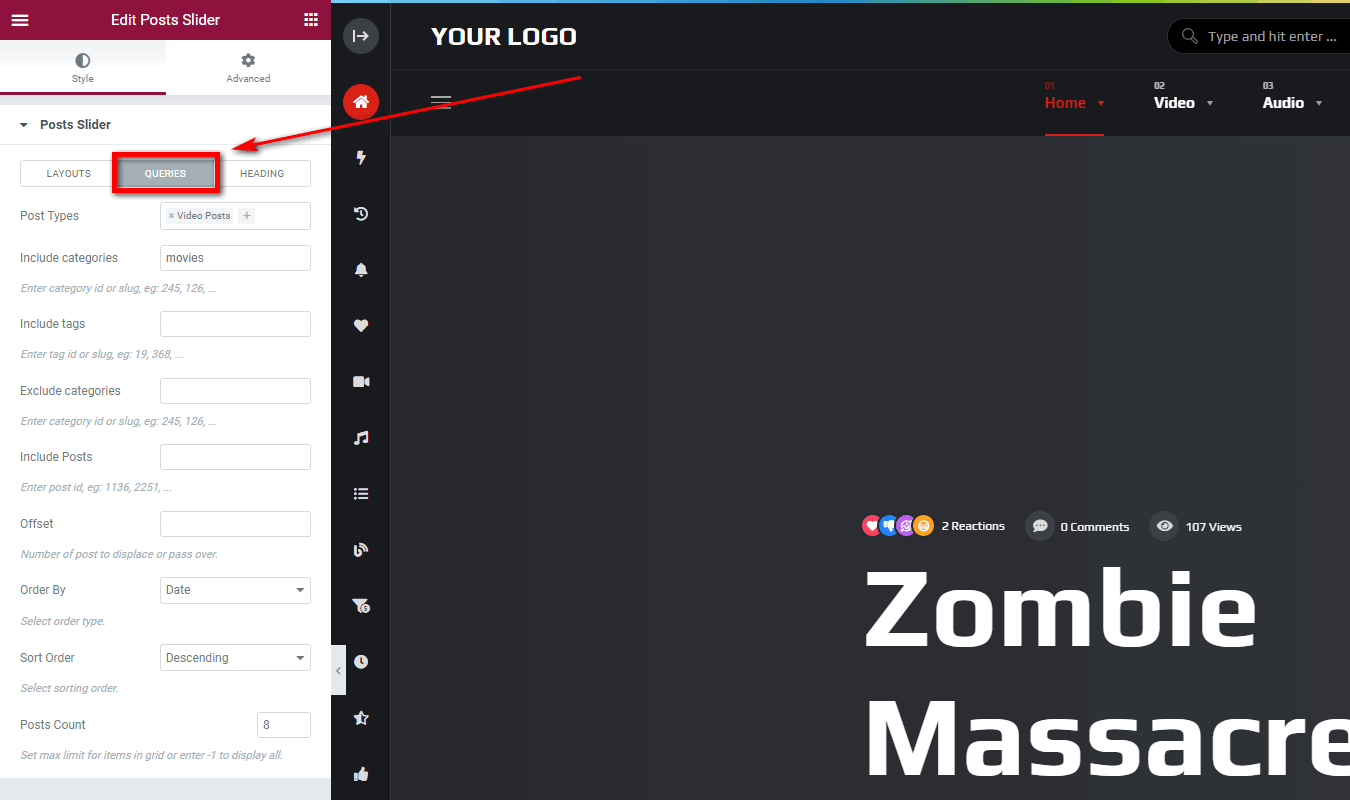
5.Are the slider layouts having a category based posts feature?
Hi Streamify,
Player is unable to load: Sorry, we have double checked on different devices and the player is still working properly.
What device are you using? And can you describe this more clearly? Because we have not received any reports regarding this.
Thanks!
macbook(chrome) Is adblocker an issue?
Resolved! Player is working without the adblocker! Will you please answer the above questions?
Thank you! Seems like Adblock blocks everything… Maybe I’ll look into adding a warning if the user’s browser has this extension enabled.
1/ We haven’t added the TMDB import feature yet, because we are re-optimizing it from VidoRev.
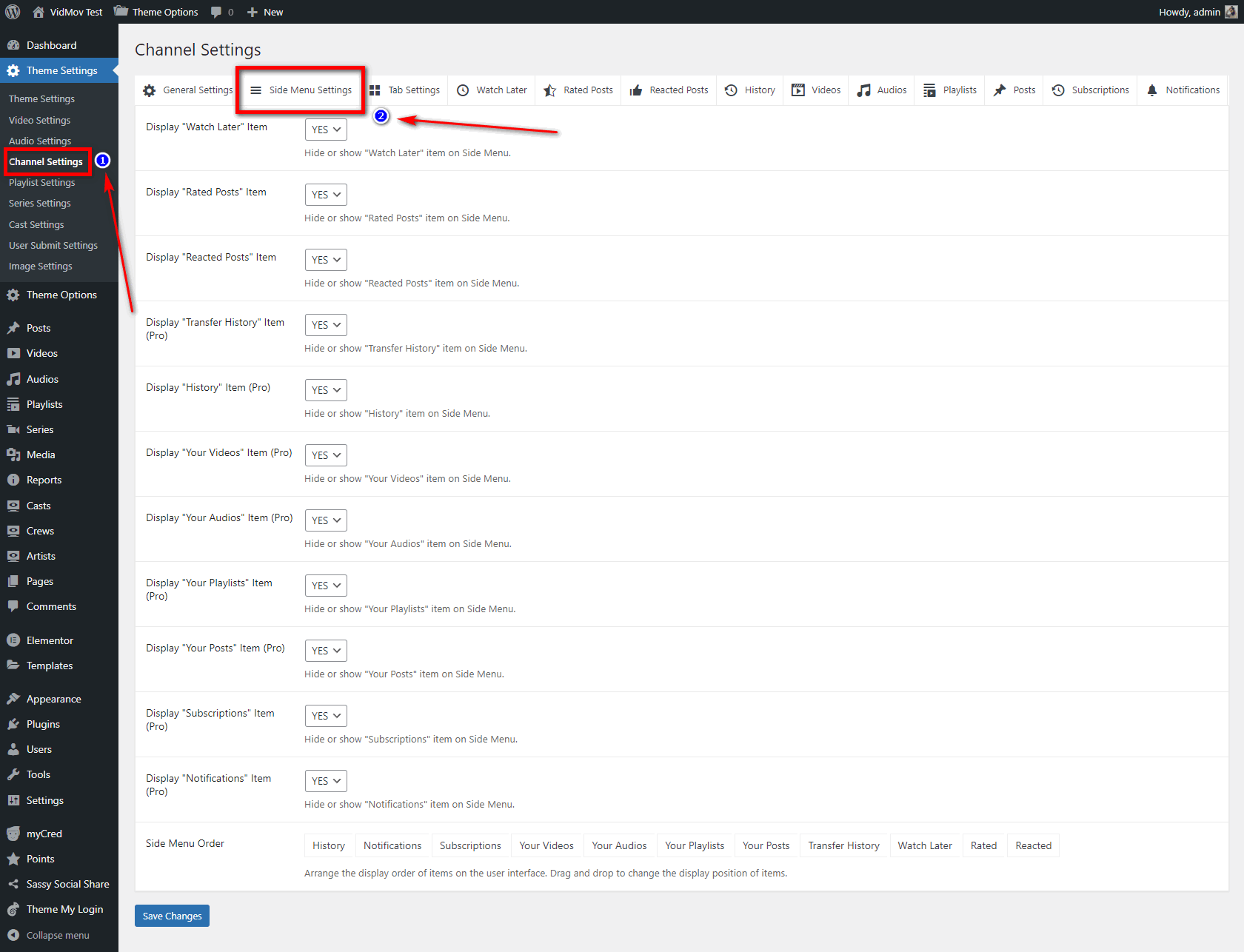
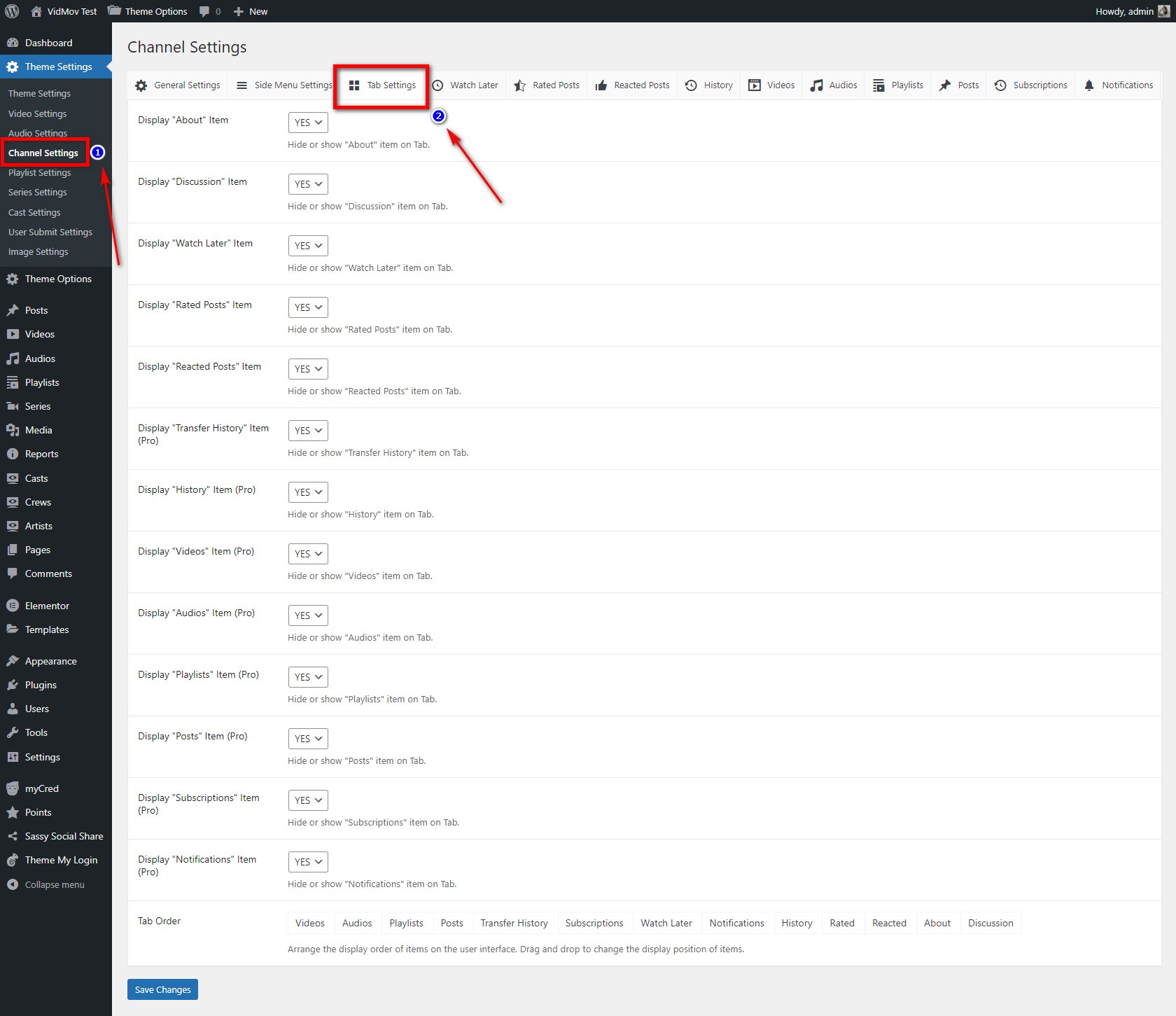
2/ Sure, check out the options here:
A/ https://vm-demo.beeteam368.net/documentation/assets/images/doc-09.png
B/ https://vm-demo.beeteam368.net/documentation/assets/images/doc-25.png
C/ https://vm-demo.beeteam368.net/documentation/assets/images/doc-26.png
The document is a bit long, but you can use your browser’s Find tool and search for Channel Settings: https://vm-demo.beeteam368.net/documentation/#theme_settings
3/ Currently, it doesn’t have this feature. We may update this feature in the future for Elementor so you can add it to your homepage.
4/ Yes, it uses pre-existing tags from WordPress, you can scroll to the bottom of any video post and you will see how this element will display
5/ Yes, for sure: https://vm-demo.beeteam368.net/documentation/assets/images/doc-87.png
Thanks!
Thanks for resolving 3/5 doubts. Just a last one is that the preview does not play audio?
The autoplay policy of all browsers does not allow audio if the video is in autoplay mode: https://developer.chrome.com/blog/autoplay/
That’s why we added this feature (Muted Autoplay) to make sure users can watch the video without any problem.
eg: https://vm.beeteam368.net/video/love-other-drugs/
You can use Google and search this keyword to learn more: “autoplay policy”
Thanks!
Yes I know about the policy already, but when the user hovers on preview then he most probably wants to watch the preview right? And like Netflix he would expect to watch the trailer as a preview (with sound) You can give an option to toggle it in the backend
No, to play video automatically needs to mute. Because this video is only generated when the user hovers over the specified image or button. It is not a click to play video.
You can’t preload dozens of videos at once, It will make the page load a lot heavier.
If you just need a preload mode for the slider position, we can add an option. But I think is not optimal.
Thanks!
This looks good, hope the theme can be fully editable under elementor from header to footer and side bar menu too.
Have to be appearance improve on mobile device like cellphones. Desktop version looks very good, but mobile need more job, like that search at the top dont look good, but as soon can be all editable by elementor no problem. Please add player with cast option.
Will be awesome if you can integrate or prepare the theme to work with wp video robot for adding videos from video sites like youtub… vime …. and others. I have that plugin…. and is awesome.
Hello Ctarrosado,
VidMov supports changing headers, footers and elements inside SideMenu with Elementor Pro.
However, in the current version we have not added elements such as: live search box, login icon, purchases icon… to Elementor. Therefore, when using Elementor Pro, you will not be able to use these elements.
We don’t have any plans with Video Robot plug-in yet, try contacting its author to see if they are willing to assist you with VidMov custom fields? Usually it’s not too complicated, but it’s best to contact its author to get the best compatibility and custom code.
Regards!
hello, sorry I bought the vidorev theme I have some questions before buying this theme. 1: How would I migrate the videos and series to this new theme? 2: Where would the ads go?
Hi,
Thanks for coming back to us!
1/ Currently, there aren’t any tools to do that. The structure between these two themes is completely different. If there are any future updates, we’ll let you know!
2/ We are optimizing the ad system to make it suitable for the new player. And also to add some ad revenue management features.
If you’re interested, you can try it out today and prepare your content for new features this February and March.
Thanks!
Hi,
When accessed directly from the listings page ( https://vm.beeteam368.net/series/ ), its link is always: https://vm.beeteam368.net/series/squid-game/
Internal links to support pagination. And it will be useful when your series has a large number of posts.
Thanks!
hello,
I’ve purchased videorev from you before. but I cannot use it because of a number of problems that you did not care to fix.
that was a major disappointment.
I see that you have this new theme which looks a lot better than videorev. I have 3 questions.
1. can we arrange for a trade in . I’d. you give me a discounted price for trading in videorev which I cannot use period.
2. I plan on using bunny. net cdn with video library transcoding support and streaming.
they have the http api which supports front end http upload to their video library storage zone.
if I purchase videomov theme , I need you to write code to integrate their api library into your front end upload script.
how much would that cost? please send your quote PM to my email on Envato. golearninghk@gmail.com
3. I also need pre mid roll ad feature for this theme does this theme support that.
thanks
Hello,
Not sure about your problem. However, you should contact our technical support for clarification. For complex customizations or other jobs, we charge a fee depending on the specific job.
Technical support and complex custom work are two completely different things.
1/ We do not have any discounts at this time and we don’t have any sales policy like that.
2/ We are reviewing BunnyCDN’s API and if it is suitable we will further develop to support this service. Currently, we do not have a specific time for this job. But I see this work in the development roadmap for february (02/2022). VidMov has a completely different data structure from VidoRev. For other jobs, please create a ticket through the support tab.
3/ We are optimizing the ad library for the player. It will add other important features.
Thanks!
Hello!
Hi,
It’s a 10-point scale, not a 5-point scale.
Thanks!
Congratulations, Best of luck with sales 
Thank you
Pre Sales Question: 1) Is there any chance of forum implementation 2) How long before advertising in vidoes will be included
Hi C64,
Thank you for contacting us!
1/ Are you referring to bbPress? https://wordpress.org/plugins/bbpress/
2/ We are optimizing our ad library and it will be updated in February.
Regards!
Okay great, ill wait for the feb update
Wooow
Hi,
Thank you
Can we replace the player with something like Presto Player or do we have to use the one included in the theme?
Hi,
You can use shortcodes from 3rd party players. However, the theme’s player is very good and you can use it normally.
Thanks!
Would this theme work with RankMath and would you recommend Video Blogster Pro or WordPress Video Robot to import videos from YouTube?
H Primitive,
1/ VidMov works well with RankMath.
2/ You can use WP Automatic (https://codecanyon.net/item/wordpress-automatic-plugin/1904470) to import videos from Youtube or Vimeo. Our tech support will help you declare custom fields with WP Automatic.
Thanks!