952 comments found.
do you have an elementor tab or page that displays all the channels? havent been able to locate.
this is so users can find their favorite video creators
Hello,
1/ The “Member List” page is a list of channels.
2/ Each author is a channel – You can find this option at: Theme Settings -> Channel Settings -> Replace Author Page With Channel Page
3/ You can see how to set up the channel here: https://vm-demo.beeteam368.net/documentation/#channel – Step 1 and step 3 is how to set up the channel list (Member List)
Thanks!
Hi, today I sent another mail, but it looks like that it did not get through 
got your mail. thanks!

How to set the left side menu?
Another question. There are Most liked videos, News TV Shows, in the side panel. How to set the content of the side panel?
Hello,
1/ Side-Menu: What do you need to set up for that location? If you need to change the navigation bar, please visit: WordPress Dashboard -> Appearance -> Add a new menu or edit your existing menu ( Then scroll to the bottom to the Menu Settings location and choose Side Menu to put it there )
For Channel related features, please go to Theme Settings -> Channel -> Side Menu Settings Tab
2/ Sidebar: Please go to WordPress Dashboard -> Appearance -> Widgets and click on widgets to set up or add another widget instead. The parameters are in the VidMov Post Extensions widget.
Thanks!
I hope this will be added to this theme: bunny. net cdn . Is this on the roadmap for future update?? This will give the theme a huge boost for sales. Because there is no Theme yet that intergrades bunny. net cdn. I hope this will be added. Then i wanna buy this awesome theme.
Hello Finder2016,
Support for a 3rd party CDN is being worked on and tested in February.
We can’t say exactly which CDNs we’ll be supporting in this update.
Because we are testing the API of each service. But surely this feature will be updated soon. We don’t want to rush, almost everything is already prepared for that feature. We’ll let you know when it’s released.
We are reviewing the pricing and availability of each service. To ensure VidMov’s customers can save costs as much as possible.
Thanks!
Just to inform you about this feature: https://vm-demo.beeteam368.net/documentation/#bunnycdn
Thanks!
How to hide reviews from video post by default?
Hi Krelv3,
Thank you for contacting us!
Please visit: WordPress Dashboard -> Theme Settings -> Review Settings [Tab] -> Review & Choose OFF.
It will disable that feature.
Regards!
Thank you beeteam How to set video preview images? Is there any way to set preview images automatically for embed vids?
Hello,
Are you referring to thumbnails?
VidMov only supports automatic fetching of thumbnails for Youtube, Vimeo and Dailymotion: https://vm-demo.beeteam368.net/documentation/#auto_fetch_data
With other video networks, you need to manually add a thumbnail to the featured image area of the video post.
Thanks!
Thank you. Problem is that I can’t see auto fetch data. Trend settings is last option I can see.
Hello,
Have you updated to the latest version?
This feature just appeared in version 1.0.9.
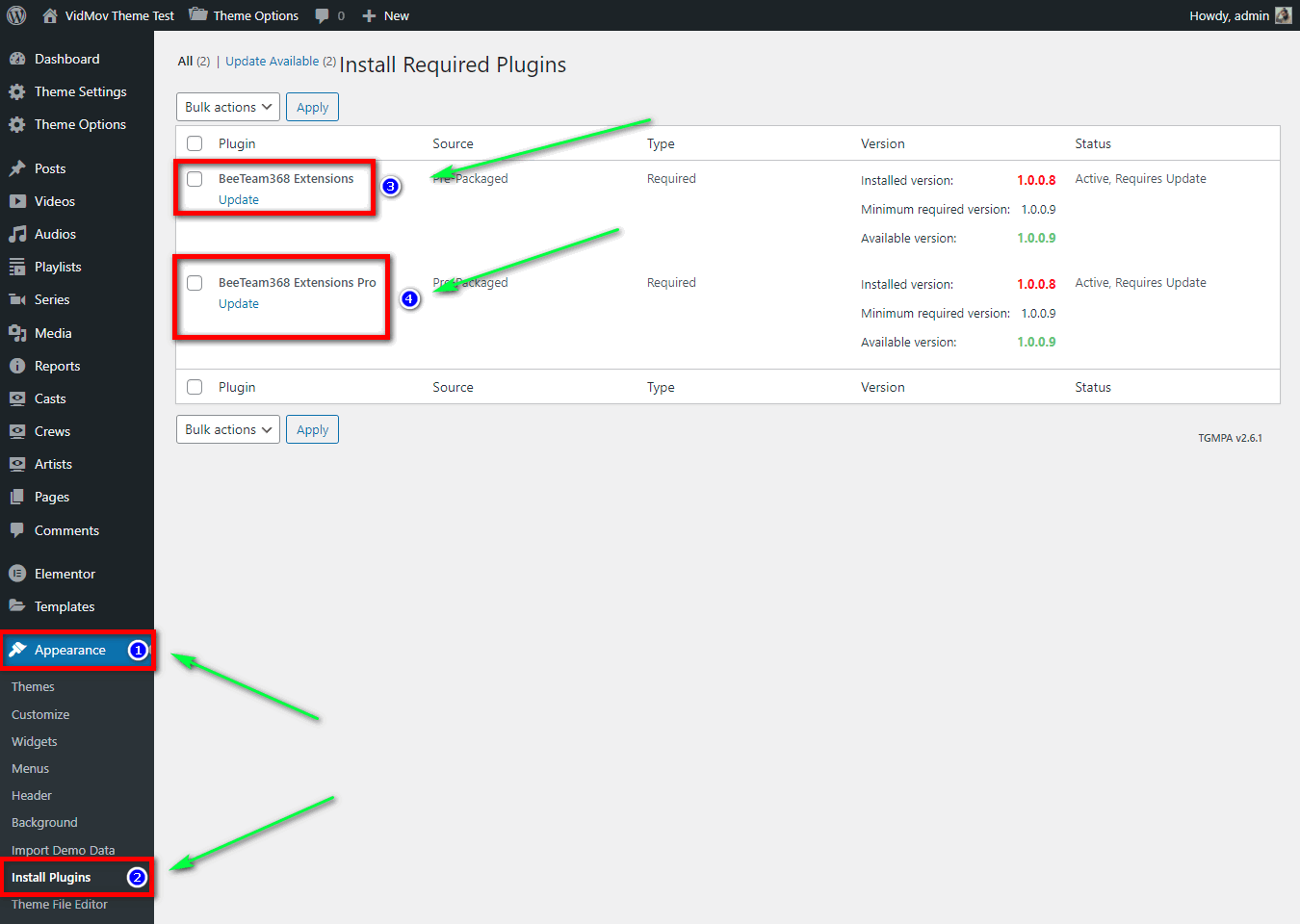
Please note, if you have updated the theme to the latest version: https://vm-demo.beeteam368.net/documentation/#update
Please update the BeeTeam368 Extensions and BeeTeam368 Extensions Pro plugins: https://vm-demo.beeteam368.net/documentation/assets/images/doc-134.png
Thanks!
Thank you. It works!
Hello, I want a sub-category and a nice filtering system for the Artist, Model, Actress sections.
Also I want to show these products from Elementor plugin on Homepage. It would be nice to have a nice upper area for the biography for this part. Example: Artist’s height, weight, eye color, hair color, marital status, date of birth, etc.
I just bought the theme, if these features come, you will have done a great job.
Hello a1bay,
Thank you for supporting BeeTeam36!
I can’t decide on such big features. Because I am not involved in the product update roadmap.
However, you can create a ticket and suggest that feature: https://themeforest.net/item/vidmov-video-wordpress-theme/35542187/support
Our technical support will review and reply to you.
Basically, this feature is already available for video, audio, playlist or series posts. Supports filtering by categories as well as tags: https://vm.beeteam368.net/home-page-demo-3/
Regards!
Bjr, I would like to know if it is possible to schedule a video upload over a given period so that as soon as the period is reached the video will not upload by itself?
Hello Thedio9,
Sorry, it does not have this feature!
Thanks!
hello i sent an email to you to change my activation domain so i can activate on new domian, previous domain will no longer be used. thanks
Hi Littpanda,
Please create a ticket through the support tab and tell us the domain name you have activated. A tech support will help you restore it: https://themeforest.net/item/vidmov-video-wordpress-theme/35542187/support
Thanks!
Ok I have done this before leaving comment, thanks
Also is there a setting to make default color light theme instead of dark?
Hi,
1/ Can you create another ticket?
I just contacted a colleague and he said he hasn’t received your ticket yet?
I’m not at the office at the moment so can’t visit and check for you.
2/ You can see that option here: WordPress Dashboard -> Theme Options -> Styling -> Scroll to: Color Mode
Thanks!
Ok just resent
Ok! Thanks -> You can submit it here: https://themeforest.net/item/vidmov-video-wordpress-theme/35542187/support
I have
Sorry, Looks like we haven’t received it yet…
My colleague has not received your message yet.
Please send this request to us at email: support@beeteam368.com
Please attach this link and tell us your domain name in that email.: https://themeforest.net/item/vidmov-video-wordpress-theme/35542187/comments
Thanks!
Ok sent, subject: domain switch
thanks
I will buy it as soon as the discount is made. The dollar parity is very high in our country. In other words, it is a quarter of a minimum wage employee’s salary.
Hi fearlessly,
Thank you for contacting us!
Sorry, we don’t have any discounts yet. I don’t have that information either, it depends on the work plan from our team leader or manager.
Thank you for your interest in our products!
Best Regards!
Hi…do you have a light theme..its very dark for me..
Hello,
Please click this icon (it’s on the top menu, the last icon on the right side of the screen): https://ibb.co/VwkKgv2 – It will help you switch between light and dark modes.
You can view the demo in light mode.
Thanks!
There is a page full of videos. 1/ Want to display videos dynamically? a/ On the top are such videos, that match user previously watched video category, based on cookies. How to set it up? b/ How to dynamically display videos based on user location, referrence website, number of views, age of video, comments? c/ Is there a tool that can solve all dynamic content issues?
2/ How to create video page with unlimited video loads? User should be able to scroll down forever.
How to remove social media icons from left side? It’s covering the vertical menu
In the top menu there are only 3 links. I can’t find how to set this menu? In wordpress Appearance – Customize there is no menu created.
Hi Kavelv3,
1a/ On the top are such videos, that match user previously watched video category, based on cookies: VidMov doesn’t have that feature!
1b/ How to dynamically display videos based on user location, age of video: VidMov doesn’t have that feature!
1b & 2/ With other query conditions like views, likes… You can check out the instructions here for setting up with Elementor: https://vm-demo.beeteam368.net/documentation/#elementor ( #2. Queries -> Order By & Pagination )
3/ Social:
A/ Please visit: WordPress Dashboard -> Sassy Social Share -> Floating Interface -> Disable option: Enable Floating sharing interface
B/ Please visit: WordPress Dashboard -> Sassy Social Share -> Standard Interface -> Disable option: Position with respect to content.
I think you should import sample data, some settings will be automatically added and you will have easier reference!
If you need more detailed support, please create a ticket through the support tab!
Regards!
I want to buy the theme but how about the discount? when does it go on sale?
Hello a1bay,
Thank you for contacting us!
Sorry, we don’t have any discount plans yet.
Regards!
Between the Vidmov and VidoRev versions, which version is more suitable for a website to share music by videos? I am wondering which option is better between these 2 versions.
Hi Tiendatdinh,
VidMov has contributions from several companies and customers that have used VidoRev.
Basically, VidMov is more comprehensive because it supports audio, in addition, it is also completely refreshed compared to VidoRev and does not reuse code from VidoRev.
VidMov is also more optimized and has many improvements. We are still continuing to develop and optimize the libraries to update the missing features for VidMov. These updates will be available in February and March.
VidMov’s feature system is also divided into specific groups, you can turn them on and off depending on your needs: https://vm-demo.beeteam368.net/documentation/#theme_settings
Thanks!
I will buy VidMov. Hopefully this won’t let me down as it’s still in development. It takes a long time for VidMov to become more stable. Wish you success with many orders!
Thank you!
Yes, basically the features will still be updated. Maybe 1000 different features, but sometimes you just need 10 of them. Because this is a mass product, we will update it with different features to target different audiences.
Hi, I have a small problem with the homepage. The video on the homepage is not in the right position… https://ibb.co/dLPXBQx But if I open elementor to fix it looks ok … https://ibb.co/YDWmRYN – and I did not change anything. It looks like the player is hidden behind the menu.
Hello Misiak007,
That’s because the width of the two modes is not the same. When used with Elementor, the width of the website will be smaller.
This is basically a preview feature, it will be calculated to fill the outer space.
Depending on the width / height ratio, it will have a different look.
Thanks!
but its interesting why the same preview in elementor is ok and on the site not. is there a possibility to adjust it?
Same height but different width. Because Elementor’s toolbar is on the left already taking up part of the width. You can see on your own screenshot. If you want to learn the working mechanism and the formula to calculate the height and width when the video preview depends on the outer frame. Please create a ticket through the support tab.
Thanks!
Hi, I created two tickets/mails could you please check it? Thank you
Hi,
I just checked with my colleague. They don’t see any tickets from your account.
Can you resend? or send it through your old ticket/email.
Thanks!
ok, no problem, I have send mail now. thanks
Hello. Every time I browse through the template, I find that it is an exciting masterpiece without any problems. Thank you for this achievement I have one question if possible I want to add the video in more than one quality, is it possible through the existing player? If the answer is no, can you tell me how to do that? Finally, thank you for your kind support and quick answer
Hi,
You can watch the demo here: https://vm.beeteam368.net/video/self-hosted-video/
Setup instructions are here: https://vm-demo.beeteam368.net/documentation/#video -> Self-Hosted Video:
Thanks!
Thank you you are the best
I was satisfied with your theme. My only concern is google adsense on videos and direct download from the site. Please include them in the next update
Hello,
I understand, however we have answered well in the past. When these features are updated. We’ll let you know, soon because it’s in our roadmap.
Thanks!
I also seem to be having an issue with the buy button on My Cred. I get this after following your documentation buy_button
Hi,
Have you imported sample data?
It is a setting so that when displayed it will be replaced with a corresponding button for the purpose of instructing viewers to log in or buy points to watch protected videos (Pay per view).
If you need to check or more support, please create a ticket through the support tab: https://themeforest.net/item/vidmov-video-wordpress-theme/35542187/support
Thanks!
Hello Guys, Can you tell me how to allow people to register for my site using the theme? Right now I can not locate the Register Page link on the pop up when people chose to submit. Right now it just says Profile or Lost Your Password but no Register link like in your demo. Thank you! Simon
Hi Simon,
Please enable this option: https://www.wpbeginner.com/beginners-guide/how-to-allow-user-registration-on-your-wordpress-site/
Thanks!
Hi
Your theme is amazing and I want to get it but first some questions:
1. Do you fully support elementor – so I can modify and change the look of the website?
2. Do you support RTL?
3. Do you have an option to allow visitors to filter the videos according to diffrent parametars for example. categories, authors, and tags, and other custom taxemonies?
4. any chance for a good video tutorial?
Hello eli1356,
Thank you for contacting us!
1/ VidMov supports header and footer Builder with Elementor Pro and Page Builder mode.
In this version we have not developed individual elements for you to use with Elementor Pro such as players, playlists, icons for feature groups like Watch Later, Notifications, Live Search… We will add more after the other important groups of video features are updated (storage, import, advertising…)
2/ Sure, this is a mandatory requirement for themes – VidMov fully supports RTL
3/ Yes, we developed a widget specifically for Elementor so you can do this: https://vm.beeteam368.net/home-page-demo-3/ (documentation: https://vm-demo.beeteam368.net/documentation/#elementor) – Including basic filter mode like this: https://vm.beeteam368.net/layout-default/
4/ No, we don’t have any video tutorials for VidMov yet. However, with almost 150 pictures tutorial here. You can also understand about it: https://vm-demo.beeteam368.net/documentation/
Thanks for taking the time for us!
Regards!
Thanks for your fast answer. I have a few more questions: 1. Do you have an eta when will we have the ability to customize the website? 2. I see that in the other theme you have an option to display live videos – do you have it in this theme also? 3. I need also an option to play all videos from the youtube channel, do you have this option? 4. I see in the demo that you sent, that we can create some great filters, I would like to know, a. can I create a filter by author to with a link to the author bio? B. Can I create a checkbox filter or do i have to use only the dropdown? C. Using elementor templates, can I create these filters within a certin category?
THanks again for your fast response
Hello,
1/ If you need to learn more, you can contact our technical support. Maybe they will have more detailed information for you!
2 & 3/ That’s the Live Video feature for Youtube. It will search for streaming videos on a particular channel and display them. Currently, we have not updated this feature for VidMov. We are working on other features first.
4/ VidMov supports creating member list pages like this: https://vm.beeteam368.net/member-list/ – Documentation: https://vm-demo.beeteam368.net/documentation/#channel
Thanks!
Hello As you have already implemented the youtube import system, Please integrate it with the TMDB as well, It’ll become viable for customers like us.
Hello,
We were one of the first ThemeForest authors to develop that feature. You can see it in our other products. However, we are optimizing the libraries and will integrate it in the next updates.
If this is the product you are looking for. Support us with a license and discover it!
Appreciate your understanding!
Thanks!
Glad to hear that you guys are the first ones! More glad to hear that this important feature will be implemented by the next updates just make sure to remote fetch the image url(hot-link the poster & backdrop images) as it will reduce the load on server also it will increase the speed of the site
Yes: https://www.youtube.com/watch?v=M97IAul2BbA
Thanks!