952 comments found.

Does the theme remember where i left off the video, like youtube and netflix does?
Hi Harsenyoo,
Thank you for contacting us!
Currently, VidMov does not support this feature yet!
Regards!
Does the theme remember where i left off the video, like youtube and netflix does?
Hi how do I edit the footer easily Created by BeeTeam368 for my name?
Hi ralfzerdan,
Please visit: WordPress Dashboard -> Theme Options -> Footer Settings and update content at field: Fotter Copyright Text
Thanks!
Thanks!
How much do you charge to set up my website? Website to listen to music.
Hi,
For custom jobs you create a ticket through the support tab: https://themeforest.net/item/vidmov-video-wordpress-theme/35542187/support
It needs review by our developers or our technical support.
Thanks!
Ok. I send. Thanks!
Ok please wait patiently!
My colleagues will review and reply to you as soon as possible.
In the meantime, you can learn about VidMov and try some of its features: https://vm-demo.beeteam368.net/documentation/
Thanks!
Hi,
If you do not use the Sell Content feature, please visit: WordPress Dashboard -> Theme Settings -> Scroll to: myCred Sell Content (PRO) & Turn OFF
Thanks!
how can i insert banner ads in singer post below the video title position
Hello,
Updates for those placements have not yet been released.
Please wait for the next updates. It will appear soon.
Thanks!
I have tested the ad feature for both host videos and embedded videos from youtube however ads are not showing in player player I have tried html and image ads
Hello,
Currently, you cannot use player video ads with embedded videos.
You need to set up and use with VidMov player.
If you need to check, please create a ticket through the support tab!
Please provide a link to your website and an admin account.
Thanks!
thank you so much
We’re about to release an update that supports displaying ads before the iframe of an embedded video is visible.
We are testing again before releasing this feature.
( Note: need to set “Time to show ads” = Pre-Roll )
Thanks!
I updated the theme using the envato market plugin, but got the following error message “Updating failed The update cannot be installed because we will be unable to copy some files. This is usually due to inconsistent file permissions….”
Hi,
That’s the Envato Market plugin problem. When we encounter that message, We will click one more time and it will do the update.
Hope it helps you!
Thanks!
with the previous update version, I got this error and pressed again as you said and it worked, but with this update, I tried pressing many times but all failed. I tried resetting the permissions for folder (775) and file (644) and restarting the server but it still doesn’t work
new error: An error occurred while updating VidMov: Update package not available.
Hi,
So I think you should download the installation file from ThemeForest and install it directly into your WordPress. WordPress will automatically recognize it as an update.
Changing the folder permissions doesn’t help with this. The Envato Market plug-in is managed by Envato, and so are the update files. Most likely, your server is not connecting to Envato’s server at this time.
We can’t help more, because it belongs to Envato.
This is the result we just tested on a website from our client: https://www.youtube.com/watch?v=t0MvvGfqCBw
Thanks!
okey thank you so much
I no longer see the vidmov theme in the envato market plugin, what happened?
I don’t know about this issue!
Please try to generate a new API key and try again.
Because this plugin is built and managed by Envato.
Thanks!
it’s hard to understand I bought another “A” theme on themforest a long time ago and i buy your vidmov theme days ago it still showed 2 themes in envato market plugin however today it only shows the theme “A”, your vidmov theme has disappeared
Hello,
I think you should reinstall the Envato Market plugin, generate a new token and try again.
We are only the authors, not the system administrators of Envato, so we cannot provide you with support in this case.
All payments, licenses, downloads are managed by Envato. We do not have any authority in those items. Hope you understand!
If you need more information or help with your token not working, you should contact Envato directly: https://help.market.envato.com/hc/en-us/requests/new
Thanks!
Yes. I have already sent support to envato
Hello @beeteam368! Great theme! Love it!
Questions: 1. Sometimes the “hoverover” preview feature doesn’t plays for my website guest and sometimes it does. However, when I’m logged in as an administrator, hoverover previews show. I thought is was a cache’ or cookie issue, but it hasnt fixed the issue. Can you assist?
2. Are there any other recomended payment plugins options other than PayPal or Bank Transfer?
Hi,
1/ If using cache, try disabling this option: WordPress Dashboard -> Theme Settings -> scroll to: WordPress Nonces & Turn OFF
2/ If you use features from myCred, check them out here: https://mycred.me/store/
If you use features from Armember plugin, refer here: https://codecanyon.net/item/armember-complete-wordpress-membership-system/17785056
Other payment gateways will be in the paid versions (or paid extensions) of those plugins.
Thanks!
Do we need a VPS or what kind of hosting would you recommend?
Hello,
If your website has a large amount of traffic, you should consider using a VPS or dedicated server.
Thanks!
can you recommend a VPS provider that you would use with the intended function of the theme, please?
Hi,
You can refer to Google Cloud or Amazon platforms:
1/ https://cloud.google.com/solutions/web-hosting/
2/ https://aws.amazon.com/ec2/
However, with these services. You need to have technical skills to install the server software.
If you want to use a server management service, you can refer to the service of SiteGround or Fastcomet:
1/ https://www.fastcomet.com/cloud-vps-hosting
2/ https://www.fastcomet.com/dedicated-server-hosting
3/ https://www.siteground.com/cloud-hosting.htm
Best Regards!
Hello, someone asked if it is possible to go live on the site with your theme. I read that you mentioned a 3rd party dedicated server. Can you explain a bit to me?
Does the ad display feature not work for embedded videos? for example embed video from youtube
Hello,
If you use Youtube videos with VidMov’s built-in player you can play ads like with self-hosted videos.
The basic embed mode is not controllable, because it uses an external player.
Maybe in the future it will only support like VidoRev, showing only one layer at the top and when the user clicks it will show ads only once. Because the time parameter of such embedded videos cannot be read.
Basically, iframes when embedded from 3rd parties will work independently and cannot be controlled unless there is a supporting API like Youtube or Vimeo.
Thanks!
Hello is there any plans / timeline to integrating BuddyPress as i require some social functions that this would bring before i can make a transfer to your awesome theme. yours sincerely Oliver
Hi,
We are optimizing the libraries and will release the version for WooCoomerce first (in April).
We will work with buddyPress later.
Thanks!
Hopefully you will soon have the option to create a Trends page with customizations like: - Create different Trending pages. - Select Trending Category. - Time selection according to the trend. - Select Trending by tag. ...
It can be a wigdet to be able to add to any post or page it would be great.
Hello,
For feature suggestions, you should submit it through the support tab: https://themeforest.net/item/vidmov-video-wordpress-theme/35542187/support
Thanks!
Thanks, I will do that. Wish the project success and become one of the groups with the best revenue.
This function is still working normally and without any problems.
It can add categories of video, audio, series, playlist.
Thanks!
How to create a video of the form: “Premium Content This content is for paid members only.”
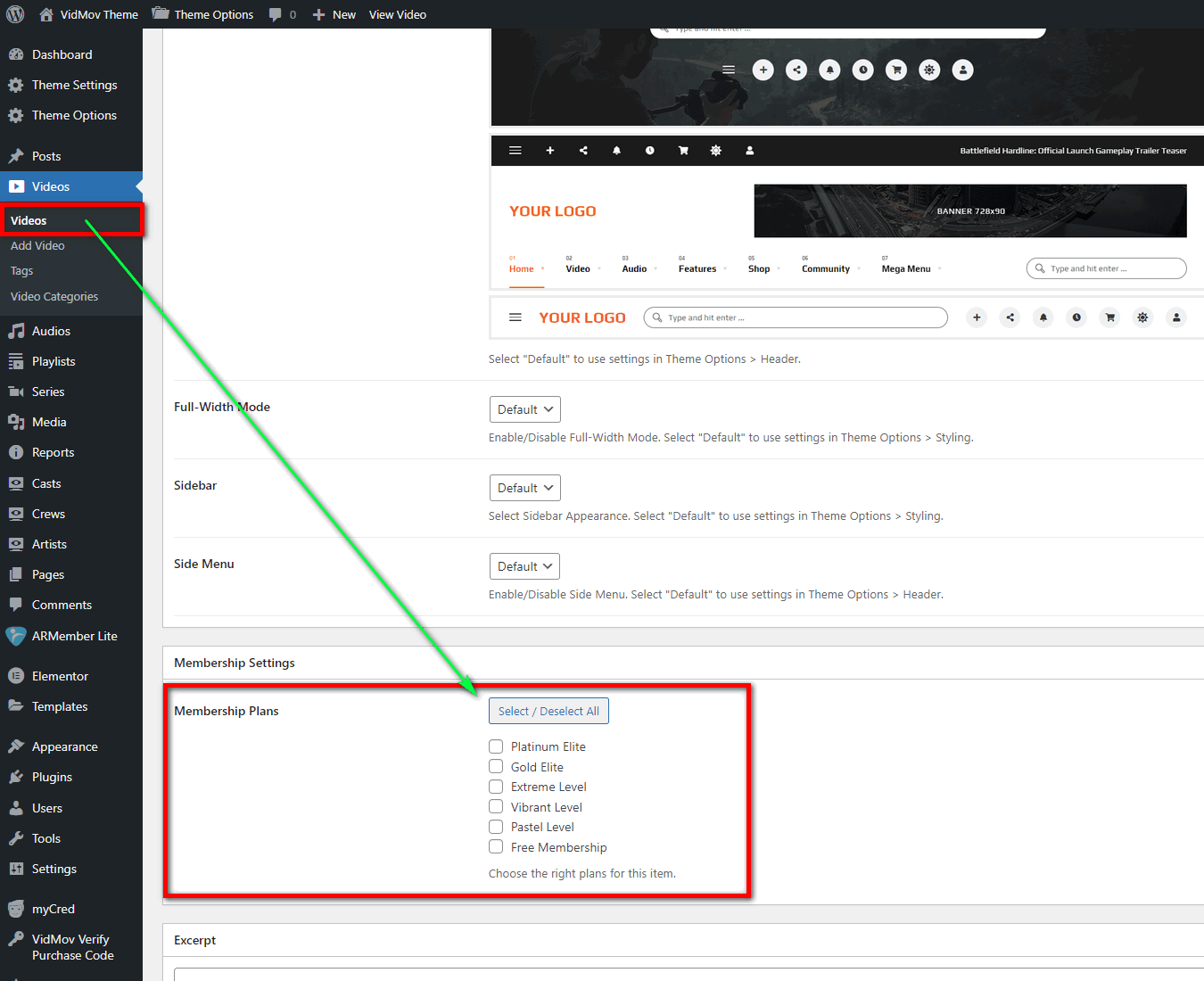
I use ARMember plugin according to the instructions, but it automatically redirects to the homepage instead of showing like your demo here: https://vm.beeteam368.net/video/emotional-arithmetic/Hello,
Please ignore the checkboxes from ArMember. You need to use checkbox from VidMov:
–
https://vm-demo.beeteam368.net/documentation/assets/images/doc-109.png
Thanks!
Hi, before buying the theme I would like to know something. Can I disable the uploading of videos and posts, leaving only the possibility to upload audio to users?
Hi mttmalaspina,
Yes, you can do it!
Thanks!
Hello dear beeteam368 Team When will you add video advertising options on video post submission form ? Thanks Regards
Hi,
No, VidMov will put this feature in each member’s profile. It will appear in early April, supporting VAST and Google Adsense ads
Thanks!
video player shortcode support?
Hello,
You can use shortcodes!
Thanks!
Hi I have a few question, please help me - How do I update my website to a new version? and me - How to make the “watch later, report” options appear in the video watch page without being hidden in the ”...” button (I see on the audio watch page these buttons are shown, not hidden. )
Hello,
1/ You can update it manually by downloading VidMov’s installation file and installing it as usual. WordPress will automatically recognize it and ask you to perform the update.
2/ Install the Envato Market plug-in to automatically receive new updates: https://vm-demo.beeteam368.net/documentation/#update
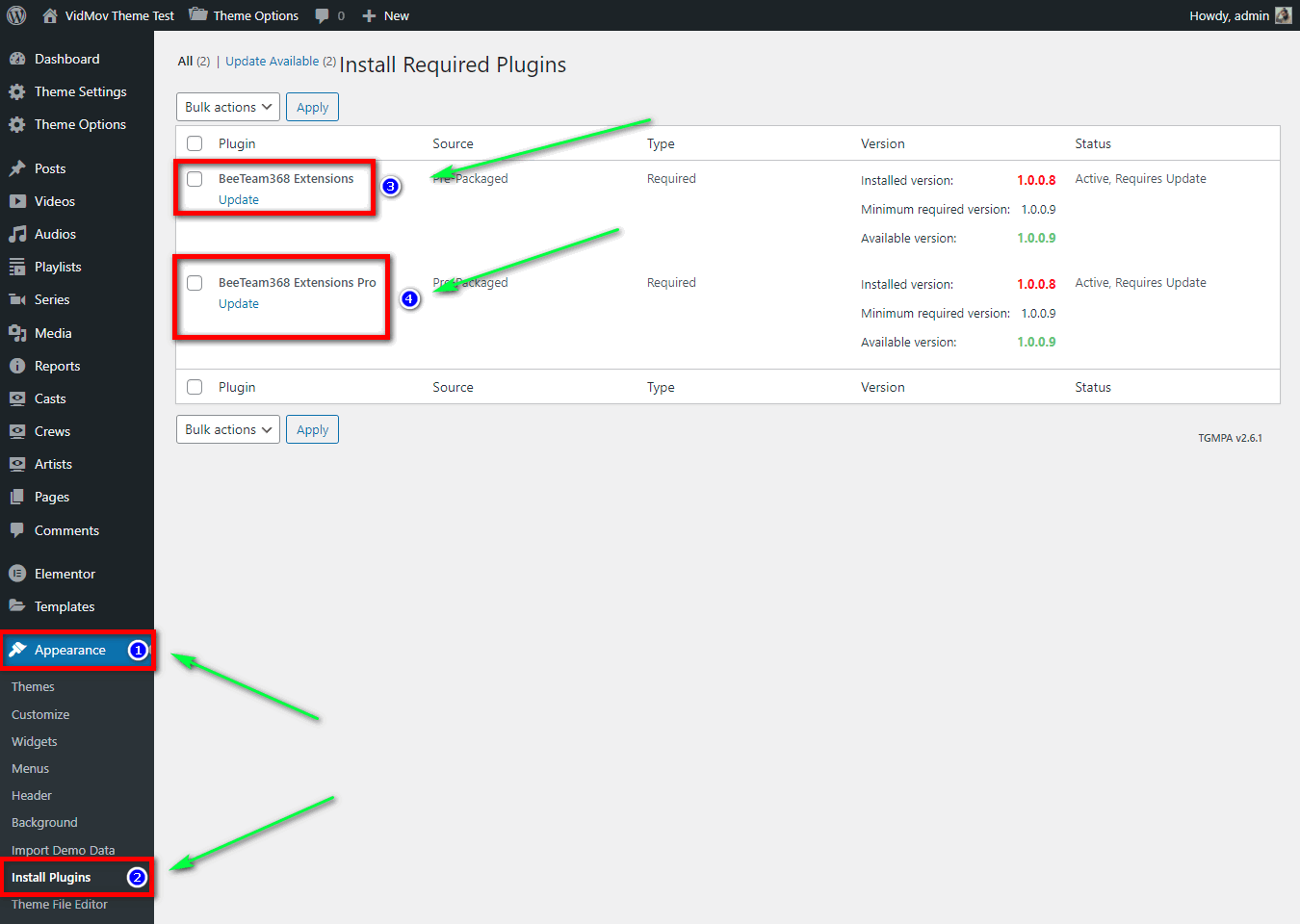
3/ Please note, after successful theme update, keep updating Beeteam368 Extensions plugin and Beeteam368 Extensions Pro plugin: https://vm-demo.beeteam368.net/documentation/assets/images/doc-134.png
4/ WatchLater & Report Icon: Currently, there is no option to sort these elements. Because the audio post has fewer tools, it doesn’t need to be hidden. When there are any updates for that region, we’ll let you know. Currently, changing its location is not possible.
Thanks!
thank you so much <3
I just updated successfully, but was asked to reactivate the trial license and received the following message please help me reactivate the license
“This domain name is already in use (” _ “)”
Ok Please try again!
Thanks!
thank you so much
How to edit User Profile page? Is there any default settings?
Thank you beeteam.
How to edit user “main-profile” page? There is no page named main-profile.
There are some fields I want to hide.
Hello,
It’s a page automatically generated by Theme My Login plugin.
It is not a basic WordPress page.
If you need higher supports, I think you should create a ticket through the support tab.
Thanks!
Which tool you recommend for creating Signup form?
How to auto redirect after login/signup to newly created User Channel-id page? There is a way to set where user is redirected after login/signup.
When choose redirect to Channel there is no content on the Channel page as there is most likely another redirect needed to redirect to the newly created channel.
Hello,
VidMov uses the Theme My Login plugin to perform registration and login functionality.
Currently, in TML’s basic login mechanism there is no option to redirect after successful login.
If you want to change the content on the login window, use the Loco Translate plugin, then find the texts in the Theme My Login plugin and translate them into your local language.
We use Theme My Login plugin because it can open login window via shortcode. It will be handy when the user needs to login and return to the current page to perform other tasks.
Thanks!
How to change content of the login pop up window?
hello my youtube auto fetch and bunny not working, do i create a support ticket for this?
just sent support ticket with info, ive been trying to figure this out for two days
Hello,
You should create a ticket through the support tab. But please note about quota from Youtube Data API V3 and PHP version you are using, because bunnyCDN feature needs to use on PHP version >=8.0.2
Regards, Nicole!
I need to be notified when someone uploads a video. How can do this? Right now, nothing. Not really practical to expect site owners to constantly login to see if videos have been uploaded. Not even an option for us. Please provide a fix for us please….even if we have to pay.
Hello,
We have released a version with this feature since 12/2 ( Version 1.0.9 )
Please update to the latest version!
The change log is at the bottom of the page, you can track the changes there: https://themeforest.net/item/vidmov-video-wordpress-theme/35542187
And please note that this is not a support area, private information is not allowed to be shared here for security reasons.
If you need technical support, please create a ticket through the support tab: https://themeforest.net/item/vidmov-video-wordpress-theme/35542187/support
Thanks!
Thanks. Also, I didn’t share any private info.