5515 comments found.

Hello, for a few days, the logo in the header and the slider images are completely pixelated on some web browsers (Chrome and Brave) while everything was still good a few days ago. It happened without making any updates or changes to the site.
Hi ARkevin, Thank you for the comment. There must be a reason for the change. We checked our demos with latest Chrome https://main.wprentals.org/ and it is working ok https://prnt.sc/mcFvAS_sLL_K (we checked retina and non retina)
Please use our client support http://support.wpestate.org/ to check your URL as well and compare views. This is also a private support where you can send us your site details (url and wp-admin access) if needed.
If you wish my assistance to register in support please send a message from here – https://themeforest.net/user/wpestate
Please note that our standard office hours are Monday – Friday, 9AM-5PM Europe timezone.
Thank you
I have purchased, installed and activated the wp-rentals theme package; thanks for this great product!
As I’m trying to “one click demo import” for the Office theme, I keep getting the error:
[ERROR] Failed to import “training5” (Media)
and the Features & Amenities are not uploaded.
Please, mind you that all server requirements are met; moreover, when I use the “one click demo import” for the Main Rentals Demo, everything is uploaded OK (incl. Features & Facilities).
Could it be that there is a bug with the Office demo? How can it be resolved?
Thank you in advance.
Hi aylinefthymiou, Thank you for the comment and feedback. I am happy you enjoy the theme.
The image failing to import, we will check that for the next theme update, but it may not be an important image (it may be an image from older demo version)
Features and amenities not being included, I am not sure why. We will check that too.
If you need our help to check the features and amenities for you, we can assist in support further. We can try to import again only properties from office demo, and features and amenities should import.
Please use our client support http://support.wpestate.org/ if you need further help. This is also a private support where you can send us your site details (url and wp-admin access).
If you wish my assistance to register in support please send a message from here – https://themeforest.net/user/wpestate
Please note that our standard office hours are Monday – Friday, 9AM-5PM Europe timezone.
Thank you
Thank you very much for your prompt response; great support as always! I have sent the request via the client support (#211654).
Hi, Thank you. I helped in support. Please check.
Everything resolved. Great support, thank you very much!
Wonderful, thank you for the follow up!
Translation of custom fields in WPML?
Hi Ocanos, Thank you for the message.
I can tell you what I know about WPML functionality
1. They register strings based on wpml-config 2. Custom fields labels must be saved in default language, then you access the page in the default language, and string translation finds them.
These are WPMl directions they sent to us https://help.wprentals.org/article/wpml-and-listing-custom-fields/
If these do not work, then please open a ticket in WPML support to help you check the directions they sent us. WPMl support is offered by WPML team and we help if we can based on their direction (which we document in our help as instructed by them)
Thank you
Hi Team
How to
Hi, The comment is not complete. Please resend the question to be able to help. Thank you
Hi, can i change this table?: https://ibb.co/PZ9RyVZ
I want to delete some columns
Hi, Thank you for the comment,
The fields you do not select to show in submit form / price details – will not show in the table either
https://prnt.sc/0ad31TJpQlQwEx – if you do not select price per weekend, it will not show in the table either.
Please use our client support http://support.wpestate.org/ if you need further help. This is also a private support where you can send us your site details (url and wp-admin access).
If you wish my assistance to register in support please send a message from here – https://themeforest.net/user/wpestate
Please note that our standard office hours are Monday – Friday, 9AM-5PM Europe timezone.
Thank you
Hi Support Team
We would like the pricing to be “per week” not per night. So could you please let me know how it is possible?
Regrds Deepak
Hello Deepak, Thank you for the comment.
We do not support book by week and for that reason we do not have price by week either.
I am not sure how I can help in this case.
The only thing we have is minim days and the possibility to use before or after price label to add a text you wish (like price per week), But all functionality related to price (sort by price, search by price) is for price per night or hour, as you set.
Thank you
Hi, is it possible to add search radius to advanced search form? Thank you.
Hi auzunov, Thank you for the comment. Radius search can only be enabled on half map, above the search, not in search form itself. We will add your question to the theme wishlist for further review.
Thank you
Hello to everyone! I have a big problem with my wpRentals theme. The menu on mobile devices does not working! I NEED HELP!!!
Hi iliask2, Please open a ticket in support http://support.wpestate.org/ to check the site and advise further.
If you wish my assistance to register in support please send a message from here – https://themeforest.net/user/wpestate
Thank you
Hi, I deleted the order but it was not deleted from the calendar, why?
Hi, I understand you talk about reservations/bookings. They must not be deleted, they can only remove from the calendar if they are canceled by owner.
That can only happen from User Dashboard -> My Bookings.
From here the owner can: Reject Booking, Issue Invoice and approve booking, or Cancel a confirmed booking.
If you deleted from wp-admin, the booking will not delete from the calendar and calendar is blocked.
Please use our client support http://support.wpestate.org/ if you need further help. This is also a private support where you can send us your site details (url and wp-admin access).
If you wish my assistance to register in support please send a message from here – https://themeforest.net/user/wpestate
Please note that our standard office hours are Monday – Friday, 9AM-5PM Europe timezone.
Thank you
sticky header doesn’t work now. do you know why it could be?
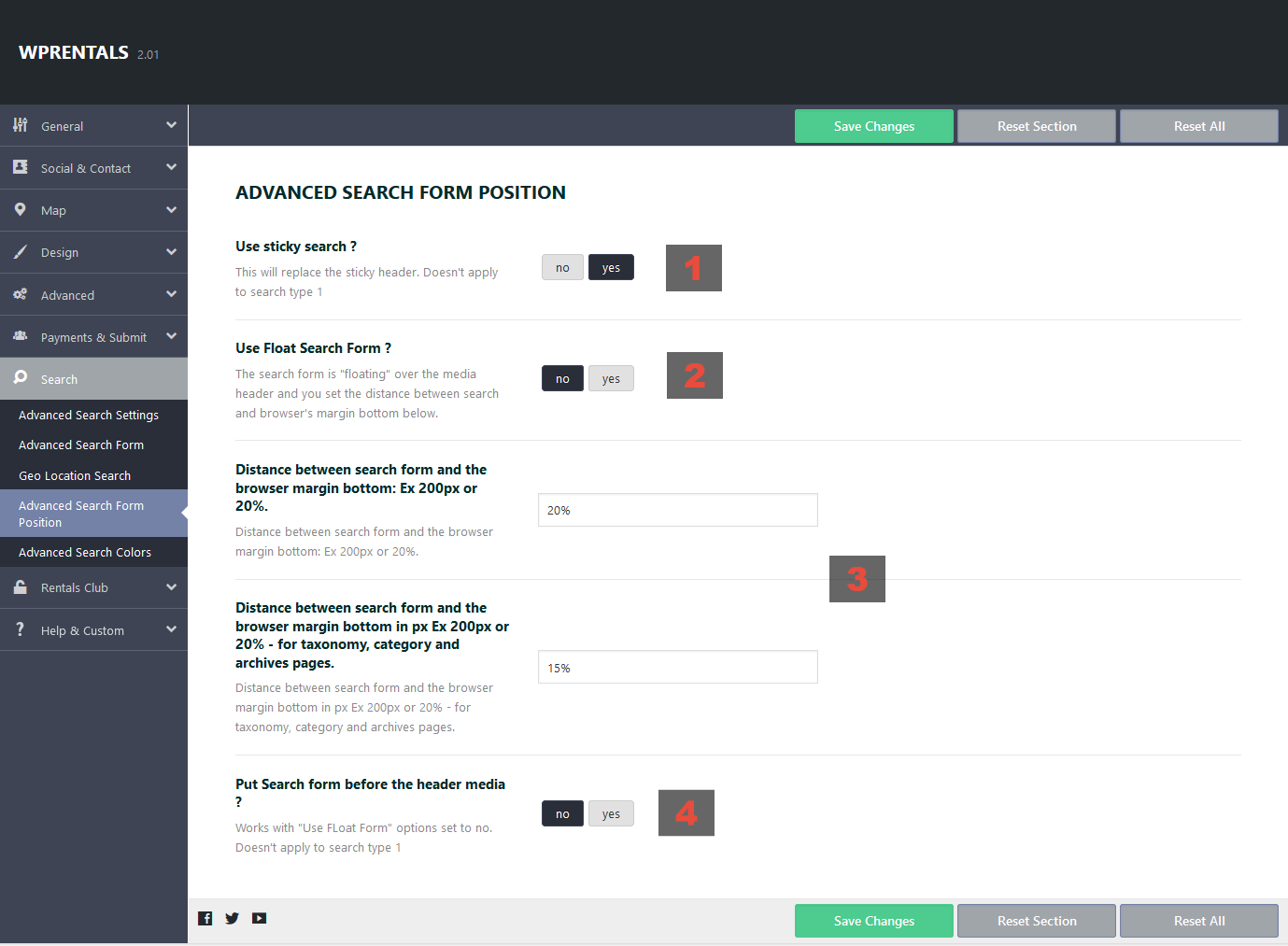
Hi, Please check if you enabled sticky search https://help.wprentals.org/wp-content/uploads/2018/09/Screenshot_2018-09-28-WpRentals-Options-%E2%80%B9-Rentals-%E2%80%94-WordPress.png That is the only option that replaces sticky header.
If sticky search enabled, check the browser console (there may be a plugin conflict blocking JS actions)
Please use our client support http://support.wpestate.org/ if you need further help. This is also a private support where you can send us your site details (url and wp-admin access).
If you wish my assistance to register in support please send a message from here – https://themeforest.net/user/wpestate
Please note that our standard office hours are Monday – Friday, 9AM-5PM Europe timezone.
Thank you
Hi there not sure if this question is asked before But i cannot find the theme pack file which containes all the homepage demo templates for elementor. i saw the video on youtube which didnot explained properly in terms of how to get the theme pack elementor templates. can you guide a little on it thanks
https://www.youtube.com/watch?v=d5LR2f7UxEo&t=48sHello, Thank you for the comment.
Download ALL FILES AND DOCUMENTATION from buyer account – downloads, unzip the file and you will find the folder with demo templates.
Please use our client support http://support.wpestate.org/ if you need further help. This is also a private support where you can send us your site details (url and wp-admin access).
If you wish my assistance to register in support please send a message from here – https://themeforest.net/user/wpestate
Please note that our standard office hours are Monday – Friday, 9AM-5PM Europe timezone.
Thank you
Hi!
We would really like to buy this wonderful theme. Has the per month booking feature been added? Can I request this through Custom Work?
Thanks
Hi leistraluc, Thank you for the beautiful message. We do not have plans to add monthly booking I am afraid. Long term rentals need different functionality (including recurring payments in some cases from what we could tell) – we would not be able to help with custom development either. Thank you
Hi, I have a pre-order question. How does the property owner receives his earnings? How can the owner withdraw his earnings? I believe the entire booking amount goes to the admin. Is there a way the owner can check his earnings and request for withdrawal or how does this work?
Hi, Thank you for the message. The theme does not support any type of payment to owner (from admin to owner or user to owner) There is no feature in the theme for this purpose.
We only have payment to site admin. Admin can collect only part of the booking (his service fee) and the rest will be managed between user and owner outside the theme.
If you need further info or want to test our theme, please send a message from here https://themeforest.net/user/wpestate
Thank you
Hi, my live site is appearing different from the wp admin site. The entire site is boxed instead of full width and the header images aren’t appearing. Can you assist?
Hi, Thank you for the message. Please send us wp-admin in support to check. In an out of ordinary situation, we need to see the wp-admin and verify further. Thank you
Hello, I have my users separate between owner and renter, how can I remove the default checked radio button on user registration? I find people are leaving it on default when they actually need the other option. Thank you
Hi, Thank you for the message. A default option is needed. I do not know if technically is easy to change in code what user type is default. Please open a ticket in support http://support.wpestate.org/ to check with development team if they can guide you to change the checkbox default to owner. Thank you
Thank you, I know how to change the default option (its this area in shortcode.php) but i’m going to continue trying to make no default option, im currently reading up on the ajax / jquery stuff  if($separate_users_status==’yes’){
$return_string.=’
<input type=”radio” name=”acc_type’.$type.’” id=”acctype0” value=”1” checked required>
’.esc_html__(‘I only want to book’,’wprentals-core’).’
if($separate_users_status==’yes’){
$return_string.=’
<input type=”radio” name=”acc_type’.$type.’” id=”acctype0” value=”1” checked required>
’.esc_html__(‘I only want to book’,’wprentals-core’).’
<input type=”radio” name=”acc_type’.$type.’” id=”acctype1” value=”0” required>
’.esc_html__(‘I want to rent my property’,’wprentals-core’).’ ’;
}
Hi, I am afraid we do not have technical help to set no default checkbox. We were not asked this before. But there may be an issue if nothing is set, as a user without user type selected will not have the dashboard correctly set either. Forcing using to select something if nothing is checked implies extra custom code to add.
The easy change is to change default checkbox. If you do not want to change default option the best I can do it guide you to check the existing code and to modify if further from your end as you want to, but you already seem to be able to find existing code. So I am not sure how i can help further.
Thank you
Hi, I installed a demo but the home page is blank after doing so.
Hello shalans, Thank you for buying the theme. I am afraid we have not seen this situation. We need to check the demo installation first of all, and we will do that asap.
Please use our client support http://support.wpestate.org/ to help with this. This is also a private support where you can send us your site details (url and wp-admin access).
If you wish my assistance to register in support please send a message from here – https://themeforest.net/user/wpestate
Please note that our standard office hours are Monday – Friday, 9AM-5PM Europe timezone.
Thank you
Hi! Your support team actually got back to me fairly quickly and I was able to sort that out. Thank you so much! Lovely support so far
Thank you! I am really happy we managed to help and thank you for the feedback as well.
hi guys, i know is late for you guys now when i write this.
but could you tell support to look at this ticket first thing in the morning please #210353
a customers booking is not showing for him in his backend anymore is all gone but i can see it in administrator so i am a little bit worried.
Hi, Thank you for the message. I have replied and waiting for your feedback. Thank you
Can iCalendar feeds uploaded to the wprentals booking calendar appear in different colors? For example: booking.com (blue), tripadvisor (red), airbnb (green)...
Hi Ocanos, Thank you for the message. We cannot differentiate the ical by the source (the ical is a common standard), but we will try to make a differentiated color for imported vs local booking in the next theme update. Thank you
Why does the “All in One Calendar” look so ugly and non-functional?!? Even in the demo it is broken https://snipboard.io/lzBHFf.jpg Please, do something or just remove it!
Hi, Thank you for the comment. The look changed with wordpress update, but there is a simple solution we can offer until we release the next theme update. Please use our client support http://support.wpestate.org/ to help you with the solution asap.
If you wish my assistance to register in support please send a message from here – https://themeforest.net/user/wpestate
Please note that our standard office hours are Monday – Friday, 9AM-5PM Europe timezone. Please open a ticket and we will assist tomorrow.
Thank you
I am looking features like your theme provides but i have one more query, can we add more than one staff member in one listing. For e.g.
Providers will be able to add their staff if they have any. Their staff will be published on the Search Map Professionals Tab, Search Map Popup, Provider’s Website, and Booking Process.
Customers can book specific staff also from the listed service.
Is it feasible?
Hi, Thank you for the message. We cannot set multiple people as owners to a listing. Only 1 owner can be set for a listing. Thank you
Sorry but i think i didn’t explained correctly. Just i need to add staff members. Like provider(Owner) can add their staff member(employee) into their listings. And if anyone booking the service then customer can select specific staff(employee) from that provider.
Is it feasible or not?
Hi, we do not have this option. A listing is added by 1 user, and no other users can be added to a listing by admin or owner.
Thank you