666 comments found.

Good afternoon. Template builders not working with wpbakery
https://www.powermoto.cl/error.jpgHello, @jorgem137,
Sorry for the inconvenience but it seems that you haven’t updated the Roles under the WPBakery page builder settings that’s why you aren’t able to edit the Templates with WPBakery page builder.
Please once go to your Dashboard > WPBakery > Role Manager > there under the Administrator tab > select the Post Types as Custom > and then check all the 4 options there (i.e. post, page, product and riode_template) > and save the changes there. After that please check back the Templates you’ll be able to find the option to Edit with WPBakery on them. See this image for reference: https://postimg.cc/7Gys3PBZ
Hopefully, it will get your concern resolved 
Regards don-themes.
Thank you very much, solved the problem
You’re Most Welcome!!
Hi, How do you show only the lowest prices in WooCommerce variable Products?
Hello, @meyssam2008,
Sorry to say that but this is not possible with theme options, by default WooCommerce show both low and high prices of the variable products so this requires Customization.
https://wpglorify.com/show-lowest-price-woocommerce-variable-products/
https://www.themelocation.com/how-to-display-minimum-price-from-multiple-variations-in-woocommerce/
https://stackoverflow.com/questions/43279746/woocommerce-show-only-one-price-for-variable-product-on-discount
https://wordpress.org/plugins/show-only-lowest-prices-in-woocommerce-variable-products/#:~:text=Go%20to%20your%20WP%20Dashboard,the%20plugin%20from%20WP%20repository.
Regards don-themes.
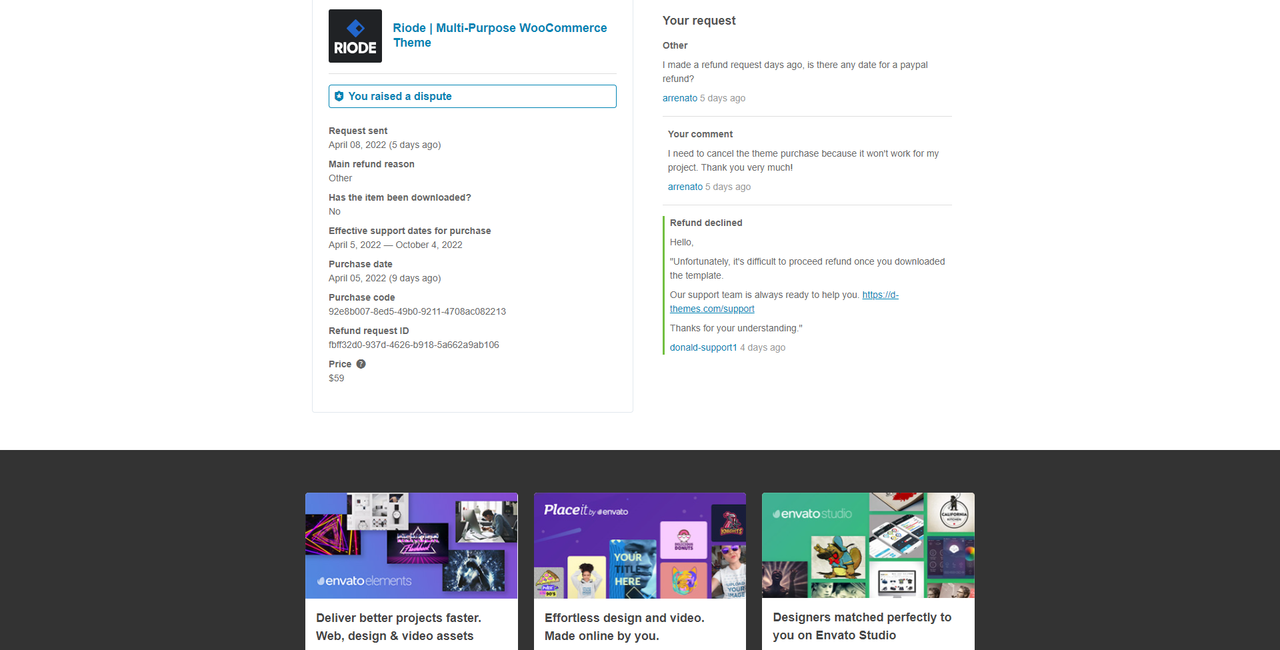
Hello, I bought the theme but I didn’t do the dawnload, why is it difficult to refund the payment? As I told you, your theme lacks features that are essential for my project, and the theme will not be of use to me.
https://i.postimg.cc/tTmnJvGk/disputa.pngHello, @arrenato,
Extra features requires extra Customization, so this is not the valid reason, as you have already downloaded the theme files as well, so if you have any theme options related issues you can contact us via our support system and for extra Customization, you have to contact the paid Customization team.
Regards don-themes.
Hello, ask what plugins I can use to translate the template since I have used several and it does not let me translate the template???
I need to translate into Spanish
Hello, @Mario_1979,
Sorry for the inconvenience that you have to bear.
The compatible Plugins of the Riode Theme regarding the Multilingual or Translation are the following ones. You can use any of the following that best meets your needs:
https://wordpress.org/plugins/woocommerce-multilingual/
https://wpml.org/
https://wordpress.org/plugins/polylang/
https://wordpress.org/plugins/qtranslate-x/
If you have only a single language to add the Translation for, then you can use the Loco Translate plugin too:
https://wordpress.org/plugins/loco-translate/You can read their official guide here too: https://localise.biz/wordpress/plugin/beginners
Regards don-themes.
Kirki Plugin / theme update failure:
Every time I try to updated the Riode theme I get an error: Update failed: already_used.
When I try to edit theme options I get “Kirki plugin is not installed. Please install it first to take a full control.”
From reading other comments I’ve deleted the Kirki plugin and reinstalled and I still get the same errors mentioned above.
I’m in some sort of loop; without being to updating the Riode theme, I can’t fix the Kirki issue.
Thanks!
I have submitted a ticket.
Hello, @kabraden,
I have reset your purchase code, now you can use the same purchase code for activation of your theme.
So you have to reactivate your theme again and then try to Install the plugins and I am sure you will not find this issue anymore.
And if yes then you have to contact us via our support system here: https://d-themes.com/support
Regards don-themes.
Hello, I have a problem with your theme on the interfodere.com site. We used a menu with anchors, but it only works in the home. When I am in the other pages (eg category or product pages) it does not work. Why? What can we do? Thanks
Hello, @jackspikedesign,
We have visited your Site. Sorry for the inconvenience but the Links added on the Menu Items on your Site are IDs of the Sections on your Homepage that’s why when you click them on the Homepage, it takes you to that specific Section.
When you are on Shop or Category pages, those Sections are not on those Pages that’s why on those Pages, these Menus link doesn’t work.
So, if you want to add a simple Menu with the Links, then try to replace those with a simple Menu or create a new Menu widget in the Header.
Regards don-themes.
Suggestion for a next update riode wordpress, riode shopify has the filters with automatic closing and add cart product listing with popup cart. This is sorely missed by woocommerce. Thanks
https://drive.google.com/file/d/1mtN5yMEgNh2wF3LDSHjMIdMEHllfM-sK/view?usp=sharingHello, @arrenato,
Thanks for sharing the suggestion/feature request with us, I am forwarding this to our development department for considering to add it in the theme, but I am not giving you the guarantee for that because please note that a theme cannot satisfy all requirements as it may occur theme heaviness. Sometimes it may require your own customization. So if the development department finds it fit with the theme environment then surely they will look through it.
Thanks for your understanding.
Regards don-themes.
Hi, i am faceing an issue but icannot login to your support to open a ticket. I have also send you an email but no naswer. Can anyone help me?
Hello, @nmoussas,
Please share your theme purchase code PDF file with me via my email: donaldaizaz@gmail.com so that I’ll check/verify and create the support account for you.
Regards don-themes.
Hello, could you post a video on how to create a size guide like in the demo. This will help a lot, teaching which table to use anyway. Thank you!
https://d-themes.com/wordpress/riode/demo-1/product/fashionable-womens-original-trucker/Hello, @arrenato,
We have made a brief Video from our Test Site explaining how you can create a Size Guide Block and use it on the Single Product Page. Please see this for reference: https://jumpshare.com/v/adzXtT6XQ83GTzEMSfTL
Hope this helps
Regards don-themes.
Hi there,
No contact page was imported. Is there a quick fix, please?
Many thanks,
Hello, @alphaomegabeta,
Can you please contact us via our support system with your site WP Admin Login details so that our experts will check it for you on your site and help you out in solving your issue.
Regards don-themes.
I try to create a support account but this error is coming up “Purchase code already used.” But I never used the code for support before.
Hello, @alphaomegabeta,
Please share your theme purchase code with me via my email: donaldaizaz@gmail.com so that I’ll check and help you out further.
Regards don-themes.
After updating to newest elementor pro, we get this erro: Fatal error: Access level to Riode_Element_Section::get_html_tag() must be protected (as in class Elementor\Element_Section) or weaker in /var/www/dealzrocket.com/public_html/wp-content/plugins/riode-core/elementor/elements/riode-section.php on line 133
Hello, @ThomasKjaer,
Sorry for the inconvenience but can you please confirm if you are using the updated Theme and Plugins on your Site. If that is so, then once try to check this issue by activating the default WP Theme on your Site too, If the issue persists on that too then you need to contact Plugin Support in this regard.
If the issue doesn’t persist with the default WP Theme, then please contact us via our Support System with your WP-ADMIN and CPANEL Login details so that our Support Team can check the issue on your Site and assist you accordingly. Here is the Support System URL: https://d-themes.com/support
Regards don-themes.
Hello Riode Team,
Thank you for your support, and your theme with which we can do a lot.
Could you tell me please how to disable the articles at the bottom of the product pages which are called “similar product”.
Thank you for your reply.
best regards,
Hugo
Hello, JVJH44,
We are glad that you liked our Theme and Support
Regarding hiding the Related or you can say Similar Products from the Single Product pages, there isn’t a direct option available in the Theme Options. So, you can apply the following CSS in this regard:
.product-single .related {
display: none !important;
}
Location to paste Custom CSS, please go to Dashboard > Riode > Theme Options > Custom CSS & JS > there in the CSS code section, you need to paste the CSS told above.
Regards don-themes.
hi i want to buy the theme with the discount, it says until march 25, but i can’t see the discount..what can i do?
Hello, @steban2,
Sorry to say that but the discount on the theme is no more, you are late, you have to purchase at its regular price now.
Regards don-themes.
Hello,
I’m looking for a way to integrate the “attribute guide” on the demo, but I can’t find how to do it.
Can you help me please!
Hello, @Saysai_,
To enable the Attribute Guide in the Riode Theme, you need to go to Dashboard > Riode > Theme Options > Woo Features > Attribute Guide > there you can enable it. See this image for reference: https://postimg.cc/PLkScRC2
Regards don-themes.
Hi,
I have done exactly as described in your post however I find myself with another problem, which is “the absence of a Size Guide block in my Riode Template” So I would like to know how can I create this block builder size guide with exactly the contents you have with your example.
Thanks for advance !
Hello, @Saysai_,
Sorry for the inconvenience but the Size Guide that you are previewing under the Theme Options > Woo Features > Attribute Guide is just an image to show. The Size Guide block doesn’t come with the Demo Import nor you can import it with the Riode Studio. But after enabling the Attribute Guide, you need to make your own Size Guide block with your choice of content in it by going to the Dashboard > Riode > Templates Builder > Block Builder. See this image for reference: https://postimg.cc/87JtxKZ1
After making the Size Guide Block, you need to go to Dashboard > Products > Attributes > there edit the Size attribute > and in that select your made Size Guide Block. See this image for reference: https://postimg.cc/MMnBGTFV
Regards don-themes.
Hi, i have bought this theme a few months ago but i didn’t install it yet because i have no time but i have noticed you are offering installation service for 50 USD.
does the installation service include customizing the theme such as creating the static pages (about / contact / services etc), categories and the home page or just installing it and importing the demo ?
Hello, @MrKhaledgad,
We will Install the Theme for you for free, Please contact us via our support system here: https://d-themes.com/support and it does not includes creating pages etc, as that is called site development and that requires Customization.
Regards don-themes.
I accidentally deactivated my purchase code and it won’t allow me to reactivate it when I enter it again. Please advise, thanks.
Hello, @ntronet,
I have reset your purchase code, now you can use the same purchase code for activation of your theme.
Regards don-themes.
Hi,
please reset my purchase code, thanks
Hello, @lukasmitana,
I have reset your purchase code, now you can use the same purchase code for activation of your theme.
Regards don-themes.
Hi ,Import demo after activation, home page normal. All other pages open in error?
Hello, @wydhzd,
Sorry to say that but there is no such issue with our theme, the issue must be on your site only, so if you have already purchased the theme then please contact us via our support system with your site WP-Admin Login details so that we will check it for you on your site and help you out.
Regards don-themes.
Hi,
I’m trying to use again the purchase code because my website was hacked. I moved the website on another hosting and tried to use the code. The error is “This code was already used in….” can you please allow me to reuse this? I just changed the hosting!
Let me know ASAP, please.
Many thanks,
Hello, @alphaomegabeta,
I have reset your purchase code, now you can use the same purchase code for activation of your theme.
Regards don-themes.
Thank you! However, the demo import works in the alternative mode only. The biggest problem is that in a customize mode or elementor/wp bakery looks awful. Is distortion like is something wrong. https://prnt.sc/FbmuaZw5WX2K
Please help
Sorted. It was the php version. Doesn’t work with newer php versions.
Sound’s Good!!
Hi. I just bought your theme. I want to build a demo first and then move that demo to the main website. But if I don’t activate the key in the demo, I can’t use the full features. Do you have any way? Main website: https://bago.com.vn Demo website: https://demo.bago.com.vn
Hello, @huuducqt,
Please read and follow the instructions written in this article: https://ptheme.zendesk.com/hc/en-us/articles/360020798698--25-Transfer-Re-Use-License-from-Test-to-Live-site-Only-For-Testing-Purpose-
Regards don-themes.
newsletter how to turn off this popup
Hello, @huuducqt,
To hide the Newsletter Popup for the time being on your Site using your Page Builder. You need to edit your Popup with the Page Builder you are using on your Site > there you’ll see a diamond-shaped icon called Riode Settings, click on that > under that open the Display Condition > under the Display Condition, you can remove the Condition defined and the Popup will be hidden from your Site.
See these images for reference:https://postimg.cc/rKNv22Qm
https://postimg.cc/ppVpHRRc
Regards don-themes.
Thank you. I have another question. how to center element in attached image: Image: https://postimg.cc/SX38xnFD
Hello, @huuducqt,
Please try out the following CSS in this regard on your Site and see if this works:
.slider-icon-boxes .elementor-icon-box-content {
flex-grow: 0 !important;
}
Location to paste Custom CSS, please go to Dashboard > Riode > Theme Options > Custom CSS & JS > there in the CSS code section, you need to paste the CSS told above.
Regards don-themes.
Thanks! I got it. Another question. 1. How to edit background of slide at homepage (Image attached). 2. How to turn off “sales popup”.
image background: https://postimg.cc/06Z6zZMk Sales Popup: https://postimg.cc/bDWwn5zh
Hello, @huuducqt,
1. To know how you can add/change and edit the Slider Images, please see this Video for reference: https://www.youtube.com/watch?v=Ip6eFntLjuo&list=PLZYd0etXngWWZHRRfMPN4vJLq0OJVDLYm&index=14&t=10s
2. To turn off the Sales Popup, you need to go to Dashboard > Riode > Theme Options > Woo Features > Sales Popup > there select Do Not Show from the dropdown and it won’t show on your Site. See this image for reference: https://postimg.cc/4ng991z5
Regards don-themes.
Thank you so much <3. Very enthusiastic!
You’re Most Welcome!
Hi. I have another question. Why in the website homepage settings (phone interface) shows 2 elements in the same row, but in fact, it’s down the line. Don’t know how to put 2 elements in the same row on the mobile interface. Illustration below.
https://postimg.cc/6T8kBtNWHello, @huuducqt,
Can you please contact us via our support system with your site WP Admin Login details so that we will check it for you on your site and help you out accordingly.
Regards don-themes.