2274 comments found.

Excuse me, can you help me this problem: I just bought this theme last week, everything is fine. But since yesterday I can’t upload pictures. It says “Failed to write file to disk” What can I do to fix this problem? Sorry for my bad english, Hope to hear from you soon
Hi there,
Thanks for choosing Zeen, but please login with the account that purchased the theme, or open a ticket at http://codetipi.ticksy.com and someone will be happy to help.
Codetipi
there is content on it, how to fix that ?
thanks
Hey again,
DId you open a ticket about this already? Please do so if not, and someone from the support team can help investigate.
Codetipi
I see that on the desktop, there is a option to have previous/next buttons on the screen.. Anyway we can have swipe left/right to navigate on mobile/tab as well?
Hey there,
Thanks for the interest in Zeen 
Which previous/next buttons are you referring to exactly? Is it the ones to load different posts in a block? Because that does appear on mobile too.
Codetipi
Hello.. On this link https://demos.codetipi.com/zeen-food/lunch/pea-dill-crustini/ On the desktop, there are arrows on the either side of the browser to go to next/previous post.. But these are not visible on the mobile.
Oh I see! That is the second design option for the Next/Previous post buttons. I’m afraid that isn’t really possible to have on mobile as mobile screens are so small so having fixed blocks on either side of the screen becomes too intrusive.
The first next/Previous post block design option outputs at the end of the post content area and is always visible on desktop and mobile.
Hope this helps.
Codetipi
Possible bug? Hi guys – just working on the CTA block today in Tipi Builder. I noticed when I go to edit some text, more often than not, the white pop up edit block is hidden behind the block so I can’t access the edit buttons e.g. font colour, link, text size etc.
Just thought I’d mention it – hope you’re keeping well.
Hey there,
Hm I’m not sure I’ve seen that, is it hidden behind another block? Can you move the block to another location to edit it and then move it back? Hope this helps!
Codetipi
Example is the Thumbnail block. When I edit the title, say I want to change the text colour, the pop up text edit box box is half hidden by the default edit sidebar on the left. The only way to get to it is to close the sidebar (not a big issue) – but I’ve also had the same problem with it hiding behind other blocks. I’ll note when and where it happens and report back
Okay please do, I’m not 100% sure what you’re seeing and no one else has ever reported anything like this, so would be interested to see.
Hi codetipi – hope you’re well.
Just an observation but I’ve used the Main Logo Override on a couple of categories today – the logo change works perfectly on Desktop (and there were big cheers all round!) but sadly there’s no logo change on the mobile view. I wondered if there was a setting I am missing somewhere? Be grateful for your advice. Many thanks, Wakie
Hey Wakie,
Ah interesting, I don’t think that option applies to mobile, will add to the dev logs to investigate. Thanks for reporting!
Codetipi
Tipi : Error : DS
and i want to know how to edit homepage
Hi there,
Please open a ticket at http://codetipi.ticksy.com for all theme support. Someone from the friendly support team will happily try to help. Thanks!
Codetipi
ok thanks already sent it , monday – friday answer right ?
Yeah it’s Mon – Fri, hope you got a response already
¡Hola! Creo que las últimas versiones de Zeen podrían contener un error. Diversos usuarios me comentaron hace unos meses que no les cargaba el contenido desde tablet, pensaba que era un problema de la caché del usuario. Desde móvil y PC, funciona sin problema.
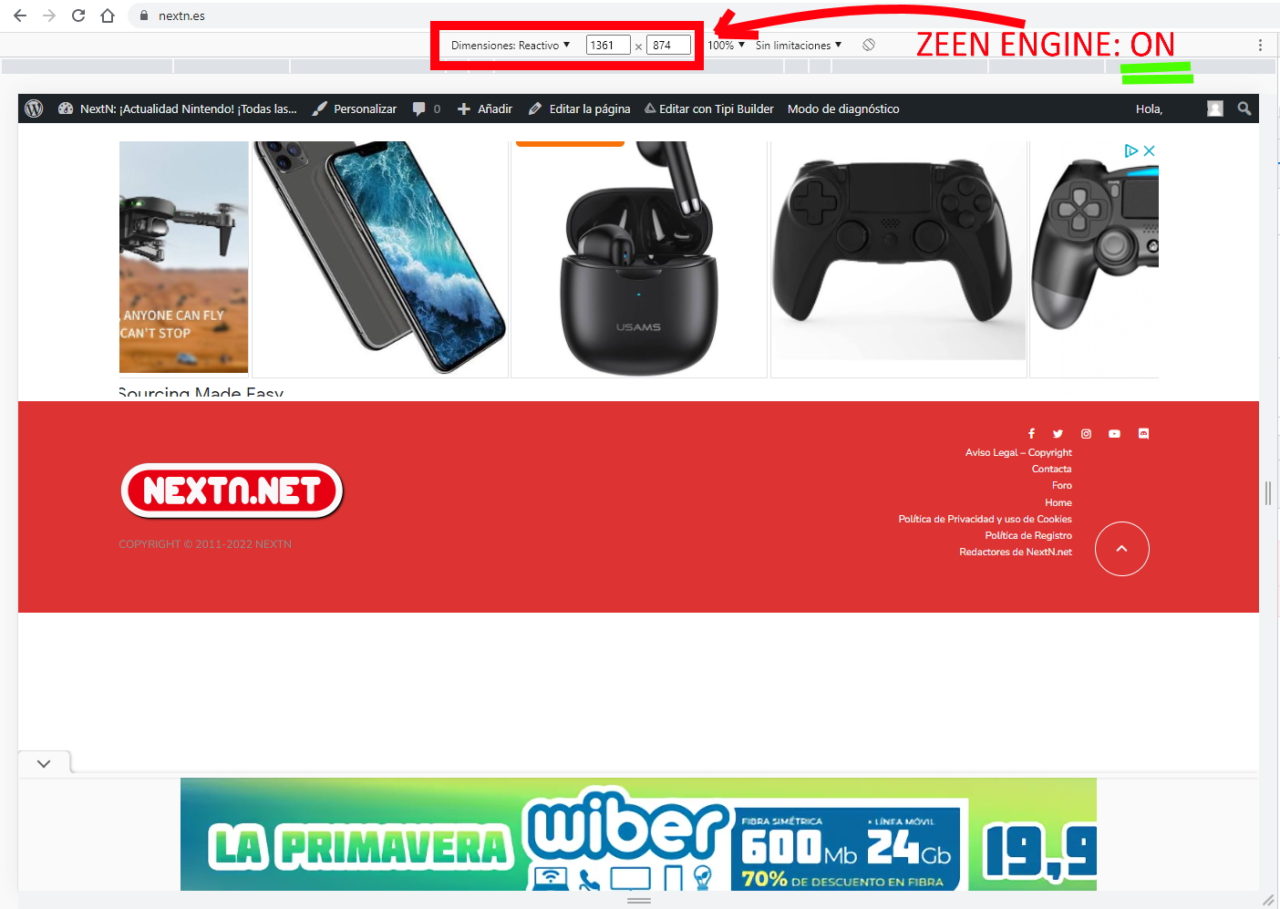
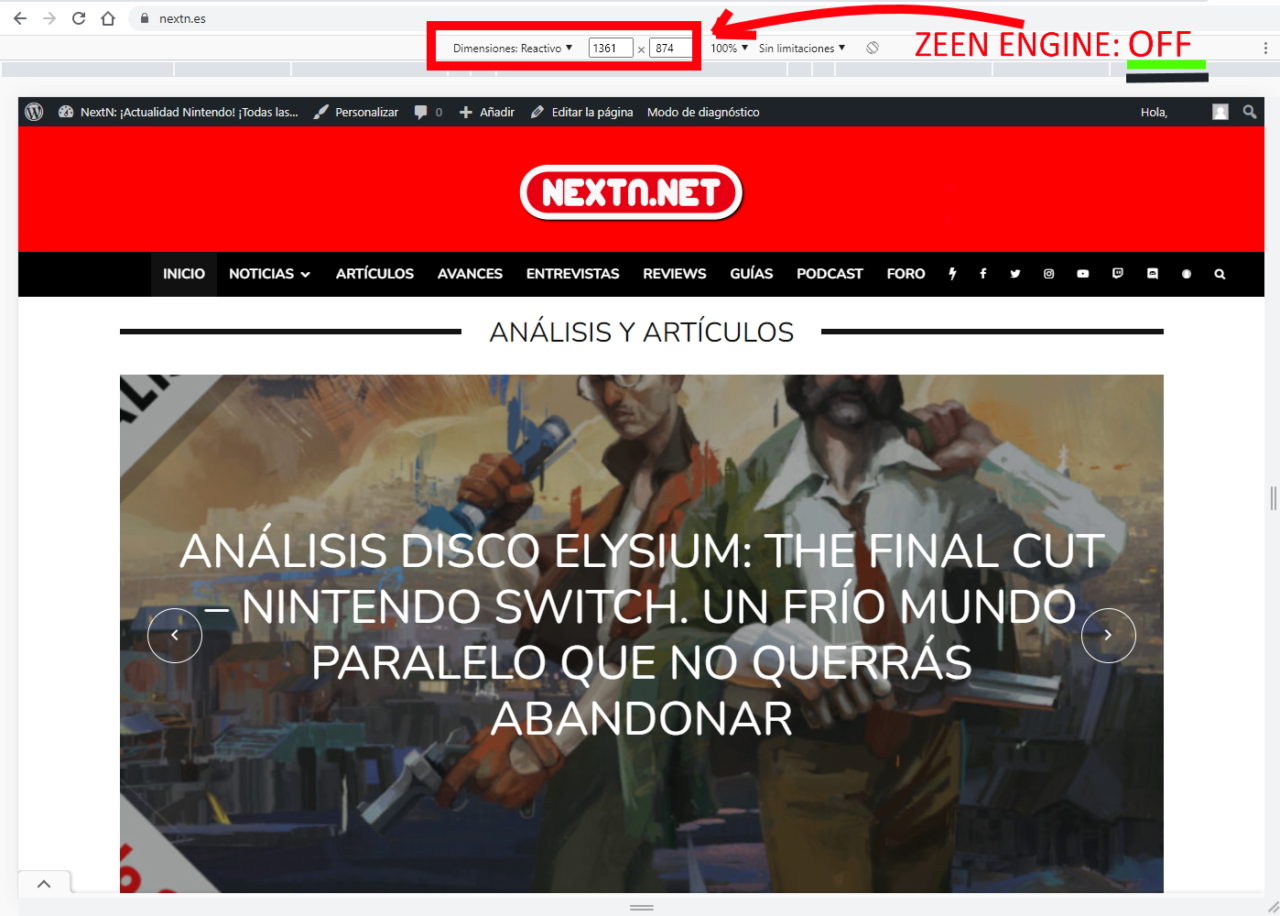
El caso es que hoy he estado haciendo pruebas (ayer actualicé a la última versión de Zeen), y he podido detectar el error. Cuando trabajas en algunas resoluciones los contenidos no cargan. Por ejemplo ocurre con resolución 1361×874.
He probado el modo diagnóstico de WordPress y he desactivado TODOS los plugins: el error solo sucede con Zeen Engine activo. Si desactivo Zeen Engine, el contenido carga (por supuesto, no funcionan las cosas de Zeen Engine). Activo Zeen Engine, y el contenido “no carga”.
Ahora mismo se puede reproducir el error en mi web (he activado todos los plugins, dado que solo ocurre con Zeen Engine)
Mi web por si puedes estudiar el problema:
https://www.nextn.esHe subido estas dos imágenes (de forma temporal) para que se vea el problema:
ZEEN ENGINE ON: https://www.nextn.es/wp-content/uploads/2022/04/Zeen-engine-ON.jpg ZEEN ENGINE OFF: https://www.nextn.es/wp-content/uploads/2022/04/Zeen-engine-OFF.jpgEl gran problema que tengo es que si fuese otro plugin, buscaría alternativas o desactivaría, pero al ser Zeen Engine no puedo desactivarlo 
Hey Alias79,
Please open a ticket at http://codetipi.ticksy.com for all theme support. Someone from the friendly support team will happily try to help. Thanks!
Codetipi
But I am not requesting support, I am reporting a serious bug that may be affecting all users, or part of them.
You misunderstand the approach of the support. If someone needs something specific, or a specific error that occurs to them with their installation or needs support for their specific installation, then the ticket system is logical, because they require personalized support.
When something like this happens to me, I look for a solution, or I could consider renewing the support… although I have to say that during the first year I opened tickets that did not get a solution, or were solved after several years. I didn’t complain, because I understood that you must be overwhelmed, and because of the great admiration I felt for Cubell and his work, who always treated me very well, also offering support in Spanish.
I’ve switched from Valenti to Zeen, and I’d jump right into the next song I develop, just for that respect. Although I don’t know if he is still in the project today I don’t know if there have always been several of you, but it gave me the feeling that I was communicating with just one person. He always treated me close and truly good.
To open a case of a theme bug, you should have a place where you can report them. In this case, it is a serious error that occurs with ALL plugins deactivated, only activating Zeen and the Zeen Engine plugin.
I fully understand that not all requests can be met, also for free, but a theme should have at least one place to report bugs. Nor is it logical to do it in this place, in the comments, but there is no other way of communication.
So, the policy that you adopt in the face of a possible critical bug, which makes it not load any content, is not even studying it. That is, you will expect someone who has support to post the question about this possible error that occurs with all plugins disabled, but with Zeen Engine active.
I say again that I understand that general themes are not supported, but you must have some kind of mailbox to check for bugs.
Hi there,
The theme does not have any known bugs, you can check the demo sites. But either way, you need to open a ticket if you are experiencing something and want to talk to the support team and for them to investigate. Thanks for understanding.
Codetipi
As you know, the test sites do not collect all possible scenarios, but very controlled ones. The installations of your clients, present and future, can be very different from those of the test sites. This is surely a bug that can affect everyone. If there is no way to be able to report it, it seems to me to be a very serious shortcoming for future clients who could find that their content is not displayed in certain resolutions, as well as a lack of respect for all of us who have been trusting your themes for years.
We are talking about a bug, not a question of personalized support or help.
If you have run into an unknown bug, you need to open a ticket so the support team can invesitgate. If it’s a theme bug (more often than not, reported “bugs” are a site setup/server/plugin/custom code/etc issue). This is how every digital service (And real life services) work :/
OK, your new way of proceeding has become very clear to me. I have finally found the Zeen function that causes this error, and I have managed to correct it. It is of course a function that did not cause this problem before. He left a couple of videos so you can see the error, and it’s already fixed, in case you help someone to see it.
ERROR https://youtube.com/shorts/8g-3BsRqGt4 ERROR FIXED https://youtube.com/shorts/tPBNtdaR8U4
And here my last communication in this comments section. It is somewhat sad, because the communications with you have always been very pleasant. I wish you lots of luck. They really have been wonderful years, I’ve been a real fan of your work, and I’ll probably still buy everything that comes from Cubell, if he’s still at the helm of the project.
That doesn’t look like a theme issue though, it looks like your server cache isn’t creating separate cache buckets for mobile vs desktop or something along those lines. But I’m happy to hear it’s all okay now
Hello I purchased this theme months ago but am finally able to move forward with plans to upgrade.
Our previous theme had ‘hero’/featured images for posts to be set at 980×551. I can’t see anything in documentation about the sizes for images to be used is there something I can read to brush up?
Additionally, regarding the Let’s Review plugin I am curious if there is a way to add a Recommended/Not Recommended option in lieu of 1-10 or 1-5?
Hey Bpash,
Please open a ticket at http://codetipi.ticksy.com for all theme support. Someone from the friendly support team will happily try to help. Thanks!
Codetipi
Codetipi
Zeen 4.2.4. Post Problem
i believe that the post big hero height 50% screen height does not work …
looks like it’s either native or 100%
Hey Leemarr,
This isn’t a theme issue, it looks like a gallery post format without a gallery set, and gallery images are not cropped. Change it back to normal post format. If you need further help, please open a ticket at http://codetipi.ticksy.com
Codetipi
Hello, I’m a translator and I translated your theme into Turkish for a friend, so I saw your theme for the first time thanks to him (if you reply to my email, I can share the 100% translation with you). I want to buy your theme for myself, you have created a really great theme. However, when using your theme in landscape mode with an 11 inch tablet, the header disappears. You can see it at https://demos.codetipi.com/zeen-robots/. Will there be a solution for this in the next update? This is the only bug that keeps me from buying the theme.
Hey there,
Thanks for that, but the theme is already translated into Turkish. If you’d like to update some of the translations from it, once you purchase the theme you can open a ticket at http://codetipi.ticksy.com and share it there. The support team will check it over and then include it in the next theme update
Regarding the issue, I can’t see it from my testing. But again, if you purchase the theme and experience any bugs, you can open a ticket and report it. Just share the exact URL it can be seen + screenshots, and the support team will investigate and if it is a theme bug, it will be fixed via a theme update.
Look forward to welcoming you to the Zeen family
Codetipi
Yes, your theme has been translated into Turkish, but the translation is unfortunately very bad and almost all of it is wrong, so I translated it again. Just wanted to do you a favor but you’re rejecting that. And you guys not admit a serious mistake in your theme. Examine your demo pages with a tablet. When you rotate the tablet, you will see that the header has disappeared on some of your demo pages. I tried with 2 different tablets and Chrome Devtools and the result is the same. Denying the error here doesn’t make it go away.
Check zeen robots demo in 2560×1600 resolution
I did, and I can’t see any issues. Can you share a screenshot of what you’re seeing?
Header disappears, use landscape mode in homepage, then open an article and you will notice that the site logo is not visible.
As I mentioned, I checked and I can’t see any issues. Can you share a screenshot of what you’re seeing?
Hi again,
I can’t recreate that at all. What tablet exactly are you using?
Codetipi
Hi, I want to report an issue https://prnt.sc/VdZjsTIqeWVV
Hi Lao,
Please report issues like that to the support system as that is where the official Codetipi product update workflow starts. But don’t worry about that, that is a warning that causes no issues. It would only happen inside your admin widgets area too, doesn’t affect the frontend at all.
Codetipi
Hi. I downloaded this theme in 2019 for my old site which I unfortunately lost. I’m creating another website and have tried to install the theme’s .zip plugin file on wordpress but I get an error message (as below) and I’m not sure what to do…
“Installing plugin from uploaded file: themeforest-4c6OwIyy-zeen-next-generation-magazine-wordpress-theme-wordpress-theme.zip Unpacking the package…
Installing the plugin…
The package could not be installed. No valid plugins were found.
Plugin installation failed.
Go to Plugin Installer”
Your help would be much appreciated.
Hey Stephanie,
It looks like you tried to install it as a plugin, but you need to install it as a theme.
If you require further please open a ticket at http://codetipi.ticksy.com and someone from support will happily help out.
Thanks
Codetipi
How can I update the theme?
One more question. TipiBuilder is not showing. Is there any setting I should touch? Is it operated with plug-in?
Hey Leo,
Please open a ticket at http://codetipi.ticksy.com and someone from support will happily help out.
Thanks
Codetipi
Hello, I have the paid Zeen theme but I am looking for the 30+ prebuilt websites that is supposed to come with it
Hi Webmaster249,
I’m afraid to say there is no registered purchase with your account. Please login via the account that purchased the theme or open a ticket at http://codetipi.ticksy.com
Codetipi
HI Friends,
I can not figure out how…or maybe there is no functionality….to use the gallery as a hero for a post page. Is that possible? Ultimately, I am trying to use a slider in a hero….to develop a villa rental page with images of the villa in the hero. What am I doing wring?...or can you assist with suggestions?
Greg
Hey Gregorio,
Yeah you can do that. A gallery post type outputs the gallery you set as the hero and works with all the hero designs/shapes/sizes:
https://demos.codetipi.com/zeen/artistic/london-guide/ https://demos.codetipi.com/zeen/fashion/chasing-shadows/ https://demos.codetipi.com/zeen/artistic/the-hunger-games/Hope this helps but if you need further assistance, please open a ticket at http://codetipi.ticksy.com and someone will happily give you a hand.
Codetipi
Hi, seven days and I am still waiting for an answer to my ticket (2988191). Why the support is so slow?
Hey Lao,
Your ticket was answered earlier today, but please bare in mind that support can get very busy, and on top of that your ticket has lots of customization requests, which isn’t part of Themeforest theme support. Even though we try our best to help where we can, this should not be the expectation.
Hope this info helps.
Codetipi
Hi, I noticed an issue https://prnt.sc/9hCxV0WjNW5L while I was checking your demo
Ouch that doesn’t look good, looks like a broken cache! But I tested it just now and it all looks normal. Is it still the same for you? If so, is that the main Zeen demo? Thanks for reporting.
Hi I checked it again and the issue is still there (res 767) https://prnt.sc/GUmlaWYD-axj
So weird! I can’t see it, even at 767 res. I have just refreshed the demo cache though, could you please check one last time? Thanks for the help.
Ah okay so it’s literally only at 767 width. The good news is that there is no device in the world that is exactly that width, but I’m interested to understand what is going on exactly, because I tried it on Chrome and Firefox and set it to 767 but it doesn’t do that. What browser and operating system are you using to see that?
How can I modify “wp-content/themes/zeen/inc/core/template-tags.php” this file from the child theme? example – “wp-content/themes/zeen-child/inc/core/template-tags.php”
Hey there,
Please open a ticket at http://codetipi.ticksy.com for all theme support.
Thanks
Codetipi
Login Ajax is updated to 4.0, please update Zeen for compatibility.
Thanks
Hey there,
They changed a lot of things, so this will take a bit of time but it is going to happen.
Codetipi
Hi, I think to find a design bug for the WooCommerce product filter widget. The Zeen theme widget did not report the correct design hierarchy (screenshot my blog: https://prnt.sc/kzW6HdlPc4c4). Normally should be similar to this https://prnt.sc/VFNs-AeoeqCk. Do you know how can I do to fix it? Thanks
Hey Gerardo,
Ah interesting, please open a ticket at http://codetipi.ticksy.com and share the exact URL that can be seen so the support team can investigate and find the exact cause and possible fix.
Codetipi
Hi, i don’t have the support, my account it’s expired, but i think it’s a theme issue. My website link: https://gerardopandolfi.com/categoria-prodotto/sportwatch
You’ll need to renew your support for any kind of theme support, please do it and open a ticket. Someone from support will happily try to help
Good Morning, i have a request from my client and i don’t know how to do it. Is it possible change the Slide-In Menu icon? Thanks (screenshot: https://prnt.sc/E1rYwZUPeS0P)
Hey Gerardo,
What would you like to change it to? If it’s another existing theme icon, then yeah. Open a ticket at http://codetipi.ticksy.com and someone can help out with that.
Codetipi

This item was featured on ThemeForest

Power Elite Author
Contact the Envato Market Help Team