1882 comments found.

Hi – can hotel transactions now be downloaded as csv?
Hi,
Unfortunately, we don’t have that feature :/
Good day,
Please. is it possible somewhere to edit existing column items from the main page of the website? In the editor or DB? Somehow switch to HTML code editing. I can not find it. Thank you.
Hi,
This data is stored in the Custom fields, but it is not stored as HTML so it might be difficult to edit.
Instead of that, you can only update the .js files from the new version of the theme to fix the page-builder issues in your old theme. Here’s a list of changed files: https://support.goodlayers.com/document/changelog-hotelmaster/
Hello, thank you for your help. It helped me a lot. Have a nice day.
Hello, I tried your recommendations and everything is ok. I sent you a message from the page you sent me with the data of my website, I await your response to know what happens. Thanks a lot.
Thanks, we’ve replied to your email.
Hello, everything is the same. It does not work. Also, the “Goodlayers” menu in the image shown in the tutorial does not appear on my site, why is this happening? Cheers
Hi,
There shouldn’t be any issues with the latest version of the theme, make sure you are using the 4.1.5 version.
If it still doesn’t work, this may be happening because of a conflict with another plugin. Could you try this after disabling your other plugins and see if it helps? If that resolves the issue, you can reactivate them one-by-one and see which one is causing the trouble.
If that doesn’t fix it, please send the site URL and WordPress username-password so we can take a look: https://themeforest.net/user/GoodLayers
This theme is supposed to have a menu called ‘Hotelmaster’, not ‘Goodlayers’: https://youtu.be/qKqsAUj5MMM
Hi. I have a problem. page builder not working, I can’t make any changes as the edit window doesn’t open. What happened?
Hi,
Please make sure that you update the theme to latest version in order to use with WP6.0 Also, by updating the theme, please make sure that you update GoodLayers’ Plugins as well and please clear browser cache after updating.
You can follow this : https://goodlayers.ticksy.com/article/1893/
Please also make sure that all your being used plugins are compatible with WP6.0 as well.
Hello, unfortunately after a few years the website that was set up became very difficult to use  The background stopped being displayed, the sliders don’t work and some other GoodLayers functions also stop working (room rotation on the start page, you can’t edit existing column items (or create new ones). The website is gradually looking very bad and we are looking for a new solution that will keep it up to date.
Hi,
Please make sure that you update the theme to latest version in order to use with WP6.0 Also, by updating the theme, please make sure that you update GoodLayers’ Plugins as well and please clear browser cache after updating.
You can follow this : https://goodlayers.ticksy.com/article/1893/
Please also make sure that all your being used plugins are compatible with WP6.0 as well.
Good day,
thank you for the suggestion. We have a number of manual changes to the code through the editor on the site because there were bugs or parts we had to edit. Moreover, many words could not be translated otherwise.Is there another way, please, where we can change existing column items? We are only concerned with the content of one column items.In the coming months, we want to do a complete reconstruction of the website. If the updated theme works well, we can keep it.
Thank you. Erik
Good day,
is it possible somewhere to edit existing column items from the main page of the website? In the editor or DB? Somehow switch to HTML code editing. I can not find it. Thank you.
Hi,
This data is stored in the Custom fields, but it is not stored as HTML so it might be difficult to edit.
Instead of that, you can only update the .js files from the new version of the theme to fix the page-builder issues in your old theme. Here’s a list of changed files: https://support.goodlayers.com/document/changelog-hotelmaster/
Hello, thank you for your help. It helped me a lot. Have a nice day.
How can I add a flag for privacy acceptance in the booking request form of the booking system (the site does not make a reservation but a reservation email is sent)? Which template should I edit?
Hello,
You need to customize this in the gdlr_get_booking_contact_form function in the \wp-content\plugins\gdlr-hotel\include\gdlr-booking-item.php file.
Hi!
Right now if a user selects a room and it is unavailable for a one of the days in the selected period, the hotel says it is closed.
We are wondering if there is any way to show rooms that are available during the period instead
Hi,
This message is only shown if all the rooms are blocked/booked on a particular date. It should show other rooms if they are available.
Feel free to send more details along with the login info if you want us to take a look: https://themeforest.net/user/GoodLayers
What about the built in calendar selector? Is there a way to make it start on Sunday instead of Monday?
Sorry, there’s no option to change the calendar.
Hi there, just a quick question: is it possible to disable the reserve box? I think hiding it using css, but may be there is also an option I can’t find in the documentation
thanks
Hello,
Yes, it can be disabled in the wp dashboard > hotel options > booking page settings section.
Hi there, I have a website and i’ve tried updating the theme, rolling back versions, updating the plugins / wordpress etc but no matter what I can’t edit a module in the page editor (i.e. the Testimonials block). When I click the orange cog icon on a block, it does nothing. Can you assist?
Hello,
Updating the theme should’ve fixed the issue, could you try clearing your browser cache and see if it helps?
If not, try this after disabling your other plugins and see if that solves the issue.
If it still doesn’t work, please send the wp login details using the form here and we will take a look: https://themeforest.net/user/goodlayers
Thanks, I’ve just emailed you over the logins etc.
We have two running hotels with almostly same content , can we purshase one or two liscences and then duplicate the website from the first created one ? Thanks
Hi,
If you’re using on the different websites, it requires two separate licenses in this case. (You can create one site first then duplicate the content using the plugins later)
Thanks for your interest by the way 
Is it possible to install other payment systems? For example Yandex
Really sorry, our theme support only Paypal, Authorised.net and Stripe. To integrate other payment options, you have to hire a coder to do this. It’s pretty big work.
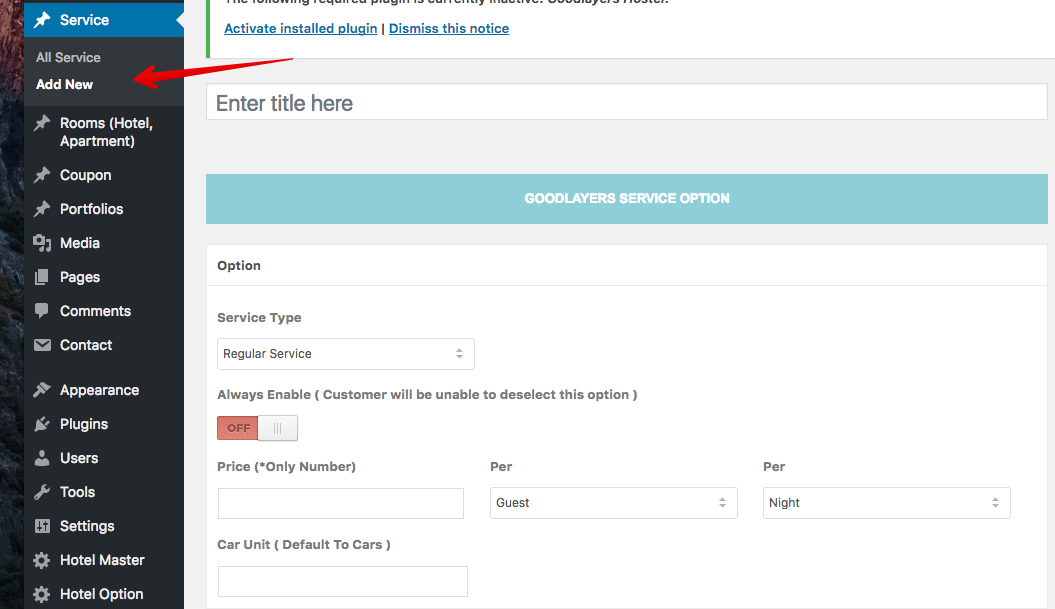
Where can I change/remove extra services? I apologize for the basic question, but I haven’t been to my client’s website for a long time and I completely forgot :))
https://imgur.com/a/NmYHoUeThank you a lot
Hello,
The services can be edited in the wp-admin > Service page: https://demo.goodlayers.com/document/hotelmaster/images/new-additional-services.jpg
That’s it Thank you !!
Hello, i have purchased the theme and using it, i have read the documentation, the ‘check in time ’ option is not available.
Hi,
Could you make sure the check in time is enabled in the Hotel Options: https://i.ibb.co/sV4tDch/2022-06-25-00-25-17.png
Hi,
That option itself is not available, i have attached Screenshot: https://ibb.co/CWwyfgD
and is there a way to block bookings on all sundays?
Can you please submit ticket in our support website? Our dev and supporters only provide support in there, not here
sPlease note that, Right now, all support will be conducted through https://support.goodlayers.com/(Purchase code can be found here : https://support.goodlayers.com/purchasecode.png )
Thank you very much!
hi Can i use This theme For Multiple Website?
Hi,
One regular license is only allowed for one website.
Thanks for your interest by the way
Can i easily integrate paystack or flutterwave payment to this theme?
Really sorry, our theme support only Paypal, Authorised.net and Stripe. To integrate other payment options, you have to hire a coder to do this. It’s pretty big work.
However, you may consider our new theme: https://themeforest.net/item/hotale-hotel-booking-wordpress/38017003 which support Woocommerce payment gateways then you can integrate Flutterwave with Woocommerce payment gateway : https://support.flutterwave.com/en/articles/3632754-how-to-integrate-flutterwave-into-woocommerce and paystack also supported I think : https://woocommerce.com/document/paystack/
So on this hotale theme, you can easily pay for rooms with woocommerce? and does it have all the features this theme has?
Yes, you can pay for rooms with Woocommerce(however, note that deposit feature won’t work with Woocommerce payment)
Regarding features, it covers most features that this theme has. However, if you’re looking for something specific, you can ask us first to make sure. Also, I suggest you to play with Hotale demo first.
The “START IMPORT DEMO!” button is not working, it’s not clicking
Hi,
So did you already purchased the theme? In this case, Can you please send wp access + ftp access through the form in this page > http://themeforest.net/user/GoodLayers ?
Please also copy the message into the form as well so we can recognise your case. We will help inspecting directly.
Can i easily integrate paystack or flutterwave payment to this theme?
Hi, FYI, I’m using Nginx+PHP 8.1 When I want to activate the Hostel plugin, i got a fatal error :
PHP Fatal error: Uncaught TypeError: call_user_func_array(): Argument #1 ($callback) must be a valid callback, function “gdlr_hostel_event_init” not found or invalid function name in /var/www/public/wp-includes/class-wp-hook.php:307
Also, Elementor classes are deprecated too, throwing fatal error
PHP Fatal error: Uncaught Error: Class ‘Core\Schemes\Color’ not found in /var/www/public/wp-content/themes/hotelmaster/elementor/image-list.php:292
Hi,
Could you replace gdlr-hostel.php file in gdlr-hostel plugin folder and /elementor/image-list.php file inside the theme folder with this new one for this.
https://drive.google.com/file/d/13yJsrUggrpLdtGLo6ym3eNtfavg4XzWT/view?usp=sharing https://drive.google.com/file/d/15sN6qk8VHvX_vZxF4al5F-WB1r2mSvVP/view?usp=sharingNot working. How a wordpress theme can not be PHP8 ready in 2022 ?
Hi,
Could you provide wp-admin and ftp-access info back via goodlayers profile page so we could fix this for you.
https://themeforest.net/user/GoodLayersSorry for inconvenience.
hi where can i see this include/gdlr-price-calculation.php file ?
i will change the weekend days https://snipboard.io/okXIby.jpgHello,
This file is a part of our hotel plugin, you can edit it in the wp-admin > plugins > plugin editor page and selecting the goodlayers hotel plugin in the dropdown.
Thanks.
1 more again . Where i can find the php email template and where i will input code. I will add logo only please help thanks
Im aware my support is expired. But please consider it thanks
You can edit the email content in the \wp-content\plugins\gdlr-hotel\include\gdlr-utility.php file at line #52
These are just text emails. You need to change that to use the HTML tags like tags, change the line #46 in that file from:
$headers = $headers . ‘Content-Type: text/plain; charset=UTF-8 ’ . ” \r\n”; to:
$headers = $headers . ‘Content-Type: text/html; charset=UTF-8 ’ . ” \r\n”;
Then you can add the or other html tags in the gdlr_hotel_mail_content() function at line #52. Replace the \n with
tags as well.
hi, - Is it possible to choose an option in the payment of the reservation if the payment is made at the accommodation? - Is it possible for the hotel owner to book the reservations and be able to do it for different clients? - In the case of business customers, is it possible to have the company name as the main customer and the name of the employees for whom the reservation was made, for example in a text field? - Is it possible to have booking reports sorted by customer and between dates? best regards
Hello,
- Yes, you can do that by using the ‘book by email’ option on the booking page.
- The owner will have to use the booking form on the website to book rooms for clients, there’s no other option.
- The customer name can be added in the Additional Field option in the booking form. You can also change rename the additional field option to suit your needs.
- Yes, you can search for bookings by a particular customer within certain dates in the wp-admin > hotel options > transaction page.