12900 comments found.
Hello Woodmart,
Your theme is really awesome and your 6.5.2 update is really nice, but how to translate your new :
BUY NOW button and people are watching this product please ?
Thank you very much, Regards
Ok fixed, we have to synchronize the theme Woodmart with Loco translate.
Thank you, have a nice day
Hello,
We are glad that you sorted it out. Feel free to contact us if you have any further questions.
Kind Regards

hello there hope you doing great evento team well i was buying before woodmart themes and try to install and input demo which is i like but there is issue like not properly showing cart and not showing product same as it in boarded gird which is this option available in shop page
and well i have issue general theme issues like plugin and themes and features and bordered grid pages gird page and and main top up side in shop pages so there many problems like for example if input demo which is i like and check it out after input demo so I check after like i click bordered grid so that pages now showing properly products properly as like showing themes and also if i click main pages up top in shop so there is also some pages missing like Tracking oder and few other and also not this issue only one demo all demo i did input and checked already but all there same issues like some pages missing showing and products are not showing me properly so
I did already create complain and like already create ticket and my request (#2785119 ) second request (#2788812). you are downloading new file in dashboard and also i did already install again and before factory’s reset my site after install but still there is also updated file issue i have faced
And i am so tired to fix this issue also my developers but not resoled and i have very disappointed because before my developers already build up full site after Facing this issue i can dele all site and everything and many times deactivated themes and install again but still faced issues
So please we are so late so please fix these issues immediately based I can’t wait as much as longer you said u need time for replt 5 days I don’t like
So please fix issue or you can delete old licenses theme and download new file and new themes with fresh new license might letter on not have any of issues otherwise please you can refund to me my money and i can buy themes from another brand
I have still waiting please reply as soon and with download in my dashboard new themes or you can fully properly updated and then allow me again install themes file with check everything
So i am waiting for reply Best regards
Hello,
Take our apologies that you faced problems working with our theme. But we don’t see any requests from you on our support forum. Please, create a new topic and we will help you asap. https://xtemos.com/forums/forum/woodmart-premium-template/
Kind Regards
here is my two request check it out. (#2785119 ) second request (#2788812)
i was already create tickets two check my request number. (#2785119 ) second request (#2788812)
We got only one support topic from you. Please, continue the conversation on our support forum.
i was emailed to evento market 2 three time and also i mentioned request number and they are update themes but still there issues i have faced like some pages missing not showing after when i input demo in my website
and here is i know i did create topic one so please did you check mmy issues did resolved and when you resolved then i can install themes in my website
because i did install many times and checked but there is still have issues which is i did mention my old topic
please reply i am waiting and now i have times only for this topic and i want to fix this issue immediately
We have replied to your support topic. If you are not satisfied with our theme, you can request a refund here https://themeforest.net/refund_requests/new
For some reason I can’t edit my HTML blocks … editing them with WP bakery is not a option…
Newest version of theme and wp bakery is installed.
WP b bakery is chosen and main builder in the setting.
Please help, what am I missing?
https://ibb.co/BP96M1yHello,
You need to enable WPBakery page builder for HTML Blocks. You can do this in Dashboard -> WPBakery page builder -> Role manager -> Post types -> cms_block
Kind Regards
The latest update 6.5 The page titles no longer work on WooCommerce pages but work fine on other pages (about us) is this because I’m using megamarket ? I cant use the extra options like Image for the category page title
how can I enable the option to be usable ??
A few other features don’t seam to work either, do I need to import the default Woodmart Main theme as well, this is is a little frustrating how do I get everything to work ? with megamarket design ?
Hi,
Please, describe to us your problems in a bit more detail. Attach some screenshots and provide us with a list of steps on how to reproduce them on your website.
Thank you in advance.
Thanks for the reply, I managed to sort it by editing the shop page with elementor and adding the page title option https://i.imgur.com/FpTvHD6.jpeg to the megamarket design
We are glad that you sorted it out. Feel free to contact us if you have any further questions.
Kind Regards
After updating to 6.5.1 and 6.5.2, widget “Product Categories” (in Elementor) does not correctly display category images in the mobile version (Layout is masonry with first wide). Does not correctly sort into two columns.
Hello,
Yes, it is a bug in our theme and we will release an update with the hotfix tomorrow.
Kind Regards
Good morning, pop up stopped working on my site. I tried to deactive all other plugins apart onec which came with the theme, but no improvement I am afraid. I also trying to reset my password for Support section and that is not working. I tried over two days to reset my password and so far I have not got any email with reset link. Could you help me with this issue? Thanks a lot. Jakub78
Hello,
Please, send us your website link using the contact form on our profile page and your admin access. https://themeforest.net/user/xtemos
Kind Regards
Hello,
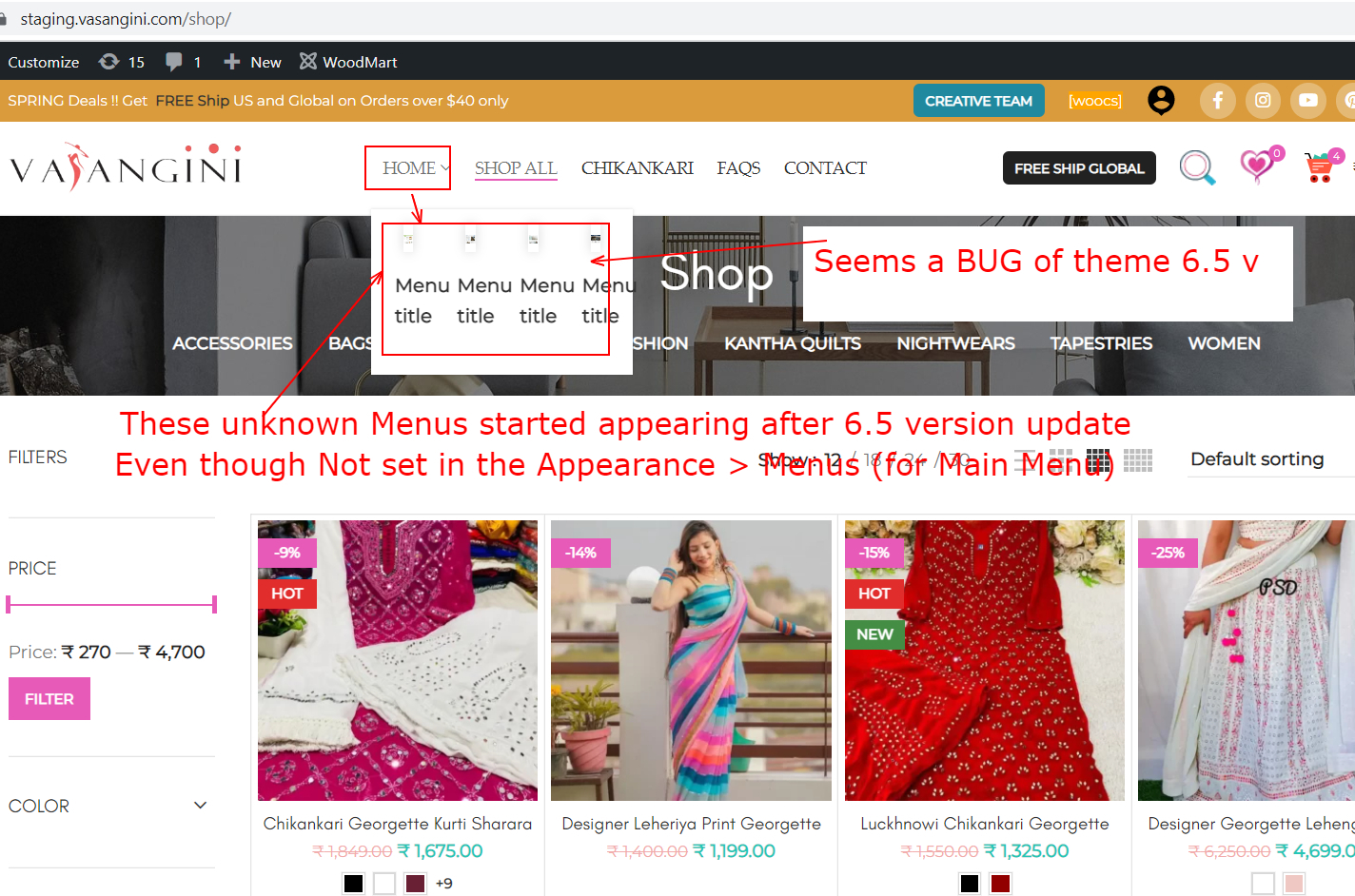
Just thought to inform you, I come across some sort of bug after update to 6.5 version (even with 6.5.2)
The Home Link under Main Navigation Menu of site, started showing few Unknown Sub-Menus and links under it.
Strange part is that Neither we had Set those inside Link named (Main Menu), Nor they are displaying there when we look from Appearance > Menus > Main Navigation Menu
Home page URL of Staging site = https://staging.vasangini.com/
https://i2.paste.pics/HA4YG.png
https://i2.paste.pics/HA51A.png
Regards
Hello,
Please, continue the conversation related to this issue on our support forum.
Kind Regards
I am facing issue with my shopping cart display – it does not show its content properly – could you please help me resolve – this has happened only after theme update
Preview: https://imgur.com/Vw7Req0
Thank you
Hello,
It seems like you have enabled Elementor’s cart widget that replaces our theme’s widget and its style. You can disable it in Dashboard -> Elementor -> Settings -> Integrations https://gyazo.com/c740c3031eb1238ff47e5b747a0c6941
Kind Regards
Mini-cart is already disabled – yet the issue is coming
I installed Element Pack Pro (and without even using any of its components that issue comes) could you please try making your theme compatible with Element Pack Pro…
Tough I have not added any of its components just by activating it – the issue comes.. Currently I have disabled but look forward for it getting compatible going forward.
Thank you
It looks like the problem is caused by this plugin. Please, contact plugin developers for help on this matter.
Kind Regards
Product category element is broken after the latest update. Layout is masonry with first wide, but the last item also gets class .first on mobile. Is there a way to submit bugs? I don’t have a support but I would like to report a bug. Thanks.
Hi,
Could you please send us a link to your website where we can see this issue?
Kind Regards
Hello,
Yes, it is a bug in our theme and we will release an update with the hotfix tomorrow.
Kind Regards
Thanks!
when i using html blocks in Mobile version HTML block then css not working those are entered in html blocks
Hi,
Please, describe to us your problems in a bit more detail. Attach some screenshots and provide us with a list of steps on how to reproduce them on your website.
Thank you in advance.
Hi there! After updating to the latest version, wishlist link and size guide are no longer on the same line (side by side). Is there a way to fix this?https://imgur.com/mboHXV2 Thanks!
Hi,
Could you please send us a link to your website where we can see this issue?
Kind Regards
It happens because of this custom CSS code. Try to remove it and check how it works https://take.ms/HlvFN
Hi! Thank you very much! It’s like this because I had to put the free shipping bar at the bottom. Anyway, the bar below is more important, so I have no choice. Thank you very much!
Taking the opportunity, I would like to ask another question. When we activate the WP Rocket delay JS exclusions option, no files enter the plugin list, it is empty. Should it appear or is it hidden?
Hello,
Files shouldn’t appear there. They are appended to the list from the plugin’s configuration interface.
Kind Regards
Perfect! Thank you so much!
You are welcome!
I said you before that mini cart quantity has a bug. I think you did not understand what I meant. I can type any quantity in Middle. please check the image. thanks https://pasteboard.co/v8ho3jBg5Oh5.jpg
Hello,
We will fix this in our next theme update. Thank you for letting us know.
Kind Regards
Hi, There is an issue regarding the variations from the last 6.5.0 update release.
Once you have product with more than (aprroximetly) 60 variations, the variations area doesnt load (https://prnt.sc/S7x9eaVlZ2bj). All plugin disabled, but still not working. It appeared first after the update.
Another issue of it is the main image which disappear after few seconds…
We updated to 6.5.2 but still same issue.
- UPDATE regarding the number of the varations that cause the issue * It started from 44 variations.
Hello,
To fix this issue you need to go to Dashboard -> Theme Settings -> Single product -> Images and increase the “AJAX variation threshold” parameter.
Kind Regards
Hi, Just did it (uploaded to few values up to the max) but the issue still there.
Please, send us a link to the page where we can see this issue.
Where can i send it to you in private please?
Use the contact form here https://themeforest.net/user/xtemos
Kind Regards
thanks. sent.
Hi, We were using the following java script to keep all tabs closed initially on mobile for single product. JS was working fine until last few updates. Perhaps some class names might be changed from your side. Would you let me know which are those and how to make JS work again. Thank You in Advance.
/* Keep All Product Page Tabs Closed on Mobile */ if (jQuery(window).width() <= 768) { setTimeout(function() { var $tab = jQuery(’.wd-tab-wrapper’).find(‘a.active’); $tab.siblings(’.wc-tab’).hide(); $tab.removeClass(‘active’); }, 10); }
Hello,
Try to use the following code snippet instead
(function($) {
    if ($(window).width() <= 768) {
        setTimeout(function() {
            var $tab = $('.tabs-layout-accordion.wd-accordion').find('.wd-accordion-title.wd-active');
            $tab.removeClass('wd-active');
            $tab.siblings('.wc-tab').removeClass('wd-active').hide();
        }, 300);
    }
})(jQuery);
Kind Regards
Hi, Thank you for the quick response. It’s really appreciable. I tried this code but it doesn’t seem working as expected. I tried this code in theme settings >> custom JS >> document ready. I also tried to put code as global JS but still it’s not working as expected. Would you please check the code again. Thank you.
Please, add this code and send us a link to the page where we can check this so we can see what is wrong there?
Kind Regards
Hi, We have added code to theme options >> custom JS >> On document ready
Kindly check the following URL on mobile device. Though it can be checked on any product page now. As mentioned earlier we want to keep all tabs closed initially on mobile for single product.
https://www.3sista.com/product/20210607003/Thank you for the quick response. TC.
We see that you have some other code on your website now that affects this. Please, leave only our code and check how it works. If it doesn’t help, please, send us your admin access.
Support Form Not Active === Your support period for this theme is already expired at August 24, 2022 and you are not allowed to create topics or replies here. To get an access to the support forum you need to extend your support period. You can purchase a support extension for WoodMart theme on ThemeForest. After you purchase the extension, you need to go to your account page and click on “Update” button for this purchase code in the table.
Hello,
Please, send us a screenshot of the error and your purchase code so we can check what is wrong there. Use the contact form here https://themeforest.net/user/xtemos
Kind Regards
Hello,
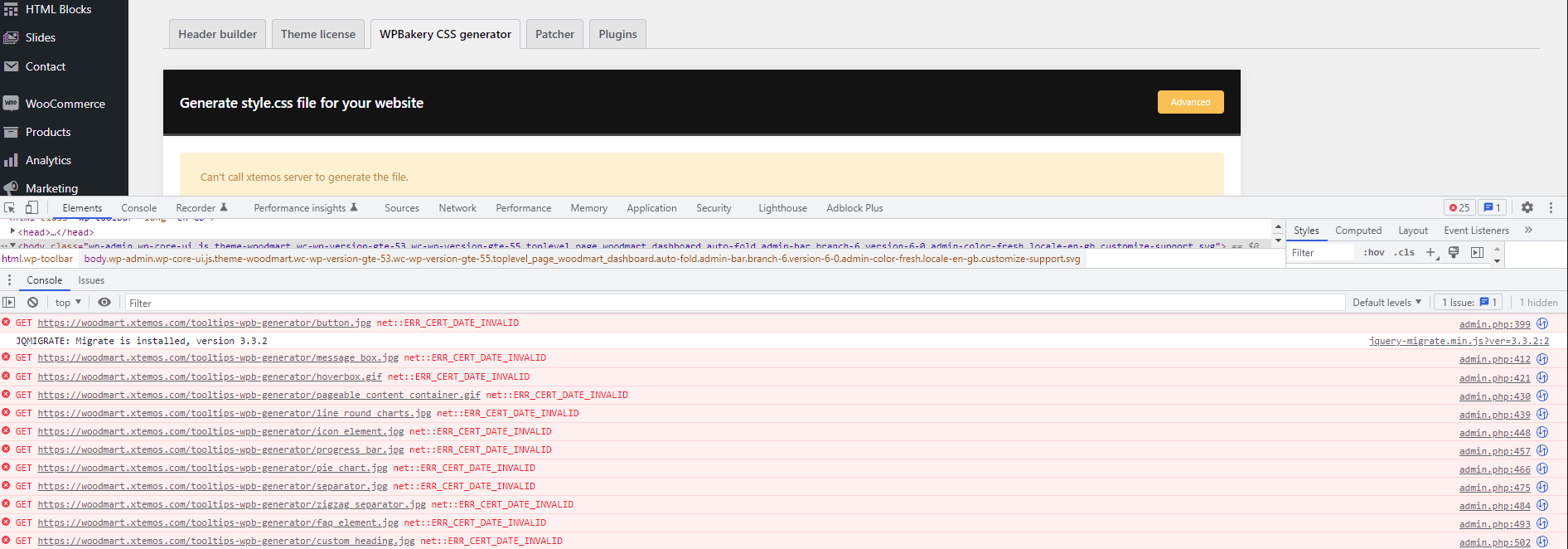
Have the following issue with the latest update when I try to generate the CSS file: https://i.gyazo.com/75763b2dd1320dacc5b4874c884efc84.png
I added your IP (which I saw in a reply to someone who had the same issue back in 2020) to allow on Cloudflare, but it’s not resolving it?
I didn’t see this issue with ver 6.4.2, and any other Third-party API/connected plugin isn’t have issues.
Looking forward to your reply.
I tried access your website subdomain directly, and it seems the certificate has expired? https://xtemos.com/ is fine, but with the “woodmart.” subdomain it’s showing errors.
I tried on Chrome and Firefox, and I get this warning:-
“Warning: Potential Security Risk Ahead
Firefox detected an issue and did not continue to woodmart.xtemos.com. The web site is either misconfigured or your computer clock is set to the wrong time.
It’s likely the web site’s certificate is expired, which prevents Firefox from connecting securely. If you visit this site, attackers could try to steal information like your passwords, emails, or credit card details.”
I tried on my mobile with my mobile network connection and the same issue is occurring, so it’s not my internet or browser/device it seems.
Clicking on DEMO on this site shows: “The web page at https://woodmart.xtemos.com/ might be temporarily down or it may have moved permanently to a new web address.”
EDIT: Ignoring the warning, I checked your SSL cert and it has expired today. 
Hello,
Thank you for contacting us. Yes, we have fixed the SSL certificate on our demo already. As for xtemos.com IP, try to whitelist the following one 95.216.69.114
Kind Regards
Hello. Banners carousel fail. The image don’t appear.
Elementror Preview: https://gyazo.com/17848eb59be976bc0e2327833daaa2b2 How it works: https://gyazo.com/136d2ef2fbdb9efe4fda7f9e696f0f34
thanks
Hi,
Please, create a topic on our support forum and provide us all the necessary details about the request with some screenshots and including your admin access so we can help you https://xtemos.com/forums/forum/woodmart-premium-template/
Regards
New Update broke everything on our page! Picture Upload, Shop-Wizard went wild, Buttons not working … Before that everything was fine.
Is there an option to download an old version of the theme or go back to an old version?
Hi,
Please, create a topic on our support forum and provide us all the necessary details about the request with some screenshots and including your admin access so we can help you https://xtemos.com/forums/forum/woodmart-premium-template/
Regards
Hi, cant register to your side. It tells me my purchase code is already in use. But i didnt register on xtemos yet.
Send us your purchase code using the contact form so we can check it. https://themeforest.net/user/xtemos
Hello,
I found a problem in the new version. When a product has a price less than 1 and is on promotion – there is a lower price, this error message appears above the product photo: Division by zero in /home/yolsrldl/public_html/wp-content/themes/woodmart/inc/integrations/woocommerce/template-tags.php
on line 1294 1294 line is: $ percentage = round ((int) $ product-> get_regular_price () – (int) $ product-> get_sale_price ()) / (int) $ product-> get_regular_price ()) * 100);
https://gyazo.com/08b915615599c92e414698d49537153aHello,
Please, update the theme to the latest version 6.5.2. We have already fixed this problem. Let us know if it still doesn’t work for you.
Kind Regards