951 comments found.

the next creation try to be able to import the content of the previous theme, from vidorev I have almost 120 thousand videos that I am transferring to vidmov :”3 I only go to 10% xd
Hello,
VidMov and VidoRev are two completely different themes.
And VidMov doesn’t have any tools to do that either. This is complex work that requires careful analysis because the data structures are not the same.
That’s why VidMov does not provide those features.
Thanks!
I just purchased your theme but I can’t verify purchase code without I filled right user name and purchase code. I opened a ticket. Please check. Thanks
I just purchased your theme but I can’t verify purchase code without I filled right user name and purchase code. I opened a ticket. Please check. Thanks
How to turn on video sounds by default?
Hey guys, is there that option?
Hi Karelv3,
If you activate the autoplay feature, the sound will be automatically muted.
The autoplay policy of all browsers does not allow audio if the video is in autoplay mode: https://developer.chrome.com/blog/autoplay/
That’s why we added this feature (Muted Autoplay) to make sure users can watch the video without any problem.
eg: https://vm.beeteam368.net/video/love-other-drugs/
You can use Google and search this keyword to learn more: ”autoplay policy”
If you want the video to play with sound, please turn off autoplay.
The user needs to interact and be recognized by the browser. The video will then be played without being muted.
Thanks!
Pre-sale question: Is there an easy way to delete unwanted parts of the theme to make it lightweight? Everything looks very heavy.
Hello Cokett101,
Thank you for contacting us!
Which VidMov elements do you need to remove?
Because VidMov provides built-in options to turn off features you don’t want to use.
Regards!
Thanks for the response. I like the layout of the Main demo and will like to update it and remove Homepage 2, 3, 4, 5. Completely remove the Audio, Shop, Elements menus and so on.
Hello,
Those are basic WordPress features, you can completely refresh those menus…
Thanks!
Thanks for the clarification!
I bought a theme from Vidmov and uploaded it to a website that was already working, but this Vidmov theme has a post that is a video post. How do I upload my old posts to the website that contained the video post?
Hi,
Each theme has a different data structure.
You cannot use old posts with VidMov video posts.
Thanks!
I bought a Vidmov theme and then I added a domain name that I don’t want to use with the Vidmov theme
The reason I closed it is to know how the theme works
After finding out I wanted to connect the right domain name to use the Vidmov Theme
This time I entered the Purchase Code. This domain name is already in use (” “). so how do i open it
Hello,
I do not manage this system!
Please create a ticket through the support tab!
Thanks!
The “Theme My Login” plugin. 3 questions:
1) The sent “from” email is wordpress@my.site.com. I already checked Settings>General; it’s not there. Is that coming from the My Theme Login plugin?
2) Speaking of which…when a random user signs up and logs in, they get a screen with the WordPress top bar which shows WordPress stats notifications for plugin and such. Is this by design? Somehow, I don’t think that it’s supposed to be like that. Is there a way to get rid of that bar at the top?
3) Can I another login plugin or is your theme designed to work exclusively with the Theme My Login?
Hello,
1/ Please refer to this solution: https://www.wpbeginner.com/plugins/how-to-change-sender-name-in-outgoing-wordpress-email/ ( This is the default email generated by WordPress ).
2/ What elements and features do you need to disable? Are there any screenshots for that location?
3/ VidMov with default is to use Theme My Login plugin. You cannot use another plug-in to replace it at this time.
Thanks!
For question 2, here’s a screenshot of the topbar when a user signs in. I made a user called “Customer.” When that user signs in this is what they see: https://imgur.com/a/VlcbhLN
Actually, in trying to fix the email situation, I installed Code Snippets and it has a built-in snippet for “hide admin bar to everyone except Admins,” and that fixed the issue. However that isn’t a real solution.
Hello,
1/ This is also a fundamental part of WordPress, if you want to get rid of it. Please install this plug-in, it will have more options for you: https://wordpress.org/plugins/hide-admin-bar-based-on-user-roles/
2/ Or if you intend to use WooCommerce, then you don’t need to install anything else ( and ignore answer number 1 ).
Thanks!
For the most part, everything seems to work, but when I edit a video post, sometimes the the edit page just disappears and I have to re-enter the information all over again. As long as I don’t move the mouse around too much I can edit the whole page and submit the Edit to save.
Hello,
Are you referring to the WordPress Dashboard edit page or the front-end editing popup?
Thanks!
Thanks for the quick reply. I was referring to the front-end. Also, I get a white screen when someone leaves an empty comment. Was that intended or do I need to change something. I feel like I might be missing something.
Hello,
1/ Edit Popup: Actually, this feature involves you clicking outside the pop-up window – And then the pop-up will close automatically. I will create a report for the developers to add the option to disable this. And they can just disable the popup with the X button on the top right.
2/ I get a white screen when someone leaves an empty comment:
Can you create a ticket through the support tab and submit that link for our tech support to check? ( https://themeforest.net/item/vidmov-video-wordpress-theme/35542187/support )
Thanks!
Ticket created and sent.
Similar issue but this time with a member trying to log out. They get this white screen and message: https://imgur.com/a/OrT9XoZ
How do I change that is this another Support issue?
btw, thank you for being so responsive. I greatly appreciate it.
Hello,
This is a default WordPress page.
If you want to get past it for immediate logout, you need to create a ticket through the support tab. Our technical support will help you with a small custom code.
Thanks!
The help files show what features are called but most of the time, it doesn’t explain what its for. For instance, the help files show you how to install ARmember and set it up, but what does the experience look like? Then right after, it shows you how to set up WooCommerce. Do they work together or is either one an option to replace the other? Or does one require the other to work? If so, how do they integrate with signing in? Those things are not explained. I’m a little lost.
Hello,
Armember and WooCommerce are two separate plugins, depending on your needs, you can choose one or use both if you want.
1/ Armember: This is a plug-in that supports Membership related features:
A/ https://vm.beeteam368.net/video/emotional-arithmetic/
B/ https://vm.beeteam368.net/audio/the-chapel/
C/ https://vm.beeteam368.net/membership-subscription-plans/
2/ These are the features of VidMov for WooCommerce:
A/ https://vm-demo.beeteam368.net/documentation/#woo_prime
B/ https://vm-demo.beeteam368.net/documentation/#woo_download
C/ https://vm-demo.beeteam368.net/documentation/#woo_prime_download
3/ VidMov uses Theme My Login plugin to register and login.
Thanks!
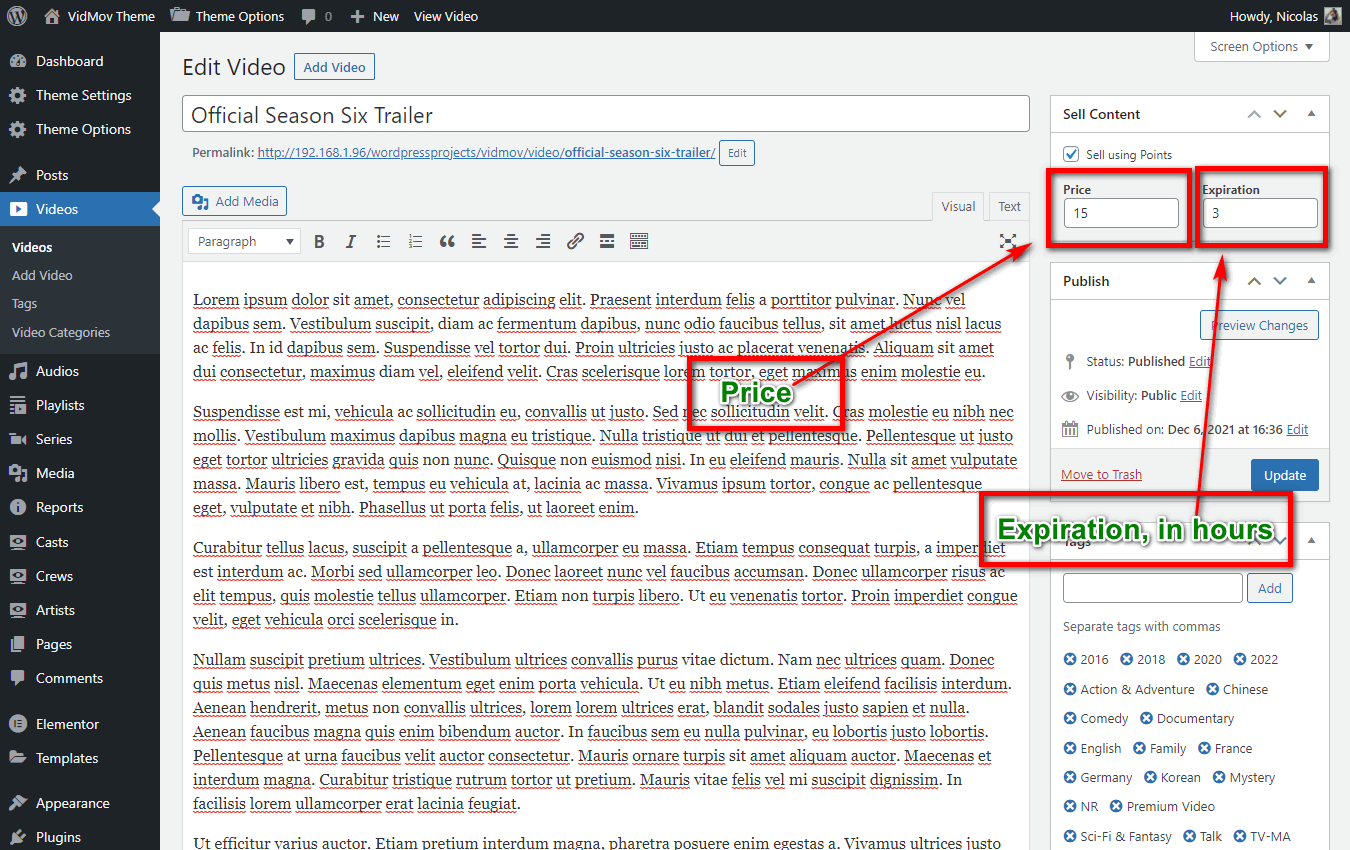
(I have 3 questions but I’ll post each on at time to keep the questions organized) I finally go the time to install your theme and start working on my website. Where on a video edit page, does someone specify how many tokens to charge to watch their video? For instance, I want to charge say 1 token to watch a video. Where do I lock the video and set that price?
Hello,
You seem to be referring to the Pay Per View feature.
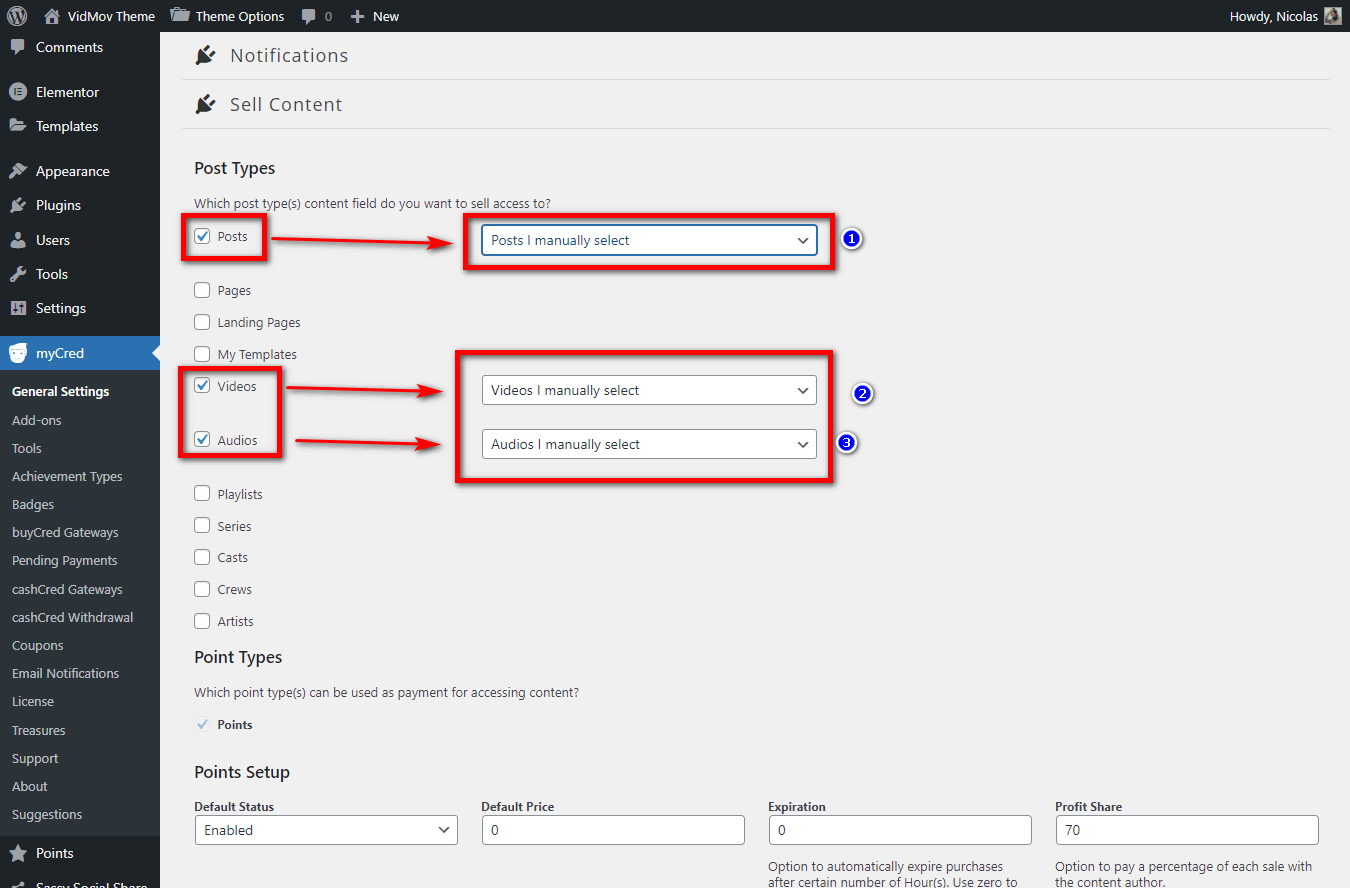
It is related to myCred and you can see how to use myCred here:
1/ It is related to myCred and you can see the instructions here: https://vm-demo.beeteam368.net/documentation/#mycred – This image shows you how to set it up for each post: https://vm-demo.beeteam368.net/documentation/assets/images/doc-80.png
2/ If you do not see the price and expiration time input box as instructed above, please check this step again: https://vm-demo.beeteam368.net/documentation/assets/images/doc-78.png
Thanks!
This was an excellent answer. Straight to the point. You see, I was hoping for a clear FAQ page that specifically answers questions like the ones I asked or something like this:
How to make a video and set a price for it: Step 1: you have to set up MyCred for it. Step 2: link (like the one you provided)
How you set up your PayPal address to get paid for… link
How to set a global price link
How to set a price per video (or audio or post or whatever.) link
This way it’s more intuitive to get up and running instantly for the main things that have to do with the most essential functionalities.
Thank you for such great responses. I love this theme. I’m really trying to master the interface.Thank you for the great answers.
Thank you so much!
In fact, many of our customers understand myCred well. This feature was born with input from our old customers (used the VidoRev theme, and this feature is also an inspiration for other authors to learn and follow).
For payment settings, I think you should refer to myCred for more details: https://codex.mycred.me/chapter-iii/buycred/payment-gateways/
Thanks!
Hello,
We see that it is displaying normally: https://ibb.co/wsbtkfm
Please check and clear your browser cache then try again.
If you need further assistance please create a ticket through the support tab!
Thanks!
Pre-sale question: does the theme support youtube mass/bulk importer videos. ? Interested in buying theme do you offer customisation services?
Hello,
Thank you for contacting us!
1/ You can use this plugin: https://codecanyon.net/item/wordpress-automatic-plugin/1904470
2/ Yes, we do provide customized service.
Regards!
last question: when i purchase is there a way to make the youtube video stretch to wide view, from classic to special style dynamically? Also do u provide installation services?
Hello,
1/ No, VidMov doesn’t have that feature.
2/ Yes, we do provide installation service – But you need to send specific requests through the support tab, we do not provide technical support in the comment area. This is a public area, it concerns your privacy as well as ours.
Thanks!
hi.
1. i updated the theme but i dont have the hooks for creator and member points for watching video. they are not showing up. i tried WordPress Dashboard -> Points -> Hooks but nothing is showing up
2. the points for creators : these are points that creators earn if their videos getting watched , right?
Hello,
1/ Please see instructions here: https://vm-demo.beeteam368.net/documentation/#update
Please note, after successfully updating the theme, please continue to update two plugins, BeeTeam368 Extensions and BeeTeam368 Extensions Pro ( Appearance -> Install Plugins )
2/ That’s right, exactly
Thanks!
There is membership option available for users but Is there any membership option available for creators. Like when someone try to submit the post they must need to have a membership. Like only paid members will able to submit the post.
Please reply me as soon as possible. I am going to buy this theme if this option is available.
Hello,
This option is not available yet, it is expected to be released in version 1.6.x
Thanks!
Can i do one thing like membership is required for registration. If yes, How?
Hello,
To do that, you need to contact our technical support for further advice.
Thanks!
i see new update that watch video can earn point , how i can setting this ?
Hello,
Please visit: WordPress Dashboard -> Points -> Hooks: https://ibb.co/2Pwgsx7
For example, a video is 60 minutes long, when you set it to 80 (percent): users need to watch the video for at least 48 minutes to earn points.
Thanks!
I love your theme is splendid …!!!... Big hug from portugal …!!!...
Thank you so much!
Pre-Sale Question. Is there a way for each user to have its own analytics, similar to YouTube?
Hello,
Currently it doesn’t have that feature!
Creators can only manage their revenue and transaction histories.
Thanks!
Is there a way to get embed link? When you press share, all you get is a link to share. There’s no options to get an embed link. When we press share there should be two links. A regular link and an embed link. Can you guys add it? And, when are you adding PiP for video and audio player? These are basics that should have existed on the theme.
Hello,
Thank you for contacting us!
Excuse me, can you describe the embed link more clearly?
Are you referring to an iframe? ( like this? https://beeteam368.net/vidorev/louis-vuitton-masters-ii-a-collaboration-with-jeff-koons/ – https://ibb.co/qMpRGGZ )
Regards!
Pre-sale Hi, it’s it possible to add a donate button next to the subscribe button?
Hello,
Thank you for contacting us!
It’s the Virtual Gift feature: https://vm.beeteam368.net/video/zombie-massacre/ ( Button with star icon )
Check out the documentation here: https://vm-demo.beeteam368.net/documentation/#mycred -> C/ Transfer ( Use for Virtual Gift feature )
Regards!
Thank you for your response, also is there a way that each user can have its own analytics like YouTube??
Hello  Before i will buy, i need to know…It is possible to put any logo or watermark on the videos? Also it is possible to hide or remove the YouTube brand logo and Vimeo logo and others?
Thanks
Before i will buy, i need to know…It is possible to put any logo or watermark on the videos? Also it is possible to hide or remove the YouTube brand logo and Vimeo logo and others?
Thanks
Sorry i forget the others questions Is it possible that only those users can start a channel and create any posts, who have a membership plan? An if i download the theme, install and take the one click demo import, my site will exactly look like the demo? Because i don’t want to settings the widgets and other structural elements. Thanks
Hello,
Thank you for contacting us!
1/ It is possible to put any logo or watermark on the videos?
Unfortunately it doesn’t have that feature – In addition to developing this feature, you also need a server that supports FFMPEG
2/ Also it is possible to hide or remove the YouTube brand logo and Vimeo logo and others?
No, Youtube doesn’t allow that ( Their API doesn’t provide a parameter to disable their branding ).
For Vimeo, you need a premium account.
3/ Every member has their own channel (it’s the author page that has been overwritten by VidMov’s channel function, that’s the default). You can only block the submission of video posts through roles.
4/ The theme’s structure and design will be fully imported through one click. You can edit to your liking.
Best Regards!
Thanks
Then we must to wait for a new version because the logo is a realy important on the medai or video share site
The FV Player pro module can to use a logo and hide the the youtube brand, so maybe you need to check and found any way to cooperation that modul
I hope these features will be include in the next version .:)
Hello botor,
Placing a logo above the player is not a problem. But please don’t get confused with the WaterMark feature… These are two completely different features.
Hiding Youtube’s logo I think is impossible, Youtube itself does not allow it: https://developers.google.com/youtube/player_parameters#modestbranding – It’s just that it will appear in a different location…
Thanks!
Hi OK you right i don’t need the watermark the simple logo is enough for me So the simple logo is available for the theme, on the videos?
But we have a site now with the FV player and as you see in this picture that is a YouTube video., and completely hide any YouTube brand. https://ibb.co/RHCdXJ9
Anyway we waiting maybe in the next version is contain these features, because this theme really amazing but we cant to pay for a theme with a video player and pay a different video player just for 1-2 features ..
I see that pay per view feature is available, that is mean that the users can start the own live streaming like twitch or other site? An the users can buy credits/ gifts and send to the streamers?
Ok Thank you!
I think you should choose another product!
Regards!
Hi! We bought the theme, after the one click install the half site is missing…. undre the Channel menu the all submenu is missing!!! the Shop menu is missing!!! The all menus 60% are missing!! You tell me after the demo insat we got a same demo! That is not true! Tell me how can we get a tottaly same site or fix it! The membership icon and settings are also missing!
Hello,
1/ In-channel menus are tabs contained in each member’s channel page. You can go to your channel page to see it.
2/ The shop page is nothing special, it’s the default WooCommerce page. Depending on your needs, you can create your own products. Just note these features were developed by VidMov in conjunction with WooCommerce:
A/ https://vm-demo.beeteam368.net/documentation/#woo_prime
B/ https://vm-demo.beeteam368.net/documentation/#woo_download
C/ https://vm-demo.beeteam368.net/documentation/#woo_prime_download
Thanks!
This is a BIG SCAM! you must to tell in the product page that the Armember plugin is not included! And i asked you before, and you told me that we will got a totally same, like the demo! i bought this theme because i belived you and i think that is a really prebuilded, but now i installed the woocommere and i need a to buy the ARMember plugin and pay someboy to setup the site! No thanks! Please send me a real demo content or a account for the demo site to see the corect settings or will ask the refund because i have not a time and more money for a half ready theme!
Hello,
1/ You are the kind of rude customer, we know you are not kind to such questions. And we immediately replied that you should choose another product ( https://themeforest.net/author_dashboard#comment_28486340 ). We never tried to tempt you to buy it, so please be polite before we report your case to Envato.
If you are not qualified and knowledgeable to use high-end products, I think you should study more.
2/ Armember ( https://wordpress.org/plugins/armember-membership/ ):
You should see the installation guide, all the features will be the same as the demo version when you follow the instructions: https://vm-demo.beeteam368.net/documentation/#membership
And the theme does not require you to purchase the pro version of Armember, there is a complete guide and you need to follow it.
Thanks!
Believe me i’m not a rude! Just i tired for these problematic themes! For example i can not found how edit the top menu items,,, not included any informations on the documentation , not found in the theme option, or menus… You see that is my problem, why i need to searching and rebuild a “ready theme”?
Hello,
Your above comment makes us no longer believe that you are really respecting us and our work. You won’t be able to hire anyone for $59 to make such a product with lifetime updates. You also need to be equipped with knowledge when using mass products, these are cheap products with tons of features attached.
You should understand that WordPress is 20 years old, its development and working mechanism is very free.
Most large feature groups have to depend on plugins from many different authors. Especially the features related to e-commerce.
For the last time, if you continue to make inaccurate, rude, offensive words about us and our work. We will report to Envato.
And if you want to continue to cooperate, please stay calm, polite and continue to send support to us:
If you need to get a full demo like ours, you need to create a ticket through the support tab. Provide your cPanel account and the domain name you are using.
Our tech support will install it from our server backup. And we do not support technical work in the comment area.
Thanks!
You can report me if you want I’m a 10 years old member here without any problem!
I pay for this item and i have a live support, I’m not a rude person maybe you are a little sensitive.
So please answer my question where can i edit the top menu please.Thanks
And sorry again but the Enable/Disable Full-Width Mode. is not working..sorry again
And please forgive me but I’m not a stupid, i have a lot of different website in my Cpanel i will not get you or anybody access my cpanel for a demo content.
Anyway i ask your apologize if you feel that i was a rude so start a white page please.
As you need, you can ask for a refund… Quite simply, because I don’t think you’re worth our service and we don’t need your money.
Let’s do it quickly, we don’t want you to continue to use new features in the future.
Sorry but it’s not your decision, I like this theme and paid for it. so I will decide to keep it or not. Thanks
So keep it and remember never to insult or threaten the authors. That doesn’t help your work ( https://themeforest.net/author_dashboard#comment_28501715 )
If you have any questions, or need help, please create a ticket through the support tab: https://themeforest.net/item/vidmov-video-wordpress-theme/35542187/support
We only answer simple questions here, and do not provide technical support through the comments area.
Thanks!