

1508 comments found.

Activating the Wyde Core plugin completely breaks the site and I get multiple errors. Errors are definitely caused by this plugin. /home/customer/www/kcaenglish.com/public_html/wp-content/plugins/wyde-core/inc/redux-framework/inc/class.redux_filesystem.php on line 29
Sounds like you’re using an outdated version of the Wyde Core plugin. Please ensure that you’ve updated the theme and all bundled plugins to the latest update. You can find the changelog here: https://themeforest.net/item/vela-responsive-business-multipurpose-theme/9793377#item-description__update-log
Everything is up-to-date and exactly as stated in the change log. Activating WydeCore just completely breaks the site
We’re sorry but all the sites from the links you provided are currently using an outdated version of the Wyde Core plugin. You won’t find those error messages after updating to the new version.
We’ve checked it again and again on our sites and couldn’t find this issue. We’ve also checked the code in that specific file but it isn’t included the current version. It was only included in the old version of the Wyde Core plugin.
Would you mind giving us the following details about your site?WordPress version PHP version Wyde Core plugin version Vela theme versionYou can find the current PHP version in the Server section under Tools -> Site Health -> Info tab.
Also, try the following steps to re-install the Wyde Core plugin to see if it works:
1. Navigate to Plugins, deactivate then delete the Wyde Core plugin.
2. After you delete it, you will see a notification message with the link to install that plugin. If the notification was dismissed, navigate to Appearance -> Install Plugins to install it from the Recommended Plugins list.
Wordpress: 6.0.3 PHP: 7.4.32 Wyde Core Plugin: Version 2.7.0 by Wyde Vela Theme: 2.1.0
Site is still broken after reinstalling Wyde Core Plugin
We’re sorry but we’ve never seen this issue before. Our demo sites are using the latest update and everything is working fine. The error on your site is from Redux Framework that’s included in the Wyde Core plugin.
Try to visit your Theme Options page and then click the “Save changes” button to see if it works.
We will add the new version of Redux Framework into the next update of the theme and hope it will fix this issue.
However, as this is just a warning message so you can turn off WP_DEBUG mode to remove it. You can find more details here: https://wordpress.org/support/article/debugging-in-wordpress/
It’s not just a warning message – the entire admin panel breaks when the plugin is activated.
We just released the new update that’s included the new version of Redux Framework a few days ago. Try to update the theme and Wyde Core plugin to see if it fix this issue.
If it still doesn’t work, you may need to send me your site credentials so I can take a closer look. You can send a private message through the contact form on our profile page: https://themeforest.net/user/wyde#contact
Sent you user credentials – the new update just broke it even worse. I have to disable all plugins just to access the admin page when the Wyde plugin is activated.
Thank you for the details! I just reset the theme settings on your site and the problem has been solved!
Thank you for your great support! It works now.
It’s my pleasure!
Hi. I just recently purchased the Vela theme. However, it’s asking me to for a license key for Slider Revolution. Where can I find the license key for that?
Thanks,
Juan
You can ignore that notification message and can normally use it with the theme without registering a license key.
The product registration option is only available for direct customers who have purchased that plugin individually, to access the direct support and automatic updates for that plugin.
All right thanks so much!
Why is the slider revolution not working? Does the theme come with the premium subscription?
The Slider Revolution plugin is included in the theme. You can normally use it without purchasing the premium subscription. The product registration option is only available for direct customers who have purchased that plugin individually.
Please ensure that you’ve updated the theme and all bundled plugins to the latest version. You can find the changelog here: https://themeforest.net/item/vela-responsive-business-multipurpose-theme/9793377#item-description__update-log
They are all updated but it’s still not allowing me to use any sliders.
We’re sorry but please contact us from the account that purchased the Vela theme to make sure you’re currently in the correct product page that corresponds to what you have purchased.
I don’t have access to that account at them moment. I’m designing a website for the person who purchased it. But I know I’m using the demo version not the child version.
The premium templates of Slider Revolution are only for direct customers who have purchased that plugin individually. However, you can use slider templates from the theme’s demo instead.
You can import demo sliders under Theme Options -> Home. Select “Sliders” option, then choose a demo site to import demo sliders.
Dear sir/madam,
I somehow don’t know how to use the WP builder. The easy one. Normally I can switch it on with the role manager, but here I can’t seem to get it switched on.
Sounds like your site is using the Block Editor as the default editor. You will need to click on the “WPBakery Page Builder” button at the top of the page editing screen then select the Backend Editor to edit your content with WPBakery Page Builder.
If that button doesn’t appear there, try checking the settings under WPBakery Page Builder -> Role Manager. By default, it is enabled for “Pages only”. If you’d like to use it with your blog post, you will need to select “post” option too.
If it still doesn’t work, there may be plugin conflicts on your site. Try to deactivate your plugins to see if it works.
Also, please ensure that you’ve updated the theme and all bundled plugins to the latest version. You can find the changelog here: https://themeforest.net/item/vela-responsive-business-multipurpose-theme/9793377#item-description__update-log
The “read more” tag doesn’t work (the button does not appear – so, there is no preview text) in text blocks within WPBakery. What might it be?
We’re sorry but the “Read more” tag only works on the “Posts page” and archive pages where you display the excerpt of the posts. It won’t work on the page that displays the full content. Also, the “Read More” button will appear when using the “Large Image” and “Medium Image” for the blog posts, it won’t appear on the “Masonry” layout.
Hello, How Could I change my header main links color?
You will need to add the following CSS snippet into Appearance -> Customize -> Additional CSS to change the color of the header menu links:
.top-nav a,
.social-icons a,
.nav > ul > li > a,
.menu-cart > a,
#search {
    color: #1b4fe1;
}
Thank you very much. Actually, I do have manu pages, so I would like to set this custom color for my homepage. Could you include a script that specify the page?
You can add that CSS snippet into the Custom CSS settings in the Page Settings window. In order to open the Page Settings window, click on the gear icon at the top-right corner of the WPBakery Page Builder tools bar on the page editing screen.

Hi,
WPBakery require’s an update, Please attach the latest version of WPBakery to the theme’s files so we are able to update it.
Thanks.
The new update of WPBakery Page Builder plugin will be included in the next update of the theme. If you’d like to update it now, here’s a quick tip:
- Deactivate then delete the WPBakery Page Builder plugin from the Plugins screen. Your content and settings won’t be lost.
- After you delete it, you will see a notification message at the top of your WordPress admin area.
- Click on “Begin installing plugins” to install the new version.
Hi,
The portfolio page does not display the preview of the photo’s in the masonry grid. Please assist me in understanding why this is occurring.
The image has been uploaded within portfolio, categorized and using a custom permalink. The website in which I’m having this issue is the following. https://blackoutmediacollective.comYou will need to set the featured image for the portfolio under the “Featured Image” box on the right side of the page editing screen to display as the portfolio’s thumbnail.

The images within the “Gallery Options” will appear in the portfolio gallery on the portfolio detail page in case you have multiple images to show.
Hello, I would like to use template from WB editors. So I bought a license on their website but I cannot activate it in Vela. They told me it is because of this: vc_set_as_theme Regards, Sébastien
We’re sorry but when the WPBakery Page Builder plugin integrated with the theme and the vc_set_as_theme() function was called, some features from that plugin would be disabled as its content elements and design must go with the theme design. We recommend using the demo templates from the theme’s demo content to make sure they will be working properly.
Hi, we used Vela theme and it caused significant site speed delays. it was the theme that was pulling this asset. “http://placeholder.com/100×100 “
See linkhere to the .liquid file where it is located https://ibb.co/hWhLbbyWe’re sorry but the .liquid file is not included in our theme. Sounds like you’re using another Vela theme. To contact the author of your product, navigate to the “Downloads” tab and then click on the product you’ve purchased.
Can GIFs be viewed from the portfolio gallery? I can see it moving in the page edit back end, but it only displays a empty square until clicked on the live page. Thanks!
We’re sorry but GIFs couldn’t be viewed from the portfolio gallery because it always displays images in the thumbnail size. When creating thumbnails for animated GIFs, WordPress ends up saving only the first frame of the GIF so they will be static images.
The back end editor displays the original animated GIF you uploaded to your site then you will be able to see the animation there.
Thanks! I also would like to use Revolution Slider full screen without white space at the top and bottom of the slider (no scroll). I see there’s 40px padding and some extra space added to the main content but cannot figure out how to remove this white space. I would like to build pages that don’t scroll but need pages that do so I can use Vela content below the viewport on detailed pages.
example page: https://christofergoodwin.com/examplep/
fixed white top space by showing slider on top of page
Also are progress bars working? when i put the % in the value I only get this code
5B%7B%22label%22%3A%22Indesign%22%2C%22value%22%3A%2290%22%2C%22color%22%3A%22vista-blue%22%7D%2C%7B%22label%22%3A%22Illustrator%22%2C%22value%22%3A%2290%22%7D%2C%7B%22label%22%3A%22After%20Effects%22%2C%22value%22%3A%2270%22%7D%5D
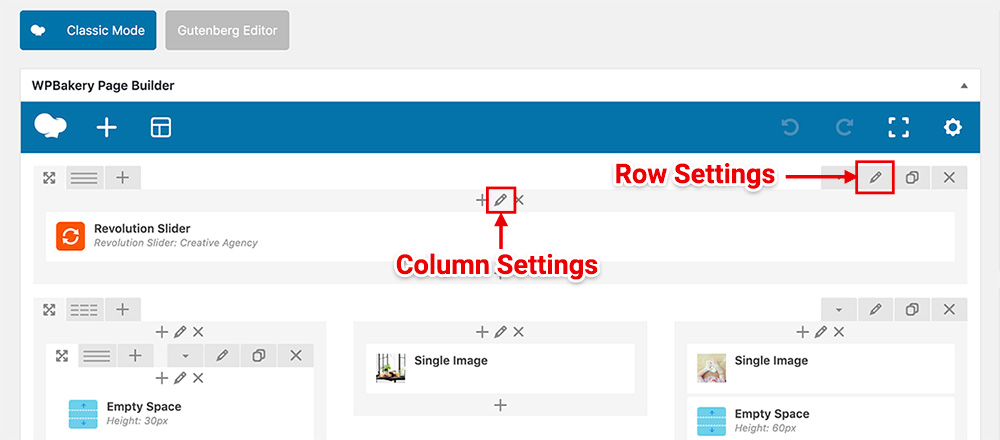
You have to set the Padding Size setting in the Row Settings and Column Settings to No Padding to remove the white space from the row and column.
The progress bars are working properly. However, the value field accepts only numbers. If you’d like to put the %, you can put it in the Units field instead.
If it still doesn’t work, try to remove the Progress Bars element and add it again to see if it works.
padding setting in row & column was exactly what I needed. But the progress bar still not working correctly. I deactivated all plugins as well and no change. I’ve added and removed the element and tried changing all the parameters I could. When I add the element without anything inside the unit field I only see a thin grey line with no content inside. When I add the % to the unit field I get this text. 5B%7B%22label%22%3A%22Development%22%2C%22value%22%3A%2290%22%7D%2C%7B%22label%22%3A%22Design%22%2C%22value%22%3A%2280%22%7D%2C%7B%22label%22%3A%22Marketing%22%2C%22value%22%3A%2270%22%7D%5D
I have it loaded onto my page if you could please check: https://christofergoodwin.com/examplep/
I would also really love to use a gradient on the progress bar colors if at all possible. Thanks for all the help.
I’m sorry but I’ve never seen this issue before. It’s working fine on our sites, as you can see in the links below:
https://wydethemes.com/vela1/about-us/ https://wydethemes.com/vela1/about-us-2/Please ensure you’re using the latest update of the WPBakery Page Builder plugin (6.8.0).
If you have a cache plugin on your site you will need to clear all caches after updating.
Also, try to bypass the cache and force a complete refresh of your browser caches by pressing CTRL + F5 (or CMD + SHIFT + R on Mac) to see if it works.
If it still doesn’t work, you may need to send me your WordPress admin login credentials so I can check it for you. You can send a private message through a contact form on our profile page here: https://themeforest.net/user/wyde#contact
hello! Is this theme getting an update any time soon?
We just uploaded the new update of this theme. It will be available for download soon.
Dear Envato team, we have a problem with mobile visualization of our Rubix Template by Vela Theme. The slideshow doesn’t look as it should, the first one at the home page and also the following banners (Example. the advertisement of the thermostat, where the button is half hidden). People can not click on the button, is not acceptable! Can you please help us improving mobile devices visualization? thank you in advance for your, Best regards
We’re sorry but it seems like you’re in a wrong product page. This theme doesn’t include the Rubix Template. Navigate to “Downloads” tab then click on a link of the product in your recent purchases.
Hi, we are Vela theme users. we have an issue with the mobile visualization of the web site and we’d like to receive assistance. People can not click on the buttons, they are often hidden by the other banners that are overlapped in the visualization! this is not acceptable! Can you please help us improving mobile devices visualization?thank you in advance for your work, our support service is expired. Thank you once more,
We’re sorry but please contact us from the account that purchased our theme to make sure you’re currently in the correct product support page that corresponds to what you have purchased.
It appears that the Vela theme (2.0.9) files have a lot of strings with a text domain of ‘flora’ or ‘Flora’. This does not match the theme’s own text domain, i.e. ‘Vela’, and makes it impossible to automatically translate these strings. Any chance you could do a search and replace in an updated version of this otherwise great theme?
Thank you for reporting this issue. It will be fixed in the next update.
Hello,
We are facing an issue with Contact Form 7 from theme Vela. We are not receiving any emails after the form is submitted even if we’re seeing the message below: “Thank you for your message. It has been sent.” We are switching between many email pluggings trying to fix the problem, but with no luck.
We need some support in order to make it work. For making the thing easier we’ve created a user for you and we can send the credentials privately.
Many thanks
Make sure the email address in the “From” field is correct and in the same domain as your website. By default, the Contact Form 7 plugin uses specific email address wordpress@yourdomain to send out an email. You may need to add this email address on your web host to make it work.
Also, please ensure that your WordPress site can send out an email. You can check it by using this plugin: https://wordpress.org/plugins/check-email/
If your site couldn’t send out an email, please check out this link: https://www.wpbeginner.com/wp-tutorials/how-to-fix-wordpress-not-sending-email-issue/
Thank you for you answer. The problem was caused by rDNS / PTR. We managed to solve it and have the form up and running. Now the guy who takes care of our site complains that after after he does any change, even as little as adding a new image, other sections of the Home page are being lost/broken (for ex the Company section at the top or the Skills section). Is there anything specific that he needs to do from WPBakery in order for his changes to not always affect other parts of the site?
Also another quick question regarding GMaps. We’ve removed that from the Contact Us page, so no actual Gmap components are currently present on our sites pages. But still we’re getting, on each page, two warnings related to the missing GMaps API key. Can you guide us please in how we can completely remove the gmap scripts from the Vela Theme?
1. If you have any other plugins, try to deactivate them to see if it works. If it doesn’t work, there may be an invalid shortcode/element included in the page content. You may need to send me your web address so I can check it. If you’d like you can send a private message through the contact form on our profile page: https://themeforest.net/user/wyde#contact
2. You may need to add the following filter into functions.php in your child theme to completely remove the Google Maps API from your site:
function vela_child_remove_google_maps() {

  wp_dequeue_script( 'googlemaps' );

}

add_action( 'wp_enqueue_scripts', 'vela_child_remove_google_maps' );
hello. I am working on the ambro home 4 on a Shopify template. the vela multiple banner is not working on all screen sizes. although i am using the right bootstrap classes. col-xs-6 col-s-6 col-md-6 col-lg-6 col-xl-6. Though the resize seems to be working on some of the screen sizes and some other just don’t. P Please help, i am starting to get frustrated with the template.
Thank you
We’re sorry but this is the Vela WordPress theme, not a Shopify template. To visit the right support page of your product is, navigate to the Downloads tab then click on the product link in your purchased list.
Hello, the VELA theme is giving me problems to install it in Wordpress. After installing it, the theme appears without any style, only HELLO WORLD appears. Can you help me?
You have to install bundled plugins to make all content elements work. Also, you can import demo content to make your website look like our demo site. You will find more details in the documentation: https://wydethemes.com/vela/documentation/#import-demo-content
It is never a good sign when the site of a plugin is not available…How can I update the wyde-core without being able to download it?
We’re really sorry, there was an issue with our webserver so the plugins were not temporarily available to download.
However, it is working now so you can download and update them normally.
Also, all bundled plugins are included in the main download zip file which you can download in the Downloads tab on ThemeForest. Choose “All files & documentation” to download, then extract that zip file you will find all bundled plugins in the folder “Plugins”. You can upload and install them manually under the Plugins screen in your WordPress admin area to replace the current ones. You can find more details here: https://wydethemes.com/vela/documentation/#package-content
Hi there,
a couple of months ago I posted a comment regarding the team members slider, which is not appearing anymore on my website?
As you can see for example under the ‘Meet the team’ dropdown you will see that no content is appearing: https://www.animoassociates.com/our-network/uk/
You did respond and I have taken the actions you mentioned. I have updated the theme, plugins and WordPress all to the latest versions but still having the same issue. Can you please advise?
Many thanks.
Please ignore this is working now. Thanks.
Glad to hear it has been solved 


