945 comments found.

how can i change the color of the arrow in testimonials? when i import is turn to black. i want to put white like demo 5
Hi,
Do you have a public URL, so I can check?
Best regards!
Hi,
Go to admin dashboard > Appearance > Customize > Additional CSS and paste the following css:
.pxp-testim-1-container .owl-carousel .owl-nav button svg g line {
    stroke: #fff !important;
}
Make sure to change the #fff color to the one you need.
Best regards!
thanks a lot!
You’re welcome 
Any plans to add to this theme? Any extra features? Like a booking options? Or schedule tours? Or appointments? All would be nice additions.
Hi,
Thank you for the suggestions, I will take them in consideration.
Best regards!
I would like extend CRM contained in your theme. I need suggest properties to leads like Idealista system. When user show interest in a property (adding to favourites or filling contact form) I need that the system show for the agent other similar properties to send them to customer. That is posible?
BEST regards.
Its possible? best regards
Hi, sorry, this is not possible. Best regards!
Hi. may be I dont explained correctly.
I would like to extend (myself) your theme (CRM functionality) with 2 new functions and I need to solve me some questions:
1. When any user use the contact form (new lead) then system must be suggested me (admin or agent) properties to show this lead. This would be possible?
2. When any user make a property like favourites this make a lead?
3. Your CRM functionality is in a separated plugin from theme?
Best regards
Hi,
1. But the lead would have to give some kind of information to be used for the suggestions. Right?
2. No.
3. Yes, the plugin that comes with the theme.
Best regards!
1. Contact forms are inside in every property page. If user fill contact form for determinated property then suggestion must be properties like property that user show interest
Yeah, ok, that would be possible.
fac8d2c2-01f9-4f55-b950-e16206e01f86
this theme does not work. please issue me a refund.
done
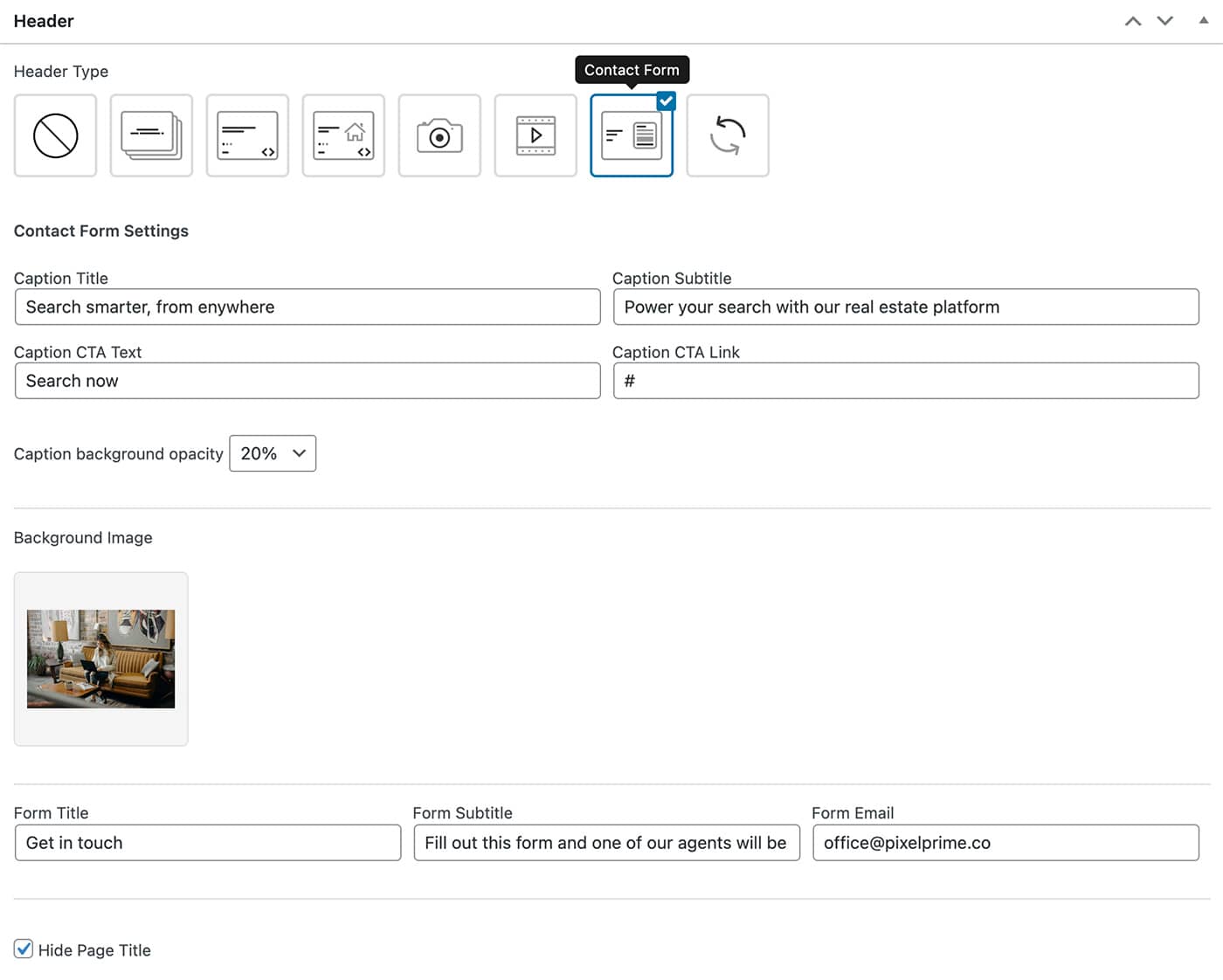
I’m using demo 7, where do the responses from the header form go? I can’t find it
Hi,
You will find the settings when you edit the page, please see here: http://pixelprime.co/themes/resideo-wp/documentation/assets/images/170.jpg
Best regards!
Hello, Im having problems to install the theme i buy in wordpress, I was reading the documentation but the installation dont work because is needed files .css and the .zip file dont have them in in a regular form to install it just with adding the file as documentation say
Hi,
Please make sure when install the theme, first unpack the package received from themeforest, that is not the theme you need to install. Ufter unzip-ing the package, you’ll find inside a folder called theme and in it a zip file > that is the theme file.
Best regards!
Dear I sent some requests via email, before Christmas. Administrative access to the site was requested and I passed the data. I still haven’t been answered.
Hi,
I have received your email and I will answer shortly, thank you for your patience.
Best regards!
Hi, some settings are not saved in the db. Like for example I save property variables to be shown in search, filter etc and that is not saving correctly in db. Even if its enabled in the backend, in the frontend it doesnt show. When I print the variable, its shows the value no which is the value for disabled state. Could you perhaps tell why?
Hi,
Which settings in particular?
Best regards!
size and price properties in property fields
Hi,
Please send a private message ( using the contact form on the profile page: https://themeforest.net/user/pixel_prime ) regarding this issue and also mention your website URL and admin credentials.
Best regards!
I have sent the details in private contact form, can you please let me know the status
Hi, Is there any update? Did you get chance to have a look at it
Hi,
Please see my email reply.
Best regards!
can you please check my website it does not load Demo https://mycontact.ikurd.org/
Hi,
Please also follow the Setup section from documentation: https://pixelprime.co/themes/resideo-wp/documentation/#setup
Best regards!
Hi, can I install currency converter plugin? On my website?
Hi,
Yes, if the conversion will run in front-end.
Best regards!
Hi,
You have no page that has the “Property Search” template. You need this page in order to see the listings.
Best regards!
but it was working perfectly some few day ago
thank you i create a new one then
Hi, i want to hide the part of “Explore the Area” in the propieties descripctio, i tried a lot, but i can´t do it, can you help me?
Hi,
I have done this on your website, please check.
Best regards!
Ciao, il tema si installa, però non vedo nulla che faccia riferimento al tema acquistato. Mi appare una pagine blog. Non ci sono i plugin da attivare. Puoi aiutarmi?
Hi,
Please check the documentation: https://pixelprime.co/themes/resideo-wp/documentation/
Follow the “Import demo” and “Setup” sections in order to have a content to start with.
Best regards!
Hello,
couple of weeks ago i send a message regarding an issue i am facing with the resido them, of which i havent received any response.
The issue is the theme logo is getting cropped, due to which the logo is not showing fully.
You can check the https://www.driftwoodrealestategroup.ca
Kindly share the solution as soon as possible.
Thank you,
Hi,
I have already responded to you:
“Are you still having this issue with the logo, because I have checked your website and it looks good.”
Best regards!
Hello, I bought this theme. Am I allowed to use the photos and icons in the demos? Thanks!
Hi,
Yes, you are for some of them, which were free to use.
Best regards!
Hello, pre-buy question, is it possible to change the logo’s position to the center of the header rather than have it be on the default left side as seen in the demos?
Thanks!
Hi,
I don’t have a demo with logo in center.
Best regards!
Yes, i’m aware there is no demo with a logo in the center but will it be possible to implement a code where the logo can be moved to the center?
Thanks, again!
Yes, sure, it can be customized via code.
Hello. I would like to have access to the demo to see the CRM. I couldn’t access it, only the website demos. I’m wanting to change the theme I bought a few years ago, because I don’t have a native crm and this is a very important factor for the change. Thanks.
Hi,
For demo user access, please go here: https://pixelprime.co/themes/resideo-wp/sandbox
SIMPLE USER TEST ACCOUNTUsername: user Password: 1234AGENT USER TEST ACCOUNT
Username: agent
Password: 1234
Best regards!
OK. I logged in and found the crm. Regarding the CRM, is it possible for the administrator to create campaigns and move the customer to another agent?
Hi, sorry, that can’t be done.
Hello , Please Reply my property page is not redirecting
Hi,
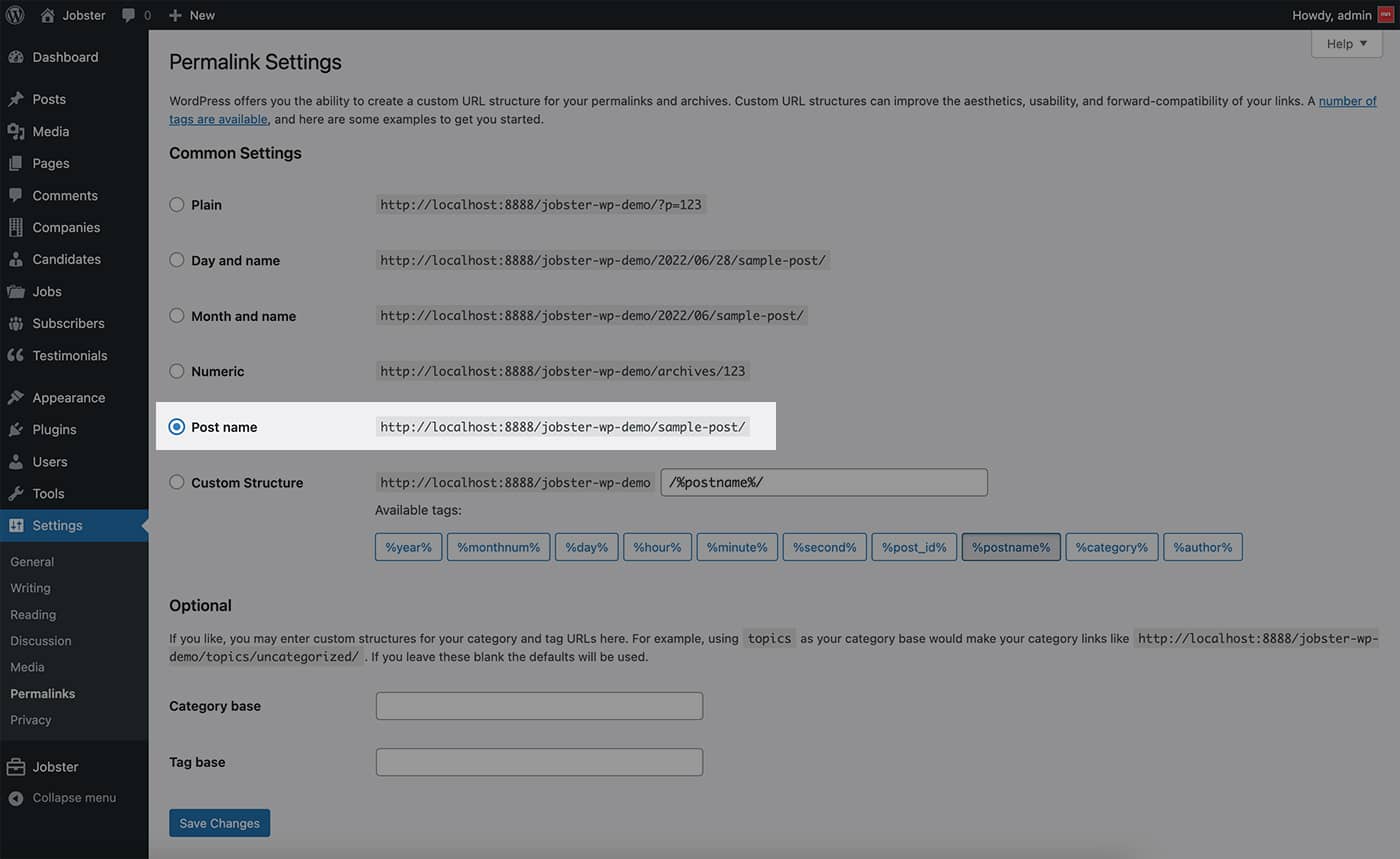
Did you set your Permalinks to “Post name”? If not, Go to Settings > Permalinks and change Common Settings to Post name, as seen in the image below: https://pixelprime.co/themes/jobster-wp/documentation/assets/images/5.jpgBest regards!
I have set the Permalinks to Post name, But whenever i click the page it redirects me to the home page.
Hi,
Please send a private message ( using the contact form on the profile page: https://themeforest.net/user/pixel_prime ) regarding this issue and also mention your website URL and admin credentials.
Best regards!
Yes, Sent.
Go it.
Hey, I am using your theme. How can i edit the header of the theme. I want to add whatsapp and call icon on the header.
Hi,
I see that you have already added the items.
Best regards!
Pre-buy Is this theme fully translatable?
Hi,
Yes it is. Thank you!
Best regards!
Are all pages editable with elementor? Can I remove login functionality?
Hi, I’ve installed the theme and Demo1 on my site, but the properties page links to the demo website. How do I solve this?
I don’t seem to have the “My Properties” page included in the demo, not even the template.
Hi,
Please send a private message ( using the contact form on the profile page: https://themeforest.net/user/pixel_prime ) regarding this issue and also mention your website URL and admin credentials.
Best regards!
I am using “Resideo – Real Estate WordPress Theme”, I have posted a lot of properties. If I switch to “Reales WP – Real Estate WordPress Theme”, will the properties be lost? I don’t want to repost each property, but “Featured Properties” of “Reales WP” is nicer and easier to see than “Featured Properties” of “Resideo”.
Will the “Featured Properties” of “Resideo” be made more visible in the future? I’m very happy with it, except for “Featured Properties”.
Thanks ad
Hi,
Sorry, I didn’t try this. Both themes have property as custom post type, but some of the fields are different. You can try, but I think there would be some differences.
Best regards!