4653 comments found.
Is there some kind of container for the logo? It seems as though the “container” cuts off the bottom of any custom logo that has a height larger than 30px? can this height be adjusted (for both general view and the scrolling view).
It shouldn’t cuts the logo unless you’ve add some Extra CSS.
May I see the URL?
edit: I saw your website and I don’t see anything that should cuts the logo…
Hello Brankic! How are you?
Just a quick question: any chance to customize the color of bra_graph short code? I’m using the orange version of you theme… I need to have just one bra_graph with a different color… is for a series of evaluations where the final one must be of a different color.
Thanks and keep hard!
Hi,
Add this to Extra JavaScript
jQuery(document).ready(function($) {
$(".skills-graph li:nth-child(3) span").css("background-color", "#000000");
});
ps: You should use only one graph container and in that case my script will work. If you don’t know how to do it, please send me your wp-admin URL, u/p (via email form on our profile page) so I could fix this for you. Also, please include your question into this email
pps: I’m fine, thank you 
Thanks Brankic, works fine!
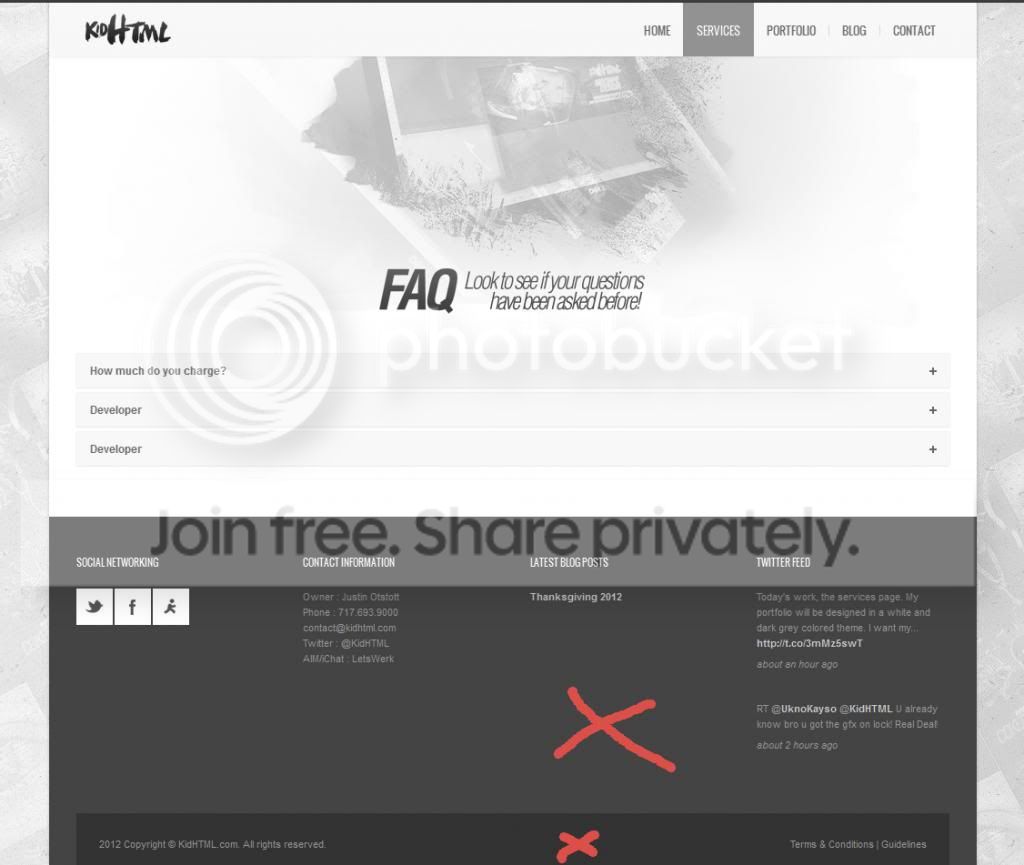
How do I change these backgrounds from a solid color to a background image? And how do I change them to a different solid color? Where are the lines located?
http://i1321.photobucket.com/albums/u546/OfficialKidHTML/question3434.jpgHi,
use Inspect Element feature in Firefox/Chrome.
Add this to Extra CSS
#footer-bottom {
  background-color: #333333;
}
#footer {
  background-color: #444444;
}
If you have basic CSS knowledge you’ll know how to use background image…
Hi Brankic,
I’m using the standard comment system and was surprised by the fact that comments won’t appear on “pages”.
Here is an example on my website : http://www.ubimind.net/dossiers/lifi/Any idea on why standard comments are not showing up ? I checked the box that says ‘enable comments’ on the page, but nothing happened. I was thinking of installing a plugin but wanted to ask you 1st as it seems they are not appearing on your live demo as well ? (ok for blog part and articles, but not appearing on “pages”).
Thanx in advance for your feedback
Hi,
We haven’t added comments on pages. You can add it yourself if you edit page.php (Appearance -> Editor) and add<?php comments_template(); ?>just after
the_content();
?>
I hope this makes sense…

The theme is great. I just updated WP3.5 and the Shortcode JavaScript popup is broken. It won’t generate code. It also freezes the pages responsiveness.
WP 3.5 BigBang 1.7.5
Update: I used your download (bra_shortcodes177.zip). The popup works now. However once the shortcode is inserted the popup remains on the screen and can’t be closed.
Hi,
You should click again on shortcode icon to close the pop-up.
So I put the shortcode into my portfolio post. But there is nothing on my home page. When I previewed the post, it appeared on the Contact page, which I also can’t find on the home page.
question 1, How do I remove the portfolio post from the contact page and have it shown on the home page?
question 2, How to I list the contact page on my home page?
Hi,
I really don’t understand your issue, so please send me your wp-admin URL, u/p (via email form on our profile page) so I could fix this for you. Also, please include your question into this email
There are several problems with WP 3.5 and the short codes. How long will it be until you release an update?
Hi,
Update is submitted. There’s no need to update whole theme. Only one file is changed – includes/bra_shortcodes.js and you can download that file from my download server http://download.brankic.net/BigBangWP/bra_shortcodes177.zip
I think I found it…Category page style! Wow…all this time and it was an option. Sorry about that.
> Only blog style 3 use 270×270 featured images…
Sorry, I was not clear. I am not talking about the blog page. I refer to the list of articles such as (you may see a different template when you go to this link) http://www.marcostradiotto.org/category/i-dossier/could you tell me where I can change this in the code or css? My client basically wants thumbnails there.
Hi, it’s my first time using template to build website, your template has a beautiful design and strong function. Thanks! Here is one question, in the work page, can I display all my portfolios in a random order instead of in published order? Thanks a lot!
Hi,
thanks for purchasing our theme.
To change order of portfolio shortcode items, you’ll have to edit includes/bra_shortcodes.php (Appearance -> Editor)
    $args=array(
    'tax_query' => array(
        array(
            'taxonomy' => $taxonomy,
            //'field' => $termID
            'terms' => $cat_id
        )
    ),
    'post_type' => $post_type,
    'orderby' => 'date',
    'order' => 'DESC',
    'posts_per_page' => $no
    );
Change orderby parameter from ‘date’ to ‘rand’. To see all order and orderby option, please visiti Codex page http://codex.wordpress.org/Function_Reference/WP_Query#Order_.26_Orderby_Parameters
Nevermind, I found the answer in an earlier comment. Thanks!
hi,
i’m having a hard time getting the filters up in my porfolio page like the ones you have up on your “work” page.
i created a new page and inserted in the portfolio shortcode. i tested the page out with and without changing the category and the filters are not showing.
can you give me a quick run through of how i can get them up? much appreciated!
I upgraded to WordPress 3.5 today and found that many of the Brankic shortcodes from the WYSIWYG toolbar no longer work.
Will an update be coming out soon OR is there a workaround?
Thanks you for your responsiveness.
Best regards.
Hi triquint,
I did it myself too, and I’ll try to publish update ASAP…
How soon do you expect to release an update? Just curious if rollback to 3.4.2 is the best option.
Hi,
update is release yesterday.
You have to replace only one file (in folder includes) http://download.brankic.net/BigBangWP/bra_shortcodes177.zip
hi, after clicking the menu. why not change of menu color?
www.olletrack.com
You MUST use Appearance -> Menus -> Primary Menu
Thank you!!
Hi, I would like to stop the portfolio slider after one loop, how do I do that?
Hi,
haven’t tried it, but here is the URL of slider website with documentation http://www.woothemes.com/flexslider/
I would tryanimationLoop: false,Add this to slider options in slider.inc.php near the end of the file…
How do we remove the horizontal lines? Under logo, Under header, etc?
.section-title {
  border-bottom: none;
}
.content-wrapper {
  border-top: none;
}
> featured image should be shown if it’s set in editor.
ok, I see. I did not realize you can hide it from the post, so I did it now. Next problem. The featured image stretches to 600 px even if the image itself is smaller. This image
http://www.marcostradiotto.org/http://www.marcostradiotto.org/wp-content/uploads/2012/11/Screen-shot-2012-12-11-at-19.51.33.png is stretched to 600 px with the following result (screenshot) http://www.marcostradiotto.org/http://www.marcostradiotto.org/wp-content/uploads/2012/12/Screen-shot-2012-12-11-at-20.19.27.pnghow can I keep the featured image as it’s intended?
You can’t do that.
All images are set to be 100% wide.
Only blog style 3 use 270×270 featured images…
So once I convert my blog posts to portfolio posts, how do I display them with the masonry style like I saw on the live preview? I’m quite new at this.
You have to add portfolio shortcode and choose blog category.
If you just want to have that masonry look, you don’t have to convert post to portfolio custom type. Only if you need portfolio single post layout do that…
Hi, are you planning to add pricing, faq and other page variations, tables and more banner options?
Hi,
we’re not planning to add such a features…
I have a code under my website. This is the code:
/—-—-—-—-—-—-—-—-—-—- COMMENT FORM CODE —-—-—-—-—-—-—-—-—-——/ jQuery(document).ready(function($){ $(”.comment-list li”).addClass(“comment”); $(”#comment-form”).addClass(“form”); $(”#comment-form #submit”).addClass(“submit”); $(”#reply-title”).addClass(“title”); $(”#reply-title”).after(”
Make sure you fill in all mandatory fields.
“) });
How can I delete or change it back.
My website is: http://www.enoi.co.uk/your-little-garden/
When adding Extra JavaScript you don’t have to use script tag, just pure JavaScript (without HTML tags)