471 comments found.

Topic Tags in the forum are not working. Take a look at these 2 pages for eg,
https://wordpress-theme.spider-themes.net/docy/forums/topic-tag/cogumelos-magicos-e-a-lei/ https://wordpress-theme.spider-themes.net/docy/forums/topic-tag/%d0%b2%d1%80%d0%b5%d0%bf%d1%80%d0%b8%d0%b0%d0%b5%d0%b2/Both return incorrect results for these tags.
Can I get a fix for this please?
@spider-themes Following up on this.
Thanks for noticing the issue. We’ve noted it and added in the next version queue to fix it.
I bought your theme. One question. How I can let open images as a lightbox? Thank you
I apologize for the confusion. Without specific details or descriptions of the images of the lightbox you mentioned, I am unable to provide a specific answer. Please provide more information about the images, such as that section or any specific aspects you would like me to explain. Thank you.
Can you please tell me how much I need to pay so the theme can be used as in demo? I guess for $44 that can’t be all since you offer some additional pro plugins too and also I read in comments about that most features are hiding behind paywall.
I dont have a problem to pay for a good service but I want to know what I will pay at all at the end. Its like to buy a porsche with flat tires but when you want to get air inside you have to pay $500 for the air and each tire. I don’t like that kind of surprise.
Thank you
What inconsistencies you’re seeing in our theme with the demo? Please contact our support and we will try to resolve it. Thank you
Thanks for you quick reply. I’ll do so. Your theme looks really amazing
Thank you.
Unable to access spider themes ticket system. I enter purchase and its verified as invalid. One of my queries regarding permalink was pending moderation. Please check into it.
Also, need to report a bug.. When you set the visibility of a topic and its sub topic as private, it sill shows in the ToC.
Absolutely no response!!..its been two days.
Third day, no response here or to the ticket that I had files. I think its still in moderation. Can someone look into it please.
Why am I not able to see my ticket response ?
We replied to your support ticket two days ago. Haven’t you seen it yet? See our reply https://postimg.cc/0KQmMgCs
Thanks
Yes..I had seen it but the message was truncated in the email, and I could not access my ticket online. I seem to have lost access to the ticketing sytem.
 But I have another problem. Users with author role do not have edit option. I upgraded to pro max to allow users with author role to edit pages. Did anything change recently in the code ? Please do respond quickly.
I apologize for the inconvenience. EazyDocs Pro Max allows users with the author role to edit pages. There might be some configuration issue that’s causing this problem. Can you please check if the permissions for the author role are set correctly in the EazyDocs settings? If the issue persists, please send a support mail from the EazyDocs account spider-themes.net/account/. The plugin developer will developer will investigate the issue.
Thanks
Here are the settings for author role in Easydocs Pro
Author Settings 1
https://pasteboard.co/u2MzxZzg2mC7.png
Author Settings 2
https://pasteboard.co/oCUgwFrSs7yQ.png
What else is required? And, please note for some reason, I am not able to access spiderthemes ticket forum with my purchase code.
What do you mean by screenshots? I don’t see any problem between the 2 screenshots. Please make it clear. Thank you.
Those screenshots show the permissions I have given for author role. But still author do not edit permission in easydocs pro. Users with author role are not able to edit or create docs in easydocs pro. The screenshot show I have given the permissions, but users with author role are not able to edit or create new docs.
Yes, we have checked this. We are updating our easydocs plugin to fix the issue as soon as possible. Stay with us. Please open a ticket to our support. Thank you.
I am not able to access ticket in your support. I am getting purchase order not valid error.
Hello spider themes, when can we have a fix? All our authors are set as administrator to edit topic. We cannot do this as per security policy.
We already have released a new version of EazyDocs. And the role management functionality has been resolved in this version. Hope this version would be helpful for you. Thank you.
All forum posts are displayed anonymously After the installation was completed, I posted in the forum section, but after the publication was completed, the username remained anonymous. I also tested other accounts and the problem was the same. I checked in the background and found that the author’s column also displayed anonymity. I don’t know what this is, but I sent it after logging in with my account.
After my testing, I found that as long as I enable the EazyDocs plugin, the forum will display this error prompt
Error: Slow down; you move too fast.
I really don’t know how to solve it.
When I am on the Settings Forum page,I cancel the selection:“Allow flood protection by throttling users for 10 seconds after posting”
the error mentioned above will no longer occur, but in exchange,After posting on the forum, All users who post become anonymous GUEST.
so please help me!
word press ver is 6.2,The DOCY theme was also released on April 11th
It should not be related to the version of Word Press. I still encountered the same error using version 6.02 of WP
We found your support ticket on our forum. We’ve replied you there regarding the issue.
Thanks
Still unresolved, could you please read the information quickly. I’ve been waiting for your reply for almost two weeks now
We have noted your issue and it will be resolved soon.
We have already resolved your issues and you have been notified. Thank you.
Unable to post on the forum. I keep prompting errors when posting or replying to forums
Error: Please take your time; Your operation is too fast.
I made the same mistake when switching to another account. please help me.
Since you told in the previous comment that the issue was solved for you, I’m closing this comment conversation.
Hello, after the installation is complete, I found that the forum pages are all 404 and cannot be opened. I don’t know why? I have modified the permalink in the settings before, is this the reason? how should i adjust
I reinstalled this theme and found that the problem still exists, indicating that it is not the permalink I set up. So, what is the cause of this and how to solve it.
it has solved
Glad to know that the issue has been solved for you.
is the EasyBuilder option not visible for WP users in the Author role ?
Your question is not clear to us. could you please explain it more?
When the wordpress user is in author role, the easydocs is not available, but if the user is administrator, we can see easydocs.
Yes, EazyDocs is only available for website Administrators by default. BTW, you can allow the Author user role to edit/manage docs in the EazyDocs Pro. See how it works https://spider-themes.net/eazydocs/features/user-role-management/
Thanks
 Upgraded to Pro..getting fatal error on activation.
Please provide a quicker reply…have a demo later today.
Upgraded to Pro..getting fatal error on activation.
Please provide a quicker reply…have a demo later today.
Fatal error: Uncaught Error: Call to undefined function ezd_get_page_by_title() in /nas/content/live/nskpdocs/wp-content/plugins/eazydocs-pro/eazydocs.php:221 Stack trace: #0 /nas/content/live/nskpedocs/wp-includes/class-wp-hook.php(308): EazyDocsPro->activate(’’) #1 /nas/content/live/nskpedocs/wp-includes/class-wp-hook.php(332): WP_Hook->apply_filters(NULL, Array) #2 /nas/content/live/nskpedocs/wp-includes/plugin.php(517): WP_Hook->do_action(Array) #3 /nas/content/live/nskpedocs/wp-admin/plugins.php(194): do_action(‘activate_eazydo…’) #4 {main} thrown in /nas/content/live/nskpedocs/wp-content/plugins/eazydocs-pro/eazydocs.php on line 221
The free version of easy docs is required for installing the pro max version. This information was missing in the installation note for pro max upgrade.
This topic is resolved and closed.
Hello, my experience with your support service has been a nightmare. I have been with a ticket open in the support forum for 6 days to which they have answered 2 times to say nothing. Today I have not been able to identify why the system does not validate my registration key. According to themeforest I still have 5 months left in the support service. Can someone help me with this?
We are extremely sorry for the late reply. Please check our reply on the ticket you opened.
Thanks
3 weeks later… you keep giving me answers to say nothing.
Glad to let you know that we’ve opened live support via chat. Please send messages via chat to get an instant solution.
Thanks
Hi,
I am interested to buy this. But do you have back-end demo of this? to check some features on this.
I tried https://wordpress-theme.spider-themes.net/docy/demo/ and submitted my email. But no email is received for me to redirect WordPress.
sorry I just got the email and I was going through it. Can you check the below points are possible?
1) Is there way we can restrict the articles in the frontend based on the categories we assigned. Like IT will see only IT related articles, HR will see only HR articles etc 2) Can we put a login when someone access the website? 3) When an article is upload, can it be in a status of pending? and then an super admin will come and approve this?
Thanks for your queries.
Note that, These features are not available in the Docy theme. You can get these features in the EazyDocs Pro plugin.
1. In EazyDocs, you can restrict Docs for users who are not logged in. But if you want available the frontend Docs based on custom user roles, you can hire us to develop that feature in EazyDocs.
2. Yes, you can put a login when someone accesses the website.
3. Yes, This feature is available in the EazyDocs Promax’s Contributor module.
I recommend purchasing the EazyDocs Promax plan along with the theme to get the features.
Thanks
Your FAQs don’t seem to have proper Schema markup?
Yes, we checked that the FAQ hasn’t the Schema markup yet.
We’ve noted it to add proper Schema markup in the FAQ templates.
Thanks for noticing it.
Hello,
Is it possible to restrict some KB articles to specific users roles ? Thanks,
Sorry to say that this feature isn’t available in the theme feature.
But, it’s possible in EazyDocs Pro. You can get it here .
Thanks
I have submitted Ticket as you asked me to do, please RESPOND to solve EasyDocs issue mentioned earlier!
Thanks for the FIX!!!
Hi I have a few questions before purchasing.
Whats theme’s compatability with adsense? Compatibility with yoast seo? And all in one seo plugins?
Regards
Hello,
Thank you for your interest in the Docy theme. I am glad to inform you that the theme is fully compatible with Adsense and both Yoast SEO and All-in-One SEO plugins. You can easily add your Adsense code to the theme, and the theme’s clean code ensures that your SEO plugins work seamlessly. Please let me know if you have any further questions.
Thanks
Thank you for your response. May I ask if the theme is possible with “content restrict pro” or “memebership”/ “subscription” plugins. I understands that roles can be restricted in Easydocs pro that’s not what I need because in that case its not internal or password based restriction. I want to add some docs which should be available to paid users only. Kindly answer Thank you
May I ask if the theme works* with “content restrict pro” or “memebership”/ “subscription” plugins.
Some of our clients restricted their docs with third party plugins for paid users. But we didn’t test it ourselves.
Thanks
Is “Featured image” showing on top of each doc a Docy or EazyDoc setting? Can’t find it anywhere.
We already notice it. You’ll get settings for controlling the featured image show/hide in the next version of EazyDocs.
Thanks
Hi. Looks great. Is there a way to turn off the spinning waiting screen when the page is trying to load. That’s a deal breaker for me.
Sure, you can turn off or customize the Preloader from the Theme Settings.
Thanks
Keep getting a key error when i try to register the theme. dont have it installed on any other sites
Please try again to register the theme with the valid Purchase Code. If you fail again open a ticket here with sharing your website credentials to allow us to investigate the issue on your website.
Thanks
Amazing thank you all working
I would require a refund for the Docy theme i purchased. Please let me know how to proceed.
The problem i am facing is that i am not able to remove the 'doc' slug from the URL while using the Eazydocs plugin. This will affect wil SEO all toghether.I would purchase another theme from theme forest
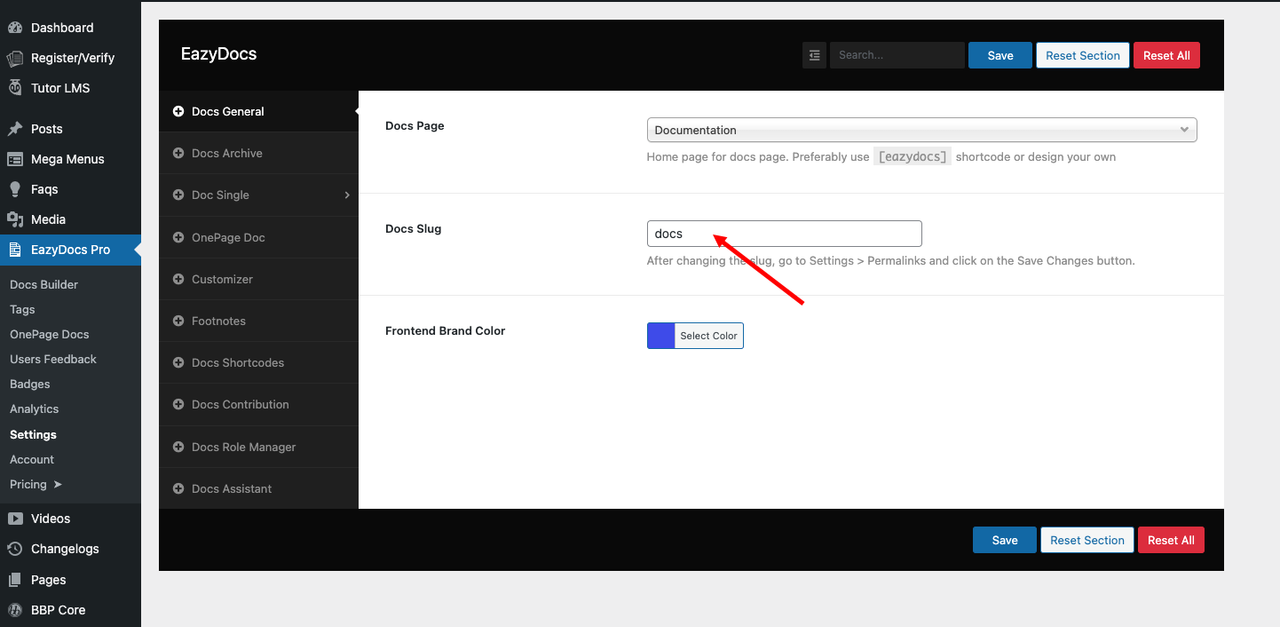
You can change/replace the doc slug from EazyDocs > Settings > Docs General. See the Settings screenshot here https://i.postimg.cc/BQD8kPPD/image.png
Thanks
I would want to “remove” the unneccessay slug like the way it can be done with other wordpress themes. Changing or Replacing does not help my cause. I would be adding 400 pages to my website in 1 month and i dont want a needless slug in all the pages.
We are confirming that you can’t completely remove the slug because of WordPress page hierarchy system.
I think, it’s not bad for SEO. If you think, you can prove that it’s bad for SEO, you can help WordPress to resolve the issue by contributing to WordPress Core.
Thanks
I don’t want the “slug” in between my URL’s. Please arrange for Refund
Hello, The “docs” slug make my URL lengthy unnecessarily. Lengthy URL’s tend to Impact SEO negatively. Below are the studies/graphical representations supporting my claim.
https://images.app.goo.gl/DjewTXAarpJiKyGf9 https://images.app.goo.gl/pbw58RAUqP54W2Js8 https://images.app.goo.gl/EKxfLfkf4gf4AzEy7Please let me know on refund. Hope docy slug doesn’t spill all over the internet.
You are saying that the slug is unnecessary for SEO, but the search engine says that it can impact the user experience and readability of your URLs. This slug is helpful in distinguishing it from other post types. If the slug is not given, then if you add a post with the same title in another post type, then it would definitely create a duplicate issue which the search engine does not allow.
So you cannot think of such a serious thing as unnecessary and it is not appropriate to ask for a refund for this. Therefore, we request that if you find any problem with our plugin, we will try to solve it, and if we fail to solve any problem, we will refund you. Thank you.
.
We have been using a skin on the light them, but notices, it is now converted to a pro… https://pasteboard.co/0ViqDNPi5vmb.png ...
This widget is getting from EazyDocs. Use the Docs widget which is from the Docy theme.
Thanks
okay, got it. But issue persists. I tried import the Light Knowledgebase demo content, but its failing. I think the import process is not recognising the pro elements plugin. But I have it installed. https://pasteboard.co/5YewPwBxevpf.png , any method to get that specific theme and the skin, so I can continue setting up the site. Thanks.
How did you try to import the Light Knowledgebase ? And could you share the error screenshot, please?
Thanks
After installing the theme and all the plugins ( i did not miss any), I did Appearance > Import Demo Content and selected Light Knowledgebase demo. Thats when I was getting this error >> https://pasteboard.co/5YewPwBxevpf.png . ...
I tried again, and I got message the import was successful. But when trying to add the Docs element in the page builder, I do not see the specific skin >> https://pasteboard.co/DLX97w6H6VZ0.png
No error message is showing here https://pasteboard.co/5YewPwBxevpf.png
And no error is showing on here also https://pasteboard.co/DLX97w6H6VZ0.png
In the screenshot, I can see the skins are rendering properly on your page.
Thanks
Okay sir…here is a screen recording. I am adding the DOCS element and do not see the skin… plesae check this https://watch.screencastify.com/v/KRHVJ9Vk7FIBaKCu5fBX
Just now, deleted all plugins and the theme related to docy, installed again. Opened the home page in elementor, added the docs element, but the skin is missing.
I am looking for this specific skin. https://pasteboard.co/ViDtz4cnOwNP.png It used to be part of my setup which I was using, suddenly it has now gone missing or become PRO. Found it from an old screenshot of my setup.
Could you please help with getting the missing skin…
We’ve tested that widget skins. It is working perfectly on our end. See it here https://www.loom.com/share/62e760a469e5483fb5cabde62b32a7a8
I’m requesting you to open a ticket here with sharing your website credentials to allow us to investigate the issue on your website.
Thanks
Even in your video, the TOPIC BOXES skin is missing . I am looking for the skin that displays tiles in the landing page. You also do not have that. It used to be available for me but its suddenly missing now in the latest update of Docy.
https://pasteboard.co/Ro2uzjkSZPzB.pngFiled a ticket as well. Please assist, I am blocked now and unable to set up my doc site.
Here is what I did again… 1. Removed theme and all the plugins. 2. Reinstalled the docy theme after downloading the zip from Themeforest. 3. Installed and activated all required and recommened plugins. Including PRO ELEMENTS from elementor website. 4. From Appearance > Import Demo Content ..i imported the light kb theme. 5. I could see the Home Light page and when viewed as the site, I can see the TOPIC BOXES skin. 6. But when I open it for modifying in elementor, it goes missing.
Please watch the screengrab here: https://watch.screencastify.com/v/pyj9IPUIaz6KVD53l4n7
Have responded to the ticket (private reply), could someone please look at it…running against time to set up our protal.Need the topic boxes skin in light KB demo for our portal. Thanks.
:cry
We have already solved this problem for you. So we can end the conversation for the “topic boxes” here. Thank you.
Yes and thank you for that.
But I see there is new update, if I update the theme or plugin, will I loose the topic/boxes skin ?
Hello …can you please confirm..can I go ahead and update ?
No, there should be no problem. You can update. But if you get any problem after updating then contact us. Thank you.
Hello developers… One oddity I see is when the 2nd tier (level) in the left nav / toc is opened, all nested links are expanded regardless of level, really blows up the left nav, opens the complete doc set. And the tiers from level 3 down do not respond when you try to collapse them. Level 2 works, fwiw. Could you please let us if there is a way to fix the open/collapse of left-toc/nav.
Thanks..
Any suggestions or solutions, ... ?
Please let us know about your issue by submitting a ticket to our support https://helpdesk.spider-themes.net/forums/forum/docy-wordpress/ The support team is always ready to solve any problem you may have. Thank you.
I filed a ticket..could someone please look into it.!
Can someone please look into my ticket ?
Please check private reply ….
Any luck with my ticket ?
Replied. Please check
Hello, I want to use docy. But I want to confirm a few things on WordPress Admin dashboard. Can I request a demo or trial? Thank you.
Thanks for your interest in the theme.
Yes, You can try Docy for free here https://wordpress-theme.spider-themes.net/docy/demo/
Thanks
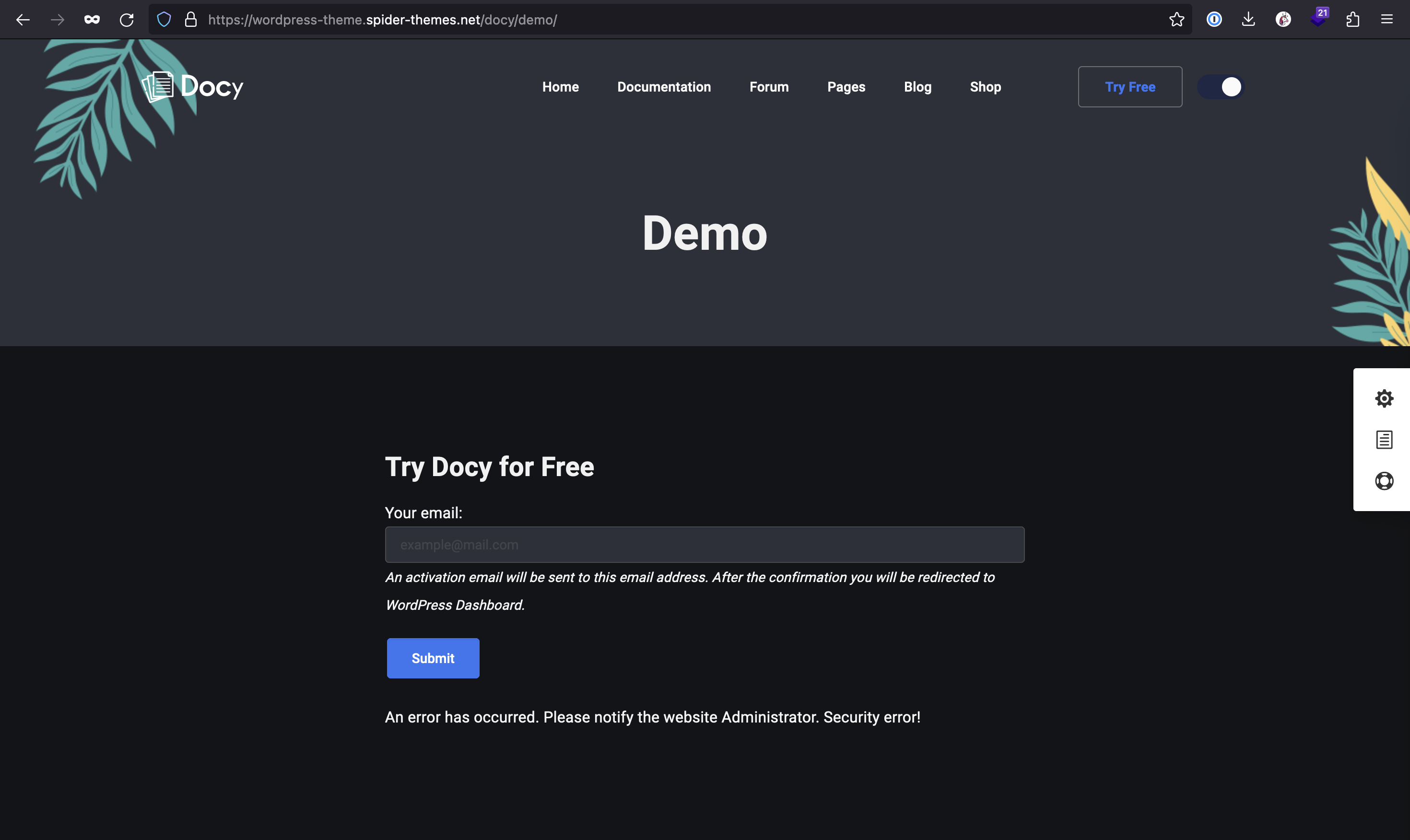
I have already written my e-mail. But an error has occurred. Please check this screenshot: https://i.dnva.me/1b2d1-image.png
Thank You.
Thanks for noticing it. We’ve fixed the mailing error.