952 comments found.

how to add multiple embed code in video post
Hello,
There is no way for you to add more than one embed code to the same area. It’s a illogical question.
I recommend learning about the theme’s Multi-Links feature: https://vm.beeteam368.net/video/day-of-the-warrior/
Documentation: https://vm-demo.beeteam368.net/documentation/#video -> scroll to: Multi-Links.
If further assistance is needed, please create a ticket through the support tab.
Thanks!
Hello! I´m using the single URL from my youtube videos in the posts! And i realize that in player settings, we have video “advertising option”, and I can see many options to choose!
Whats the correct option to show youtube ads normally, without prejudice my youtube account or my earns… I mean, show youtube ads normally as it appears at youtube site…
( I´ve tried to select Google Adsense but it doesn´t works, any other option as HTML5 Video Ad works but I need to know if its running at my acoount normally )
Hello,
Youtube ads are managed by Google. You do not have the right to change or interfere with the display of Google’s ads.
Please refer to the Youtube policies here:
https://support.google.com/youtube/answer/132596?hl=enNo one can interfere with the display of ads from Youtube.
Not to be confused with the theme’s video ad features. Those are the features so you can make money from other ad networks.
Thanks!
Hello! Mycred puts a lot of load on the database, maybe a gamipress system would be better? Do you have plans for even more optimization?
Hello,
Currently, we have no plans with gamiPress.
Thanks!
Fine! But you need to solve something with mycred, because when you have 10 thousand users it will hit the speed of the site and hit the server capacity
Hello,
We’re not sure if gamipress is really more optimal than myCred.
There aren’t any studies or reviews at this time. Database optimization belongs to the authors of those plugins, we cannot interfere or change it, I recommend you contact their author for further advice.
Thanks!
hello can you pls add wasabi storage support in the next update as it is very affordable and fast
Hello,
We noticed that you are creating a lot of new accounts asking the same questions.
Please don’t spam so much. We don’t have any plans with wasabi at this time.
Thanks!
My site is down, I wanted to reinstall the vidmod but I get the following message This domain name is already in use. PLEASE DEREGISTER IT FROM THERE AND THEN I Could try AGAIN
I can,t access old website where I registered first time
therefore I,m blocked
Hello,
Please create a ticket through the support tab for help.
( Provide your purchase code information in that support ticket. )
Thanks!
ok, thanks
Pls add wasabi support
Do vidmov supports leopard offload media plugin and wasabi storage
the videos in the theme loads very slow i checked the demo even the embedded video loads slow. Will that be fixed in next update and using bunny cdn you can store video and audio but what about the posts where they will get stored if we do not have enough amount of space on our server.
Hello,
Please check your internet connection speed to those video networks.
If further technical advice is required, please create a ticket through the support tab.
Thanks!
onde altera a linguagem do tema? é multilinguagens? ou precisa de plugins extra?
We are really looking forward to your update!
Here are some features that will take your theme to a new level. -more frequent updates! -more optimization! -modern design! -UX/UI design MYCRED, DASHBOARD (now it all just looks terrible)
Hello,
1/ That is also the basic structure of myCred. When using myCred, it means that you will use their existing structure. It has been improved to display well with the theme.
2/ If you need to customize to your liking or according to your ideas, we have our own custom service, you can provide the necessary information, design and we will quote for you.
3/ If you need technical advice, please create a ticket through the support tab!
In addition, VidMov is still regularly updated, you can scroll down to the bottom of the about page to see the change log.
Good Luck!
Thanks!
When will be the next update released?
Hello,
I’m not sure, because I’m not on VidMov’s development team.
Most likely in the next 10 days, this version has some major updates so it will take more time to roll out.
Regards, Nicole!
Hi!
I have a few questions:
1. Is there a way to connect my other social accounts with the theme “live streaming” feature so that I can go all on multiple platforms at once via my website?
2. Do you have Vidmov available as a plugin? I love all the features and I want to use it, but I have put to much time in customization of my current theme to switch theme all together. I’d love to be able to buy Vidmov and use it as a plugin on my site…
Best regards,
Hello Eltye,
Thank you for contacting us!
1/ Unfortunately, VidMov doesn’t support that.
2/ VidMov’s features only work with the VidMov theme.
Best Regards!
Thanks for your reply. But what if I want you to create it for me as a plugin that I can use on my site? I really need the features but I want to stick with my current theme.
Hi,
You should create a ticket through the support tab to meet our technician.
Thanks!
Hello, how do I use my License on another domain? I am still testing the theme on 2 of my servers and I need to be able to deactivate/activate on different domains till I finish and settle for one domain.
Thank you!
Comprei o tema mas não consigo alterar isso File is too big (11.35MiB). Max filesize: 10MiB. como posso alterar?
Pergunta pré-compra File is too big (11.35MiB). Max filesize: 10MiB. como posso alterar?
Hello,
You can change that option in WP Dashboard ( post submission settings area )
Please use English!
Thanks!
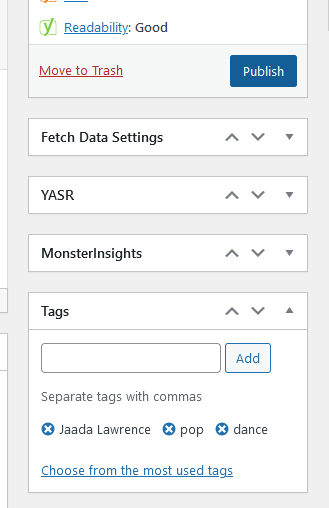
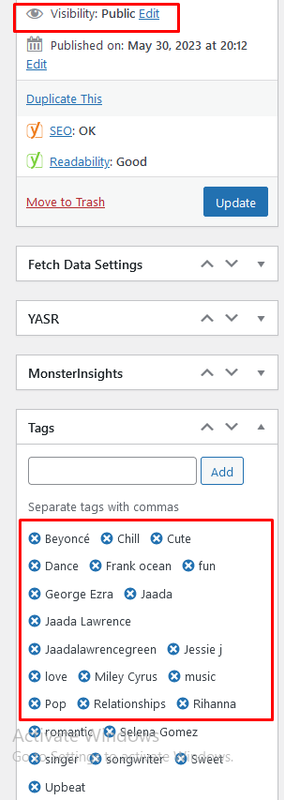
There is a problem going back several versions. When people add 100 tags, you cannot remove them even AFTER you make the post “public”, please fix this. See the images please. It’s SO annoying.
Hello,
Please review the options regarding fetching data from Youtube or Vimeo. If that option is on, turn it off.
If technical support is required, please submit questions through the support tab.
Thanks!
Request: Please add the 404 Page to Elementor. Currently we cannot design the 404 page other than changing text and image.
Hello,
Currently, VidMov does not have this plan. If you are using Elementor Pro, you can override the entire 404 page and rebuild it from scratch with the Theme Builder feature.
Hope this helps you: https://elementor.com/blog/create-custom-wordpress-404-page/
Thanks!
Ah, okay, that is all I needed. Thanks.
Hello Vidmov,
I’m reaching out because I need assistance with adding a home button to the mobile menu bar of my website. Could you kindly help me with this? If possible, it would be great if you could provide the necessary code and instructions on where to add it. Alternatively, if you could let me know the location of the phone bar menu, that would be helpful too.
Thank you, and I appreciate your support.
Hello,
For technical support, please create a ticket through the support tab.
Thanks!
They take times to answer even I buy extra support
Hello,
I see that your support period is still available and you don’t need to buy more at this time.
Maybe your ticket is in the queue and they will respond as soon as it’s their turn.
Thanks!
Hi Can i delete this Bar section that appear on phones
Hi,
If you need technical support please create a ticket through the support tab
Thanks!