1386 comments found.

I have followed instructions to optimize my site to load quickly. No go….don’t know what else to do. I disabled every plugin except the minimum required (and also kept WP super cache and autoptimize enabled) and activated my test homepage that had no media content that needed to be loaded. It is pretty much just a blank page. SO SLOW STILL. Is the culprit my web hosting? I use Bluehost dedicated. My LARGEST CONTENTFUL PAINT is horrible. Is it possible my custom headers are causing the slow speed? https://www.shufflehike.com
Which of the Rey premade headers would you say is the fastest to load?
https://snipboard.io/HaXhAb.jpgHey!
Just had a look and here’s what I noticed:
- Is WP Super Cache enabled in its settings? It feels a bit like it isn’t.
- Yes, hosting might make a difference. Perhaps you can try CloudWays. I believe they have a 2 weeks trial and you could try just cloning the site there (they have an automatic migration tool). You’d get a temporary URL like wordpres-0000000.cloudways.net or something like that and you could try running benchmarks again and see if there’s any difference.
- I see Roboto Slab font is not used anywhere but still loaded. Try removing it in Elementor global fonts ex: https://d.pr/v/n90mBU .
- the site preloader is enabled. I’m not sure how much it helps and I actually recommend it to be disabled in Customizer > General > Site preloader.
- Try enabling Lazy Load background images ex: https://d.pr/i/PB3yGK .
- No, the LCP is likely not affected by the custom headers but more like the amount of CSS that’s being loaded in the site ex: https://d.pr/v/xb7Ujq . From what I’ve looked inside of those Autoptimized combined CSS files, there are likely lots of styles (from some plugins) which are not used in the page and since CSS is a render blocking resource it delays the first pixel until the CSS is downloaded and parsed by the browser.
The only solution here is to manually manage those stylesheets and ensure they don’t load in the page. This can be done with a plugin called Assets Manager or manually through some custom code.
Optimizing for benchmarking tools (which are very, very pretentious) is very painful and it gets frustrating when you’re unable to control every part of the site and what’s being loaded. Getting even a near good score is pretty hard.
Okay. Thanks for the additional info to make it faster. I will make changes per your recommendations. Hopefully they improve load speed because I love your theme and want to continue using it.
You’re welcome!
Those changes should improve but not dramatically. For great scores the site really has to have all things in order, in particular the CSS styles and JS scripts.
I definitely recommend continuing to use Rey because I really put a lot of effort into optimisations and I can definitely say it’s one of the best out there.
Now what I actually mean by that, Rey has a “smart” assets manager meaning all styles and scripts are loaded on demand only. Most themes bundle everything and load them regardless if a certain component is used or not. I split Rey’s styles in over 250 micro stylesheets in order to have complete control over what’s being loaded. Believe me, nobody does that.
The problem in most cases is the fact that plugins/themes pile up with CSS/JS even if they’re not used in the page. Benchmarking tools understand that and penalises this.
If you would swap Rey with another theme, for example a minimal one like Hello (from Elementor), you might have better scores indeed, but it depends on the features you require and if you will need other plugins to install which would result in the same scenario.
PS: Just sent you an email through the ticketing platform.
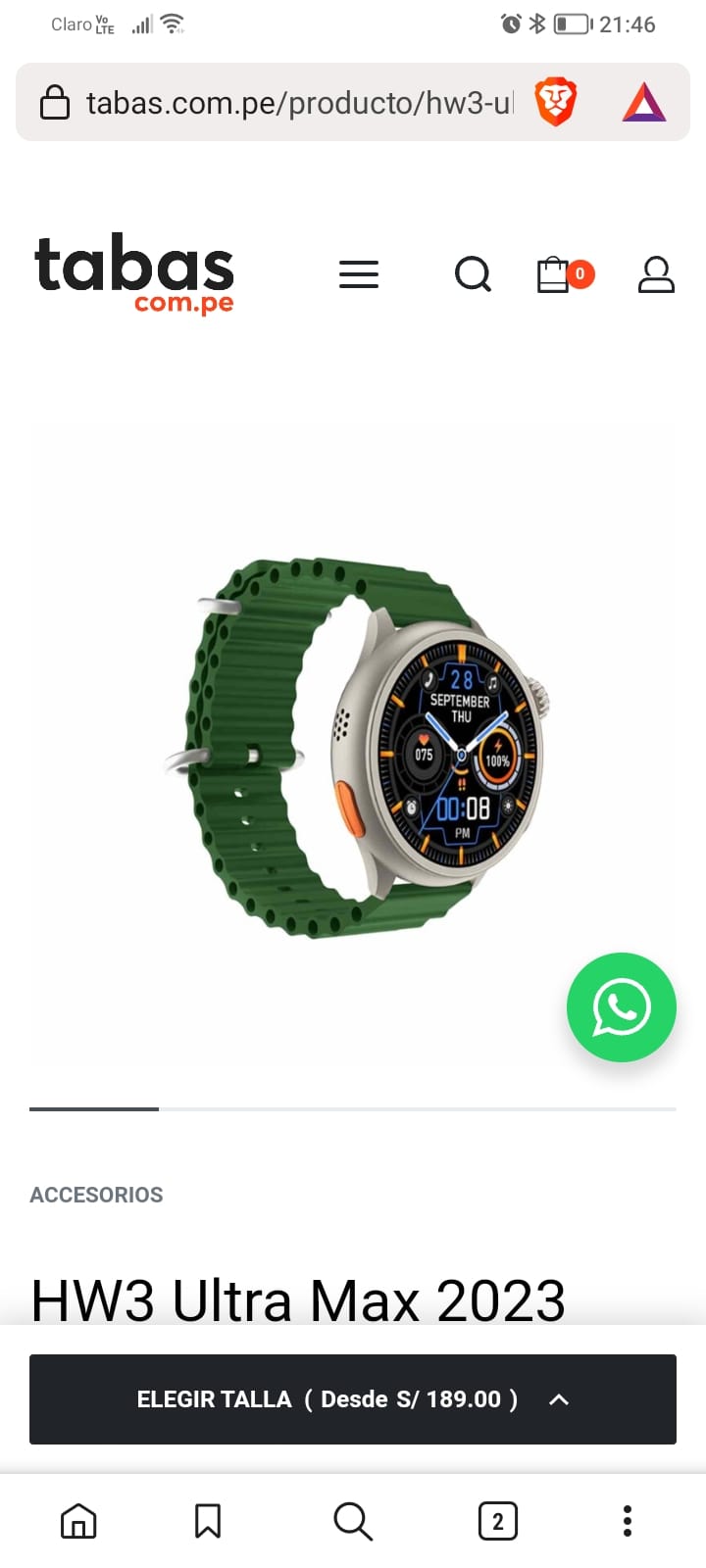
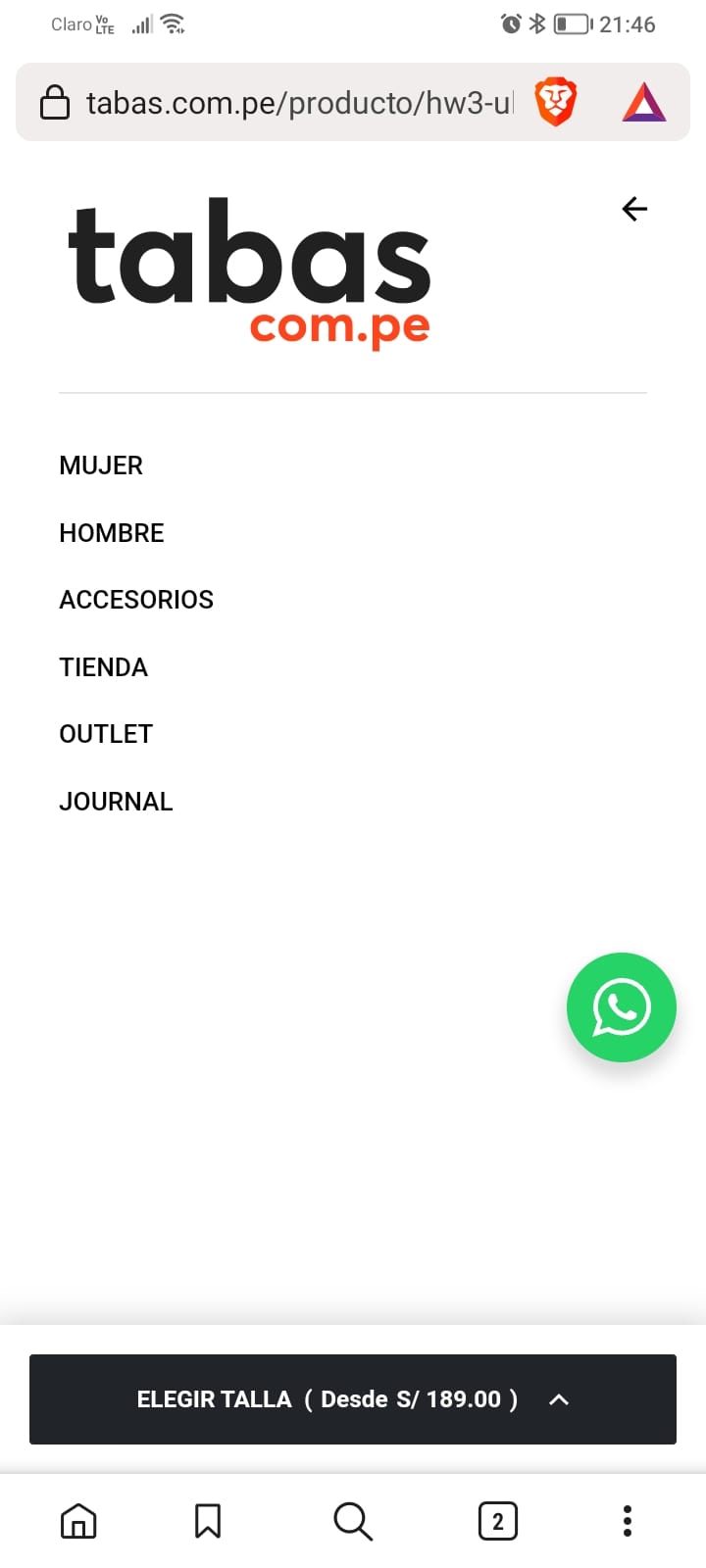
Hello how are you, I have noticed that when I am viewing a product page from my mobile and then I go to the menu, the bar at the bottom of the page overlaps the mobile menu and avoids seeing the option that is at the end of the mobile menu. I add a couple of images that help to show this issue that I don’t know if it is a bug or not. Gracias!
https://www.tabas.com.pe/img/mobil1.jpeg https://www.tabas.com.pe/img/mobil2.jpegHey Luis! Hope you’re doing great too.
Just fixed it locally for the next update and here’s a quick CSS snippet https://d.pr/n/LEOE8l you can add into Customizer > Additional CSS to get it fixed until then. Thanks a lot!
Thank you!! It works great, really love your theme. I hope to buy a new license soon for a new project or for any client. Your theme is outstanding.
Hello, a small question: how can I get rid of the word ‘OFF’ from the sales label?
Hey! Just replied to your ticket. Thanks!
Hi Guys,
A pre-purchase question. This theme is compatible with Litespeed ESI function?
Hey there!
Many customers use LiteSpeed and haven’t reported anything about ESI, so I believe it is compatible, yes.
Hello I have a problem with the search, Many of our products have SKU with white space and the Ajax search of the theme doesn’t work if SKU has spaces
sorry the problem is that in my case don’t search parent SKU, I don’t now why, in customiser both parent and variation are on.
Hey there!
I’m having a closer look and try replicating locally and will get back to you with news.
Just replied to your ticket with news. Thanks!
Hi,
I’m about to purchase this theme, but I have some query please answer it as soon as possible. Thank you.
Is it possible to use this theme as base and create every WooCommerce page(shop, single product page, cart, checkout) and sections(product card, header, footer, cart slider or search) from scratch?
Please mention if anything is not possible from above. 
Hi Dipesh,
Yes, it’s possible. For product page & Shop (or categories) I suggest using Custom templates (more here https://support.reytheme.com/kb/custom-templates/ ).
For the Cart & Checkout I recommend using Rey’s custom widgets (.more here https://support.reytheme.com/kb/how-to-create-a-custom-cart-checkout-layout/ ).
For Header/Footer etc. it’s possible with Global Sections.
To be honest I recommend importing one of the premade sites (or the Starter one) to have an overview and understand it a bit, and only afterwards to start from scratch because the learning curve might be a bit overwhelming. I promise I tried my best but I’m sure some options and various feature are likely not very intutive.
Thanks!
Thanks for quick response.
What about Product Card and Search?
You’re welcome!
Indeed, product card is not possible. I’ve started working on this feature a couple of weeks back but got stuck because of its complexity and delayed it. Unfortunately I can’t share any time estimation but for sure it will take some time.
The Search page yes, it’s possible to be modified with the Custom templates, in Archive mode ex: https://d.pr/i/sq7rLd .
Thank you for dedicatedly improving and adding features in this.
As for Product Card, can I use the Loop Builder for this? By incorporating it in every custom template.
My pleasure! Yes, I may have seen other customers using the Loop Builder, but for sure reproducing the same Product Card skins like Rey has (with hovers and all of that) is likely not possible. I mostly recommend the Loop builder when needing to display more information in the item and have more control over it. Rey has something in the Product Grid widget ex: https://d.pr/i/V6zLjQ however it might be too primitive to work with vs the Loop builder.
Hi, I have purchased the theme.
Is it possible for me to import templates on a different domain(maybe a subdomain) and see how some elements are set up, meanwhile actually establishing on a different domain from scratch?
Thank you. 
Hi Dipesh,
Sorry for the late reply and thank you so much!
Can you send me a message through my profile page’s contact form? Thanks a lot!
Hi, your demo site is not working, could you please check out?
Hey!
Just tested but seems to be live on my end. Is it still happening on yours? Can you paste the link where it’s offline (or not working)? Thanks!
Thanks for getting back! Super odd.
Another request if you won’t mind. Can you try making another screenshot or recording a short loom.com video and share it with me, but make sure to open the Inspector ex: https://d.pr/v/rbv3WT ? I want to see what kind of errors are showing on the page resources and research about them.
I have a sense it might be related to the CDN but I’m not entirely sure.
Thank you very much!
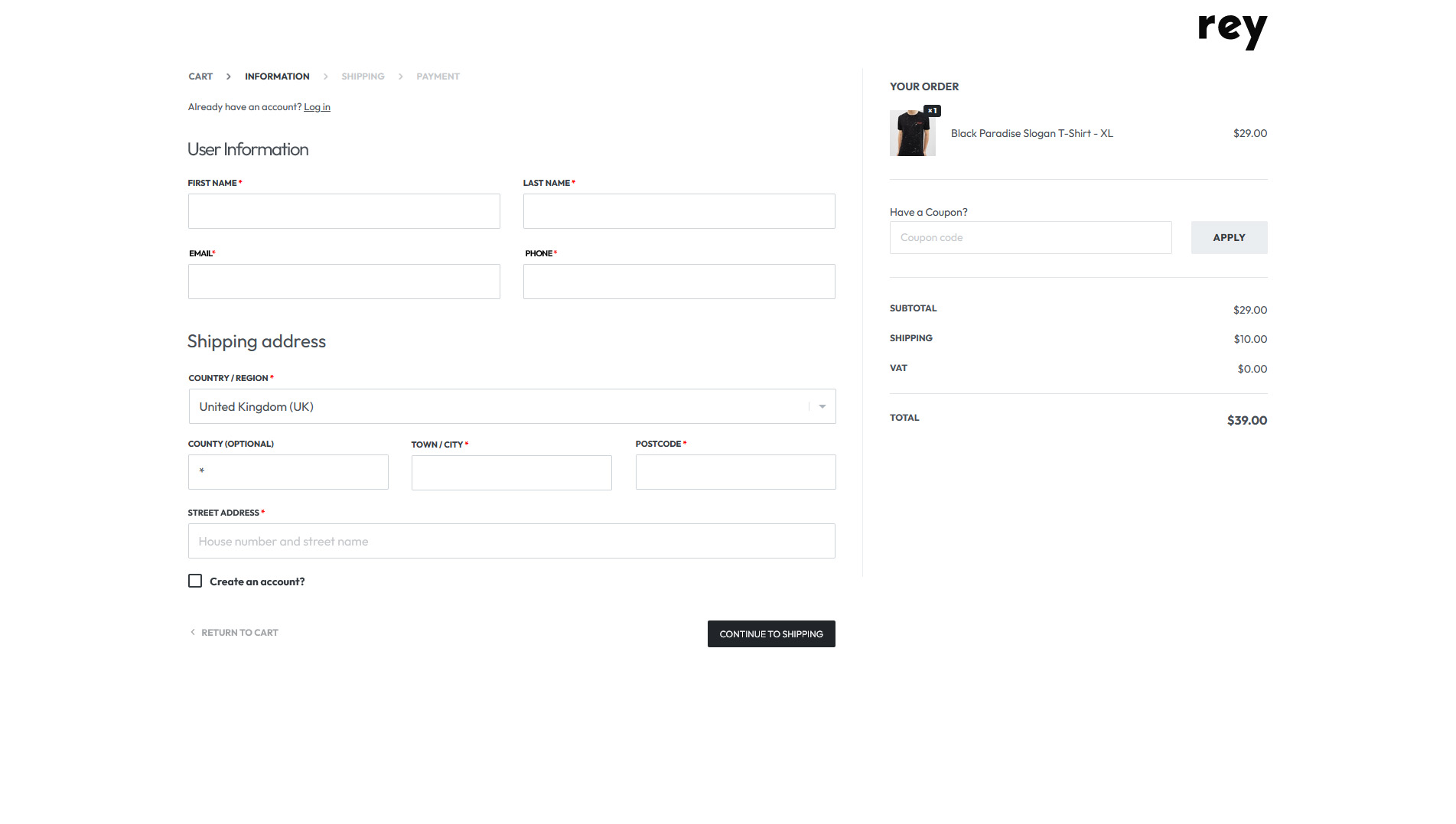
Hello, Could you help me with guidance on what is the best way to modify the CheckOut design?
What I need is to change the position of each field in the checkout to get to the example that I put below: https://www.tabas.com.pe/img/checkout-redesign.jpg
I thank you in advance for the help.
Hi Luis,
Unfortunately it’s not possible, sorry. Maybe with a Checkout field editor plugin it might be doable though.
Thanks for answering. I understand the situation, I will be attentive to any information that I find in woocommerce.
Hello, thank you for the great theme, however id like to have an other header template from other demo, where can i find all the header’s template ??
Hey!
Did you received our ticket reply? Basically make use of the Rey Template Library. More on this topic here https://support.reytheme.com/kb/template-library-faqs/ . You should find a section inside called Headers.
How to modify the content below the product page?
Hey!
Those are global sections. You can either hover the “Edit with Elementor” admin bar menu to edit it, or access via backend Rey theme > Global Sections.
You can disable or change it in Customizer > WooCommerce > Product page > Components in page ex: https://d.pr/i/BXezuW .
Thanks! If I use access via backend Rey theme>Global Sections, how can I make the content of each product different
Hey!
Sorry for the late reply. Sure, you can edit the products themselves with Elementor (first you need to enable this ex: https://d.pr/i/FmVw9w ). You will be able to edit the products afterwards ex: https://d.pr/i/ACbRmx . Finally recommend making the product description block as fully stretched ex: https://d.pr/i/0fos1f . Maybe this helps?
Hey!
A few things:
- When we use Site Preloader other than Default, Rey Product Grid keeps using the default one. Shouldn’t it be uniform across the Rey?
- Rey’s Request Return option in My Account. It shows all the orders irrespective of order statuses but instead it should show order with specific order statuses only, and we should be able to configure those statuses in Admin. In current situation, customer is able to send us return request even if his/her order(s) are cancelled or failed, that may result in confusion and even financial loss.
- That cross-sell thing I asked in my last query where they weren’t appearing at all on cart page, it seems up-sell has the same issue.
We are using 2 plugins
- https://woocommerce.com/products/woocommerce-points-and-rewards/
- https://woocommerce.com/products/smart-coupons/
It seems they are not compatible with Rey, their visual elements either displace Rey’s elements or they appear scattered or too close. They seem to be working ok with the default wordpress theme. Some screenshots from athens:
Best Regards
Hey!
Sure, let’s see:
1. Yes, the preloaders only refer to the site one, not loading animations throughout the site.
2. This should be fairly easy with a bit of custom code. I just updated the docs to include this https://support.reytheme.com/kb/refund-form/#show-orders-by-status .
3. Upsells should be fixed as well. I added a condition when in Cart page to pull the upsells of the products from the cart.
4. In the last update i remember I made some visual tweaks for the product page. For the distance between notices though, I can’t do much because the notices from the plugin don’t use the Woo. notices API correctly.
Hey, I’m moving my site to a faster server. Same domain but I’m being told that This purchase code is already in use. If I de-register will I be able to use code again for same domain on new server? Just don’t want to move forward and need to purchase another code because of this. Thanks for advice!
Hey!
Yes, basically the registration cannot be made simultaneously on multiple sites, only one at a time. Anyways, everything should work properly and only cloud based stuff (like new updates, templates etc.) are unusable when not registered.
Hey!
No it didn’t. I focused on ecommerce and to be honest I’m not sure if I’ll implement this anytime soon.
Hello, when are you going to make a price reduction?
Hey there!
At the moment, or at least for the upcoming 2 months I haven’t planned a discounted campaign. Most likely in September though. Would it be too late for your project?
Thank you for your quick response, I’m looking for a theme to work on my project this summer for the start of the school year. Unfortunately it will be too late
Hi I waited impatiently for the discount
Hi does your theme complay with accessibility rules?
Hey there!
Yes, should be. I mean anything that has been reported so far, I took care of fixing them. If you spot an issue, please let me know and I will look into it. Thanks!
Hi there!
Screenshot: https://1drv.ms/i/s!AnP2nMm0GQ-igpZRNJofXnHXGXXqXQ?e=DRmSYo
Could you please let me know how to disable/remove logo from checkout page? This doesn’t seem to be selectable in Elementor’s editor mode.
Tried disabling almost everything in Page Settings (e.g. General >> Title, Page Cover, Header, Footer), but to no avail.
Thanks & Regards!
Hey!
Not sure where it’s coming from. Can you reach out through my profile page’s contact form and send me the checkout page link?
Or, try inspecting the 2nd logo and please show me its source code ex: https://d.pr/v/OlHYZf . Thanks!
Hey! Message sent with admin access.
I have one more query: is there a way to show cross-sell products based on products in the cart on Cart Page using Global section or any other method? You can check, currently I have a Rey Products grid (mini grid) showing best sellers on cart page but when I change it to Cross-Sell no products shows.
Hello, hope you are doing well.
I just would like to ask you if there is any option to add image in dropdown menu?
Regards, Chris
Hi Chris,
I’m not entirely sure what you mean. You can build mega menus with Elementor widgets, including images (more on this here https://support.reytheme.com/kb/how-to-add-mega-menu-panels/ ).
If you meant menu icons, sure, you can assign per menu item ex: https://d.pr/i/OLUrVB . Maybe this helps?
Hi, i liked the theme and specially the San Frasisco demo. I just want to know if this is a bug or not? Upon visiting the cheekout page of this particular demo… Which is a multi step checkout, for some reason the page can be scrolled horizontally, which looks bad, as if there is a css bug. An empty space can be seen on the right side, while i sceoll from left to right in this page. Please can you acknowledge this issue and resolve this?
Hey there!
Just double checked the Checkout of the San Francisco demo but couldn’t spot the horizontal scrollbar. Please visit https://whatsmybrowser.org/ and share the generated link to me, so I try simulating the same environment and investigate it. Thanks a lot!
Please check this screen recording. Hipe this helps you understand the issue. https://drive.google.com/file/d/1V66vRW5x2IxeqsuRZ_8wTDFvAh4Y8vhc/view?usp=drivesdk
Ah got it, I thought it was a desktop thing. Just fixed it locally and until the upcoming update you can paste this css snippet from here https://d.pr/n/qIfRaW into Customizer > Additional CSS and should fix it. Thanks!
The code works, but i guess, the problem is with the ? sign in the phone field. If i click that, again the same problem arises.
Please can you regenerate the issue at your end and resolve it?
Hey, did you check it?
Hey!
That’s odd. I just added the snippet inside the SF demo’s Customizer > Additional CSS ex: https://d.pr/i/k3cX1S and at least on my end seems to work fine. Is is still having the scrollbar on your end https://demos.reytheme.com/san-francisco/checkout/ ?
It solves the issue, but then try clicking on question mark sign on mobile number field. It gets disturbs again. (check on your mobile phone)
Got it. I’m getting this fixed too. The tooltip should’ve opened more to the left in order to be entirely visible (and prevent the horizontal scroll). Consider it fixed until the upcoming update (hopefully somewhere late this week). Thanks again!
Any news on update?
Hey!
Will do my best tomorrow morning. I still have one more thing to wrap up with. Thanks!
hello, you have different style filters in the demo. Do you use additional filter plugins in the demo, or is it configured in the theme?
Hey there!
No, the filters are included inside an internal Rey module. What you see in the demos should be found inside Rey too.
hi with recent update for woocommerce ver 7.8.0 the header cart panel stopped functioning as its used be. after pressing cart icon the panel does not open instead the loader keeps loading. when can we get an update for rey to fix that
Hey!
A fix is on its way. Until then, please try downloading the previous stable version of WooCommerce from here https://downloads.wordpress.org/plugin/woocommerce.7.7.2.zip . You can manually install it like a new plugin and you will be prompted to replace the current version, to which you will need to confirm.
Please let me know if that will work. Thanks!
thank you for the responce, that worked and cart panel is functioning as its used be. kudos
Awesome!
I also just released a new update earlier which takes care of the incompatibility. Thanks a lot too!