1370 comments found.
“WPBakery Page Builder Du hast Version 6.10.0 installiert. Aktualisiere auf Version 7.0.”
We use Flora Version: 1.7.7 and have no possibilty to update WPBakery- or do we have?
Thank you!
We will add WPBakery Page Builder 7.0 in the next update of Flora theme. We’re working on it and will release the new version soon.
Oh, thank you and good luck!

Dear author of Flora, I have a question regarding Flora. I have a blog with WP Wordpress, it was years that I didn’t write new articles of my blog. Finally yesterday I have published a new one, and flagged on “public-in evidence”. The problem is that I don’t see this article in the blog home, seems that it’s not been updated with the last one. I still see old articles in the home. Could you please help me with this item? Thanks in advance. Valentina Lombardi from Italy. Website https://valentinalombardi.com/
Thank you for reaching out!
First of all, please ensure you’ve updated the theme and all bundled plugins to the latest version. You can find the changelog here: https://themeforest.net/item/flora-responsive-creative-wordpress-theme/12038776#item-description__update-log
Also, you can find the instructions on how to update the theme in our documentation: https://wydethemes.com/flora/documentation/#update
However, it sounds like you’ve filtered the posts to show on the home page. To check it, you will need to edit the Blog Posts element on your home page, then click the “Build query” button in Blog Posts Settings window. If you have filters in the setting fields, try to remove them to see if it works.
Also, if you have a cache plugin installed, you may need to clear the caches after you publish a post.
Hi Support,
I am trying to change the color of the navigation menu whenever they are being hover. Currently, the nav menu will turn into orange whenever it is being hover. Can you please help by pointing out what are the tags that is needed to disable the hover color.
Thank you.
We’re sorry but please contact us from the account that purchased our Flora theme to make sure you’re currently in the correct product support page.
Responsive Options in a ROW
If I try to define the order of the boxes in a row, I can check either mobile or small, not both. But I need both options to make it look nice. Please have a look here:Thank you for reaching out!
Actually, you should be able to select both options or even all options there. As you can see in the picture below:

Please ensure you’ve updated the theme and all bundled plugins to the latest version. You can find the changelog here: https://themeforest.net/item/flora-responsive-creative-wordpress-theme/12038776#item-description__update-log
If it still doesn’t work, there may be plugin conflicts on your site, try to deactivate your plugins to see if it works.
I created a page and inserted the “Blog Posts” widget with a query filter to show only one category. However, nothing shows on the page (https://www.lellobird.com/goodies/). I tried including that widget without a filter and that also doesn’t display any posts. I definitely have posts with that category on them. Do you have any suggestions for what I should change? Thanks!
Actually, there is one hidden post on that page. I’ve no idea why it doesn’t appear. Try to update the theme and all bundled plugins to the latest version to see if it works. You can find the changelog here: https://themeforest.net/item/flora-responsive-creative-wordpress-theme/12038776#item-description__update-log
Also, there may be plugin conflicts so that the masonry layout doesn’t work correctly. If you have other plugins installed on your site. Try to deactivate them to see if it works.
If it still doesn’t work, you may need to change the Layout option for your Blog Posts widget to another one because the masonry layout is not suitable for displaying only one item or a few items.
Hello,
I would like to add my four icons and use them “Info box” from wpbakery editor. Usually there is any cion manager I can add my own icon. Please let me know how to do it here. Is tgere any possibility to add:my own icon sent, or just replace current?
We’re sorry but WPBakery Page Builder itself doesn’t have any icon manager. It might be from your third-party plugin.
By default, WPBakery Page Builder plugin allows you to add custom icons manually by adding the code to your child theme. Here are the instructions:
1. Upload your font icon files (.woff, woff2) to your child theme folder on your web hosting server.
2. Add your custom icons CSS into “style.css” in your child theme. For example:
@font-face {
    font-family: "your-icon-name";
    font-style: normal;
    font-weight: 400;
    src: url(your-icon-name.woff2) format("woff2"),
        url(your-icon-name.woff) format("woff");
}

[class^="your-icon-name-"]::before,
[class*=" your-icon-name-"]::before {
    display: inline-block;
    font-family: "your-icon-name", sans-serif;
    font-style: normal;
    font-weight: 400;

    /* fix buttons height, for twitter bootstrap */
    text-align: center;
    text-decoration: inherit;

    /* For safety - reset parent styles, that can break glyph codes*/
    font-variant: normal;
    text-transform: none;

    /* Font smoothing. That was taken from TWBS */
    -webkit-font-smoothing: antialiased;
    -moz-osx-font-smoothing: grayscale;
    width: 1em;
}
3. Add the following code into functions.php, it will add your icons into the Flora icon set in the Icon Picker:
/**
 * Adds your custom icons to Icon Picker, this method will append your icons into the Flora icon set.
 *
 * @param array $icons An array list of the icons.
 * @return array An array list of the icons.
 */
function flora_child_add_custom_icons( $icons ){

    $custom_icons =  array(
        array( 'your-icon-name-1' => 'Icon 1' ),
        array( 'your-icon-name-2' => 'Icon 2' ),
        array( 'your-icon-name-3' => 'Icon 3' ),
    );

    return array_merge_recursive( $icons, $custom_icons );

}

add_filter( 'flora_iconpicker_icons', 'flora_child_add_custom_icons' );
I need to switch to PHP 8.x but the Website is not loading (Critical Failure) as under PHP 7.4 anymore. I already updated Wordpress to 6.1.1 and updated the Theme to 1.7.7 inside the Envato Market Plugin of Wordpress. Nothing happens. Still no PHP 8.x support.
Please ensure you’ve also updated Wyde Core and all the bundled plugins to the latest version. You can find the changelog here: https://themeforest.net/item/flora-responsive-creative-wordpress-theme/12038776#item-description__update-log
To update the bundled plugins, navigate to Appearance -> Install Plugins and then update all the plugins in the list. You can find the instructions here: https://wydethemes.com/flora/documentation/#update-plugins
Thank you for your reply! I figured out, that the Website was still online under PHP 8, but the Wordpress CMS was not reachable anymore. In the end nothing worked out for me. I installed a new version of Wordpress and copied the webpage and export data. Making some additional fixes and this worked it out. I just deleted the old Wordpress. Maybe there was a problem with the database, because duplicating or migrating also did not work anymore.
Great! Thank you for the update.
Hi guys, I have a quite old installation which is up to date. Still I get these errors – I’d like to update wyde core plugin. What is your advice?
Warning: “continue” targeting switch is equivalent to “break”. Did you mean to use “continue 2”? in /home/httpd/vhosts/ramona-sturzenegger.ch/httpdocs/wp-content/plugins/wyde-core/inc/redux-framework/inc/extensions/customizer/extension_customizer.php on line 376 Warning: “continue” targeting switch is equivalent to “break”. Did you mean to use “continue 2”? in /home/httpd/vhosts/ramona-sturzenegger.ch/httpdocs/wp-content/plugins/wyde-core/inc/redux-framework/inc/extensions/customizer/extension_customizer.php on line 398 Warning: “continue” targeting switch is equivalent to “break”. Did you mean to use “continue 2”? in /home/httpd/vhosts/ramona-sturzenegger.ch/httpdocs/wp-content/plugins/wyde-core/inc/redux-framework/inc/extensions/customizer/extension_customizer.php on line 416 Warning: “continue” targeting switch is equivalent to “break”. Did you mean to use “continue 2”? in /home/httpd/vhosts/ramona-sturzenegger.ch/httpdocs/wp-content/plugins/wyde-core/inc/redux-framework/inc/extensions/customizer/extension_customizer.php on line 420 Warning: “continue” targeting switch is equivalent to “break”. Did you mean to use “continue 2”? in /home/httpd/vhosts/ramona-sturzenegger.ch/httpdocs/wp-content/plugins/wyde-core/inc/redux-framework/inc/extensions/customizer/extension_customizer.php on line 447 Warning: “continue” targeting switch is equivalent to “break”. Did you mean to use “continue 2”? in /home/httpd/vhosts/ramona-sturzenegger.ch/httpdocs/wp-content/plugins/wyde-core/inc/redux-framework/inc/extensions/customizer/extension_customizer.php on line 459 Warning: “continue” targeting switch is equivalent to “break”. Did you mean to use “continue 2”? in /home/httpd/vhosts/ramona-sturzenegger.ch/httpdocs/wp-content/plugins/wyde-core/inc/redux-framework/inc/extensions/customizer/extension_customizer.php on line 478
Those errors come from the outdated version of Redux Framework that’s included in the old version of the Wyde Core plugin. You will need to update Wyde Core plugin to fix this.
Try to check if you have updated the theme and all bundled plugins to the latest version, here’s the changelog: https://themeforest.net/item/flora-responsive-creative-wordpress-theme/12038776#item-description__update-log
After you update the theme to 1.7.7.1, navigate to Appearance -> Install Plugins, then install all the plugins in the list. You can find more details in the documentation: https://wydethemes.com/flora/documentation/#update-plugins
Exactly what I needed, thanks, worth the support fee.
Hi Wyde,
I am using the flora theme for some time now, however when adding custom link to the header the text is very dark. I have selected custom text color (white) but it still doesn’t change.
Is there a css I can add to override the link color?
www.baileyrose.co.za
By default, all the links use the same color as your site’s color scheme. Unfortunately, it looks like you’ve set the color scheme to grey (dark) so your links are invisible in the dark background. You may need to add the CSS snippet below to Appearance -> Customize -> Additional CSS to work around this:
.w-custom-heading a {
   color: inherit;
}
Hi, I have a client who has your Flora template for his website. We want to add text to the portfolio categories (in this link is where the text would go: https://www.marinavalenti.es/portfolio-category/franquicia/ ) We have tried but we have not succeeded, so we think two options:
1. If you can tell us how we can add the text to each category page of the portfolio (there are 4 different pages in total)
2. If you can send me the template shortcode guide to make the page from scratch adding the text.
Thanks in advance, I look forward to your reply. Best regards.
We’re sorry but WordPress doesn’t have an option to edit the content on the archive page. You have to add the text to the category description on the category editing screen and display it in the header on the category page. You will need to enable Title Area setting under Theme Options -> Portfolio -> Portfolio Archive to show the portfolio category page header.
Thanks for the answer, the comment was very hepful. But now, I have another issue. I have enabled what you have told me but a subtitle appears in the header and I have made it transparent in CSS but I want to remove the h6. How can I delete this H6?
We’re sorry but please contact us from the account that purchased the Flora theme to get technical support for this item.
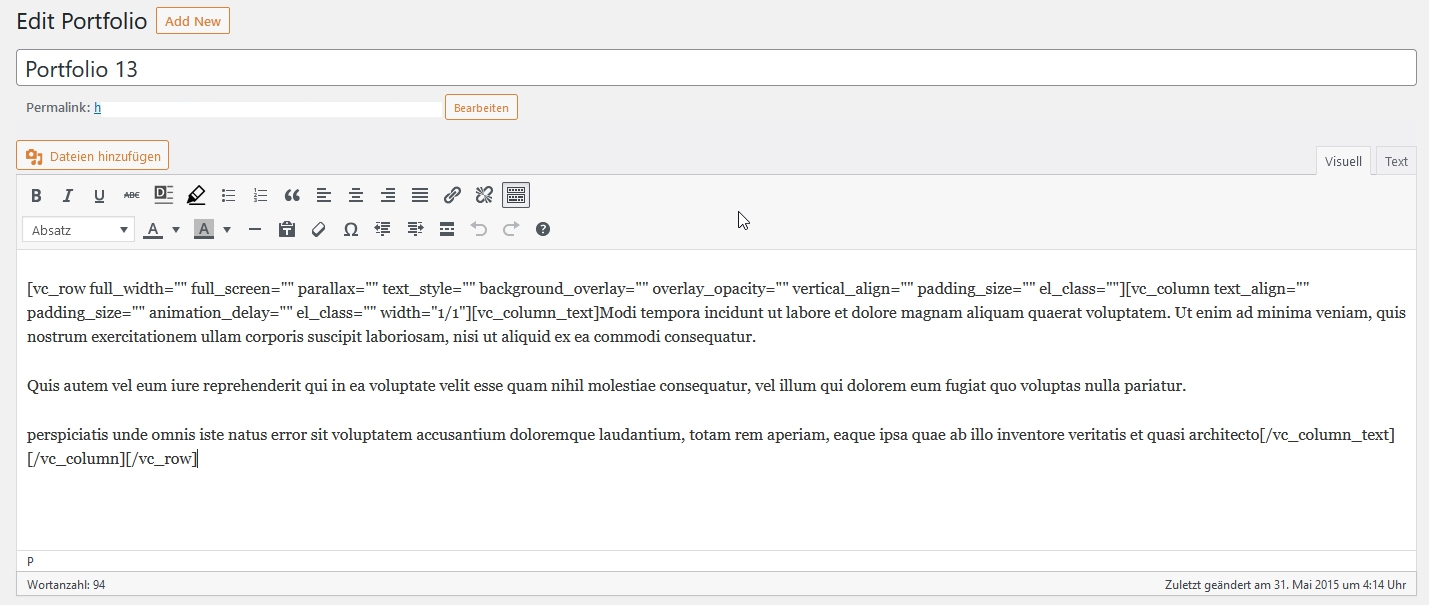
Portfolio Pages are without Bakery’Support’. How can I read or edit the upper terms? I’ll show you an image to explain: https://christiane-klein.de/edit_portfolio.jpg . Thank you!
By default, the page builder is available for Pages only. You can enable it for the portfolio under WPBakery Page Builder -> Role Manager. In the Post types setting, choose “Custom” and then select “page” and “wyde_portfolio”.
Wonderful, thank you!
Thank you for choosing our theme 
Hello, I’d like to buy this theme for a client, but his provider only offers PHP 8. Is it a good idea to purchase now? Thank you.
Thank you for your interest in our theme. Yes, it is! This theme is now compatible with PHP 8 and WordPress 6.1.
.
Hello, I’ve noticed that in a recent update the child theme functions.php file does not seem to enqueue the child theme style.css file. I am not sure if this is how it was done in previous versions, but I only noticed because the style customizations we had were not being loaded by the child theme. I could fix this by adding a few lines in the functions.php file to load the child theme stylesheet.
So, even though I don’t currently have an active issue on the site, this raises a few concerns: - if this is behavior was done on purpose during a recent update, it would have been good to have documented it (I don’t see it in the change log) - if it was done on purpose, this raises concerns for future updates, as I will have to manually add the code every time. Why are child stylesheets no longer supported? - if it was not on purpose, then perhaps take this as a notice of a bug in the current version.
My apologies! We made a small change to the flora theme but forgot to include it in the changelog.
If you’re using the child theme, there are 2 options to fix this issue:
1. Add the following code into functions.php in your current child theme:
/**
 * Enqueues Child theme styles.
 */
function flora_child_enqueue_styles() {
    wp_enqueue_style( 'flora-child', get_stylesheet_uri(), array( 'flora' ), wp_get_theme()->get( 'Version' ) );
}

add_action( 'wp_enqueue_scripts', 'flora_child_enqueue_styles' );
2. Or install the new version of the child theme that’s included in the recent update. And then move your changes to the new one.
Thank you for reporting this issue, we will also include a fallback function for the sites that are currently using the old version of the child theme.
Hello,
We just released the new update of the theme. It includes a fallback function so you don’t need to do anything. Please ignore a workaround provided in the recent reply. All you have to do is just to update the theme to 1.7.7.1.
Again, thank you for reporting this issue.
Great, thank you for your prompt response
My pleasure
Hello, I’ve been using this theme for quite a long time now and I’m totally hooked! I love it. However, we are no longer allowed to connect to Google servers in Germany due to data protection. I have removed all Google Maps maps on my site and also in the backend settings the API deleted….. Why is there still a connection to Google Aufgebaut, see screenshot: https://prnt.sc/4ANRlgf62TP8 my homepage: www.housegrafic.de
sorry, I think it was only still in the cache! I think it works now
no, it was not due to the cache, the problem persists. Can anyone help me?
We’re sorry but the Google Maps script is always included by default. Thank you for reporting this issue. We will fix it in the next update.
Okay, first of all, thank you very much. Can you say how long it will take approximately?
It has been included in the next update that will be released within a couple of days.
very cool, thank you!
Hi there,
I edited the theme i bought in wordpress, but there are some problems.
- I can’t change the order of portfolio items on the homepage and portfolio homepage. I thought there would be options for the view but i couldn’t see them. How will i handle it?
- When i open my site in windows of different sizes and on mobile devices, the texts and images get mixed up on the pages with parallax, including the first page, and also the text colors change, the related parts look very bad. Why do these problems occur?
I’ll be happy if you can help me.
You can change the order of the portfolio items in the Portfolio Grid Settings. Edit your Portfolio Grid element, click the “Build query” button under the “Custom Posts” setting and then change the “Order by” option.
Regarding the layout issue on mobile devices, it can vary depending on your page layout and responsive settings for the columns. You can change the column width for mobile devices under the Responsive Options tab in the Column Settings.
Would you mind giving me the link to your page so I can take a closer look? If it needs a login, you can send me the login details through the contact form on our profile page: https://themeforest.net/user/wyde#contact
xx
Is there an update for the theme to work with the 8.0 or higher php on go daddy? I keep having critical errors when I updated.
I re-downloaded the theme and installed etc. thinking that would fix it. It has it back up but when I went to edit any page, it says critical error. Any ideas?
Thank you for reporting this issue. We’re working on this and will make the theme and all bundled plugins work with PHP 8.x in the next update of the theme.
Hi, When I try view a post category on my site, the category archive page fails to load. If use chrome dev tools to display:none the preloader I can see an error message. You can see the problem on this link https://www.green-shoots.org/category/skills/
Many thanks
Patrick
My apologies for the late reply!
Thank you for reporting this issue. It has been fixed in the latest update of the theme (1.7.5). You can find the instructions on how to update the theme here: https://wydethemes.com/flora/documentation/#update
Hi, a few days ago I update my wordpress version to 6.0 and now when I edit one of the page that I have in my website, I can see only lines of code thats are impossible to understand. I can’t see a block or objet editor. Can you help me? Thanks in advance. Max
You will need to click on the “WPBakey Page Builder” button at the top of the page editing screen to edit your content with the page builder.
Also, make sure you’ve updated the theme and all bundled plugins to the latest version to make sure they will work correctly with the new WordPress update. You can find the theme’s changelog here: https://themeforest.net/item/flora-responsive-creative-wordpress-theme/12038776#item-description__update-log
If it still doesn’t work, you may need to give me your web address so I can check it.
Hy Guys thank for the replay. I can’t see “WPBakey Page Builder” button at the top of the page screen. the web address is; www.simplyradio.it
Thank you for the link! Your site is using an old version of the theme and WPBakery Page Builder plugin. You will need to update the theme and all bundled plugins to make them work with the new update of WordPress.
You can find the instructions on how to update the theme here: https://wydethemes.com/flora/documentation/#update
Hi Guys, I follow the instructions that I find in the link, I update Flora Theme at 1.7.5 version but when I want edit my page i see only html code and i can’t find the block/object editor. Please can you help me? Thanks
You need to update WPBakery Page Builder plugin and all bundled plugins too. After you update the theme, you will see a notification message with the link to update the bundled plugins at the top of your WordPress admin page. If the notification message was dismissed, navigate to Appearance > Install Plugins to see the bundled plugins list. You will find more details here: https://wydethemes.com/flora/documentation/#update-plugins



This item was featured on ThemeForest

Elite Author
Contact the Envato Market Help Team