155 comments found.

Does your theme have an option for portfolio page?
Hello,
All the pages are shown on our demo. We didn’t create a portfolio page, but it is a good idea to add one. We have added your request to our backlog for future updates.
Best regards, Eugene
thanks.
Hi, Which font do you use for the logo “Chérie” ? Thx
Hi,
We were recently asked about this. Unfortunately, we couldn’t find the source file of the logo to determine the font name. In this case, we recommend looking at similar fonts using ‘Cherie’ logo as a reference.
Best regards,
Hi, I would like to know which plugin you are currently using on the Demo site? Is it the Amelia booking plugin? THANKS.
Hi. Yes, on the demo we are showing the Amelia booking plugin.
change font on footer
I would like to change the font and enlarge the text in the menu footer but where do you change them from?
Hello,
We offer support through the Ticksy system. Please create a ticket using the link: https://firstsight.ticksy.com, and our support specialist will be there to assist you.
You can find general guide in our documentation: https://firstsight.design/cherie/docs/, as well as in our video tutorial: https://youtu.be/pNvnNT73-KM.
Best regards, Eugene
Greetings Team, I need the new Ameila update 7.4.3. It was released on 3-5-2024. Can you please give a timeline on when I could expect the update. Thanks
Hello. Thank you for reaching us.
We plan to add last version of the plugin during next 2 days. We usually update all plugins on all our themes once a month.
Regards, Eugene
Thanks, sounds good.
Update is already available.
Hello
Am I tripping or is the theme options deleted from admin? Like the only way to change the theme settings is in customize page in dashboard???
I can’t customize tonz of stuff.
- anxiously waiting for your reply xx
Hello,
We offer support through the Ticksy system. Please create a ticket using the link: https://firstsight.ticksy.com, and our support specialist will be there to assist you.
You can find guidance on settings in our documentation: https://firstsight.design/cherie/docs/, as well as in our video tutorial: https://youtu.be/pNvnNT73-KM.
Best regards, Eugene
Hi I can’t translate with Polylang the widgets (paragraph) and the footer. My support ended but I think that this problem it’s for the template.
Hello,
Thank you for bringing this to our attention. We haven’t received similar reports, but we’ll check it. If we identify a bug, we’ll address it in the next update.
Potentially the reason may be in restrictions of the free version of Polylang.
Regards, Eugene
Bonjour , sur le plugin amelia , je souhaire modifier la duration sur la partie service mais elle est limité à 24 heures , alors que j’ai des duration de 27H et 4Jours par exemple , comment faire ???
Hello,
For support inquiries, we use the Ticksy support system. You can create a support ticket via the link https://firstsight.ticksy.com
We recommend referring to the Amelia plugin documentation at https://wpamelia.com/documentation/ for information on its settings.
Please note that if you need a service for installing, configuring, or maintaining Amelia plugin, or access to auto-updates or support, you will need to purchase the license separately, directly from plugin authors and submit a ticket to Amelia’s support.
Regards, Eugene
Hello, how are you??
My client has this theme, however, the product page looks wrong. Any advice on how to fix it?
Hello,
Kindly create a private ticket to our support and duplicate your question using the following link: https://firstsight.ticksy.com When opening the ticket, please include a link to your site as well as the login credentials so that we can better assist you.
Regards, Eugene
Bonjour , Le slider video ne s’affiche plus sur mon site. comment proceder?
Hello,
For support inquiries, we use the Ticksy support system. Kindly create a private ticket and duplicate your question using the following link: https://firstsight.ticksy.com. When opening the ticket, please include a link to your site as well as the login credentials so that we can better assist you.
Regards, Eugene
Pardon mais le lien que vous m’avez communiquer ne fonctionne pas , il affiche un message : page introuvable . je vous prie de bien vouloir me communiquer une adresse correct pour pouvoir contacter le support technique directement
Sorry, there was an extra period at the end of the link. Try the corrected link, it should work fine https://firstsight.ticksy.com
You can also find the support link by clicking on the Support tab and then on the button Go to item support https://www.dropbox.com/s/djlar237jv2grxd/Screenshot%202024-02-19%20at%2013.54.00.png?dl=0
Thank you.
Regards, Eugene
Hello
How can I update the theme? If I proceed according to the documentation and deactivate, delete and reinstall the plugin “Cherie Core” the version remains at 4.3
Thank you very much
Hello,
The update is possible manually. You can download the latest theme version from your TF account Do a backup of your website, after simply reinstalls the parent theme. https://youtu.be/-lus04G-zAw?si=tsOYrIHBflD5_-RPIf you made some code customizations check this article: https://www.wpbeginner.com/wp-themes/how-to-update-a-wordpress-theme-without-losing-customization/
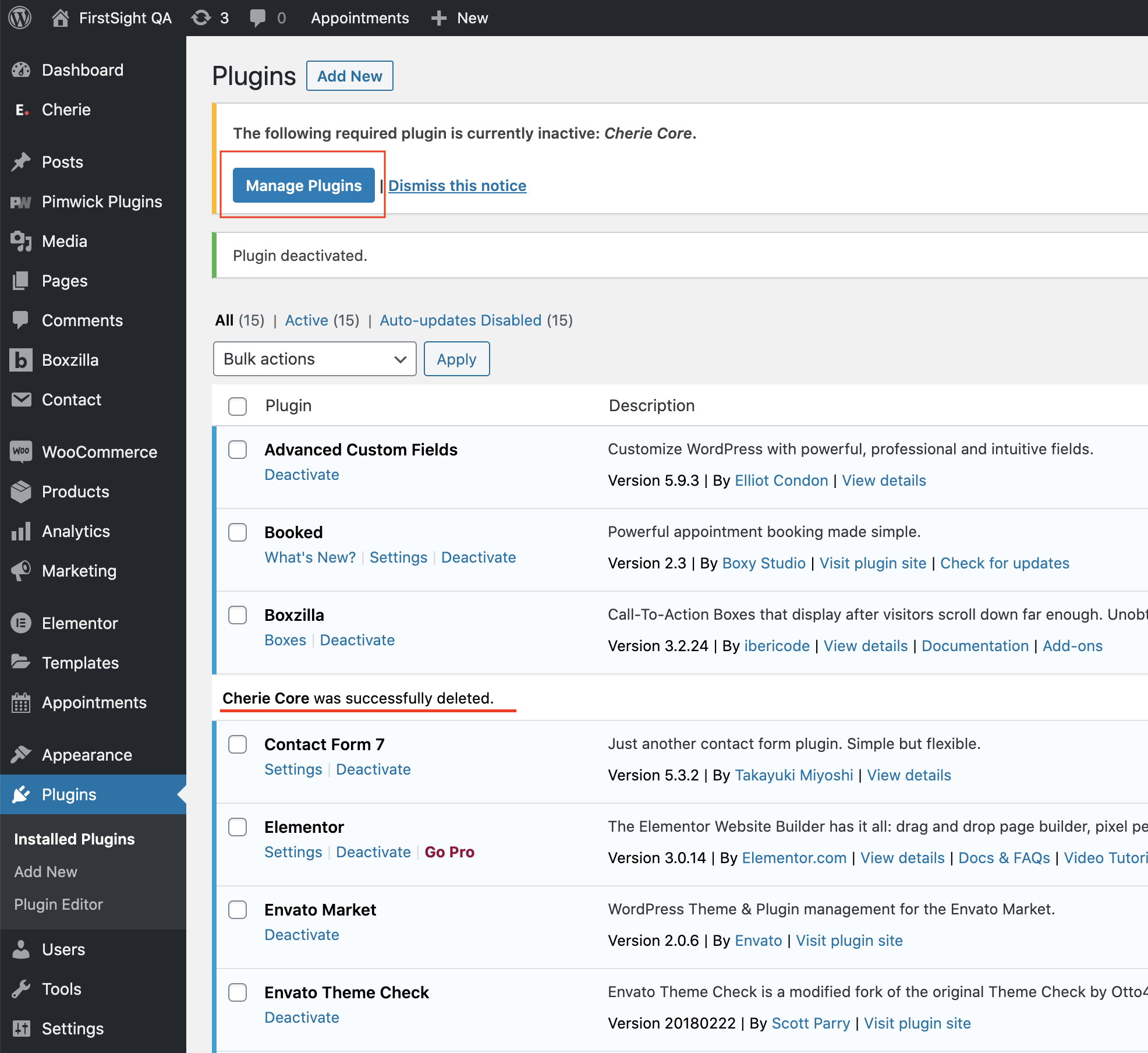
After it Delete the Cherie Core plugin from plugins and click on Manage Plugin button https://ticksy_attachments.s3.amazonaws.com/2427254768.png
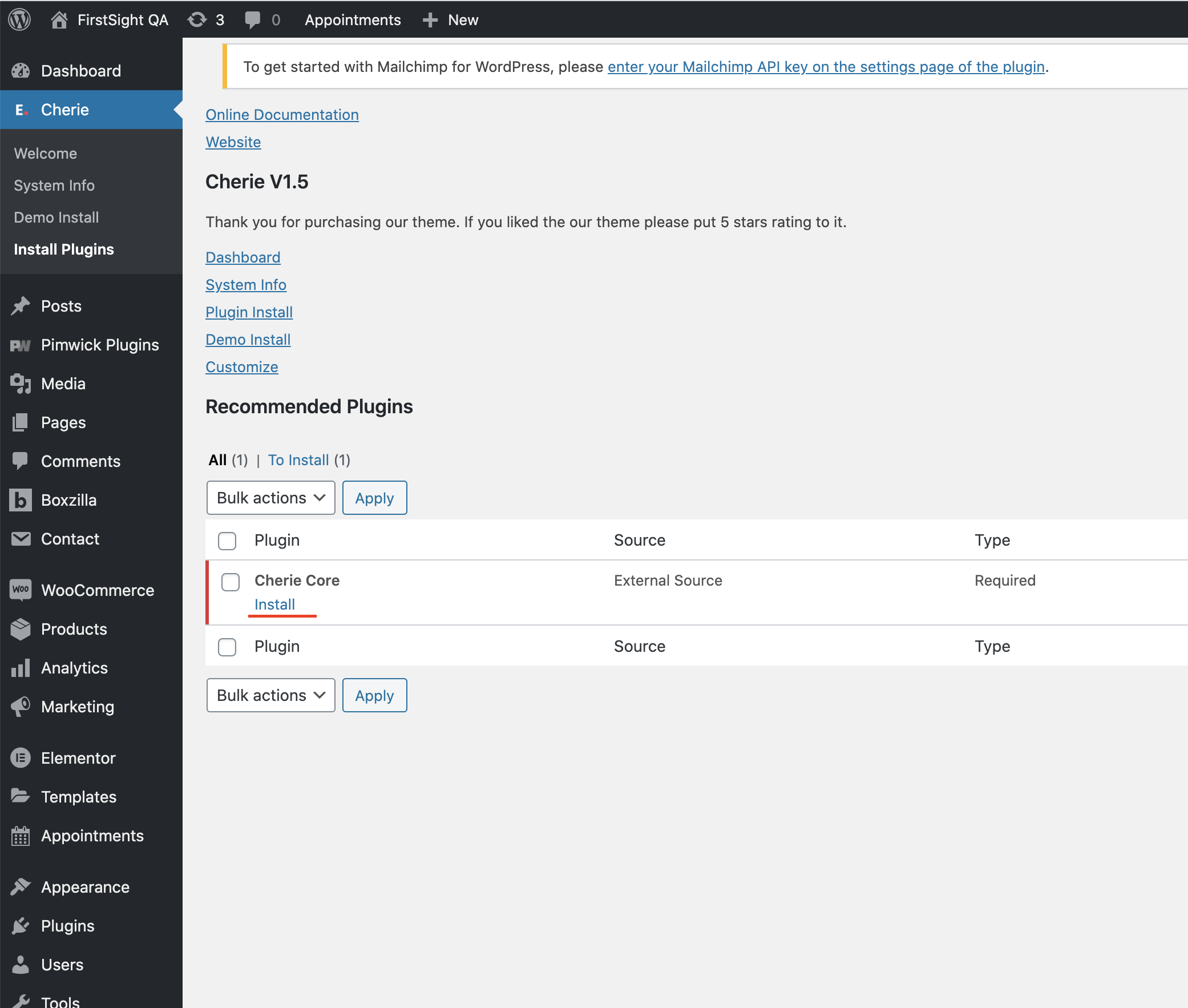
2. Install Cherie Core — updated version will be installed https://ticksy_attachments.s3.amazonaws.com/6228166216.png
This is the way to update plugin.
We provide support via https://firstsight.ticksy.com. Please create a ticket if you need further assistance. Additionally, you can ask common questions on the Envato forum.
Regards, Eugene
Hello, Amelia does not work properly. I have tjhis error: “Maximum allowed database prefix is 16 characters. Please change the database prefix, deactivate and activate plugin again.”
I’m not sure if this error is the cause, but the services I created won’t save. Similarly, the employees I added won’t allow me to edit them, and the system just keeps loading indefinitely. So obsequiously something wrong with the Amelia plugin. Can you tell how to fix this?
Hello. Try to install the latest version of the plugin from the new update.
If you need a service for installing, configuring, or maintaining Amelia plugin, or access to auto-updates or support, you will need to purchase the license separately, directly from plugin authors and submit a ticket to Amelia’s support.
Sorry i don’t fully get it. What do you mean by “from the new update.”? Amelia was already there when I installed this theme. Do I need to delete and install it that I get from somewhere else rather than using Amelia with theme?
It says “Automatic update is unavailable for this plugin. To receive automatic updates license activation is required. Please visit settings to activate Amelia.” When I visit settings to activate Amelia, they ask Purchase code.
I don’t need installing, configuring, or Automatic update, but I can do manually myself and just want to use it. Or do you mean in order to use it functionally, do I have to purchase?
If you wish to update the plugin – you can simply reinstall it. Remove it and install it as from the scratch theme installation process. This way, the latest plugin version will be installed.
If you want to have auto-updates it would be a need of purchase the plugin and get a license code.
Ok now I reinstalled and it’s a latest version but still have the same error “Maximum allowed database prefix is 16 characters. Please change the database prefix, deactivate and activate plugin again.” Also I can’t save Category I created although it says “Success Category has been saved”...
We don’t provide service for installing, configuring, or maintaining Amelia plugin, or access to auto-updates or support, you will need to purchase the license separately, directly from plugin authors and submit a ticket to Amelia’s support.
If you’re facing a common issue, you can try finding a solution via Google. A similar issue to yours has been discussed here: https://tmsplugins.ticksy.com/ticket/2281540.
Additionally, we recommend checking the Amelia documentation at https://wpamelia.com/documentation/ for further guidance.
Greeting Cherie support. The Amelia plugin recently updated to version 7.4, do you have any idea when you will push the update?
Hello. The update with the latest version of the Amelia plugin is already available.
Bonjour , j’ai acheté le théme chérie parce qu’il contient le plugin Amelia sauf que j’ai besoin de la clé d’activation d’amelia. le plugin refuse la clé d’achat sous motif qu’elle est invalide
Bonjour. Vous n’avez pas besoin d’activer le plugin bundle avec une clé de licence. Veuillez en savoir plus sur son fonctionnement via le lien https://help.market.envato.com/hc/en-us/articles/213762463-Bundled-Plugins
et la mise à jour d’amelia qui n’est pas disponnible et me remonte une érreur critique au niveau de mon site ??
Les mises à jour automatiques ne sont pas disponibles pour les plugins fournis. Vous devrez effectuer les mises à jour manuellement. Si vous avez besoin d’aide, veuillez écrire à notre support et nous vous fournirons des instructions sur la façon de procéder. Nous mettons à jour les plugins fournis avec des mises à jour de thème, généralement environ une fois par mois. Vous pouvez simplement ignorer le message de mise à jour et continuer à utiliser la version actuelle du plugin jusqu’à ce que la nouvelle mise à jour du thème soit disponible.
Support: https://firstsight.ticksy.com
When will your next update be? I am purchasing because you have the Amelia plugin included and Cherie is beautiful of course. Amelia has been updated on Jan 3rd, 2024. I would like to purchase Cherie soon… Please let me know. Thanks
Hello,
Thank you for reaching out. We intend to update the Amelia plugin to the latest version today. You can check the status of update on the theme’s listing page on ThemeForest.
Regards, Eugene
Hi, I hope you are well. We would like to purchase this theme, but before we move forward can you let us know if the images and all shown in the theme promo ( all assets ) are they free to use. will we be able to use them to make the site?
Hi, and thank you for your interest. You can check our QA website with the installed Beauty Salon demo at https://firstsight.design/qa/.
Regular images without blur have an open license for use in creating the site. However, blurred images cannot be provided with the demo import. We can share a link to Photostock, where you can purchase such images if you decide to use them in your project.
Let me know if you are interested in a demo other than Beauty Salon.
Kind regards, Eugene
I did not get you what do you mean by Regular images without blur. Can you please let us know Thanks
All photos can be used except for the blurred ones. You can identify the blurred images via the link https://firstsight.design/qa.
The icons can also be used, we created them exclusively for this theme.
Hope this information is helpful.
Link is showing as 404
Please, use the link from first reply. It should work fine.
Hi, I hope you are well. Before we purchase the theme can you kindly confirm if we will be able to change the colour scheme? Also the theme shows book an appointment, is it a plugin or part of the theme. Also how far can we do the modifications to that. Can you get back to us so that we can finalise the theme. Thanks
Hi, Yes, you can change the colour scheme of the theme. You can find more in our documentation https://firstsight.design/cherie/docs/#theme-options-main-theme-colors and video tutorial https://youtu.be/pNvnNT73-KM?si=ujx1pfPpJjjWVZZQ&t=690
Theme authors create themes. For functionality like appointments, we use third-party plugins. Our theme supports Amelia – probably the best appointment plugin for WordPress on the market. You can use this plugin with the theme as a bundled plugin without a need to purchase it but with some conditions and limitations. If you need a service for installing, configuring, or maintaining Amelia plugin, or access to auto-updates or support, you will need to purchase the license separately, directly from plugin authors via the link https://tms-plugins.sjv.io/Y9Dn7J and submit a ticket to Amelia’s support. You can learn about plugin features on Amelia’s website https://tms-plugins.sjv.io/Y9Dn7J
You can integrate with a theme other appointment plugins. For example, Cherie theme was also tested with Booked and Bookme booking plugins. Such integrations may need special skills and are not covered by our support.
Regards, Eugene
Hi, I hope you are well. One thing which is you have small images on your theme , but those are matched to the colour code of the overall site. Our colour code will be bronze colour so once we change the theme colour , will the colour of those images also change or how can we change that. Check link – https://paste.pics/1b76870e897727c36550def00376e663.
Hi, can you update us on this. also we wont be taking the payment online as there is not going ecommerce functionality with the site as of now. so I assume that theme will support that.
Hello,
Thank you for your patience. I will try to provide an idea of how it works. These icons were created by ourselves and styled to fit the colors of each demo. The icons are in .svg format and are independent elements, so it is not technically possible to change their color in the admin panel. To do so, you can download the icons from the admin panel, open them in a graphic editor like Figma, change the colors to those you want, and then reupload them. This process may require the assistance of a web designer or finding a tutorial.
The theme supports e-commerce functionality and uses the WooCommerce plugin to build a shop. You can find an example of the shop on our demo.
I hope this information is helpful.
Regards
in terms of ecommerce what I meant is this our site will not have ecommerce functionality, so that should not create any issue? Am I correct.
Hi, in terms of small icons or SVG images – there are 4 unique demos or design available with the theme. and the colour from the other homepage design ( svg images ) matches or requirement. I think we should be able to use those images.
E-commerce: Yes, if you don’t need a shop, you can simply disable it.
Icons: The icons were designed for each demo’s specific purpose, and they are color-coordinated with each demo. If you want all icons from all demos, you can install each demo, download the icons, edit them with the color you desire in graphic editor, and then re-upload them to the demo you plan to use.
As an exception, we can provide you a 30-day money-back guarantee if it does not fit your needs. So, you can rest assured that if it is not a perfect match, you have the option to get a refund.
Thank you so much, let me move forward as it will be very convenient
You are welcome
I bought the Cherie theme and am very satisfied with it, but my website has been hacked and now I would like to reinstall the theme, but it now appears that the license is no longer valid.
Hello,
It should work, at the moment we don’t have a system to validate license-domain activations.
I may recommend checking such an issue with marketplace support. You can learn more about purchase code and find a link to support via this URL https://help.market.envato.com/hc/en-us/articles/202822600
Kind regards, Eugene
Dear author,
I rebuilt my website because I got hacked. But now my license has expired. Can you please unregister/deactivate the theme license from the old domian/website.
Best, Rianne
Hi Rianne,
As authors, we don’t have the technical capability to handle questions related to licenses, as that falls under the purview of the marketplace. We recommend reaching out to Envato support. You can find the support link here: https://help.market.envato.com/hc/en-us/articles/202822600. Additionally, you may seek suggestions on the forum: https://forums.envato.com/
Kind regards, Eugene
I was hacked and now I want to reinstall my theme in WordPress, but the license seems to have expired. the website is now online, but says that the license has expired
Hi,
Let’s imagine that we are a photo shooting studio.
I will have some questions.
1- Can payment be made by selecting more than one service?
For example:
Cocktail Makeup $55.00
Formal Makeup App $49.00
x .............. $75.00
x…............. $25.00
Total: $2042- Can the time selection be set as a time interval?
For example;
14.00 – 16.00 16.00 – 18.00
3- Is the occupancy status on the dates visible?
4- Can a person limit be applied?Exm; Can it be limited to 5 people between 14:00 – 16-00?
5- Can I change the language in the booking area? For example: Turkey (October – Ekim)
6- Is dynamic pricing possible?
For example: Saturday Sunday +%20
7- Can a reservation table be added to the Woocommerce product page
https://screenmark.net/651dc2b2689ccYour answers are important to us for our purchase. We have urgancy. I would appreciate it if you get back to me as soon as possible.
Hi,
Thank you for your patience and for providing detailed questions. We are theme developers, Amelia is a third-party plugin bundled with a theme. We recommend checking Amelia plugin documentation (it is great and detailed) https://wpamelia.com/documentation and asking their support team to find a correct answer to such specific questions.
7- Can a reservation table be added to the Woocommerce product page: — It is outside the standard theme design. You could add it with customizations that needed special knowledge or specialist.
Please note that we don’t provide support for the Amelia booking plugin. If you need a service for installing, configuring, or maintaining Amelia plugin, or access to auto-updates or support, you will need to purchase the license separately, directly from plugin authors and submit a ticket to Amelia’s support.
Kind regards, Eugene
Bonjour J’ai télécharger le thème chéri qui n’est pas comme je l’ai vu avant l’achat tout est désordonné
Hello, thank you for reaching out. Please, create a ticket with the question to our support via the link https://firstsight.ticksy.com
We recommend installing the theme and demo import to the fresh WordPress. You can find more information on how to do it in our video tutorial https://youtu.be/pNvnNT73-KM and the documentation https://firstsight.design/cherie/docs
Regards, Eugene
Hello, Can you please let me know what is the settings for SVG file used for logo? Does it has to be at a certain size or format standard? the SVG logo won’t show on header no matter sizes or settings I used. (I’m using Adobe Illustrator). Using PNG or JPG for logo and it looks blurry.
Hello,
Thank you for your detailed inquiry. We highly recommend uploading an SVG logo, as it will help eliminate any blurriness.
In similar cases, many users have found success by exporting their logos with Figma, a free tool, rather than using Illustrator. We’ve prepared a brief tutorial on how to do this, which you can access via this link: https://drive.google.com/file/d/1_hgMohQNzYAnkY4jQRbaDS2BKqaeB6bl/view?usp=sharing
In some instances, it may also be necessary to convert text to editable paths and verify other source file settings before exporting.
Please give exporting via Figma a try and let us know about the results.
Best regards, Eugene
Hi Eugene, Thank you. It worked.
Great! I’m pleased to learn that the solution was effective.