1175 comments found.

Hi, how can i remove “downloads” and “my vehicles” from my account page? Thanks.
Hi, send the link with the logins to enovathemes@gmail.com i will proceed
Hi, i have sent email. Thanks.
Hello,
How can i remove “downloads” and “my vehicles” from my-account page?
Thank you, Regards.
Hi, please write from the profile you bought the theme
Hi, need to inspect from inside, please send the link/logins to enovathemes@gmail.com for inspection
I have an issue on the mobile site > Warning: Trying to access array offset on value of type bool in /home/customer/www/onestopmotorshop.ie/public_html/wp-content/plugins/enovathemes-addons/shortcodes/shortcodes.php on line 3528
I’ve not made any changes to the website for this to happen. Can you help fix please
Hi, check your mobile logo, make sure it is set correctly
how do i check that i’ve been looking for past few hours
send the link with the logins to enovathemes@gmail.com, i will check
I have send email now, thank you
Ok, checking now
I have a new message now > Warning: Array to string conversion in /home/customer/www/onestopmotorshop.ie/public_html/wp-content/plugins/woocommerce/src/StoreApi/Schemas/V1/ImageAttachmentSchema.php on line 93
Hi, refers to woocommerce plugin, but I know how to fix, send the link with logins to enovathemes@gmail.com will help
Hi hope your well? im having an issue with MobiMax, the makes of the cars are not editable anymore they have just disappeared. is there a solution to this?
Hi please send the link with logins to enovathemes@gmail.com will inspect
Merhabalar ,
https://prnt.sc/xZrfsNO3q_h7Loca Translate ile ekranda bulunan alanları nasıl Türkçe yapabilirim.
Teşekkürler
Bana Loca Translate veya Mail adresinizi yazarak cevap vermeyin. Marka , model, searc ve diğer ayarlar nereden düzeltiliyorsa yazılı veya video şeklinde cevaplayın, Diğer soru soran kişilerde bu bilgilerden fayda sağlasın. Teşekkürler
Hi, find the vehicle information in the products >> make, model, trim (year is part of the trim)
Türkçleştirmek istiyorum ! Örnek: Make-> Marka , Search-> Arama yap, Login-> Giriş Bu işlemlerin nereden yapacağım, Loca Translate te bulamadım.
O i got it – you need translations – these are in the enovathemes-addons plugin language file – but make sure to configure the translation file from the language file
Like i said you should generate the translation file from the enovathemes-addons.pot file. Please send the link with the logins to enovathemes@gmail.com will configure your translations
Don’t edit the theme core files until you know how to override in child theme. You need to configure the translation file to translate the strings you need, since with each theme update your custom modifications to the theme files core will be overwritten
Hello, I’m trying to import database.one to php my admin but after I have added I don’t see on my wordpress my car models I have added
Hi, not sure it relates to theme itself, since I can’t say for sure what do you import from database. one. And what is the reason you do such import?
What could this error mean?
Warning: Array to string conversion in /home/customer/www/*/public_html/wp-content/plugins/woocommerce/src/StoreApi/Schemas/V1/ImageAttachmentSchema.php on line 93
This is on cart page
Also all products, including new products create a 404 error.
Hi, this relates to woocommerce, bit I have a fix for it, please send the email to enovathemes@gmail.com will help
I sent email this morning did you see?
Hi, will check now
Many thanks for resolving my issues, excellent support.
Hello, great theme but how do I change the car manufacturer dynamic filter? I want to add a car manufacturer that’s not there and remove some that I don’t want, I cant find how to do this.
Sorry I worked this out, support not needed
Good afternoon. I have a problem with photos in the product gallery.
How to force crop images?
1) Tried it in the theme settings.
2) /* Woocommerce image sizes
—-—-—-*/
add_theme_support( 'woocommerce', array(
    'thumbnail_image_width'         => 106,
    'gallery_thumbnail_image_width' => 106,
    'single_image_width'            => 600,
));
add_filter( 'woocommerce_get_image_size_gallery_thumbnail', 'mobimax_enovathemes_change_shop_thumbnail' );
function mobimax_enovathemes_change_shop_thumbnail( $size ) {
return array(
'width' => 106,
'height' => 106,
'crop' => 1,
);
}Hi, it should crop by default, until you disabled it from appearance/ customize/ woocommerce
Let me inspect, please send the link with logins to enovathemes@gmail.com
best support)
Thanks!
Hi,
I am having issues with a plugin on my site. “Yith Qyuickview”
The popup on the site is acting up. at first 2 weeks ago I had issues that the popup was staying blank and not showing info. now it is showing info but the popup is half hidden and not displaying properly.
I reached out to the plugin developer and they advised me that there is an issue with the theme. I also reached out to my siteground care plan developers and they also advised me that it is an issue with the theme.
Please see the issue details and also responses from the plugin and my developers.
QUICKVIEW PLUGIN ISSUES
1) on mobile it opens up outside of the screen. 2) on desktop (only when not logged in) check on a private window, the quickview stays blank and doesn’t show anyting.
see reference
https://drive.google.com/file/d/1IlT28Bm_8lqoa3mIpQz_E5r0h6c1G27I/view?usp=drivesdk https://www.loom.com/share/ab39b0ee0f904145a2a981472378225d?sid=303d94bf-3cab-46d6-a49d-5795f76cfa75PLUGIN SUPPORT RESPONSE
Hi there, about the mobile issue position, it is due to your theme styles, see attached images.
if I disable all of them it shows good then. Please contact your theme support.
About the quick view empty when not logged I cannot replicate it, I am attaching a screenshot where I am not logged and I can see the quick view content.
SITEGROUND DEVELOPER TEAM
Hello Pinches Surkis,
I carefully examined the issue reported and I to do so I created a staging environment https://www.staging16.topmedicalmobility.com. To make sure no user can access it I set a password protection for the URL from SiteTools -> Security -> Protected URLs. The login details are the following: user: XXXXXXXXXX password: XXXXXXXXXXXXXXXXXXXX
The issue was still present on this staging environment. This is why, using the oldest backup we have, from January 22nd I restored the files of the theme to a folder .RESTORES/1706562165: /home/u3-l2wyuhoaig4n/www/.RESTORES/1706562165. The wp-content/themes folder of the staging was renamed to quick_view_broken_themes. Then copied the wp-content/themes folder from the said backup to the wp-content/themes folder of the staging environment and after flushing the cache of the site, the issue was no longer present.
What this did was to replace the theme files of the the staging with the theme files with their state on January 22nd. This means restoring the theme resolved the issue on https://www.staging16.topmedicalmobility.com and I suppose this would do the same for the production site as well. I tried comparing the differences between the functions.php files of the present and the restored themes however, the differences were too many.
Please consult with the support team of your site’s theme about the possible reasons for this issue or consider running a restore for the wp-content/themes folder from a date when the QuickViews was working to your expectation.
Hi,please send the staging environment details to enovathemes@gmail.com , don’t publish here, it is public comment.
Hi, I have to issue on my site: https://carsidemirrors.com.au
1. Sometimes the header disappears on some pages e.g. https://carsidemirrors.com.au/faq/ and other pages.
2. The seems to be a bug with the filter. So if you pick make, the models don’t appear until you go back to make and select a different one for the models to appear.
Hi,
1. Use caching plugin with separate mobile/desktop cache
2. This is what i see when viewing the filter
https://imgur.com/a/LhZqStzHello, I’m interested in this theme but it will be used for the UK market. We primarily use Make/Model/Year but alternatively vehicle registration number (licence plate) to search by. I notice you offer VIn search through Vin decoder which uses the vehicledatabases.com API. I’ve looked on their site and they offer search via licence plate. Would it be possible to modify the theme to include this please?
Hi, sure, possible, btw, please take a look at advanced mobimax version https://themeforest.net/item/mobex-auto-parts-wordpress-theme/49859756
Mobex theme, it is based on elementor, has all the mobimax features and more. If you like the design, i highly recommend this one
And yhe modification is free, after purchade please contact me i will do it
Also, my header is something that i can’t find to assign…
Hi, do you mean the search in the header? It works, i just searched for a product and it works.
The second question, actually i did not understand. Your headers are in the wp dashboard >> headers. To assign header globally go to appearance >> theme options >> general.
To assign header per page go to page edit screen under the main editor find the header options
No I mean the bar for finding parts in the webshop it self. car > model > etc..
And yeah The header is installed—> when you click on another page another header come up…
What is wrong with the filter? It does not load data?
Yes that is for demo purposes, if you set page header to inherit, it will inherit from global
Yeah it does not load my products, Can you send me documentation for this… i did not change the settings of the filter
Let me see it, please send the link with logins to enovathemes@gmail.com
Hi,
I have sent you an inquiry per email regarding customization of the theme. Please let me know if this is something you can help me out with.
Thanks.
A. U.
Hi, sure, checking
Hi There
I purchased the Mobimax theme and want to customize the home page a little, do you have a recommended contractor I can get in touch with to do this work?
Hi, sure, i am available for custom freelancer jobs, write to enovathemes@gmail.com, will help
hi
I need little help with this…
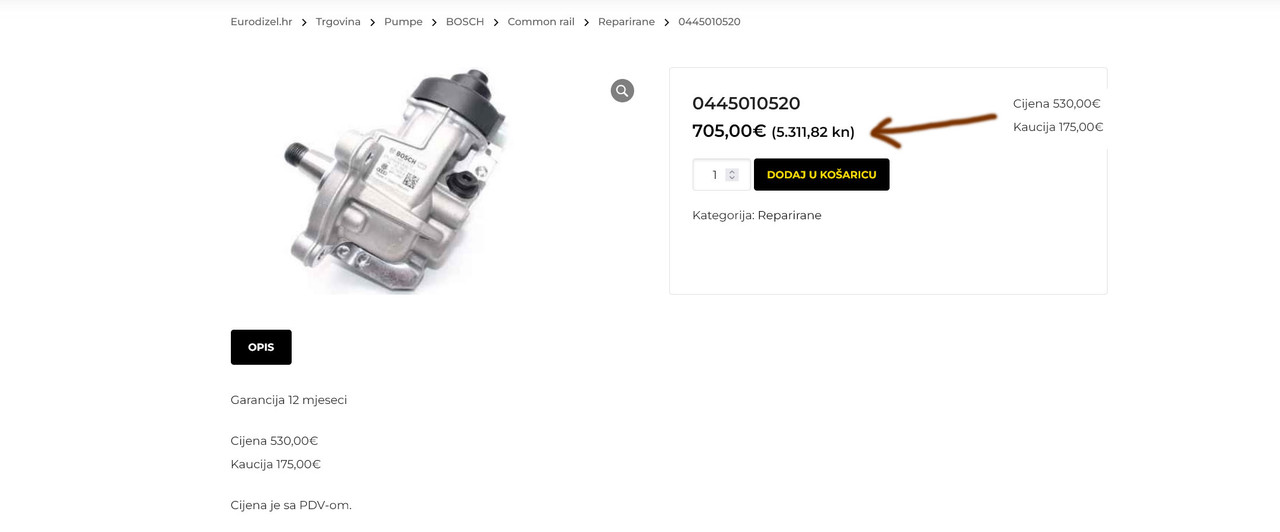
I need to add “kaucija” below “price” on the single product page…
https://i.postimg.cc/nhFnrGJY/cijenaaa.jpgI have a shortcode but how to put it there? 
Hi, send the link with the logins to enovathemes@gmail.com with the shortcode you have, i will put it
Hi, I have some problems with translating this template to Estonian. Template doesnt update string translations from .pot files and also Loco translate doesnt translate strings. Any suggestions? Br, Hendrik
Hi, it depends on what file you translate. Do you configure it right for the theme and addon plugin? Please share the link with the logins (send to email enovathemes@gmail.com) will inspect
Hi, Sent you login link.
Hi, Have you checked it? Br, Hendrik
Hi, we do support each day, i can see that you sent it days ago, it got to spam i guess, since we could not overlook it. Please re-send and write first 3 letters of your email here, in case it goes to spam again
Hi, i have one prepurchase question. Is possible to use the advanced search also for category? For example Audi > A6 > 2020 > Engine oils?
Hi, do you mean narrow down the search based on the selected vehicle?
Yes. For example i have categori “engine oils” and i want to search all engine oils for my car. For example vehicle Audi > model A6 > year 2020 and select “engine oils”.
Since the search plugin is integrated, but not created by us i think on the ajax results we can’t affect, but for the click on search button and the results after that we can affect
I’m waiting for your responde. Thanks
Ok, checking the email