79 comments found.

Hi, This is Gaurang. I want to buy this theme but I need to know whole flow of “Online Appointments booking & management” system until Payment. Is there any way to check this before buy theme?
Another question, “Online Appointments booking & management” Plugin is free with this theme or we need to pay any buy that plugin?
Hello,
Thank you for your interest in our theme! Please find the appointment booking flow here https://psychologist.ancorathemes.com/appointment/, when the customer logged in, the page is redirected to regular Woocommerce checkout page.
The official QuickCal website (https://quickcal.co/) describes its features extensively, including “Payments with WooCommerce.” They also have detailed articles on their knowledge base (https://themovation.ticksy.com/articles/100021673) that show screenshots and step-by-step guides for setting up payments. While not a live demo you can fully interact with, these resources can give you a very clear understanding of the process.
The Quickcal plugin is free and you can download it from Wordpress repository as well.
Regards
Quickcal plugin is free that fine, but I need to know that, I no need to buy separately for Booking Appointment Plugin, Is it correct?
Hello, Thank you for your information. It’s almost clear. Just for confirmation:
1) Once I buy theme, I no need to buy any plugin separately. All plugins cost is also included into theme cost, right?
2) Once I buy theme and install theme into my website, Quick Cal and WooCommerce both are setup into theme, right?
few more things,
1) My customer is from India and I want to integrate payment Gateway like Paytm, PhonePay, RazorPay, PayUmoney or any other which are Frequently use in India. Is it possible?
2) I wish to not give user to go Login first and after that make book Appointment. I want to keep Simple for User. So, Customer will come select Date/Time, Fill up Name, Phone and make payment. Is it possible?
Hello,
1. You should not buy QuickCal, it’s included to the theme package.
2. You’ll be able to install both QuickCal and Woocommerce easily.
3. Yes, absolutely! WooCommerce is highly flexible and has excellent support for integrating popular Indian payment gateways. Your customer from India will definitely be able to pay using services like Paytm, PhonePe, Razorpay, and PayUmoney.
4. There’s a guest booking is possible within QuickCal plugin.
Regards
Thank you very much for all details.
Warm welcome!
hi!
I can’t find the [quickcal] plugin. Where can I get it? I need help as soon as possible. this! https://troubleconsultation.com/ I can’t find the [quickcal] plugin. Where can I get it? I need your help ASAP.When I tried to contact support it said it would cost $24, so I asked here.
The downloaded file was 1.40. When I updated to 1.51 the plugin was displayed. Thank you.
Hello,
Thank you for getting in touch with us!
Great! We are glad that you have found a solution. In case you have any further questions, please submit a support ticket at https://themerex.net/support/ and get qualified assistance.
Regards.
Hello, it seems that the “Blogger” element in the WPBaker builder is broken when setting it to “Classic tile” style. The order is not respected, the titles are wrong when more than 2 posts are show per row and various configurations are ignored. Would you know any quick fix for this?
And sorry about the expired support, I only had the possibility now, after one year, to install and configure the theme.
Thank you
Hello,
Thank you for getting in touch with us!
To investigate your issue additional information is required. You may use option “Presales Question” at https://themerex.net/support/ and provide the purсhase code in the message body. Our tech support team will check if the issue can be solved without support renewal.
Regards.
The Booked plugin is no longer available. To continue to receive security updates, new features, and premium support, we recommend upgrading to QuickCal for a seamless transition.
The above display appears with the booked plugin. https://quickcal.co/booked-upgrade/ Do you need the above? Or can it be solved in other ways?Hello,
Thank you for contacting us!
The latest version of the theme already contains QuickCal plugin. So it is fully supported, feel free to use it. Booked was removed. In case you have any further questions, please submit a support ticket at https://themerex.net/support/ and get qualified assistance.
Regards.
QuickCal plugin. Should I purchase this plugin?
There is no need to buy the plugin separately. QuickCak is included and bundled with the theme Version 1.5.0 – https://prnt.sc/EI6M5ooJaVQf
Regards.
hi!
I can’t find the [quickcal] plugin. Where can I get it? I need help as soon as possible. this! https://troubleconsultation.com/ I can’t find the [quickcal] plugin. Where can I get it? I need your help ASAP.When I tried to contact support it said it would cost $24, so I asked here.
Hello,
You have left the comment above that the issue had been resolved. We are glad that you have found a solution. In case you have any further questions, please submit a support ticket at https://themerex.net/support/ and get qualified assistance.
Regards.
How can edit top header section and copyright section
Hello,
Thank you for choosing our theme!
Please navigate to Appearance > Theme Options > Global Options > Header and Footer to modify the header and footer. Please check the guide https://psychologist.ancorathemes.com/doc/#to_customization
In case you come across any difficulties, our Tech support team will be glad to help you solve them at https://themerex.net/support/
Regards.
how can register new user for appointment
Hello,
Thank you for your interest in our theme!
Booked/QuickCal plugins supported with the theme offer the option to choose between “Registered” and “Guest” booking. Registered booking will require all appointments to be booked by a registered user (default). Guest booking will allow anyone with a name and email address to book an appointment. – https://prnt.sc/10zt3jt The registration form is disabled on the demo due to security reasons.
Regards.
Hi guys,
Just updated to the latest version and now have this error…
“The Font Awesome plugin caught a fatal error.
When trying to load Font Awesome, the plugin’s configuration was invalid. Try deactivating, uninstalling, and re-activating the Font Awesome plugin.”
I’ve checked the plugins page and the folder via FTP but Font Awesome isn’t listed so I’m assuming it came bundled with the theme as it is listed under Font Awesome under Settings.
How can I get rid of the error?
Thanks!
Hello,
Thank you for contacting us!
Font Awesome plugin is not included in the theme package. Here is the proof http://psychologist.ancorathemes.com/doc/#plugins_installation We cannot guarantee full theme compatibility with the third-party plugin since we have not tested it with the template.
Our Customization studio can make the plugin full compliance with the theme. To get started, please submit a request to the “Get a free quote” category at https://themerex.net/support/
Regards.
Just updated to 1.3.7. All pre-packaged plugins updated fine except WPBakery. When attempting to update to pre-packaged version 6.8.0 all I get is: “To receive automatic updates license activation is required…........” Does anything else have to be updated prior to being able to update. Thx.
Hello,
Thank you for contacting us!
Please note that the theme includes Themerex Updater plugin allowing you to update all bundled plugins directly in the Dashboard and to keep the theme components up-to-date. Please review this guide: http://psychologist.ancorathemes.com/doc/#theme_update
In case you come across any difficulties, our Tech support team will be glad to help you solve them at https://themerex.net/support/ If your support expired, you may use option “Presales Question” and provide the purсhase code in the message body.
Regards.
WPBakery needs a premium licence key?
Hello,
Thank you for contacting us!
Please be advised that only the direct plugin buyers can officially activate WPBakery Page Builder with a license key. But you have WPBakery Page Builder included and bundled with the theme. It is fully functional and is the same copy of the plugin direct buyers get. There is no need to buy the plugin separately.
To update the plugin please use this guide – http://psychologist.ancorathemes.com/doc/#theme_update
In case you have any further questions, please submit a support ticket at https://themerex.net/support/ and get qualified assistance.
Regards.
I’m getting ALOT of spam through blog post comments, any quick easy fix to stop that from happening?
.
Hello,
Thanks for reaching out to us!
You can use any anti spam comments plugin for spam protection. We cannot guarantee full theme compatibility with a third-party plugin, since we have not tested it with the template. In case some additional stylesheets are needed for its full compliance with the theme, our Customization studio can create them for you. To get started, please submit a request to the “Get a free quote” category at https://themerex.net/support/
Regards.
Hello, something very strange is happening. Wordpress does not allow me to log in. I enter the correct username and password, Wordpress keeps thinking and returns to the login page automatically. I do not have access. Please help
Hello,
Thank you for contacting us!
You can reset the wp password using this guide – https://wordpress.org/support/article/resetting-your-password/
Regards.
I have not looked at this site for a while but my client wants me to make changes. WP Bakery keeps hanging so I can not edit it at all. It has errors in the console. VM1567:1 Uncaught SyntaxError: Unexpected end of JSON input at JSON.parse (<anonymous>) at Function.n.parseJSON (load-scripts.php?c=0&load[chunk_0]=jquery,jquery-ui-core,jquery-ui-widget,jquery-ui-mouse,utils&ver=5.5:4) at Object.t.setInitElementsJson (admin.js?ver=2.1.0.2:45) at HTMLDocument.<anonymous> (post.php?
Please let me know how to fix this as I can not do anything with the site without it.
Hello,
Thank you for choosing our theme!
Please make sure that bundled plugins are up-to-date. You may update them with ThemeREX Updater plugin in WordPress dashboard – http://psychologist.ancorathemes.com/doc/#theme_update
If the issue persists, please provide your website details in the support ticket at https://themerex.net/support/ Our Tech Support team will assist you with the issue. Thank you!
Regards.
Thanks – That worked.
Guys please let me know why every time i update the theme there are elements like the header and footer that get all messed up. Seriously every update it’s wasting more time than needed.
Hello,
Please make sure that you’ve updated ThemeREX Utilities plugin after theme update.
You can click on “Update” button (if available in a particular theme) or deactivate and delete this plugin. Then follow the prompt to install it again. This will load a new plugin version on the site.
If you still have any difficulties or issues, please submit a ticket at https://themerex.net/support/ – our Support team will be happy to help.
Thank you.Hi, I noticed there is a “login” screen, but can’t seem to find the “Signup” screen in your demo. Thanks
Hi, I really like this theme, good job on the design! Before I buy the theme though, two questions: 1. Are the design colors customizable?2. Are the custom icons included in the theme? Thanks, Anna
Hello Anna,
Thank you for your interest in our theme!
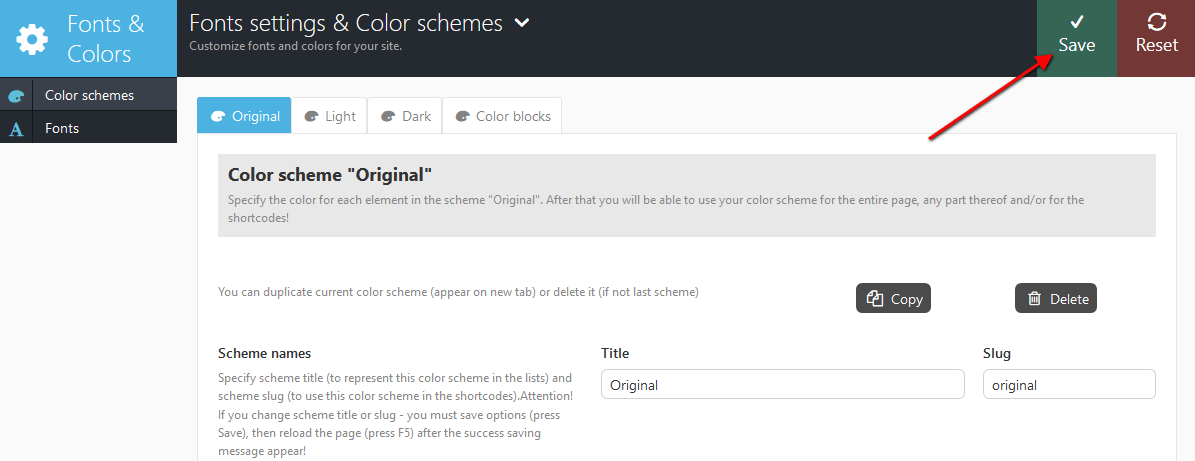
1) Sure, you may adjust theme colors in Color scheme editor:
2) These icons are included: http://psychologist.ancorathemes.com/wp-content/themes/laura-anderson/css/fontello/demo.htmlIf you mean services round icons on homepage – they are implemented as images.
Please be advised that all clipart images included in this theme are the copyrighted to their respective owners and are not available for download with this theme. Clipart images can not be used without express permission from the owner and/or need to be purchased separately.
We can provide you with the list of image ids used in the theme, just contact our support team.
Thank you.Hello, is it compatible with Wordpress 5.3.x ?
Guys! In your latest release (1.3.3), you renamed the theme folder from laura-anderson to psychologist! You can’t do that without warning people. It breaks the child theme dependency. And when I updated the parent theme to psychologist on my child stylesheet, the site was broken and wouldn’t show. So I renamed the main theme back to laura-anderson and all is well. You need to either rename it back or put a allcaps note in your change log that anyone with child themes need to update their child theme.
The way your Fonts & Colors work is also really annoying. Every time I update the theme, my Fonts & Colors go away because the compiled stylesheet gets overwritten so I have to go in, change something in the Fonts & Colors and save then change it back and save to force a re-compile of the less files. Very not ideal…
Hello,
Thanks for notifying. We’ll fix that.
In case fonts or color styles/schemes (accent styles), for some reason (for example after the theme update) fall back to their default settings/values, then you need to regenerate the styles and colors again. All you need to do is just click on “Save” button:
http://psychologist.ancorathemes.com/doc/images/color_save_button.png Thank you for understanding.Looks like there might be a problem with your numbered list feature? http://psychologist.ancorathemes.com/pages-about/
Hello,
Thanks for noticing that.
We’ll fix that and add a fix to new theme update.
If you still have issues or further questions, please submit a ticket at https://ancorathemes.ticksy.com/ – our support team will be happy to help.
Best regardsFixed in the latest release, thanks!
Hello, is it possible to add an image on the right side of the header. At the right of the logo. I mean on any other page than the home page V2. Thank you. Best regards.
Hello,
Thank you for choosing our theme and contacting us!
Let our Tech Support Team take a closer look at this feature/option to check if additional customization of the theme files is required. Please submit a support ticket at https://ancorathemes.ticksy.com/
Thank you.Hi, does this theme come bundled with a WPBakery license?
Hello,
Thank you for your interest on our theme!
WPBakery page builder is bundled with the theme. Bundled plugins do not include activation license key, however they are fully functional.
Regards.
Thank you very much for your reply
You’re welcome!