2014 comments found.

good afternoon, I have the problem of importing the demos
Hi,
can you please describe your issue in more detail?
Lubos
I use TownPress – Municipality & Town Government WordPress Theme by LSVRthemes. My site is Haddonfield.Today (or HaddonfieldToday.com).
How can I upload a PDF document from my desktop computer and where can I post it? It’s not posted anywhere else, so I am not able to post a link to a URL.
Thank you.
Hi,
the simplest way is to just go toy your admin / Media, upload it there, then upon clicking on it you should be able to see a direct link to it, which you can post anywhere you want.
Or you can use the build-in documents feature. Go to Documents, create a new post, scroll down to Document Settings and assign a PDF document to that post. You can then use one LSVR Documents, or LSVR Document Attachments widgets to put it into your sidebar. I see you already have bunch of documents on your site: https://haddonfield.today/documents/
Lubos
I have looked every where how to I edit the Magazine home page. It appears that they are categories but cant find where to change them
Thanks Kirk
Hi,
you mean how to change the category assigned to a specific front page posts block, or how to add new categories which can be used there?
Lubos
I would like to where to change categories assigned to the magazine page. Where are the categories set at? The slider on the magazine page is using notice categories, but the 4 blocks under the slider are pulling from categories I can not locate they are not post or notice categories.
Both slider and those four blocks use only the post categories. When you click on the block title you will open the category archive page of that particular category. You can find each of these categories under your admin Posts / Categories. Feel free to share your URL so I can take a look.
Hi there, presales question. Is there a way to take a look at the backend? Thank you
Hi,
here are some admin screens:
http://assets.lsvr.sk/townpress.wp/3.7.2/townpress_admin_01.jpg
http://assets.lsvr.sk/townpress.wp/3.7.2/townpress_admin_02.jpg
http://assets.lsvr.sk/townpress.wp/3.7.2/townpress_admin_03.jpg
There is unfortunately no live admin demo.
Lubos
what is your return policy? if i can’t test the theme beforehand, but realise after buying it that it doesn’t fit my needs, can i return it uncomplicated?
Hello. Is it possible to add a filter to the LSVR widget ‘Events’ in the display of recent events? For example: “all events except category X”
Thank you very much. Michael.
Hi,
I am sorry but that is not possible.
Lubos
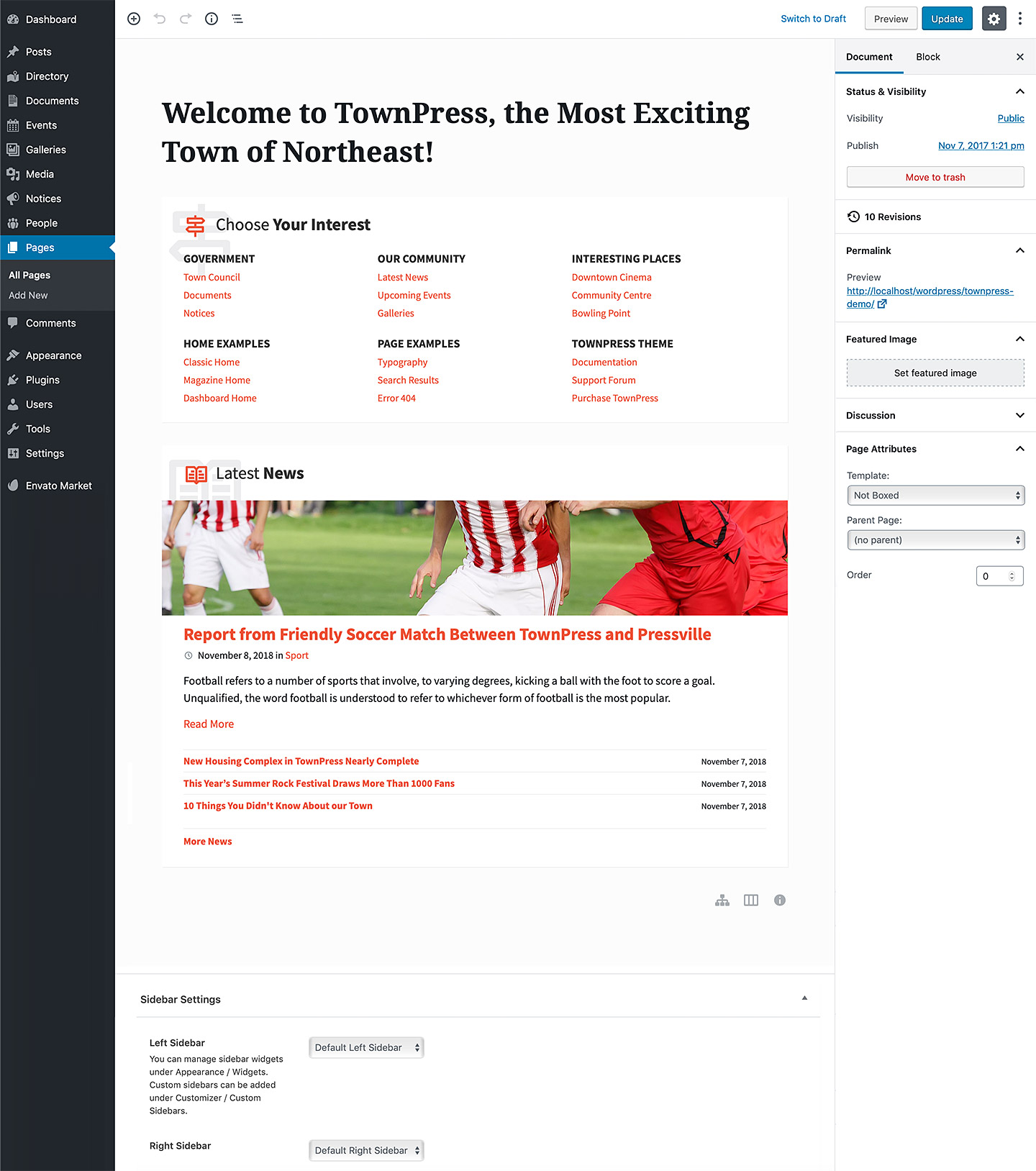
Hi, where is it possible to manage (appear / desappear), traduce and edit content the “Choose Your Interest” box on main homepage please ? I would like to desactivate or set a widget for example or to chose what pages links I want to appear Thanks
Hi,
it is a TownPress Sitemap block which uses a standard menu managed under Appearance / Menus. Please check out this Front page tutorial to learn more: http://docs.lsvr.sk/townpress.wp/#front-page
Lubos
Ok thanks
Hi,
We are using the Magazine Home template as our homepage because we like how it displays different categories. However, when we install the theme, we struggle to set up links to other categories. Currently, it only directs users to the News posts on the same page.
We are using the WPBakery Page Builder. Could you please guide us on how to create different links for each category? We also want to be able to name and edit these links.
Thank you!
Hi,
have you set the category for each of the TownPress Posts block on your home page? Feel free to share your URL.
Lubos
Hi, We have to add many different to post to magazine page, Can we do this? here is the link : http://schoenbach.lahsik.de/
Because We liked the magazine page to be our homepage, but our Categories wont only be Post Categories that is why we are asking if we can change the link and how? now everything in news even if that we have different categories we can’t see them
Or you can use multiple TownPress Sitemap blocks to add any links you want.
How to use multiple Townpress Sitemap, Because I tried to use Post type, and it didn’t work, Where I can use the same format that you have already in Townpress list post and Add the link to it. Please help
For Example I want to add ‘Notices’ to post s Lists the same that I have done to Kultur and Sport, But the Difference is Kultur and Sport Two Categories. and Notices is Post Type,
I think you are responding to other question. I wasn’t asking about Choose Your Interest. Please review My questions
I understand. I am just saying that take a look at Choose Your Interest block in the demo as an inspiration on how to use the Sitemap block with custom links on your front page.
Yes But how to use them the same format a Postlist that I have In Magasin page? Because I want Post type to look like What we already have for Categories
Unfortunately, that is not possible. It won’t look the same. But it is the closes you can get without custom coding. Alternative would be to alter the existing Townpress Posts component code, but that would require some decent WP coding knowledge to pull off. I have some very basic know how here: http://docs.lsvr.sk/townpress.wp/#code-customization
The Posts component file can be found here (relative to your WP installation): wp-content/plugins/lsvr-townpress-toolkit/templates/shortcodes/townpress-posts.php
Thank you for your help so far. Please I have created New custom post type to use it for Protocols, and I want to add it to Widgets left side bar. In our old website we did this as you can see : https://www.schoenbach-eifel.de/ ( PROTOKOLLE ). Now we need to do the same thing in our new website : http://schoenbach.lahsik.de/ But we didn’t find In widgets Protokolle ( our custom post type ) to drag it our left side bar! Please any advise
Is this a plugin? Yes I did install all plugins from our old website. Other small thing please How to change The Name “Menu” color on mobile when someone click on the menu, the background it turns blue and the typo color of “menu” black so it doesn’t look good on mobile! please advise.
It is definitely a plugin.
Try this CSS:
body .header-toolbar-toggle__menu-button--active { color: #FFF; }
Hi again,
Thank you for your assistance. I have two questions:
1- How can we hide all text and keep only some of it on the magazine homepage (TownPress Posts)? We have long posts and don’t want them to be fully displayed on the homepage, as it doesn’t look good. For example, we need to show just the first 200 words and not the entire text to keep it organized. You can see the current issue here: http://schoenbach.lahsik.de/.
1- How can we make the slider responsive for mobile so that the entire picture is visible on the homepage?
1.) You need to define your post excerpt. When editing a post, search for the Excerpt field in the right panel. Make sure it is enabled under screen options.
2.) You can use this CSS but it won’t look good. There is a reason why it is being cropped on mobile:
@media screen and (max-width: 800px) {
.lsvr-townpress-post-slider__post-bg {
  background-size: contain;
  background-position: center;
  background-repeat: no-repeat;
}
}
Thank you; If I don’t have excerpt when I edit post do you suggest any plugin? Bcs I didn’t have it
Find it, thanks
Hello,
I’m trying to separate a page into sections. For example i’ve added the “Latest Notice” widget to the top of the page, and i would like a gap (that is transparent) between that widget and the content below it. However I cant seem to do it.
Hi,
there should be a Spacer block in the block editor: https://wordpress.org/documentation/article/spacer-block/
Lubos
Is there a way/plugin/custom code I can update documents added with theme v1.6.4 to theme v3 documents? I have over 3000 and reuploading all is out of discussion.
Hi,
unfortunately no, documents in the 3.0 works very differently. You can now assign multiple attachments to a single document post. Theoretically you can assign all 3000 attachments to a single post at once, but I don’t know how it will work performance wise.
I would advice you to install the latest version locally or on some staging environment and just test it out before you update your live site.
Lubos
Hello,
I have a question about the events calendar. Everything is working great, except when the day of the event comes around, it disappears from the upcoming events list. How do I get it to display the current day’s event?
Thanks!
Hi,
make sure that you’ve set correct timezone in the Settings.
Please note that you need to contact me using an account with which you’ve purchased the theme to get my assistance. Thank you for your understanding.
Lubos
When creating an event, i can’t see it on the event page if it’s just a few months out in the future. But we are not having that many events during the year, so i would like to have all year events shown on the main event page. Is it possible to change this?
Hi,
can you please share the URL of the event detail?
Lubos
i am
Please do
What is the process to upgrade the theme?
Hi,
what version are you upgrading from? If it is a 3.x then please see this: http://docs.lsvr.sk/townpress.wp/#how-to-update-theme
Lubos
mi consula es que no migra toda las paginas de la plantilla como se muesntra al momemto de aduirir que devo hacer
Hi,
please use English if you need my help. Thank you for your understanding.
Lubos
Hi,
Thank you for the the support thus far. I was wondering if it’s possible to move the logo position to the header or the main title block?
Best regards
Hi,
I am sorry, but that is not possible.
Lubos
I’m having a bit of an issue getting the background image to look decent. On the phone and small screens, it shows fine but on my monitor (2560×1440) it only shows the very top of it. I’ve tried to change the image to something much smaller (and much bigger) and it only shows the top. Is there a better way so it properly renders the background image?
Hi,
try different aspect ratio, for example on the demo site the header image is 2000×600px.
Lubos
Is there a debug log for the weather app? It just shows all 0’s for the weather, despite any location I put.
Hi,
when you try searching for the location directly at https://openweathermap.org does it work?
Lubos
Good day,
I am doing a redesign of a town’s site using this theme (really like the theme btw). However, I am having an issue with the menus not expanding to show their sub items, as well as the menu drop down not working on mobile. I’ve recorded a short video of the issue here: https://www.youtube.com/watch?v=PqDjCKzTTNk
The menu items with sub-items are Custom Links, and I have tried with and without ’#’ in the URL. This set up was working as intended with the previous theme. Any advice would be greatly appreciated!
Best regards, Andrew
Hi,
can you please share your URL? The video is unfortunately not enough for me to figure out what can be causing this.
Lubos
Sure, prototype url is: http://3.96.159.69/
Hmm, I actually see that the menu links are working now that I’ve hosted it on AWS. They weren’t working in the local environment.. strange.. guess its fixed 
Hi,
I am wondering if it is possible to add or edit fields of information (email, phone, etc) in the LSVR Featured Person widget on a page?
Related question – there is a checkbox to “Display Excerpt”. I do not see where to edit this text.
Many thanks,
Jason
Hi,
ad fields: that is unfortunately not possible without customizing the code.
ad excerpt: when you are editing a post, you should see an Excerpt field in the right panel, if you don’t see it you have to enable it in screen options in upper right corner.
Lubos
Hi, why can’t i find this section: To import the demo data, go to Theme Options / Demo Importer
Hi,
have you installed the One Click Demo Import plugin as mentioned in the documentation?
Lubos
Yes sorry! I totally missed that part. – Another quick question. Is it possible to create an event that people can reserve tickets for?
I am sorry but that is not possible.
My site at stash.org.uk no longer works because the plugin LSVR Framework has the following error:
An error of type E_COMPILE_ERROR was caused in line 76 of the file /home4/stashorg/public_html/wp-content/plugins/lsvr-framework/inc/classes/post-metafields/lsvr-post-metafield-opening-hours.php. Error message: Array and string offset access syntax with curly braces is no longer supported
What can I do to get my site up and running again?
Hi,
please try updating the theme to the latest version (3.8.6), then follow the prompt which will update all LSVR plugins as well.
Lubos
When I tried to do this by re-installing the theme from the zip file WordPress tells me that I have an “Incompatible archive”. How do I update without re-installing the theme?
Please check out this http://docs.lsvr.sk/townpress.wp/#how-to-update-theme