8688 comments found.

Hi, just info The Price Sale and Regular display is reversed when shown on the individual course button. Please check.
Hello,
Thank you for your request. I have reviewed the course price and sale price on my side, and it appears correctly displayed to me. Please ensure that both the theme and the bundled plugins are up to date.
Best regards,
Why everything used is depreciated ?
Please check the link : I am unable to use this as everything is depreciated.
https://docs.google.com/document/d/1gLED5LHMB7RzF2d-O3hCkaMYBR5CvWE4FfYYOph3WoU/edit?usp=sharingHello,
Thank you for your request. I have forwarded it to our team. The issue stems from the Redux framework file. Rest assured, we will prioritize and fix it as soon as possible. Thank you for your attention and for helping us improve our product. We truly appreciate your cooperation.
Could you please let us know the version of PHP you are using? It would be incredibly helpful for us to consider every case and prevent such warnings in the future.
Best regards.
Hi, I had once set a prerequisite course for all my courses but I later did away with the prerequisite course and it’s no longer needed but courses are still asking for it. I have cleared the cache but no change.
Hey there!
It looks like the prerequisite courses were deleted before unlinking them form other courses and aren’t showing up in the prerequisites section of the course builder as well. Because of this, you’re unable to remove them, but they still exist in the database. You need first remove the connection and then delete the pre requested course itself.
Could you try restoring the deleted prerequisite courses? After that, navigate to the course builder > prerequisites, and unlink/remove the prerequisite courses. This should allow you to remove the course successfully.
I understand this situation is a bit unusual, but thank you for bringing it to our attention. We’ll certainly take this case into consideration for future improvements.
Best wishes,
Prepurchase question Do I need to still pay for pro once I buy this plugin? Can I install this to my WordPress site and add courses straight away or I still need to go back and pay for the pro first?
Hello,
Thank you for your question. You do not need to pay anything extra; the MasterStudy theme already includes the Pro plugin, which is more than sufficient to build a perfect educational website and start selling your courses.
However, we also offer the MasterStudy LMS Pro Plus plugin, which includes additional premium add-ons such as Email Branding, Google Meet, Upcoming Course Status, Question Media, and Social Login, along with all upcoming add-ons. It also includes all the features of the MasterStudy LMS Pro plugin.
If you need these additional features, you can purchase the Pro Plus plugin. Please note that loyal theme users will receive significant discounts on the Pro Plus plugin.
Best regards
Hello!
Why is it impossible to see the subcategory when adding a course???? – https://ibb.co/jH6W4PV
How can I fix this? I don’t see a solution in your documentation.
Hello,
Thank you for your request. We are already aware of this issue and are working on a fix. Rest assured, it will be resolved soon. I will update you with the release date of the fix as soon as possible.
Thank you for your understanding.
Best regards, Lisa
Hi
1) How to enable shop products to checkout as whenever add shop products so it ask to add courses at checkout and do not display wooCommerce products!
2) can you confirm which payment method will be on page checkout for Paid Membership Pro like on Demo!
Hello there,
To set up a payment gateway for membership plans, go to Memberships > Settings > Payment Gateway & SSL. Here, you can configure payment methods, currency, credit cards, sales tax, and SSL settings.
For detailed instructions, please refer to the manual:
I understand your request might be a bit unclear, but here’s some information that might help:
You have two options for handling checkout processes:
- MS LMS Checkout: A specific checkout process for LMS products.
- WooCommerce Checkout: Use WooCommerce for all e-commerce features on WordPress.
In MS LMS, LMS products and shop products are managed separately. However, you can sell LMS courses as WooCommerce products if you prefer. Additionally, WooCommerce payments can handle transactions for MS LMS products.
For more details, please check the following documentation:
I hope this helps! If you have any more questions or need further assistance, please let me know.
Best regards,
Your Name
Hi,
Paid Membership Pro, Discount Coupon code field at checkout page not displaying! how to enable discount coupons on checkout
WooCommerce coupon is working, but Paid Membership Pro coupon is not displaying at Checkout page
Hi,
Thank you for reaching out. I understand your concern
Please refer to this link for detailed documentation on discount codes: Paid Memberships Pro Discount Codes Documentation.
Additionally, I recommend visiting the PMPro forums and contacting their support if you continue to experience problems with PMPro coupons, as this issue is beyond the scope of MasterStudy theme support.
However, here are some general recommendations:
- Make sure that both WooCommerce and Paid Memberships Pro plugins are up to date.
- Ensure that the coupon is correctly configured in Paid Memberships Pro. Verify that it is active, has not expired, and is applicable to the membership levels you are offering.
- Temporarily switch to a default WordPress theme (like Twenty Twenty-One) and deactivate other plugins to see if the coupon displays at checkout.
- Enable debugging in WordPress by adding the following lines to your
wp-config.phpfile:
Afterward, try to replicate the issue and check thedefine('WP_DEBUG', true); define('WP_DEBUG_LOG', true);debug.logfile in thewp-contentdirectory for any errors or warnings that could indicate the problem.
I hope this helps! If you have any other questions or need further assistance, please let me know.
Kind regards,
Lisa
Dear Sir, Paid Membership Pro already installed at other website and at Checkout page it display apply discount coupon, can you tell how to display discount coupon field or edit checkout page
Paid Membership Pro Discount coupons configured correctly still not showing at Checkout page, can you tell from where to enable it or add, thank you..
Hello,
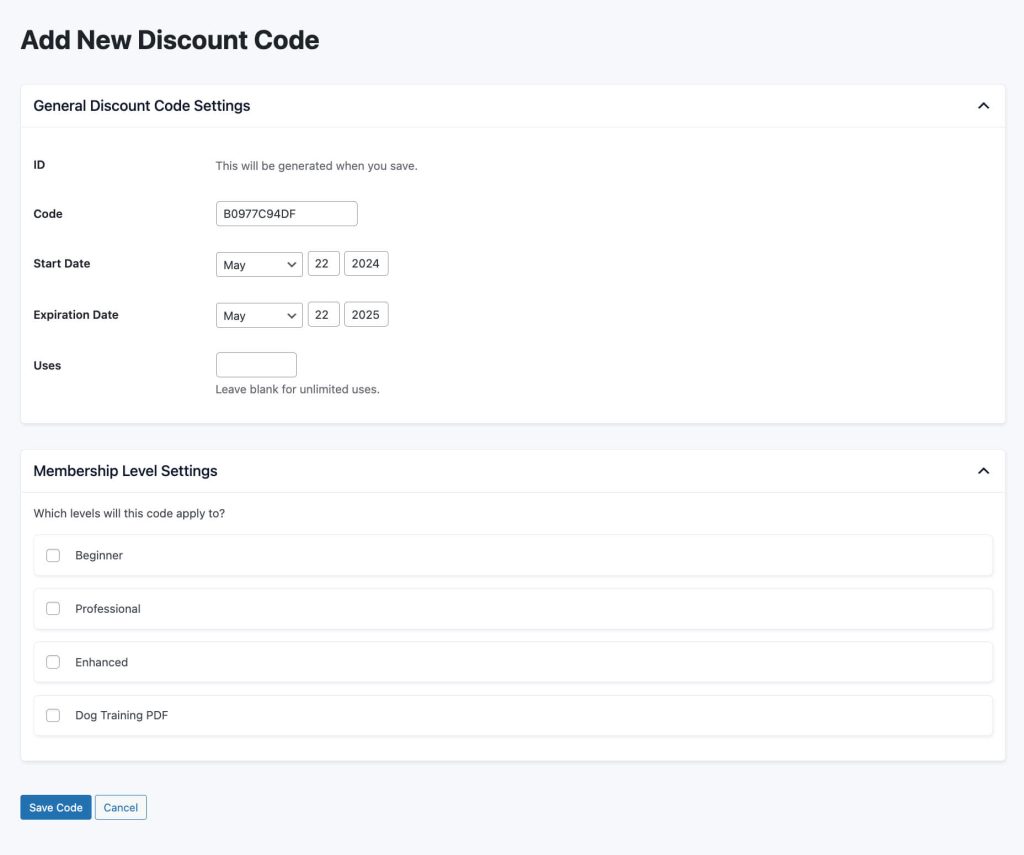
Please refer to the following image and instructions for setting up the discount codes correctly: Discount Code Setup.
Ensure that the discount codes are configured as shown in the instructions. If you’re still facing issues, please email me at lisastylemixthemes@gmail.com with a description of the issue and your website credentials. I’ll be happy to take a closer look.
Best wishes,
Pre-purchase question:
Is it possible to integrate Easy Digital Downloads (EDD) Plugin to Masterstudy? or anything else that allows me to sell digital downloads and subscriptions?
Hi,
Thank you for your inquiry!
Currently, we do not have an integration with the Easy Digital Downloads (EDD) Plugin for MasterStudy, and we haven’t tested any similar plugins or tools. However, your feedback is invaluable to us.
Please spare 10 minutes to help us by creating an offer and putting it to the vote >> https://stylemixthemes.cnflx.io/boards/masterstudy-lms
By studying the statistics, we can understand how many customers like you need this feature and its potential impact.
Kind regards,
Lisa
hi, i would like to ask you the following questions: 1: i want the audio lesson and question media, but they are part of the Pro Plus, the price is expensive for me right now, is it possible to get discount on these? 2: i think i am missing something, but i can’t find the lesson/course player and course details template, i want to edit them, the setting page options is limeted , what is the best way to edit them? for example in the course detail page, i want to remove the instructor name, total enrolled students and the review stars. thanks in advance.
Hi,
Thank you for reaching out! I’d be happy to assist you with your questions.
As a valued theme user, we can certainly provide you with a discount for the Pro Plus plugin. Please contact me via email at lisastylemixthemes@gmail.com so we can discuss this further.
For editing course details templates, you can choose from three beautifully designed templates by navigating to MS LMS > Settings > Courses. With the MS LMS Pro Plus plugin, you’ll unlock additional course description page designs.
Unfortunately, you cannot edit the design of pages generated by MS LMS directly. However, you can add blocks and widgets using Elementor after the MS LMS-generated content (such as course description, details, instructor name, and other course page content). If you need to remove specific course details like the instructor name, total enrolled students, and review stars, you can contact our support team by creating a ticket on our support platform.
Additionally, with the Pro Plus plugin, you’ll have access to premium support, ensuring you get the help you need promptly.
Thank you in advance, and feel free to reach out if you have any more questions!
Kind regards, Lisa
Hi Lisa, Thanks for your kindly reply. I have sent you an email yesterday. Waiting for your early reply. Thanks in advance.
Hello,
Could you please check your email? I have replied and sent all the necessary information.
Warm wishes, Lisa
Hello!
Will you, or do you already have plans to incorporate an Ai course generator to help assist with generating courses, quizzes, assessments, etc? That would be a total game changer for MasterStudy!!
If not, do you have an recommendations as to what platform works well/seamlessly with MS?
Ai and course creation is where everything is going (imho).
Thanks, Winners!
Hello there,
Thank you for reaching out! Currently, we do not have plans to incorporate an AI course generator to assist with generating courses, quizzes, assessments, etc. However, as a support team member, I will forward your feature request to our development team.
In the meantime, you can officially vote for this feature request using the link below:
https://stylemixthemes.cnflx.io/boards/masterstudy-lms/22075If it gains popularity among other users, it has a better opportunity to be planned for future updates.
Thank you for your suggestion!
Best, Lisa
Pre Buy Query:-
1. Is it possible in this theme to use Membership and Recurring Membership feature. Like we can create 3 packages 1. Basic 2. Intermediate 3. Expert and then keep pricing according to the courses and features in each package?
2. Do Membership feature requires any other 3rd party plugin?
Hello there,
Thank you for the requests.
Membership and Recurring Membership Feature: Yes, it is possible to use Membership and Recurring Membership features in the MasterStudy LMS theme. You can create different membership packages such as Basic, Intermediate, and Expert, and set pricing according to the courses and features included in each package. This allows you to tailor your offerings to meet different user needs and preferences.
Third-Party Plugin Requirement: The MasterStudy LMS plugin is designed to work smoothly with PMPro, enabling you to create a comprehensive Membership System with Subscription Plans on your website. The Paid Memberships Pro plugin is 100% GPL and available for free from the WordPress repository or the official website at www.paidmembershipspro.com. The full version of the plugin comes without any restrictions. However, some advanced add-ons might require a PMPro Plus license type, details of which can be found on their pricing page. This setup allows for both one-time and recurring payments, providing flexibility in how you manage memberships and subscriptions.
Best wishes
Changed domain. However, I can not reactivate the plugin on the new domain and getting this error ” Your license is invalid or expired. Visit the PMPro Membership Account page to confirm that your account is active and to find your license key. ” Old domain: goodcitizens.online
Hello there,
To use it on a new domain, you’ll need to deactivate the license from the old domain first.
Please follow these steps to reset it:
-
On your old website’s dashboard, click the “Deactivate” button.
- Confirm deactivation by pressing “Ok”; the theme will be automatically deleted.
- On your new website’s dashboard, click the “Activate” button and follow the steps on the Theme Activation page.
Afterward, kindly ensure that the MasterStudy theme and bundled plugins MS LMS Free and Pro are up to date. Let me know how everything goes.
Thank you!
Hello there I have the theme bought but I am not able to activate on a new domain. I want to change the domain for the website. could please help me immediately regarding this issue.
If you used your purchase code for an old website and can’t register it for your primary site, please follow these steps to reset it:
-
On your old website’s dashboard, click the “Deactivate” button.
- Confirm deactivation by pressing “Ok”; the theme will be automatically deleted.
- On your new website’s dashboard, click the “Activate” button and follow the steps on the Theme Activation page.
If you need any further assistance, please feel free to ask.
Hello,
Thank you so much for your request.
Could you please check your server error logs for any errors that might provide more insight into what might be going wrong?
Additionally, please ensure that the server requirements are met by referring to the following link: https://docs.stylemixthemes.com/masterstudy-theme-documentation/general/system-requirements
If you need any further assistance, please feel free to ask.
Best wishes
There are no errors in the server logs. The server is fine and well-configured. The problem turned out to be with your theme. When I changed the number of products displayed from 12 to 9, everything worked.
Thank you for your response!
Could you kindly try changing your PHP version to either 7.4 or 8.0 if you’re using a higher version? 7.4 tends to work best. If you still experience the issue, it might be caused by something else. In that case, we would love to help you further.
Please send your credentials to lisastylemixthemes@gmail.com so we can take a closer look at your website.
Best, Lisa
Hello, I have a critical issue that needs urgent attention. Despite setting the currency to Swiss Francs (CHF) in the theme settings, all transactions are still being processed in US Dollars (USD). The settings appear to be correct, but the charges are not reflecting the chosen currency.
Could you please assist in resolving this issue as soon as possible? Ticket number is: #Z73868. Thank you.
Hello,
Thank you for reaching out. I have checked ticket #Z73868. Our team will investigate this issue and respond to you shortly.
In the meantime, please ensure that your WP-admin credentials are correct to facilitate the troubleshooting process. If you are using WooCommerce for checkout, please verify that the currency settings within WooCommerce are also configured to Swiss Francs (CHF).
Log in to your WordPress dashboard.
Go to “WooCommerce” > “Settings”.
Click on “General”.
Scroll down to “Currency options”.
Select Swiss Francs (CHF) or your preferred currency.
Click “Save changes” at the bottom.
Check the currency symbol and format on your website.
If needed, clear cache for changes to take effect.
We appreciate your patience as we work to resolve this for you.
Best regards,
Lisa and MasterStudy Team
Hello, I am located in Switzerland and the currency we use is Swiss Franc (CHF). How can I configure the theme to use Swiss Franc as the default currency for all transactions? Check please #Z73868
Hello,
Thank you for your inquiry. I’ve reviewed your ticket #Z73868. It has been responded to. To streamline your requests and receive quicker responses, I recommend creating separate tickets for each specific request. This way, different agents can work on your requests simultaneously.
Regarding configuring the theme to use Swiss Franc (CHF) as the default currency for transactions, you can set the currency value under the WP Dashboard > MS LMS > Settings > General > Currency section. Please adjust the currency symbol there to reflect CHF.
Feel free to reach out if you have any further questions or need assistance with this process.
Best regards,
Hello, I just checked but Woocommerce checkout is not working in the theme. Payment is possible in Woocommerce, but when I press the button it does not perform any action.
Hello, thank you for your request. Please create a support ticket, and our agents will review your settings.
Hello, please check #Z73871 about woocommerce issue. Thanks
Hello, i have tested the site and encountered a persistent problem. When switching to WooCommerce and clicking the purchase button within a course, it does not redirect to the cart page or perform any action. There is no error message displayed either, indicating a possible code or software issue.
This problem is critical for my site, and it is becoming quite frustrating. I am losing valuable time, and the issue is clear: there is no action taken when WooCommerce is active on the purchase button. If this issue is not resolved promptly, I will have to reconsider my rating and feedback for this theme and support service.
Please assist in resolving this problem as soon as possible. Thank you.
LMS login page
It looks like your theme has a Login Page built in or embedded in the Sign Up form: do you have an option to redirect the Sign Up URL to any page of my preferences?
Please provide some tutorials or documentation that can help me add a redirect URL on your Sign Up form.
Hello,
Thank you for reaching out. Currently, our LMS theme directs users to the dashboard > enrolled courses section upon signing up, and unfortunately, there isn’t an option to redirect the Sign Up URL to a different page at this time.
For further assistance with this matter, please create a support ticket. Your premium support access ensures that our team can provide you with dedicated help and guidance.
Best regards,
Hello,I would like to know if an invoice is automatically sent after each purchase. If so, could you please provide details on the invoicing system used, how it works, where to find the settings, and how to configure it properly? Regards
Hello,
After a course purchase in MasterStudy, the system sends an email to the student confirming their enrollment in the course.
If you’re using WooCommerce checkout, your subscribers will receive a WooCommerce-generated invoice email along with the MasterStudy enrollment confirmation email.
However, if you use MasterStudy’s checkout exclusively, only the enrollment confirmation email will be sent.
For further details or assistance, please feel free to create a ticket on support portal >> https://support.stylemixthemes.com/tickets/new/
Best regards,
After updating the latest version, the site is going to be super slow…
Every update it’s makes garbage.
Thank you for reaching out.
I’m sorry to hear about the slowdown issue after updating. Let us investigate this further. Please send the wp-admin credentials for your staging website and server logs to lisastylemixthemes@gmail.com.