6409 comments found.

Can the Paywall plugin/s included with this theme also be used independently from it with other themes?
HI flashfan10,
Thanks for reaching out to us, for the JNews paywall it only compatible with JNews theme, but we also have Jeg Paywall plugin, standalone paywall plugin that you can use with other theme, you can check it in the link below
Thank you
Problems adding a category to the content filter? when I add include category for a category example culture doesn’t show the culture posts
Hi bensaidyasmine9,
Thanks for reaching out to us, to troubleshoot this issue please follow the steps below
please make sure the post status with the culture category is published, you can check the status of the post by editing the post and finding the status at the right sidebar in the post editor
please also try to disable the cache query option in dashboard > JNews Dashboard > Additional Option > Query Option > disable cache query , so the changes you made that related to the query filter will be applied immediately
If you have any further questions or need further help, please create a support ticket in our official support forum using the link below
Thank you
Hi, Is this price for a single site or it can be used on multiple sites.
Hi rehanrock2003,
Thank you for your interest in JNews! The price applies to a single-site license. Let me know if you have any further questions.
Thank you
1) i have some questions about the paywall. is it possible to have just a free plan for users to be able to login in order to see all articles?
or is it possible to have a free plan for users to be able to see free articles and premium plan that users have to login to see premium articles? in this situation is there a way to set which post to consider as premium post?
2) about dark and light mode, is it possible to add on all themes or just those that appear to have in the demo area?
3) quest-post : is there a way for people to upload articles and just accept them in order to be visible? i am not talking about paying them.
Hi KyriakosKaz,
Thanks for reaching out to us, it is possible to set a post as a free post or a premium post, you can check the documentation of the paywall in the link below
to set specific posts as premium posts, please check the documentation above at Restricting Post Content only for some Posts section
our dark mode feature can be used across all demos, so it’s not limited to specific demos, you can import the demo that you want and then activate the dark mode, or you can use it without importing any demo, you can add the dark mode toggle from Dashboard > Appearance > Customize > JNews: Header Option
yes, it is possible to let your site user upload posts I need your approval for the post to be published, it can be done using our JNews Frontend Submit plugin, below is the documentation of the plugin
If you have any further questions or need further help, please create a support ticket in our official support forum using the link below
if your support license expires, please try to extend or renew your support license.
Thank you
Do you use any framework like boostrap or is it pure css?
HI uelintond25,
Thanks for reaching out to us, for the CSS in our Theme we are using our own CSS, if you have any other questions don’t hesitate to reach us
Thank you
Hi,
Can we use different layouts for custom post types and taxonomies?
For example: a different Single Blog Post Template and Single Blog Post Layout for different custom post types.
HI ranukadev
Thanks for reaching out to us, sorry unfortunately at this point our custom layout is only compatible with WordPress’s default ‘post’ post type
If you have any further questions or need further help, please create a support ticket in our official support forum using the link below
if your support license expires, please try to extend or renew your support license.
Thank you
When the content is locked for subscription, is it also locked for google search engine?
Hi iavinash,
Thanks for reaching out to us, to improve the visibility of locked content, you can use an SEO plugin such as Yoast SEO it can generate JSON LD for the locked posts and help Google index it
Thank you
can i add any rss source?
Hi fadedplanet,
Yes, you can add any RSS source. Here you can check the demo https://jnews.io/rss-block-element/
Let me know if you have any further questions.
Thank you
so the feeds or source will be automatic, not manual?
yes, the feeds will be fetched automaticlly
But author page and category page are not displaying blog(custom) post type
Hi vishalparmar,
Thank you for reaching out to us and for using our theme.
We appreciate your feedback and wanted to address your query. At the moment, our category and author pages are designed to display posts from the default ‘post’ post type only. Since you are using a custom post type named ‘blog,’ these posts will not appear on the author or category pages by default.
if you need further help, please try to open a new support ticket on our forum. Our support team may need further information about your website based on your problem.
if your support license expires, please try to extend or renew your support license.
Thank you
Hi,
Would you provide the required feature in your theme? Then we can plan to renew our support license.
we will add it to our feature request list for future consideration, but unfortunately, we can’t promise that it will be available soon.
Thank you
Can I make a Table of Contents using any of the JNEWS add-ons already available on the list? If not, which plugin is most compatible with JNEWS? Please guide.
Hi ByteSnoop,
Thanks for reaching out to us, JNews has a built-in table of contents feature, you can check the demo in the link below, on the demo you can scroll down the page and then at the top left corner the table of content will appear
to use the JNews table of contents you can activate the Jnews Split Post Plugin, you can check the documentation in the link below
JNews Split Post Documentation
Thank you
Opps! Your License is Invalid – but i have purchased this theme, please can you help, my support has expired i cant create topic on your support centre
Hi medianaija,
Thanks for reaching out to us, If you consistently receive an invalid message after activating the theme, it may indicate an issue preventing the license from being updated. This often occurs when someone is using a nulled version of the theme file, to troubleshoot this please follow the steps below
1. Reinstall the JNews theme by downloading the latest version from ThemeForest then install the zip file theme from Appreance > Themes
2. Reset your license by accessing the following URL.
yourdomain/wp-admin/admin.php?page=jnews&path=jnews&action=reset-licenses
please replace yourdomain with your actual domain
3. Reactivate your license. When trying to activate your license, remember to use the Envato account that you using to buy the JNews theme to allow you to access the activate license page. If you cannot change the account logged in on Envato, you can activate the license in an incognito browser so that during the license activation process, you will be prompted to log in to your Envato account again.
If you have any further questions or need further help, please contact us through the link below
https://themeforest.net/user/jegtheme#messageThank you
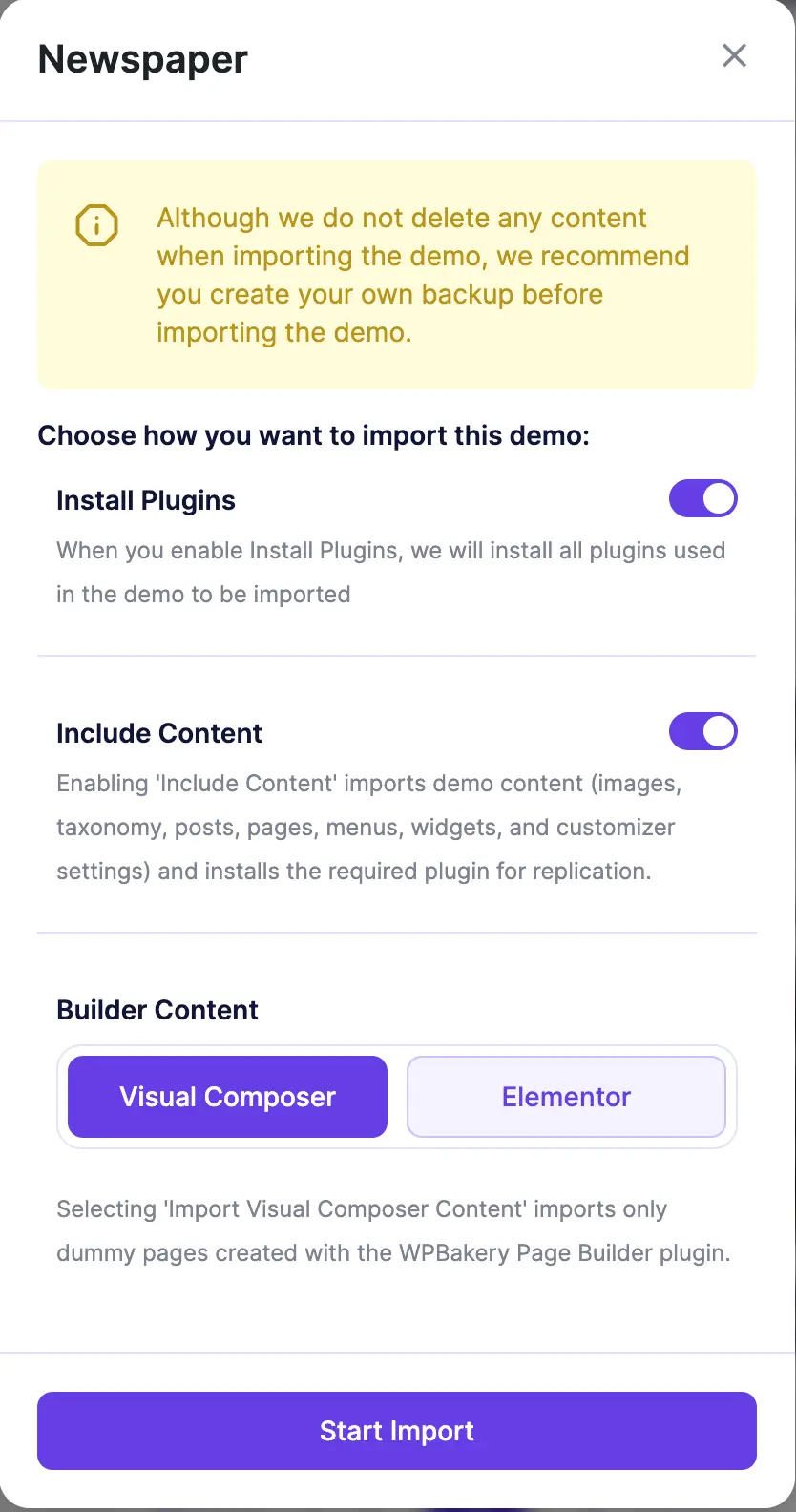
Do the pre-built websites include any content as shown in the DEMO?
Hi birchbrook,
Thanks for reaching out to us, our import demo feature have option to include the dummy content, below is the example
if you have other questions don’t hesitate to reach us
Thank you
Because I like Jnews, I have bought 7 licenses so far, 3 are in active use.
But it cannot be that when an update of Jnews is installed, serious problems suddenly arise, and I cannot even report this in the forum “You cannot create new topics. It may because your support license is expire, or you haven’t bought this themes yet”. I have no problem renewing support if I need something that is not standard. But the software has to work!
What I am currently noticing:
Modules in the widgets no longer display options. The fix for “jQuery.Deferred exception: Cannot read properties of undefined (reading ‘value’) TypeError: Cannot read properties of undefined (reading ‘value’)” does not work either
and
PHP message: PHP Warning: .../wp-content/themes/jnews/lib/theme-helper.php on line 673; . . . PHP message: PHP Warning: ...Attempt to read property “name” on array in /wp-content/themes/jnews/lib/theme-helper.php on line 674
Hi fairitgraz,
Thank you for bringing this to our attention. We have reviewed your report related to the module in the widgets, We’re currently working on a fix, which will be included in the next update. We apologize for any inconvenience this may have caused and appreciate your patience as we resolve this issue.
Thank you
Hi Team, 1. Paypay subscription demo is not working on the demo site, it always says “Sorry, it seems that there are no available payment methods for your state.” 2. I have tried to setup paypal sandbox to test subscription model but it never works. There is a lack of proper documentation/video to setup sandbox in paypal and use those credentials in jnews. 3. If we receive the payment offline, is there any way to mark the the subscription status of the user to “Subscribed” from here : Jnews Paywall > User Status 4. Currently post are restricted for all wordpress default user types except Admin. Can we allow bypass for other user types as well, like Contributor, Editor etc?
5. How much you would charge to setup paywall completely for my website?
Hi amexing,
Thanks for reaching out to us, could you please tell us from which country you are trying to do the payment?
sorry, unfortunately at this point, we don’t have the option to set the status for offline payment, we have the option to set the status if the user made the payment from the site
yes, you can allow specific user roles to access premium posts without subscribing or unlocking the posts
our support team can help you set up a paywall on your site, as long as your requirement is still within our support policy
you can extend your support license by following the link below
Thank you
Hi team, thanks for reply, could you please share any document or help with the navigation to enable subscription or unlock option for any particular user.
I am trying payment setup from india.
Hi team, appreciate if I can get reply on this. I don’t see any option to bypass subscription for any specific user.
To verify whether PayPal is supported in your country, we recommend contacting PayPal’s support team directly. They will be able to provide the most accurate and up-to-date information regarding payment availability in your region.
to allow specific roles to access premium posts, we have custom filter, you can use this additional code below to use the filter
you can change the roles in the code above according to your need, you can add the code in JNews Child theme functions.php, to use JNews child theme, you can follow the documentation below
JNews Child Theme Documentation
if you need help to use the code, please try to open a new support ticket on our forum. Our support team may need further information about your website based on your problem.
Thank you
Thank you that was really helpful. PayPal is supported in our country (india).
May I have another question. In the previous release it was mentioned that “Add paywall subscription status manual update option”. What does it mean actually? Even if I manually change the order status for PayPal subscription status to completed from woo commerce order page, user still doesn’t get subscription.
The manual update option for user subscription status is designed to provide site administrators with greater control over subscription management. Here’s how it works:
Automatic Updates: Typically, the subscription status of users is automatically updated by the payment gateway. The gateway sends a request to your site to update the subscription status once the payment is completed.
Manual Updates: The manual update option is available if the site administrator needs to:
Update the subscription status of a user before the payment gateway sends the status update request. This is useful if the administrator does not want to wait for the gateway to process and send the update.
Stop a subscription manually, for instance, if there’s a need to end a user’s subscription before the renewal due date due to specific circumstances.
if the payment status doesn’t get updated automatically please make sure your paypal IPN is configured properly
please check the documentation below at Woocommerce Settings section
if you need help to setup the paywall, please try to open a new support ticket on our forum. Our support team may need further information about your website based on your problem.
if your support license expires, please try to extend or renew your support license.
Thank you
I try manythings I can’t understand why single post page shows like this!? its like endless of posts down each other! I reinstall theme and reimport demo.. problem still exist!
?
Hi manalelsabbah,
Thanks for reaching out to use, could you please send us a screenshot and mark the part of your site you are referring to by endless posts? to avoid misunderstanding
Thank you
Hello there, I’m also wondering, is it possible to update to the latest version of WordPress 6.7? Is it compatible?
Thanks
Hi megapublicidad,
Thanks for reaching out to us, yes, JNews is compatible with WordPress 6.7, If you have any further questions or need further help, please create a support ticket in our official support forum using the link below
Thank you
Hi there. I am having issues editing with wpbakery or elementor. I get the error message about the “the_content”. Please help solve it as i got stuck.
FYI. I’m honest here…The error appears on my clients website (for website details i can dm without a problem and will explain), as the previous person with did work on has disappeared and now i have taken over to solve the issue.
As i said, ask me anything in regards to legitimacy and will answer or provide details.
Kind regards
Hi eddievet,
thanks for reaching out to us, to troubleshoot the issue, please try to disable some plugins that are not related to JNews for a while to check if there are any plugin conflicts or not, please also try to clear cache from plugin caching or cdn caching if you are using one, you also can try to check the PHP error log to check if there are any Fatal error
if you need further help, please try to open a new support ticket on our forum. Our support team may need further information about your website based on your problem.
please login to our support forum using Envato account you use to buy JNews theme
Thank you
Hello I hope all is well.
FYI – Recent update I cannot edit anything with elementor. Just gets stuck in a loop.Was able to edit pages with elementor prior to update.
JNews Version: 11.6.5
Hi techspecx,
Thanks for reaching out to us, regarding this, please try to check your PHP error log, and see if there are any Fatal Errors in your php error log while accessing your page with Elementor edit, please also try to disable some third-party plugins that are not related to JNews for a while to see if there are any plugin conflicts or not
if the problem still persists on your site, please contact us through the link below
https://themeforest.net/user/jegtheme#messageThank you
Okay I replied – please see. Thank you.
Hi Guys,
1. In the documentation, I couldn’t find how to set the default Page Layout for pages. I can set it for an individual page, but I believe there’s a setting to apply it to all pages by default.
2. It looks like there’s a bug with the “Single Blog Post Layout” setting under the single post options. I can’t enable the two-sidebar layout from there. Even when I select it, the two sidebars don’t appear.
Hi ranukadev,
thanks for reaching out to us, sorry unfortunately at this point we don’t have the option to set a specific page layout globally, if you want to apply the existing layout to a new page we recommend duplicating the page or you can copy the layout from an existing page to another page from Elementor or WP Bakery.
for the double sidebar, we’ve checked on our side and it still working, please check the screenshot below.
please make sure the widget area that you use for the double sidebar contains any widgets.
you can check whether the widget area has any widgets or not from Dashboard > Appearance > Widgets> find the widget already that you use
if the problem still persists on your site, please try to open a new support ticket on our forum. Our support team may need further information about your website based on your problem.
if your support license expires, please try to extend or renew your support license.
Thank you
Can I apply paywall to podcast and audios?
Hi IvanCarrizosa,
Thanks for reaching out to us, yes you can apply a paywall to the JNews podcast, for the premium podcast that will have a lock icon (please check the screenshot below)
If you have any further questions or need further help, please create a support ticket in our official support forum using the link below
if your support license expires, please try to extend or renew your support license.
Thank you