12912 comments found.

Could you please share examples of successful websites built using this theme?
Hello,
Thank you for contacting us.
You can find our customers’ websites showcase on the theme description page https://gyazo.com/f5d589db8b3a47abf2c275c55b099b54
Kind Regards
https://imgur.com/a/Rra4sag
PS: this used to work fine.
Any idea?
Hello,
Thank you for reaching out with your issue regarding the WoodMart WordPress theme. To provide you with the best support, we kindly ask that you create a topic on our support forum.
If you don’t already have an account, you can easily register using your purchase code from ThemeForest. Here’s how:
1.    Visit our support forum: https://xtemos.com/forums/forum/woodmart-premium-template/
2.    Register: Click the “Register” button and fill in your details, including your purchase code.
3.    Need help finding your purchase code? Here’s a guide: https://help.market.envato.com/hc/en-us/articles/202822600-Where-Is-My-Purchase-Code
Once you’re registered and logged in, feel free to create a new topic in the relevant section. Please provide as much detail as possible so we can assist you more effectively.
We look forward to helping you on the support forum!
Best regards
Hello, unfortunately the site is very slow, but why? Dekstop works reasonably well, but mobile is catastrophic. my support has expired so I can’t write in the forum.
Hello,
Our theme is optimized for speed and should not significantly slow down your website. However, it’s possible that your website’s performance is affected by the content you have added. For instance, the use of too many plugins, large unoptimized images, or other resources can slow down your website.
We recommend that you remove any unnecessary plugins and install a JS & CSS optimization plugin such as WP Rocket. Our guide on how to optimize your website using our themes can be found here: https://xtemos.com/wordpress-performance-optimization-the-ultimate-guide-in-2021/.
Kind regards
Hello,
After updating a few days ago (before the woodmart 18 December release), I noticed that there are mismatched HTML elements.
For example, if you view the source, the
<main class="wd-content-layout content-layout-wrapper container" role="main">
does not have a matched </main>
Also, there is an orphan close /div just above the
<div class="wd-close-side wd-fill" />
        <a href="#" class="scrollToTop" aria-label="Scroll to top button"></a>
I had saved the source of a couple of pages before my last update and the above missed matches did not exist.
I checked your demo at,
https://woodmart.xtemos.com/home/and the above mismatched elements are also there. I don’t know if your live demo includes the 18 December release, so I don’t know if it has been fixed.
If a fix for the above is not included in the 18 December release, are any plans to do so?
Thank you.
Hello,
Thank you very much for the report. Yes, we see that <main> closing tag is missing and will release a fix asap. But as for other tags, we don’t see this problem. Could you please clarify where you see it?
Kind Regards
Hi,
Thank you for your reply
The marked as unmatched close div is the second after the closing /footer
</footer> </div> </div> <div class=”wd-close-side wd-fill”> </div> <a href=”#” class=”scrollToTop” aria-label=”Scroll to top button”> </a> <div class=”mobile-nav wd-side-hidden wd-side-hidden-nav wd-left wd-opener…..>
I counted the
<div>
and
</div>
they should be the same, but I found
https://woodmart.xtemos.comOpening divs = 891
Closing divs = 867
https://woodmart.xtemos.com/product-category/clocks/Opening divs = 604
Closing divs = 580
Products loop in
https://woodmart.xtemos.com/product-category/clocks/Opening divs = 288
Closing divs = 288
The reason I have checked them is because I am using a js filtering, having the filter buttons in the 1st six columns and the products in the 2nd six columns (3 columns ie., 3 products per row).
It used to work fine, but after the last update before 18 December release, when I click on a filter button, although filtering works OK, one single product occupies 3 columns (1 product per row). So I had to start investigating what goes wrong after the update.
Thank you
I wanted to say, I counted the <div (not the <div> that I wrote).
We have released a patch 8.0.6 with fixes to this issue. Please update it on your website and test how it works.
Hi,
I updated, ”<main ” has been fixed but there is still difference between <div and /div>. I checked https://woodmart.xtemos.com/home/ and I found 891 opening divs and 866 closing divs.
Regards
Hello,
All tags are closed now. Note that some tags may be a part of JS strings and escaped like this https://gyazo.com/e18ca99e310406396d2561e1a7790205
Kind Regards
Hello,
You are right, they are escaped and part of JS,
Thank you so much
You are always welcome. Feel free to contact us if you have any further questions.
Hi, How do I create this promotion with a countdown? I have on my site WPBakery Page Builder! https://woodmart.xtemos.com/vegetables/promotions/ Thank you.
Hello,
You can enable the countdown in the promo banner as shown on the screenshot https://gyazo.com/4b57fe5287cffc2fc475c9dcf3b22087
Kind Regards
Thank you! KR
You are welcome.
After thte update place order button not functioning. The spinner keeps spinning and nothing happens. I need to downgrade urgently to 8.0.4 but there is no download link for older versions. Can you please send me an email to sbalcik@ozgunreklam.com so i can send you admin account details. We had to turn the maintenance mode on. Please let us downgrade easily.
Can you please just email me Woodmart 8.0.4 Since yesterday we can only accept orders with bank transfer which is not really common payment method here. I just want to rollback to 8.0.4 urgently.
Just realised new update somehow blocks credit card verification window popup. We seperated credit card information section to a new page after clicking place order button and now it works but this is not the way we want our checkout page to be. People should enter their credit card information before clicking the place order button as it always was, not after.
Hello,
To better assist you, could you kindly test the functionality with default WordPress themes such as TwentyTwenty or WooCommerce Storefront? This will help us determine whether the issue stems from our theme or elsewhere.
Regards
Hello author. My shopping account lost access to gmail. I wonder if you can support me here? My website has a 404 error on Google Search Console on more than 4000 pages. When I checked, all the pages were not found with the example extension: https://example.com/pay_207298478.html or https://example.com/pay_479923393.html. Many, many sites like that just change the numbers. Hope you can help me fix that error.
Hi,
Could you kindly create a topic on our support forum and share all the necessary details about your request, including some screenshots? Please also include admin access so we can assist you more efficiently: https://xtemos.com/forums/forum/woodmart-premium-template/
If your support period has expired, please make sure to renew it on ThemeForest before reaching out.
Thank you!
Best regards
After upgrading from v7.4 to v8.0.4 why are my theme styles not detected but they exist in the theme still?
Hello,
After upgrading from v7.4 to v8.0.4, we made significant optimizations and refactoring, which included changes to many CSS classes and HTML structures. This may cause your custom code or styles to not be detected as expected.
We recommend reviewing and updating your customizations to align with the new structure. Let us know if you need further assistance.
Best regards!
Hi,
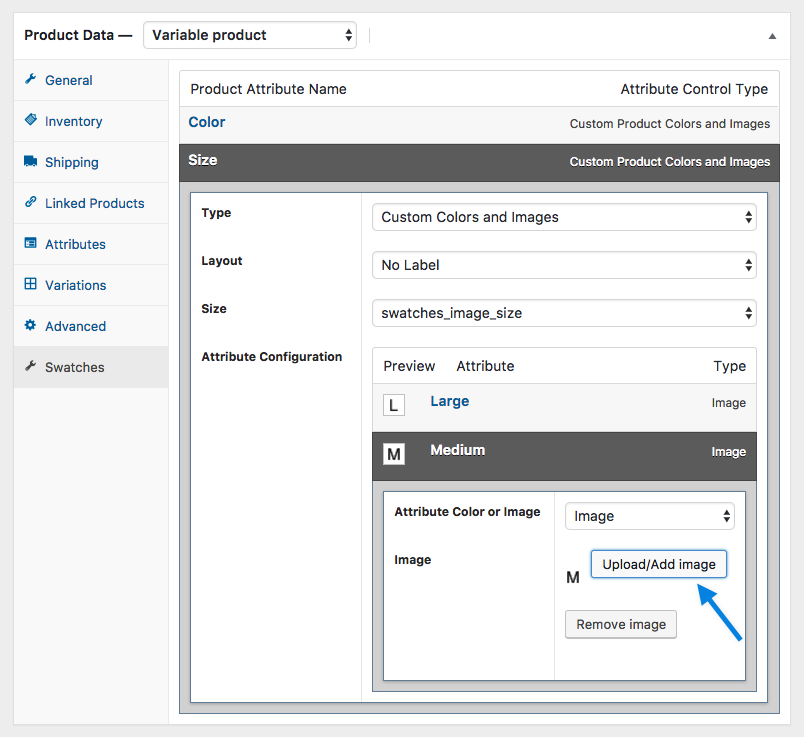
it possible to manage swatches images inside the Product Date – product variables section? I have seen a plugin “WooCommerce Variation Swatches and Photos” maybe Something like: https://woocommerce.com/wp-content/uploads/2012/06/variation-color-and-image-swatches-05-e1484578075779.png
I await your feedback. Thanks
Hello,
Our theme has built-in functionality for variations swatches. Check the following article for help https://xtemos.com/docs-topic/variable-products-and-swatches/
Kind Regards
After I Buyed today Installation comes Error
Ein Fehler vom Typ E_ERROR wurde in der Zeile 492 der Datei /var/www/vhosts/domain.com /wp-content/themes/woodmart/inc/classes/class-theme.php verursacht.
What’s Wrong with this file?
Fehlermeldung: Uncaught Error: Failed opening required ’/var/www/vhosts/domain.com/wp-content/themes/woodmart/inc/modules/header-builder/class-header-builder.php’ (include_path=’.:/opt/plesk/php/8.2/share/pear’) in /var/www/vhostsdomain.com/wp-content/themes/woodmart/inc/classes/class-theme.php:492 Stack trace:
0 /var/www/vhosts/domain.com/wp-content/themes/woodmart/inc/classes/class-theme.php(161): XTS\Theme->enqueue_files()
1 /var/www/vhostsdomain.com/wp-content/themes/woodmart/inc/classes/class-theme.php(38): XTS\Theme->general_files_include()
2 /var/www/vhosts/domain.com/wp-content/themes/woodmart/functions.php(50): XTS\Theme->__construct()
3 /var/www/vhosts/domain.com/wp-settings.php(672): include(’...’)
4 /var/www/vhosts/domain.comwp-config.php(101): require_once(’...’)
5 /var/www/vhosts/domain.com/wp-load.php(50): require_once(’...’)
6 /var/www/vhosts/domain.com/wp-admin/admin.php(34): require_once(’...’)
7 /var/www/vhosts/domain.com/wp-admin/customize.php(13): require_once(’...’)
Hello,
We are sorry for the trouble. Please re-download the theme from ThemeForest and reupload it to your website now. It should solve the problem.
Kind Regards
Thanks for fast feedback, now works. Great Support!
You are always welcome.
Single product page demo import not working, but why? can you please solve this?
Hi,
Could you kindly create a topic on our support forum and share all the necessary details about your request, including some screenshots? Please also include admin access so we can assist you more efficiently: https://xtemos.com/forums/forum/woodmart-premium-template/
If your support period has expired, please make sure to renew it on ThemeForest before reaching out.
Thank you!
Best regards
I can’t Create forums, cause my license date expired. and I face an issue, when I import a single product page layout from the theme pre-build, not import anything, after load just shows a empty page.
Please send us your admin access using the contact form so we can check the issue. https://themeforest.net/user/xtemos
Hello, we use the vegetable demo and noticed that when clicking the all categories button from menu the vertical Menu is gone. Can you help?
Hello,
Could you please send us a video of the problem and your website link so we can better understand what you mean?
Kind Regards
Hello,
We have fixed this bug on our demo. Please clear the browser cache and test how it works now.
Kind Regards
Hello, after update 8.0.4. the woocommerce checkout button cannot click or not functioning properly. Can you email us web.eurekahomeappliances@gmail.com please
Hi,
Could you please send us a link to your website where we can see this issue?
Kind Regards
Hello, issue solved. I just replace the Gutenberg to Elementor default editor. Thank you.
Great, we are glad that you sorted it out. Feel free to contact us if you have any further questions.
Hi ! After the update, the logo disappeared from the site even though everything is uploaded correctly. What should I do?
Hello,
Thank you for reaching out with your issue regarding the WoodMart WordPress theme. To provide you with the best support, we kindly ask that you create a topic on our support forum.
If you don’t already have an account, you can easily register using your purchase code from ThemeForest. Here’s how:
1.    Visit our support forum: https://xtemos.com/forums/forum/woodmart-premium-template/
2.    Register: Click the “Register” button and fill in your details, including your purchase code.
3.    Need help finding your purchase code? Here’s a guide: https://help.market.envato.com/hc/en-us/articles/202822600-Where-Is-My-Purchase-Code
Once you’re registered and logged in, feel free to create a new topic in the relevant section. Please provide as much detail as possible so we can assist you more effectively.
We look forward to helping you on the support forum!
Best regards
How to change the side cart background color?
Hi,
Could you kindly create a topic on our support forum and share all the necessary details about your request, including some screenshots? Please also include admin access so we can assist you more efficiently: https://xtemos.com/forums/forum/woodmart-premium-template/
If your support period has expired, please make sure to renew it on ThemeForest before reaching out.
Thank you!
Best regards
After the latest update the woocommerce in backoffice always shows in english in spite of other lanaguages being installed and the website is set to other language, and the following warning is thrown:
Notice: Function _load_textdomain_just_in_time was called incorrectly. Translation loading for the woocommerce domain was triggered too early.
Hi,
Could you kindly create a topic on our support forum and share all the necessary details about your request, including some screenshots? Please also include admin access so we can assist you more efficiently: https://xtemos.com/forums/forum/woodmart-premium-template/
If your support period has expired, please make sure to renew it on ThemeForest before reaching out.
Thank you!
Best regards
Hello
After the 8.0.4 update, when a brand is selected in the filters or on the product page, the products of that brand are not shown. The message “No products matching your selection found” appears.
Hi,
Could you kindly create a topic on our support forum and share all the necessary details about your request, including some screenshots? Please also include admin access so we can assist you more efficiently: https://xtemos.com/forums/forum/woodmart-premium-template/
If your support period has expired, please make sure to renew it on ThemeForest before reaching out.
Thank you!
Best regards
Hello.
My support is expired, but this is a bug after the last update. I don’t want support, I want you to fix your mistake
Hi,
Could you please send us a link to your website where we can see this issue?
Kind Regards
Could you please send us a link to the page where we can see the brands filter?
Hello.
I just realized that there should be a brand filter under the price filter on any category page. I had created this in the components section and it was working. The brand filter is there in the components section but not in the frontend section.
Apart from that, when I went to any product page and clicked on the brand logo there, the products belonging to that brand were listed, but now it says product not found.
https://www.detailingexpress.com.tr/magaza/?filter_marka=cars-giftPlease send us a link to the product page with the brand logo so we can check the problem.
This problem occurred due to an error in the database. It is fixed now. Thank you for your attention.
Great, we are glad that you sorted it out. Feel free to contact us if you have any further questions.
Hello,
Could you please provide guidance on how to hide/customize this menu, as illustrated in the screenshot? https://share.cleanshot.com/H0YyryB5Thanks
Hi,
Could you kindly create a topic on our support forum and share all the necessary details about your request, including some screenshots? Please also include admin access so we can assist you more efficiently: https://xtemos.com/forums/forum/woodmart-premium-template/
Thank you!
Best regards
I saw that in the Athletex theme, clothes initially have the current size to choose from in the catalogue. Tell me, is this available at Woodmart? What is the difference between Woodmart and Athletex?
Hello,
We have answered your question on the forum. Please continue the conversation there.
Kind Regards