3570 comments found.

Can you tell me how to fix the Social Network settings? There is no box for a TikTok link even though it’s been added the “Visible” column. Basically, the icon shows on the site, but there isn’t a link behind it.
Hi
You are right, the URL input for TikTok is really missing, so I have fixed this.
You can apply the fix by downloading this file:
1. https://d.pr/f/A8i6Wa+
2. Replacing it (in Aurum theme directory):
inc/lib/smof/functions
This should display the URL input after.
Best regards, Arlind
Hi! Is Aurum still being updated? Thanks.
Hi there,
Yes, the latest update was released on 14th of October.
Kind Regards,
Art from Laborator
Yes, I know, but that’s more than two month. You used to do updates every month. Perhaps the update frequency has slowed down a bit?
Updates for all our themes, including Aurum, will be released during January.
Hello dear Laborator folk,
Since the latest WP update, I’ve had this warning appearing prominently on all my product/item pages, where the zoom window appears, and also on the sidebar to its left:
“Warning: trying to access array offset on value of type bool in” ... and then it gives my ISP’s directory files, ending in “aurum/inc/laborator_woocommerce.php on line 1045”
This takes up most of the left side of the page, and causes the zoom function to glitch. Obviously, this is quite unsightly, and quite unwelcome as Christmas approaches.
Please let me know how to fix this at your earliest convienience.
All my best and happy holidays,
Andrew
Hi Andrew,
Our developers confirmed this warning appears when a product image is missing or fails to load. Please check the affected products and make sure all main and gallery images are properly uploaded and not broken.
Once the missing image is fixed, the warning and zoom issue should disappear.
Kind Regards,
Art from Laborator
Hi Art,
Thanks very much for the quick reply, and I will follow your instructions.
Strange that these broke just recently; they’ve been fine for ages.
Best regards,
Andrew
Hi! Seems there is still a pb updating Advanced Custom Fields Pro: «An error occurred while updating Advanced Custom Fields PRO: No update archive available.» Thanks.
Hi there,
This issue was happening across all our themes as ACF Pro made some changes in their latest update. We’ve already fixed it by adapting our plugins API.
Please update your theme to the latest version, then click “Check again” for updates, and update the plugin once more, it should work fine now.
Best, Art from Laborator
Is the WooCommerce Store Notice no longer supported? It doesn’t show anymore.
Hi there.
We’ve noted the issue with the WooCommerce Store Notice in Aurum. WooCommerce recently changed how the notice bar is implemented, so we need to adapt our code. This will be fixed in the next update.
Kind Regards,
Art from Laborator
Under the product edit page, sub-section inventory, we’ve set to limit the purchases to 1 item per order.
When we do that, the + – buttons still show up on the product listing page.
On the cart page, instead of the quantity showing as 1, the + – buttons show up too but doesn’t do anything. Is there anyway we can remove them?
Hi there,
If you’ve limited the product to only 1 item per order, WooCommerce usually renders the quantity input as a hidden field. In the meantime, you can use this CSS to hide the entire quantity section (including the + and – buttons):
.quantity.buttons_added:has(input[type="hidden"]) {
    display: none !important;
}
This will hide the quantity field on both the product and cart pages when it’s not meant to be changed.
We’ll also address this in an upcoming theme update to improve the handling automatically.
Kind Regards,
Art from Laborator
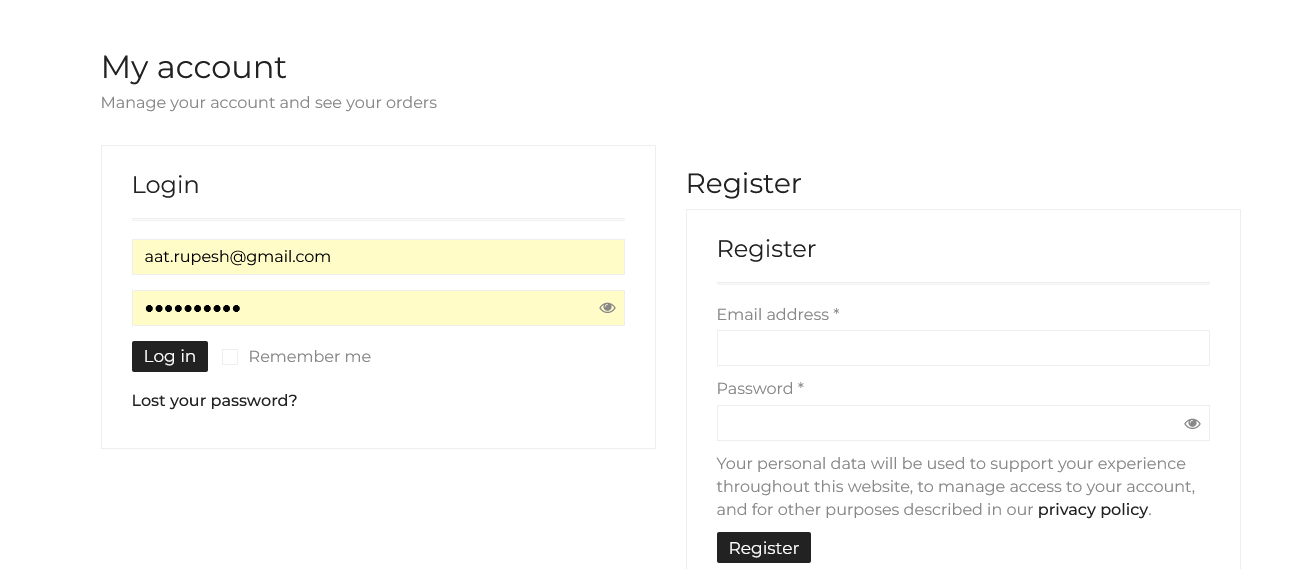
why in register page register is written 2 times please tell me how i can remove 1
Hi there,
I’m not sure I fully understand the issue yet, could you please clarify what you mean by “register is written 2 times”? If possible, please share a screenshot of the page so we can take a closer look and help you fix it.
Kind Regards,
Art from Laborator
how i can share screenshot
and also send me solution i think everyone have this problem
Hi there,
Try adding this CSS to Custom CSS:
/* Hide register title */
#customer_login .u-column2>h2 {
    display: none;
}
Kind Regards,
Art from Laborator
yes its work fine thank you
Hello, I bought the theme years ago, and I want to use it on one of my new pages, but it won’t let me. Where can I find the license code it requires?
I have downloaded the TXT file as indicated in the guide, but that code does not work.
Can you please share the code or your email? If you don’t want to share them over here, then please send us an email.
To send us email use this link: https://themeforest.net/user/laborator?ref=Laborator#contact and please write us your request again, because we receive a lot of emails on daily basis and we unfortunately can’t remember all customer requests.Kind Regards,
Art from Laborator
Why not theme option is working if i try to change my logo its not allow me to change and save option working
rror Details
An error of type E_COMPILE_ERROR was caused in line 269 of the file /hermes/walnacweb06/walnacweb06ag/b1236/moo.abbeybranchcom/wp-content/plugins/js_composer/include/classes/core/class-vc-manager.php. Error message: require_once(): Failed opening required ’/hermes/walnacweb06/walnacweb06ag/b1236/moo.abbeybranchcom/wp-content/plugins/js_composer/include/classes/core/access/class-vc-current-user-access.php’ (include_path=’.:/usr/share/php’)
Hi Rupesh,
There is no known issue with Aurum related to this. Please make sure to disable all third-party plugins and try again. If the issue persists, we’ll need to investigate further.
Can you please send us your site URL and WP credentials via email? Use this link to contact us:
https://themeforest.net/user/laborator?ref=Laborator#contactPlease write your request again in the email, as we receive a high volume of messages daily and cannot track all support inquiries.
Note: We usually do not provide support via email, as our dedicated support center handles all requests. Email response times can be up to 7 business days.
Kind Regards,
Art from Laborator
Is Aurum theme currently compatible with Wordpress 6.7.1? Thank you.
Yes, Aurum is compatible with WordPress 6.7.1. That version was released in November, and our theme was recently updated to ensure compatibility.
Kind Regards,
Art from Laborator
Hi, the theme works fine on the production site. The license is active. We created a staging site and the system does not detect it. The error returns: This license is already in use can only be activated on a single site. If the main domain is called www.domain.com, the staging site is called www.staging2.domain.com, it should detect it automatically. I also tried to download the theme from the freemius site but the result does not change. Thanks.
Hi there,
This should not be an issue, as the domain format stagingN.* (e.g., staging2.domain.com) falls within the license staging rules and should work without any problems.
If possible, please share more details about the issue so we can investigate further. If you prefer not to share it publicly, feel free to contact us via the profile page by clicking the button in the bottom-right area.
Kind Regards,
Art from Laborator
Hello, I updated the template and texts come out that are already translated in crazy translate and continue to appear in English, they are these:
- You’ve got one item in the cart: - Update Cart - Checkout
And in the header in the search engine: - Search…
And in Payment: - Payment Method - Personal information and payment
How can I translate them, I already looked in the whole template !!! Thanks a lot
Hi there,
Please note that the comments section is not used for support inquiries. For faster and more detailed assistance, we encourage you to open a ticket via our official support channel: https://support.laborator.co/Regarding the translation issue you mentioned, it would be helpful if you could share screenshots of the specific areas where the untranslated texts appear, or a screenshot from the admin area.
Kind Regards,
Art from Laborator
Hello, I see that they changed the support page, with my email I requested a new password, but I never get the email, and I can’t access the support.
If you can help me, thank you.
Hi there,
Can you please send us your site URL and WP credentials on email? We need to investigate your problem and then get back to you with possible solution.
To send us email use this link and please write us your request again, because we receive a lot of emails on daily basis and we unfortunately can’t remember all customer requests.
P.S: Please note that we usually do not respond to emails that request support, because we only provide support on dedicated support center. Also emails response time can be up to 7 business days.
Kind Regards,
Art from Laborator
Hello, sorry, I don’t see any link!!
Sorry, this is the link:
https://themeforest.net/user/laboratorHello, I haven’t heard anything about this topic, no one has answered me!!!
Bye
Hi there,
It seems the email I sent to you bounced back because of an issue with the email address. Could you please confirm if there’s an alternative email address I can use to reach you? Alternatively, feel free to resend your message or provide any updates here.
Kind Regards,
Art from Laborator
Hello, I don’t know, that’s the email I use for all purchases on themeforest. Can I give you another one, do I put it here?
Just send us an email at info@laborator.co
I sent the email, let’s see if we can move forward …
Address not found Your message wasn’t delivered to rmolezun@nerade.com because the address couldn’t be found, or is unable to receive mail.
I’ve sent an email again but I still get this:
The response from the remote server was: 554 5.7.1 : Sender address rejected: Access denied
Anyway I have sent an email from my private email and I did not get an error, please reply to that email (Art)
Kind Regards,
Art from Laborator
Hello, I don’t understand anything, the emails from Envato Market arrive perfectly in the mail, because I don’t get yours, I don’t know…
I didn’t receive the private email. I’m working with other templates, and I have no problem with any email, only with you.
I don’t know what to do anymore … before with the old support platform I had no problems.
But did you get the email I sent yesterday to info@laborator.co?
Regards.
This issue is not related to the theme or any templates. It seems that your email server is not properly receiving emails from us. While I did receive the email you sent to info@laborator.co (which is why I was able to reply), the problem arises when I send emails back to you. That’s why I asked you to provide an alternate email address. However, you replied using the same address, so the issue persists.
As for your mention of the previous support system, I’m not entirely sure what you mean. Our support platform is accessible as always and hasn’t changed in terms of ease of access. If you’re encountering any issues with accessing it, please let me know, and I’ll assist you further.
To resolve the email problem, I strongly recommend providing a different email address so we can communicate without interruptions. Let me know how else I can assist you.
In the email I sent you, I put you another email address, I don’t know if you saw it?
Hi! What is the WooCommerce compatibility of version 4.0.1 please? It is not specified in the release note. Thanks.
Hi there,
WooCommerce 9.3.x compatibility was added in version 3.35 of the theme, released on September 23, 2024.
Additionally, we’re planning to release updates this week across all our themes to ensure compatibility with the latest WooCommerce versions. Stay tuned for those updates!
Kind Regards,
Art from Laborator
Thanks. Little bug on last update: a small red border appears after adding a product to the cart (around the green banner). Also visible on your demo.
Hi there,
I checked but can’t see a red border, instead I see a blue border and that is not a bug but part of recent accessibility improvements added by WooCommerce. It’s a :focus indicator, designed to improve usability for keyboard navigation and screen readers.
If you’d prefer to remove or customize this border, you can do so with a small CSS adjustment.
Kind Regards,
Art from Laborator
Hi! I can’t access my theme options without creating a freemius account.
I don’t want to to this as I never connected my theme to Envato. and never updated my theme through Envato before, I always do it manually.
How can I access my theme options to change my logo, header, settings, etc?
Hi there,
You can always download the latest version of the theme by visiting your ThemeForest > Downloads section. However, activating the theme is essential to access the theme options, such as changing your logo, header, and other settings.
Activation ensures access to the theme’s full functionality and features, including updates and support. While manual updates are possible, the activation process is required to unlock and configure these core options.
Kind Regards,
Art from Laborator
Hello my theme in the dev site is regularly licensed but when I try to access appearance > customize I get this as my theme is not licensed correctly.
https://pasteboard.co/lgQwrK4N7YWe.pngI’m using the child theme, not the main one but the main one is correctly licensed.
Also, if you mind, in the documentation I’m not able to find an explanation of the mega menu feature.
thanks
Hi there,
Have you tried disabling custom plugins to see if this issue get’s fixed? This is not something other users reported or we have noticed it in the theme.
Kind Regards,
Art from Laborator
Hello Art, this is a new site I’m building to replace the actual one. I don’t have any plugin but Woocommerce and the others bundled in the theme.
Hi there,
Can you please send us your site URL and WP credentials on email? We need to investigate your problem and then get back to you with possible solution.
To send us email use this link and please write us your request again, because we receive a lot of emails on daily basis and we unfortunately can’t remember all customer requests.
P.S: Please note that we usually do not respond to emails that request support, because we only provide support on dedicated support center. Also emails response time can be up to 7 business days.
Kind Regards,
Art from Laborator
I’ve also tried to switch to the main theme, not the child one, but it’s the same. Here are my data https://pasteboard.co/xa2n81gCqt7g.png
Thanks, done.
Hello, I’ve a site that is using your theme and now I’m rebuilding it and I’m completely rebuilding it using always your theme but If I try to install it it ask me for the purchase code. Can I use the only one I have or this can cause problem?
BTW I go ahead and activated it with success. Since the development site is on another domain, I’ll need to change the domain when the new site will go online. Can I ask later to your support? Thanks!
Hi there,
You can manage this yourself by going to https://laborator.co. Click on Account, log in with the Freemius credentials sent to your email, and then, under Websites, select the domain you wish to deactivate. This will free up the license for your new site when it goes online.
Kind Regards,
Art from Laborator
Gentlemen,
I am receiving a warning report of 3 outdated theme files from the WooCommerce site status app and am also receiving a banner warning: “Warning: Undefined array key 0 in /misc/.../*.com/wordpress/wp-includes/meta.php on line 638” since updating WP to the latest version.
I’ve been working with my ISP to rectify this but so far no luck. All plugins are up to date except the layerslider and ACF bundled with Aurum, which always lag a few months. I doubt that these plugins are the problem, but the 3 WC theme files may very well be.
They are: *aurum/woocommerce/loop/pagination.php version 3.3.1 is out of date. The core version is 9.3.0, *aurum/woocommerce/myaccount/form-edit-address.php version 7.0.1 is out of date. The core version is 9.3.0, *aurum/woocommerce/myaccount/my-address.php version 9.2.0 is out of date. The core version is 9.3.0,
If you could update these files to conform with WooCommerce’s demands at your earliest convenience I’d be most grateful.
Yours, Andrew
Hi Andrew,
We have just published the new update containing latest WooCommerce compatibility along with premium bundled plugins updates.
You should receive an email shortly after the update is approved.
Best, Arlind
Dear Arlind,
Thank you very much for such a swift update! It is greatly appreciated and has done much to help identify the cause of this problem. Superb support, as always.
Yours, Andrew
Currently compatible with Woocommerce 9.1.X ? or just 9.0.x ?
Aurum has been tested up to WooCommerce 9.0.x. While it should work with 9.1.x, it hasn’t been specifically tested with this version yet. If you experience any issues, please let us know.
Kind Regards,
Art from Laborator
Hello, is compatible with wp-rocket? (cache plugin) Thanks!
Hi there,
The Aurum theme has not been officially tested with the WP Rocket cache plugin. However, many users have successfully used them together. If you encounter any issues or need assistance, feel free to reach out.
Kind Regards,
Art from Laborator
There is a WPBakery Page builder vulnerability that needs to be updated….
https://cve.mitre.org/cgi-bin/cvename.cgi?name=CVE-2024-5265Hi there,
WPBakery 7.7.1 is now available on our servers. This update addresses the issues caused by the previous version. We apologize for any inconvenience this has caused, but please note the delay was due to the WPBakery team’s publishing schedule.
Thank you for your patience and understanding.
Kind Regards,
Art from Laborator