1260 comments found.

Hi!
I have some issues with the revolution slider and the website animations:
1. When I activate “Fade” on Global Options – Page Transitions, all the revolution sliders disapear.
2. When I don’t have the fade selected, one of my revolution sliders has a glitch where it shows a thin white line as a frame. I removed backgrounds, shadows, everything.
Can you help me please???
Thanks!
Hi,
Can you please email me url to your website and to page with revolutions slider, also temporary admin access so I can take a look?
Best Regards
Qode Interactive Team
Sure, can you give me the email please?
Sure, it’s support@qodeinteractive.com
Email sent!
Replied 
Hi again  I’ve used “FWB Slider” to set a background image for my website but I’m using the bg image only on 2 pages, and 3 are without bg image. There is one point, if I turn off the AJAX everything works well but if turn it on, all the pages will show the background of the first page. it means, when AJAX is on, if I open a page that has a bg image, then all the pages will show the bg image but if I open a page with no bg image then all the pages will show no bg image. I know it’s because AJAX doesn’t reload the whole page but is there any chance that I can keep both the AJAX transition and the bg customization.
Thanks a bunch for your awesome supports
P.S. I’ve already made you an admin of my website, http://www.niwatarchitects.com/
I’ve used “FWB Slider” to set a background image for my website but I’m using the bg image only on 2 pages, and 3 are without bg image. There is one point, if I turn off the AJAX everything works well but if turn it on, all the pages will show the background of the first page. it means, when AJAX is on, if I open a page that has a bg image, then all the pages will show the bg image but if I open a page with no bg image then all the pages will show no bg image. I know it’s because AJAX doesn’t reload the whole page but is there any chance that I can keep both the AJAX transition and the bg customization.
Thanks a bunch for your awesome supports
P.S. I’ve already made you an admin of my website, http://www.niwatarchitects.com/
Hi
I am going to review your issue later today or tomorrow and will let you know if I can help you somehow
Can you please resend me admin access and just explain in email this request. I get lot of emails, so it’s best for me to have unsolved emails/requests in my inbox folder
Best Regards
Qode Interactive Team
Sent
I will review today
Please give me advice. Sorry for many question.i am beginner. Thank you.:)
Hi,
1) It looks folder permissions are not set right at your server. Plugins folder should be set read/write/delete permission
2) Would you be able to email me temporary admin access so I can take a look? Our e-mail is support@qodeinteractive.com.
Best Regards
Qode Interactive Team
I already send email to you. Thank you.
I’ve just replied
Hello QODE,
I’m having an issue with the way the images are appearing in the shop. The issue I’m having is, the featured (product) image and the product gallery images are both appearing blurry.
I’ve tried several things such as resizing the images to match with the default dimensions in the woocommerce Image Options but that didnt make a difference. I also regenerated the image thumbnails but that also made no difference. Could you please advice?
Hi,
Would you please emails me temporary admin access and link to page with issue to support@qodeinteractive.com and I will review your problem.
It’s already 8 pm here, so I might not be able to review it until tomorrow.
Best Regards
Qode Interactive Team
i write to u 3 or 4 messages on email, can go foward! waiting for your answer!
Hi,
sorry for waiting, it’s holiday here this weekend, so rest of the team is not working and I am doing my best to handle all requests / emails / comments I will now reply to your emails
Best Regards
Qode Interactive Team
Hello,
I’m sorry there’s no option to search for a certain word in comments pages, else I would have searched for PSD. Are the PSD files provided with the theme, please ?
Best regards,
Florence.
Referencement-dans-Google
Hi Florence,
Unfortunately, we don’t have PSD files ready for this theme and main reason is that we improved the design from original PSD files, so they don’t work anymore.
Best Regards
Qode Interactive Team
Got that with Yoast SEO
Your theme contains a meta description, which blocks WordPress SEO from working properly, please delete the following line, or press fix it: <meta name=”description” content=”<?php echo $seo_description; ?>”>
Hi,
did you turn off Qode SEO in Qode options from the left nav?
Best Regards
Qode Interactive Team
Got it! Thank you, Olivier
You are welcome
Hello Nice clean theme and pretty straight forward back-end! Not sure if you have answered this but is there a way to remove the View button on portfolio items?
thanks
Hi,
Thank you very much
there is currently no way to remove that button except by creating child theme and overriding our template.
Best Regards
Qode Interactive Team
I’m curious if there is a way to set up different portfolios ie “Design” and another “Photography”. How can I filter the design portfolio items to go to the design page and the photography items to go to a photography page?
Appreciate the help, thanks!
Ryan
Hi Ryan,
Yes. You can add category slug to portfolio shortcode, so one page displays one category and another displays other category
Best Regards
Qode Interactive Team
is it possible to show me an example and I should be good to go, after that! Much appreciated!
I got it figured, thanks for the help.
You are welcome
Sorry for those many messages, but we can’t edit them. Well, I have deleted Minimum theme and all Qode related in mysql database. It seems that is working now. So my question is : Can we create a home page with : 1- A revolution slider 2- A separator below 3- Last posts blog as the same as the page named “BLOG 3 COLUMNS” If so, how to proceed ? Many thanks, and all my apologies for these messages. Best regards
Hey,
I just suggested same thing below Yes, you can create that. If you need help, send me temporary admin access and I will help you. Our e-mail is support@qodeinteractive.com.
Best Regards
Qode Interactive Team
Hi again, Now the Qode panel is no more available … There is just the check button “reset to default” and the other button “Save changes”. Whatever I do, the same things reload. I can’t use no more the Qode panel … Well, I tried a lot of things in local with your theme before use on my web site and no problem became. Now, I replaced my old theme, and some parts are not the way they should be. I’m a bit afraid, this is my business site. Any help ? Thanks, regards.
Hi,
did you copy SQL file from local to live server?
Best Regards
Qode INteractive Team
Hi there,
Congratulations for this wonderfull theme ! I have a strange problem that make me crazy, I hope you can do something. I wanted a home page with a revolution slider + 3 columns blog. So I used the “BLOG 3 COLUMNS” page and add “[rev_slider home]” in Qode custom fields. It worked great, but the title of the page appeared on the screen (between header and revolution slider), so I have clicked on ””Don’t show page title” and erased the Page subtitle. And then … everything went dumb. The page has loaded the revolution slider + slogan text in place of title + a another page with no relation at all. How this could happenned ? If I a replace the title, evrething is coming back … but I still DON’T want to see this title page …
Could you help ? (I hope that you understand something …) Thanks, regards.
Hi,
Thank you very much
I will definitely help you. I am just thinking that you might try something else:
1. build normal page
2. Hide title
3. Add revolution slider
4. Add latest blog posts shortcode to it
This way revolutions slider will show only on home page, but not when you move to next blog page
Also, I will test your scenarion to see if there are some bugs
Best Regards
Qode Interactive Team
Hi, purchased your great template yesterday and I ran into some issues: 1. What file do I have to edit to change the contact form template to german 2. I have wpshopgermany, which is wp ecommerce based and the link add to basket doesn´t work, also the # appears within the adress
thanks, regards, Christof
Hi Christof,
I’ve replied to your e-mail asking you to send me temporary admin access, so I can help you
Regarding contact form, you need to install this plugin and translate theme:
http://wordpress.org/extend/plugins/codestyling-localization/- in the url is needed for AJAX (page) animations to work. It doesn’t affect SEO and google see your web site without #
Best Regards
Qode Interactive Team
Hello,
first of all: Thank you very much for this great theme. I really love it and it was a lot of fun to create my website-update with it. Everything works fine….
... until yesterday. Since the latest rev slider update my rev slider on start-page is black on mobile devices. I use google chrome both on iPhone and iPad – it doesn’t work anymore. On my desktop-pc everything is still fine – I also use google chrome here.
You find my website here: www.disorderuniverse.com
Can you help?
Thanks in advance Martin
Hi Martin,
I was able to reproduce this issue, but as soon I refreshed the page, it started working fine. Can you try to refresh it on your end?
Best Regards
Qode Interactive Team
Hello,
I tried it a few times now – seems that the slider is loading everytime, but only sometimes its shown and somtimes not. When I touch the screen on mobile devices and wipe to the second slide it works and the second slide is always shown. Seems a little bit like a lottery if the first slide works or not. Maybe I put a little too much stuff into the slider? The rev slider at the bottom of the page is working perfect.
Nevermind – not so many people are using chrome on their mobile device and on safari browser it works.
Martin
Hi Martin,
Thanks for the update. Let me know if you need anything else.
Best Regards
Qode Interactive Team
As I go deeper in with this template the more I love it, please can you offer some guidance. I would like to recreate the huge text you use in your example with LANDSCAPES
I cant seem to edit the CSS, all info welcome
thamks in advance JG
Hi,
Thank you
You should create rev slider and import example-revslider.txt found in zip file you downloaded from ThemeForest
Best Regards
Qode Interactive Team
Also, please make sure you do this:
Copy captions.css to wp-content/plugins/revslider/rs-plugin/css
(all files are found in xml export > revslider folder)
Got it, fantastic, so I can replicate what was the font family used
Great Let us know if you need anything else
Hi,
I was wondering if you can help me with a blog problem, I bought the theme and everything works perfect, only that I created a blog page with the blog theme 1 templates and is working as a blog, only that is not showing my pictures in the page like in the minimum example. I will like to created a blog with similar to the blog 1 column 1/4.
Is there any way you can give me an advice or help me to fix it?
Thanks.
Hi,
Sure. I can help you
Can you please email me temporary admin access and explanation of the issue (link to the page also) to support@qodeinteractive.com and I will review it
Best Regards
Qode Interactive Team
Hi,
Just few observation after the new update 2.0.9.
I had this same issue with the 2.0.8 change.
Do you heard about it before ?
-The choice of the select menu is no more selected, i have to re selected it in the menu choice.
-The widget i putted in the header’s widget goes is the sidebar’s widget
- The Social icons wich were in the widget footer goes in the header right widget. and the related post: Blog too
-The widget footer is completly destroy, the left one goes in the right one and the opposite too for the right to the left
Im sure you understand that it’s impossible spending time to reorganise it at each updates.
Can you find a solution to this issue for the next one please ? 
Thanks a lot by advance.
As usual, this observations are only to make things going ahead on this beautiful and functionnal theme;-)
Best regards
Marcello
Hi Marcello,
Thank you very much for your notes. I never heard about this issue before. Can you please explain how did you upgrade the theme?
Thank you We appreciate a lot all feedback so we can make our theme better
Best Regards
Qode Interactive Team
Hi,
I updated by FTP.
Best regards
Marcello
Are you using FileZilla?
Right i use Filezilla
Can you please read this post (and setup FileZilla):
http://stackoverflow.com/questions/554960/how-can-i-stop-filezilla-changing-my-linebreaksand re-upload theme again once you fix FileZilla.
Best Regards
Qode Interactive Team
Heum,
This is not the right way i think, because i already had this parameters, because here: http://themeforest.net/item/minimum-professional-wordpress-theme/discussion/4084338?filter=All+Discussion&page=23 you already told me to do that, and my parameters are in binary since this date.
Same player shoot again ^^
Best regards Marcello
Hi Marcello,
sorry, forgot I’ve told you that
No one else has that problem, neither we have it when we upgrade our demo site. Do you do anything in admin while you upgrade the theme?
Best Regards
Qode Interactive Team
No problem,
The most important is what you say : “no one has this problem” except me.
Then i consider it’s a local problem and i will search where it come from.
Perhaps a plugin’s conflict.
I will test it with the next update. I will study this at this moment, and i will make you the report .
Im sorry for disturbing with that
Thanks for your help.
Best regards Marcello
Hi Marcello,
no problem at all. I would like to help you, but I don’t know the solution as I can’t reproduce the problem. Maybe you can email me temporary admin access once you run into problem again, so I can take a look at your WordPress
Best Regards
Qode Interactive Team
Yes, i will
Thanks again
Best regards
Marcello
Have a great day there
Hi, I’m just starting on my new site and I’m stuck on the WooCommerce integration. The quick test product I added doesn’t have any of the styling I see on the sample site. I went through the WC integration doc and it seems it was all already done (I just downloaded the latest theme a few days ago).
I’m sure I’m missing something small but I don’t know what it is. Here is the sample shop and product page (bare bones right now): http://54.235.70.247/#/?product=adrian-forty
Once everything is in place I’ll finish off the styling so this font looks good.
Thanks so much, David.
Hi David,
can you please email me temporary admin access to support@qodeinteractive.com and I will take a look.
Best Regards
Qode Interactive Team
Thank you for the quick response and fix
You are welcome
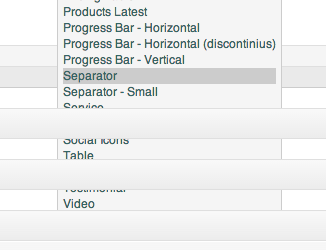
The menu in the TinyMCE goes behind the other elements on the post and page pages. Here’s a screen shot for you to understand what I’m talking about: http://richsmithphotography.net/images/Screen%20Shot%202013-05-01%20at%202.37.44%20PM.png
Hi,
you should drag bottom right corner of editor in order to enlarge it so shortcodes menu can fit in.
Best Regards
Qode Interactive Team
Yep. I figured that out. Just thought you might want to know since it’s a slight bug.
Thank you
Hi,
what exactly is incorrect?
Best Regards
Qode Interactive Team
I ‘m very sorry,Now my portfolio is the same as before. Thank you for your service.
Great. I also tested it and couldn’t find any bug Good it’s working well now