241 comments found.

Hi! I really LOVE the look of your theme! Refreshing to see something different then every other theme. Great work! I am curious if the menu can handle child links (submenus)? I saw in another comment that you can disable the flyout menu to be a vertical menu at the top, which is great… but curious if subpages are available also. Thank you for your help! Really looking forward to purchasing and using your theme.
Hi, thanks for the comments! The flyout menu doesn’t support submenus, but sidebar menu does, which as available on any page you choose. You can see it displayed on the Blog page. Please let us know if you have any other questions!
Trying to get menu set up properly but having issues.
Make sure you are following the naming convention outlined in the documentation. The menu must be named flyout-menu.
This might sound silly but I can I duplicate the demo and work from there.
Thanks for your purchase Carusoapps! We include all the demo content with the theme, follow the documentation if you would like to import it. The files you need are in the Demo Content folder. 
Warning: Invalid argument supplied for foreach() in velvetgrunge.com/wp-content/themes/flight/theme_options.php on line 29
Please open a Support Ticket with your website login details so we can have a look at this for you! Thanks
done
Perfect thanks
Hi, I’ve unzipped the main files, found the flight.zip install file, uploaded it, it completely uploaded and then took me to a “Are you sure you want to do this?” page. I tried it over and over. No go. It’s on a fresh WP install, too. Thoughts on how to overcome this? I’d like to avoid a manual install via ftp, if possible…
Please open a Support Ticket with your website login details and we would be happy to look into this for you.
Is there any way to customize the 3 columns grids page already made by you or a step by step manual of how to do the portfolios like the ones already created. I’m a newbie and not really found any help on the theme documentation. I need to create a gallery of 3 columns classic and one with comments, and have also the viewer of the portfolio but no twitter icon. and no name of the portfolio on top .. great!! theme btw, I just thought it would be everything graphic to setup.
This is quite easy to do and is covered in our Documentation. Please open a Support Ticket with the details of what you want to accomplish and we would be happy to assist you with setting this up! Thanks
Hi Beautiful theme, a couple probs though… I noticed when on the home page, from my laptop, the posts are combined and really no way to determine one post from the other. It looks like its all one post. Can they be separated?
Also when on the Iphone it does not show the “logo” above the header. It is missing on the Iphone mobile view both upward and sideways. Also on the Iphone, it shows a white box around “A Whole New Way to Get Connected” which is the flyout title Please help
Hello, thanks for the comments. We can’t seem to replicate any of these issues on the iPhone 4/4S or iPhone 5. Are you having this problem on your webpage? I don’t think we have anything that says “A Whole New Way to Get Connected” on any of our pages or menus.
Please send more info or open a Support Ticket so we can be of further assistance. Thanks!
Hi ! First … GREAT THEME !
My Customer cant see the Background when he surfs with his mobile phone on the Page?
www.bar-lifestyle.at
- EDIT i found it
 Static Image Background on Mobile Devices: YES SIR !
Thanks! Glad you figured it out!
Hi
Does the theme support sub menus?
Thanks
Pete
Yes, it does on the sidebar menu (shown on the Blog pages of the demo). It does not support it on the flyout menu, however you can shrink the font in 2 seconds and add a lot more items. Thanks!
Support site question: Themeforest seems to have changed the links for license that used to show on purchased products – it links to an explanation – and I can’t find the license to signup on your support site.
My question is about the logo: So for a text Logo I put the site name in the Tagline area. And the Heading (H1) is the page name. If I have that right, then the “logo” or site name is not clickable as the homepage and on the homepage the site name, which for SEO should be an H1 is not an H1.
Also, I don’t know if I missed it, but how do I expand/enlarge the “logo” area. Is there a reset on the admin panel settings for the theme?
Thanks!
Support Site Question: ThemeForest did change the license location, please see this screenshot regarding where you find it now: http://support.themesuite.com/purchase-code.png
Logo Questions: The text logo is in fact an H1 heading, as it should be for SEO. If you would like to link the logo (whether text or graphic) to your homepage you simply need to wrap <?php echo header_logo(); ?> with your anchor tag on Line 163 of the header.php. To expand/enlarge the logo area you can edit the CSS code in the style.css under E. LOGO.
Theme Reset: We have set it up so you can backup your settings in the Flight Option Panel under Import / Export. You can back it up and restore it as you wish.
Thanks for your purchase!
Thank you for your response and your help! I really like this theme. I’ve created an account on support and have another questions there.
I have responded to your Support Ticket. Thanks
I purchased this template today. I have a problem with the menu: normally it doesn’t appear like the demo, if I disable the FlyOut Menu options it comes in the middle. How can I solve? 
Do you have the menu named flyout-menu as outlined in the documentation under Appearance & Menus? If you are still having trouble please open a Support Ticket with your website details and we would be happy to have a look at it for you!
Hi guys, I am trying to embed a youtube video on the blog thanks to your shortcode, but no matter what link I insert from youtube the video is not showing up, I only have a black screen saying that there is an error and that I should try later… do you have an idea of the problem? here is a link : http://www.mp-endurance.com/mds-2013/ thanks!
None of them show a valid YouTube video ID You don’t enter the entire URL, just the video ID as outlined in the documentation. For example, if you want to embed this video: http://www.youtube.com/watch?v=2LHv1FPd1Ec You would just enter 2LHv1FPd1Ec
oh sorry… thanks!
I need the php.ini file from your guys i have e-mailed Adam but have got no response in two days, i really need to upload the demo content without that i would have no use of this theme. Thanks
We have emailed it as requested Sorry for the delay!
Just wondering how to get the main menu to look like it does on the demo. Just under the slider. Thanks
Under General Options you just toggle the ‘Disable Flyout Menu’ button! Thanks
This causes the menu to stack vertically instead of horizontally.
Please update your version of Flight. This has been fixed in the latest version.
Hello. I paid for two licenses and I use this on two sites. It is a great theme. I am happy with it. However I am having two problems. First let me give you my configuration. I am updated on everything to the latest versions. I am using Flight, with Cyclone Slider and Media Grid, as well as, Wordpress Importer, WP-CopyProtect, and Better WP Security. I am using the demo content as a starting point to save time, and as I am not a coder, I am a hardware guy. The slideshow is not functioning. It shows all the slides stacked on top of each other, in order, with the last one on top. It only shows the slides, if I have the slide templates set to default, or responsive. The other templates dont show the slides at all just the loading graphic. The second problem with Cyclone Slider is all the slides are left justified. When loading the slides I made sure all the images were jpegs about 500×500, and I selected “none” for justification, not left, right, or center. I have tried center as well and it doesn’t change. I thought the two security apps might be the problem, but it didn’t stop when I deactivated them. I selected Responsive “on” in the general tab under flight options. I am sure this is simple and it is operator error. Any advice? I tried to read up and solve the problem on my own first. The Cyclone website says “Jquery” conflicts cause the slider not to work. However, I deactivated the only other two apps besides the basic ones, and I loaded the demo content as suggested to avoid problems. Thank you in advance.
Please send us your website login details and we would be happy to look into this for you! Thanks
Fantastic theme, and even better customer service. Just finished my first Wordpress site and the help from the Flight team was invaluable. All I need now is to post a five star buyer rating – but don’t see that link on the Themeforest page.
Thanks Ed! It’s under ‘Downloads’ in your ThemeForest account where you originally downloaded the Flight theme. You will see 5 grey stars off to the right, you just click them. Thanks for the great review!
I have sent you a message to your e-mail address. Thanks
I just checked the main Sales and Support email addresses as well as our Support Tickets and I don’t see anything from you, maybe you emailed one of our employees directly? (It’s ok if you did, it may just take a little longer to get a response). Thanks for letting us know
Hi! I pretty much liked your theme in the Live Preview, but now that i have installed it with Wordpress 3.5.1 i get some problems:
1. If i change the width of my browser window, the navigation menu drops down into the content-div. So far so good, but the buttons are one below the other. Each one with the width of the content-div.
2. If i change the width of my browser window, the content and footer width including the navigation buttons stays the same. Only the black transparent background adapts.
3. The Flight Theme Options are not shown correctly after the first use in the backend, so some options can’t be changed.
I tried to reinstall the theme twice, but nothing changed. Do you have an idea?
PS. My browsers are Safari & Firefox on Mac OS X 10.8.2, both show the same result
Cheers!
Thanks for your purchase! Can you open a Support Ticket or send us an email at support@themesuite.com with these details and you website login information so we can have a look at this for you? Thanks!
Thanks a lot. I sent you an email. Thanks for your support!
Hi themesuit team. Did you receive my email? Best regards!
Somehow it got sent to Spam, I think because of the name in your title ‘Onshore’ – I have put it in the support queue, someone will get in touch with you shortly.
I opened a support ticket about how this site is performing in Internet Explorer. I have made really no customizations to the code. Please advise. I did send you logins as well.
The website URL you sent doesn’t work. We were retrying waiting for the server to come back up so we could look at the problem. Your support ticket has been updated to reflect this. Thanks
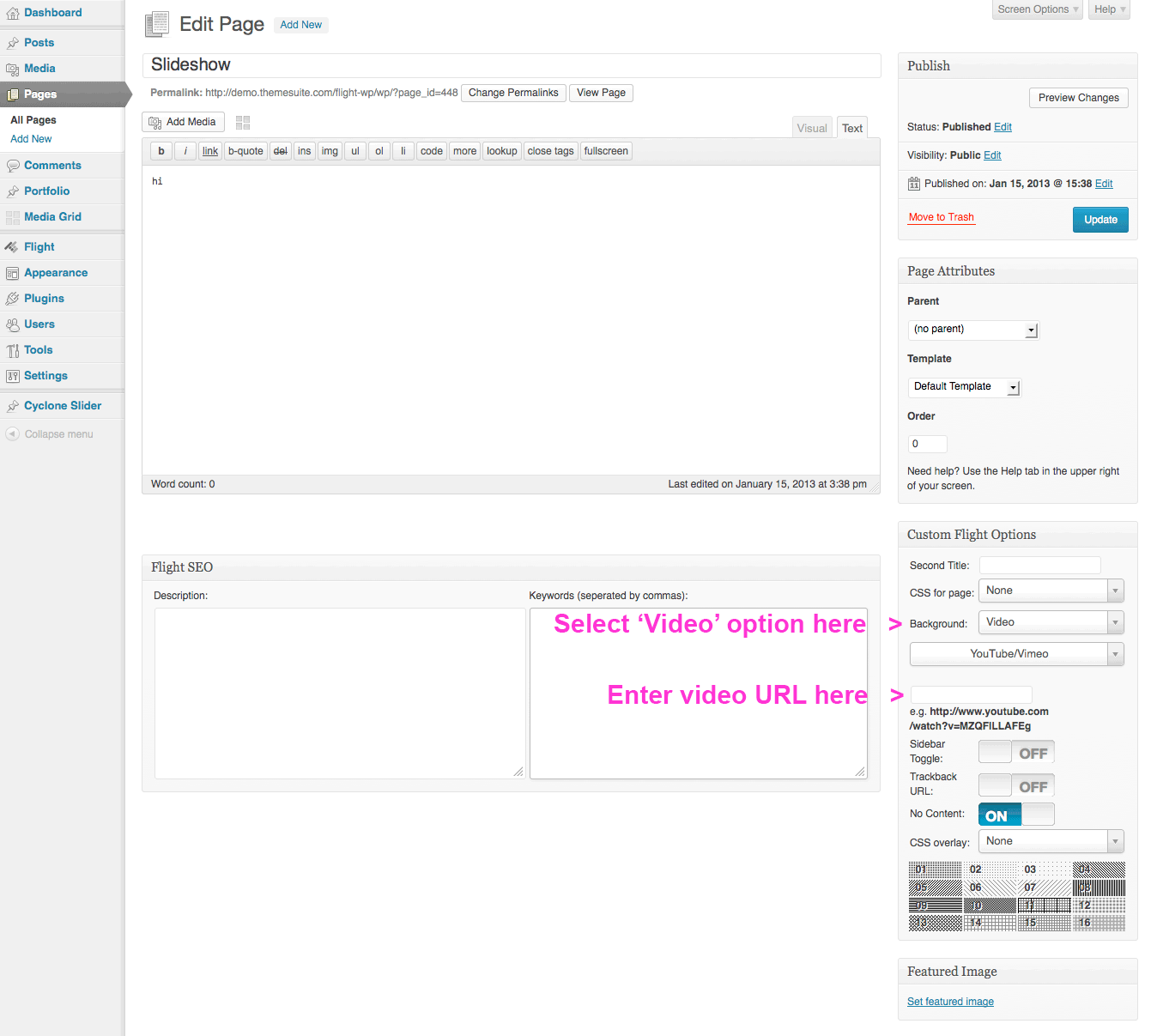
Hi, question about the video background option: -can we see a demo -can we have a look at how to implement it from the admin panel (screenshot) Thanks !
Sure, you can see a demo of the video background here: http://demo.themesuite.com/flight/flight/index-video.html This is from the HTML version but it gives you a good idea of what it looks like with a video background.
You can see a screenshot of how to implement it here: http://files.themesuite.com/flight-wp/video.pngHi,
cracking theme. I am looking at using this theme to rebuild http://www.xwrap.co.uk/
The problem we have with that site at the moment it is only seen and indexed as a one page site. Could you let me know how yours performs in this respect as when I navigate around your theme the URL doesn’t change.
Cheers
Thanks for your interest. The reason the URL shows as being the same page is because that is the transparent layer that runs our Style Switcher to demonstrate some of the themes options. If you view the actual WordPress demo (without the Style Switcher) then you will see the pages actually do change like a normal WordPress website. This is how the customer version works (just like every other WordPress site, individual pages can and will be indexed). You can view the demo without the Style Switcher here and you will see the page URL’s change between pages: http://demo.themesuite.com/flight-wp/wp/
Please let us know if you have any other questions! Thanks