328 comments found.

Hi, I’m having trouble with the Slider alignment. I’m using the sixteen columns and the slider works, but the slides are all off center. The <image> has a style=”float: right; toggle in it but changing it to center or left has no effect. Now this is not an issue with Firefox, but it does appear to be a specific issue with Internet Explorer. I have checked the page on multiple computers with the same results. Any suggestions on how to resolve this centering issue with IE? Many thanks in advance for your Theme and support.
Please provide a link to your side or give a screenshot. 
Done. http://www.dev2.lakeliquorar.com/img/front1920.jpg The results are the same. I gave the larger image a #fafafa border.
Look on slider on demo live preview http://vasterad.com/themes/incredible/. You did something weird with yours.  Use that photo as a background of a slide.
Yes. I’ve changed the url (img/slider_bg.jpg) as I must have done something trying to fix it earlier. Thanks for catching that mistake. I had replaced it with style=”background: #fafafa, but now it’s displaying more like your demo. It looks great on Firefox, but it’s still shifted to the right with IE v8. It shifts all slides to the right not just slide 1. Any suggestions?
You can use .ie8 class to style something only for IE8 e.g.
.ie8 .alignment then some css for styling.
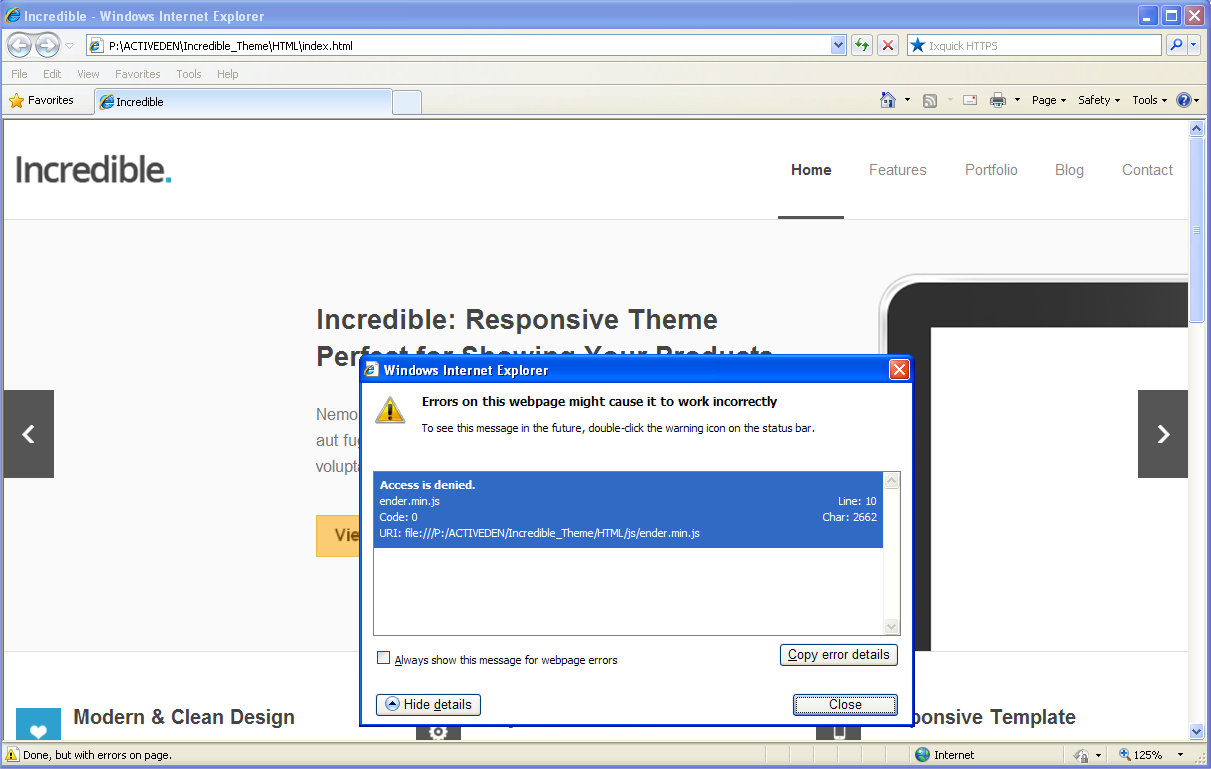
He’s another example of the error using only the file provided in the ZIP file. See screenshot. http://www.cybersol1.com/screenshot_sample.jpg
I cannot reproduce that errors on any version of IE.
The problem I’m having appears to be coming from the .custom-slide definition in the flexslider.css file. That class is interrupted by IE v8 as having a right margin of -100%
I’ve reviewed this on (4) different computers with different versions of IE. I can reproduce the issue on (2) of the four machines with both IEv8 on Windows XP Pro and IE9 on Win 7. Any help you could offer would be greatly appreciated.
To be honest, I’m testing it via browserstack, my PC and everything works for me so I cannot do anything in this case.
Thank you for your time. I’ve replaced the slider with another product. The theme works for what I need.
Ok, I am sorry for that issue but as you can see it’s not easy to fix it when sometimes it works, and sometimes not.
Hello! Is there any way to get this template for Joomla?
Hi, sorry but not.
too bad..
What should i do to apply this templete on wordpress via FTP?

wordpress replied with a “there is no style sheet (style.css) so that failed to install this theme. what should i do?
Do you provide support for your themes in a forum? I know users probably ask a lot of questions about modifying the themes via CSS and I’m not sure if I should do it here. Thanks!
Support for WordPress themes is provided here http://purethemes.ticksy.com
Awesome. Thanks for being so responsive!
Newbie question: What is the difference between the Incredible template and the Incredible WP theme? I see a lot of templates out there and don’t know what the difference is. Thanks for any insight!
WP theme has WordPress content system management. Template is just pure template with HTML and CSS>
Can I put in my own 3rd part slider (LayerSlider) in place of the current slider in the theme?
Thanks, John
Sure.
Thanks. That’s great. Is it easy to build pages with columns. I’m new to this and got used to the GT3 Page builder. Thanks again.
Also, is it fair to assume you have a widgetable areas on the bottom of the pages and in the sidebar?
I just realized this is the template. I will purchase the WP theme. Can I do all this with the WP theme?
Are you asking about WordPress of HTML version? It’s easy to build page with columns using shortcodes and you can answer on your second question is yes.
Here’s WordPress version http://themeforest.net/item/incredible-responsive-wordpress-theme/3016398
Sorry, I will be using the WP theme. So I can add widgets and plugins within columns, sidebars, and at the bottom of the WP Incredible theme? Sorry for any confusion!
Yes.
Awesome! Thanks.
hi, I have a problem. When I press the button “Send mail”, appears an error : JAVASCRIPT Sorry, unexpected error. Please try again.” . I use pure files from package, and i have tryed three different address mail. Help!!
Does your servers supports PHP?
I have tried with the server mail alice and hotmail.
Can i use Bootstrap with this, If yes How??
Hi, sorry but you can’t.
Any front end framework you can suggest we can use with this beautiful design.
You can use any framework but everything depends on your skills and knowledge how to implement that.
Hi Vasterad:
When my page has little content, there is a lot of white space after the end footer. Is there any way to correct this?? Thank you
You can add an extra div below content with margin e.g.
<div style="margin-bottom: 500px;"> </div>
Thanks for the fast reply! BTW when I look at the website from my iphone, the menu dissappear…is this supposed to happen or did I do something wrong?
There should be mobile me like on my demo live preview.
I’m having an issue with the titles of an imagebox not displaying in IE8 – they display fine in all modern browsers but in IE8 you can see them animate in very briefly but then they disappear. Normally I would say screw IE8 but as long as Windows XP is being used by government offices I need it to work in IE8. The client’s site is for a government agency and they can’t see the captions. I’ve tried playing around with the css and even the imagebox.min.js but with no luck. Any help you could offer would be greatly appreciated.
Here is the test link: http://www.thefaqtory.ca/client/eastsideroad/new2/photogallery-historic.htmlThanks, Travis.
Hi, it’s hard to find bug for me because there’s a lot of customizations you made. I’d recommend to compare code from my demo live preview with your site.
Your live demo preview has the exact same problem, click on the SockMonkee image on the home page of your demo, then pay close attention to the bottom left of the popup image when it appears, you will see the caption animate very quickly out of site. I actually did no customization to the imagebox portion of your template.
Everything works for me on IE8. Since release no one before has similar problem, so sorry but I cannot help you. It must be caused by your browser (I guess you’re testing it in IE compatibility mode).
I am not in compatability mode (although I did turn on compatability mode after you mentioned it to see if it would help, and it didn’t).
When you follow the directions I stated above and click on the SockMonkee image on your live demo in IE8, do you see the word SockMonkee spelled out underneath the image or just a white border around the image with no caption. The imagebox itself works , but there is no caption underneath. And just because no one has mentioned it, doesn’t mean that no one else has experienced the same issue, they may have just chosen to overlook it. In this instance the client specifically requested captions under the images and they are not working. Normally I would have just chalked it up to an IE8 bug and moved on, but in this case the client themselves are the ones reviewing the site in IE8. Kind of hard for me to explain to them that the feature will work for 90% of the rest of the world, just not them (and anyone else still using Windows XP).
Well, I’ll take a look but as I said there’s no problem for my browsers. Since there’s no fix I’d recommend to use http://fancyapps.com/fancybox/ instead of imagebox. Hope you understand.
in Internet Explorer (8,9,10, wp7.8) there is a small cursor (triangle) showing on the top of the website and it disappears quickly. Do you know what that is?
Hi, sorry but have no idea however I can’t see what you described in my IE.
HI Guys, love the theme.. Just a small issue with twitter? Created the app and added all the relevant tokens but nothing is displaying?
Any ideas?
Thanks and brilliant work!
Please follow documentation and be sure if your domain is authorised in twitter app.
There is any way to implement revolution slider instead of flexslider like as the wordpress version?
Yes, but I’m not planing update right now so you need to do it by yourself. However it’s good idea to add Revolution Slider to Incredible and I’ll consider it.
Hello Vasterad!
I made my own sidebar called sidebar-rides.php. WHY get_sidebar(‘riders’); calls out both (sidebar&sidebar-riders templates? I need only my own.
I searched the code but didn’t find anything that would fixed this.
Please post questions regarding WordPress version here http://purethemes.ticksy.com/
Hello, I bought this template and really like it. But I have a small problem. I inserted a 4 column Portfolio on the index.html and there are some problems with safarie and chrome. Is it possible that I send you a link via PM that you can take a look on it? Dont want to post this here.
thanks
Yes, send me an email via profile page.
Hi Vasterad, Ive bought two of these and love it, I have a challenge though.
The default option shows all categories when I do not want to load ALL” how can I set the filter not to have an *all function ?
- ”>All
- Our main items
I have tried changing data-option-value=””> to data-option-value=”.front”> without success
many thanks, I get outstanding value from your workWell, it’s not really possible (I don’t know how). :/
Hi Vasterad, The responsive functionality works in all browsers and sizes other than IE8. I’m not worried about anything lower than IE8. Once I size the browser window smaller than the original size it appears the media queries stop working correctly in IE8.
I tried adding response.js to the site to see if that helps and it did help a bit, but it seems like not all of the media queries are being respected when the browser is resized in IE8. Works great in all new browsers.
Here is a link to the test site. http://www.thefaqtory.ca/client/eastsideroad/new/Any help would be appreciated.
IE8 doesn’t support media queries and there’s no fix. :/
Hi Vasterad, I fixed the problem. You can apply either respond.js or css3-mediaqueries.js so that the template will work in older versions of IE. The trick is that you have to combine all of the css files into one style sheet. The js fixes do not work with @import css stylesheet links. Great template btw. I had fun working with it.
Hm, thanks for the tip.
Please email me (found in my previous comment)
I am getting (Sorry, unexpected error) on php mail script. http://canadarealtyinc.com/contactus.php
Thanks.
Eric
Please try to use pure files from package. Most of issues are caused because of customer modifications.
yup, just uploaded the pure template page and contact.php to a server ( http://melvinandwilliams.com/contact.html ). the only thing i changed was the email address in the php file. Otherwise… SAME exact javascript error… Take a look yourself, and please let me know the issue with the javascript. I’ve waited patiently for your help on this.
Make sure your hosting provider doesn’t need smtp auth to send emails via PHP scripts.
I am having issues with the twitter component.
Please have a look at http://canadarealtyinc.com and if you need, i can send any other files required to fix this issue.
thanks Eric
Please follow documentation to run Twitter.
i did, hence why i commented. i followed the instructions, got all the api info, placed it in the correct positions in the twitter.php file, but im maybe missing something in the .js
“Next, in HTML files change nickname to yours. You can also modify count of visible tweets.”
This isn’t really clear as to where i put this information.
Please let me know.
Thanks Eric
In each HTML file:
                <script type="text/javascript">
                    jQuery(document).ready(function($){
                    $.getJSON('twitter.php?url='+encodeURIComponent('statuses/user_timeline.json?screen_name=Vasterad&count=2'), function(tweets){
                        $("#twitter").html(tz_format_twitter(tweets));
                    }); });
</script>could my issue have anything to do with converting pages to php and having my footer as an include? As this is what i have done. So the javascript is in the php footer include.
It may has, however I’m definitely not PHP expert.
ill test it in the html to troubleshoot. if it still doesnt work, can you have a look at the code for me??
Sure.
can you email me? eric [at] citylifecreative.com and i’ll send you the files or login information for you to look at… thanks so much.