191 comments found.
This should appear under http://lamericagallery.com/dev/collection/
Any thoughts? Much appreciated! Rob
Hi,
Your plugin The default All-in-One Event Calendar theme is hiding some elements of the menu. Try turning it off… Cheers!
Thanks! Yup, you’re right. Turned it off and all the menu items appeared. I love/hate this plugin; causing so many problems with other Themes (I launch about 5 projects per month, often including the Calendar plugin) ... sigh. OK, thanks for your help.
Send me a private message if you want to work around this. Cheers!
thanks, sending now!
thanks for helping out – that fixed the issue. Now I have one question: I am very nervous about the reset button and I wonder if there is ANY reason why it is there at all. http://screencast.com/t/aLuJdq1mTaK
If I accidentally press the “RESET” button, will I get a message asking if i am “Really Sure Before Deleting All the Work You Just Did” ... kind of message.
Just curious to know. Any if there is a way to get rid off it, or make it a different color (red or so), that’s what WooThemes do…..
thanks! Great Theme!!!!
Hi,
Yes… You’ll have a popup confirmation window. Cheers!
Phew! Thanks, just what I needed to hear. 
Much appreciated….
Hi,
This is a custom map created on Google Maps. Just go there and try to create a custom location. Cheers!
I see, OK, thanks!
does this theme also provide dummy content? it would be essential for me. thanks.
rob
is the theme compatible with wp 3.6
Hi,
Yes… The preview is already with 3.6. Cheers!
i just bought the theme yesterday. did i buy the 3.6 compatible version then? thanks
Yes… Nothing was needed to make it 3.6 compatible. Thanks!
Super! Nice theme for my client: http://lamericagallery.com/dev/about-us/
Trying to also make an Artist Directory by Country … any thoughts?
If you are not going to use the portfolio posts you can use that for this purpose. Otherwise you’ll have to find a plugin for this. Cheers!

headline blog style doesn’t work anymore after updating to wordpress 3.6
It just stayed on the loading bar with no content loaded
Hi,
Do you have any active plugins? If so please turn them off. I just upgraded to 3.6 and could not find any issues… Send me a private message with a link if you prefer.
Cheers!
Hi, Problem with portfolio. First, on the portfolio page, I can only see the skills but the portfolio itself doesn’t load. Sometimes i need to click several times on the skills and it loads sometimes. (I connected each portfolio to a skill and it should be working fine)
Also, On the home page, “Latest Portfolio”, doesn’t load at all.
Is there a way to fix this?
Thanks
is there a way to load the pages faster?
Hi,
Is this problem also happening on the preview? If not, can you please turn off your plugins for a moment?
...
Hello,
I love this theme!! I am having trouble customizing [pirenko_last_posts].
I set this up with the format [pirenko_last_posts title=”Latest Recipes” items_number=”4” rows_number=”2” cat_filter=”recipes”]
This should give me two rows, each row with two of the latest posts, but instead it displays as one row of 4 posts.
I’ve done the latest update to version 1.7, cleared my cache, and the problem with the display still exists.
Is there any way to correct this?
http://www.fmitk.comThank you!
Hi,
Please send me a private message with your WP login credentials so that I can see what’s going on. Cheers!
Running Safari 5 the header on the site is cut off. Any ideas on how to fix this?
My site is http://www.snaketrailtaxidermy.com
Hi,
This seems to be fine now. Is it ok?
Hello, I am wondering how to create bullet points! I would like also not only to use points but maybe other custom icons.
I tried to use the bullet points while editing texts but bullet points don’t appear on the website after i refresh it
Could you help?
Thanks
Hi,
I assume your are using an “ul” list. Send me a private message and I’ll send you a custom CSS file that fixes this. I’ll include this correction on the next update. Cheers!
How can i send you a private message?
On this page http://themeforest.net/user/Pirenko you have a contact form on the right side…
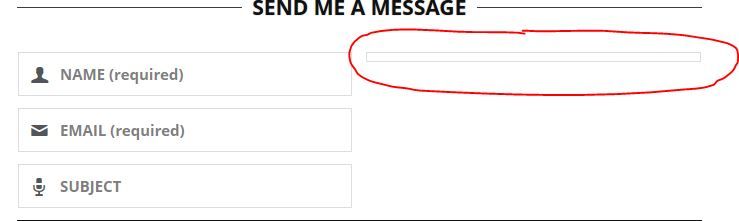
Hi, The message box on the contact page has collapsed. I’ve tried the reset all on the settings, but it’s made no difference. Any ideas?? http://i742.photobucket.com/albums/xx61/fizzyhands/Messagebox.jpg
Hi,
Can you send me a private message with a link please? Thanks!
Can I disable modules in the Homepage? For example, I don’t want Latest Work and Our Clients in the homepage
Sure… The homepage is built like any other page. What you are seeing is actually the page content (shortcodes or html). Thank you for your interest 
Is there a way to increase the body font size?
Is there a file where I can see all the fonts at once, instead of trying each and every font then refresh the page every time?
Thank you a lot
Hi,
Try adding this custom CSS code to Twisted Options>Custom Scripts tab>Custom CSS:body {font-size:17px;}
All the font sizes are calculated according to this one so it will affect the other sizes too. For further adjustments on those font sizes it’s better you edit the custom.css file directly.
For fonts preview it’s better you visit the google font directory.
Cheers!
Thanks.. Its true when i changed the body font everything became bigger. So how can i edit the custom.css file to change only the body font.
Search for font-size and set the values in “px” instead of “em” (you only need to changes the values that are in “em”). If you want to keep the font size to degrade in side on smaller devices you must use “em” like I did (that’s the reason all font sizes depend on the body size).
Cheers!
When I tried to add new page and chose Template Page – contact or timeline or whatever.
The Page custom option doesn’t change to the necessary one. It is just stuck on the
Teaser text (will be displayed below the page title): Sidebar display:
Yes, I have clicked publish already and when I tried to type in teaser text, it doesn’t work.
Hi,
Try turning off all the plugins you may have and update Wordpress. Try also dwonload and re-upload the file package from Themeforest. If this does not work please send me a private message with your login credentials.
Cheers!
Great website.
But I can’t find the icons you use. For example, the icons you use in the Services page, how can I find all this list?
Thank you
Hi,
Please open the Documentation folder and you’ll find an icons.png file inside. You can see those elements there. Cheers 
Here is a VERY strange bug for you that I discovered. It is in no way due to anything you did or did not do.
If a web browser is started in windows 8 with a touch screen plugged in then all of the slideshows in the twisted theme that have the two buttons to change the slide do not work.
However, if the web browsers are started up when the touchscreen is unplugged it works fine.
This should impact a bare minimum number of people. I just found it very very strange.
Yet another reason to avoid windows 8. XD
Hello,
I don’t have all these devices for testing at this moment, but I’ll try to make this test soon. I’ll get back to you if I reach any conclusion. Thanks!
Don’t worry about it. It does not effect us directly. Just one of those really odd things.
It is probably actually a bug with a specific javascript package or plugin.
I have a little problem: after theme instalation, when i tried to change anything in “Twisted options” menu a “Save error!” message appear. Please help me… My site is axlongboard.ro and is running with last stable version of Wordpress… Maybe is a activation error, but i dont have nowhere a link or button to activate.
Hi,
Just like in the email I sent you here’s some info: your server seems to be blocking ajax calls used to save the theme options. Please contact your hosting company and tell them you are getting the following error when you make an ajax call:
POST http://axlongboard.ro/wp-admin/options.php 412 (Precondition Failed)
This is a strange limitation of your server that never occurred to any other buyer of any of my themes.
Cheers!
you’r right – was a hosting server security limitation 10x a lot!!!
It had to be
Hi, thanks for that great theme, setting it up worked fine for me.
Just one problem here – the column-shortcodes I added (like “one fourth” or “one half” column) doesn’t work out fine on mobile. There’s no space to the border, so one can’t properly read it. Can I add something manually to the shortcode or do you already have an update for that? (Where can I download updates?)
Thanks!
Hi,
Please send me a private message with a link to your page so that I can see what’s going on. Thanks!
does the theme come with dummy content?
Yes. After activation you can do that. Thanks!
Is it possible to have different icon/images on the homepage? – I mean the gauge, rocket and network (yellow images). Wondering how I would change these to something more appropriate to my site.
Hi,
On the documentation folder you have a file called icons.png with a complete list of all the icons available. Cheers!
I’ve unzipped the main folder. In Wordpress I’ve tried to install the theme but I get “WordPress Failure Notice”, “are you sure you want to do this” coming up. I’m able to install other themes, just not this one. Any idea what’s going on. Thanks.
Hi,
The theme folder has more than 5MB. You have to upload via FTP. Here’s some help if needed: http://www.screenr.com/OJu7
Thank you for purchasing!