

2763 comments found.
Hey MegaTheme,
I love your Wordpress Theme Skylab very very much. But I am looking for HTML/PHP Website Template. My question is: can you also sell this amazing theme as a HTML/PHP Template with exactly all these function, pages, properties and mobile function?
I would buy it  so pleas sell this theme as HTML/PHP
Thank you. Andreas
Hi, there aren’t any plans for a HTML version just yet but if the demand is there I could put one together for sure.
1-)the tags input box doesn’t appear when i’m adding new portfolio. 2-)portfolio pagination doesn’t appear when i activate that and using right portfolio fixed template.
Hi!
- It’s not something which is included as an option and unfortunately I do not have time to give you a tips. Perhaps a developer would be able to help you with it.
- It works just perfect for us. Navigate to Appearance > Theme Options > Portfolio Settings and make sure the number of portfolios to show is less than portfolios you have already created.

Hi,
I would like to have categories in the gallery “fancybox gallery”, and display all photos in all categories without creating albums by categories, as happens in gallery list but with phots, no with albums. This is possible??
Thank you very much!
It may well be possible with some modification but it’s not something which is available out of the box I’m afraid.
Ok,
thank you very much for the quick response.
Sincerely, Sam
Hi MegaTheme,
Is there a way to Hide the captions on photos? I thought I had seen your response with code in the past but I have reread all comments and can not find this.
Thank you!
Hi, photos on which page do you mean?
I have the “full width window” on the home page and the captions show. I have the slider on the other galleries and I don’t see it showing. Thanks!
If you don’t need captions than don’t use them.
how can i add SEARCH box (just for portfolios) to the left menü or add to any top of page?
Hi, it’s not something which is included as an option and unfortunately I do not have time to give you any tips. Perhaps a developer would be able to help you with it.
is that your support? i will never buy your items!
I think you are just a bit confused between support and customization.
i asked you 2 times where the left menu’s codes but you are thinking it is customuzation? i want to learn where is it not to add it by you!
We have already gave you a tip on this. Navigate to Appearance > Theme Options > Style and add these lines of code to custom CSS block:
#access ul {
font-size: 13px;
}
#access ul li li a {
font-size: 12px;
}
.
Hi guys, great theme really loving it!
Just a quick one…
How do I add captions to images using the super smooth gallery?
Hope this feature is available, but if not, any idea how I might code this?
Many thanks
Kim
Hi, please see the screencast how to add captions to images http://www.screenr.com/TEHH
My apologies but I don’t think I made my intentions clear enough. I want my photos in a super smooth galley to have titles that will display next to on or above/below each individual photo as they appear. I thought this would be the image caption however when entering the captions as you described in your video it has no effect and doesn’t display anywhere on the site so I don’t see the point of what you showed me, could you explain this further please.
Regards
Kim
Did you downloaded the latest version of the theme?
Hello,
I recently purchased the SkyLab theme and managed to install it. Put some custom CSS into the Options field. Everything worked fine but somehow now i am unable to save any changes from Theme Options. It looks like i am missing the proper rights. I unistalled the Theme and re-installed it again but still nothing.
My site: http://www.hameleers.net
I would appreciate some help.
Huub
Hi, please email us your URL, username and password for your site via our profile page and we will take a look.
Hi,
Thanks for the quick reply. Meanwhile i reinstalled Wordpress, guess it was time to do that.
I’m sure it wasn’t the theme. Everything is working fine now. Really happy with the Theme
Another question: I would like to know how to use the Theme style CSS black.css or any other for that matter, which are included in the download package.
for now i pasted the content of black.css into the Theme Options Custom CSS field.
A short description on how to use them would be fine.
Huub
Glad you figured out!
To install custom styles for your site navigate to Appearance > Theme Options > Style and add styles from the “styles” folder to “Custom CSS” block. You can upload a background for your sidebar/site from the theme options panel. You can find all the backgrounds here http://subtlepatterns.com/
Is there a way to add comments in the portfolio posts?
Hi, it’s not something which is included as an option.
But it is possible, right? Is it a hard modification in code, or something you might be able to help me out with?
Sure it’s possible. We would suggest to hire a developer.
Hello team,
I was just surprised by your answer to “craigrossmuller” (2 comments above) – because to have different galleries lists it’s what every photographer really needs for presenting his/her images (by year, by country, etc), to help to photo editors, visitors or clients easily to find needed photograph or theme.
As craigrossmuller I believed it should be by default. As for me it’s a big mistake that a theme doesn’t have this feature. It’s logical.
By the way, can this feature (different gallery lists) be added with some kind of a code modification? In theory?
Thanks!
Hi, perhaps we will add it in the next update.
Please do it! Thanks!
Hello,
Is there is possibility to have full-height galleries? My images are mostly square or portrait orientated.
I’m sorry but I don’t quite understand your question. Can you try restating it or adding some additional information?
how can i increase size of font at left menu and how can i insert my widgets to the left menu?
Hi, sorry, what you have described isn’t available with the theme.
it should be do it via codes? where?
We would suggest to hire a developer.
where the codes about left menu in?
Navigate to Appearance > Theme Options > Style and add these lines of code to custom CSS block:
#access ul {
font-size: 13px;
}
#access ul li li a {
font-size: 12px;
}
.
Hi I have a subheading under one of my pages and in this subheading I have a gallery list. Am I able to add another gallery list to another subheading? ie. Gallery – 2012 (gallery list of work done in 2012) – 2013 (add another gallery list of work done in 2013?)
Hi, the theme doesn’t support multiple galleries lists.
where can i change the permalink of /portfolio/ to /myown/ ?
Hi, it’s not something which is included as an option.
i know but where can i change it please explain how. thanks.
In functions.php on line 192
portfolio.
i did it like you said but my pages giving 404?
Navigate to Settings > Permalinks and click “Save Changes” button.
hi Megatheme,
I have other questions ,
1. can the blog(journal) be single colume? not just an empty sidebar? the demo site is two column, can i make the sidebar to the bottum?
2. when viewing by tablet & phone, can the top menu be fixed on the top?
thanks a lot!
Was thinking about rating this theme….but I dont see where I can do that. I see there are 25 ratings so far so I must be overlooking it??!!
ps…please answer my other more important questions from other comments before you answer this one. 
UPDATE…found it on the download page….perfect place for it… 
Hi, see the screenshot below.
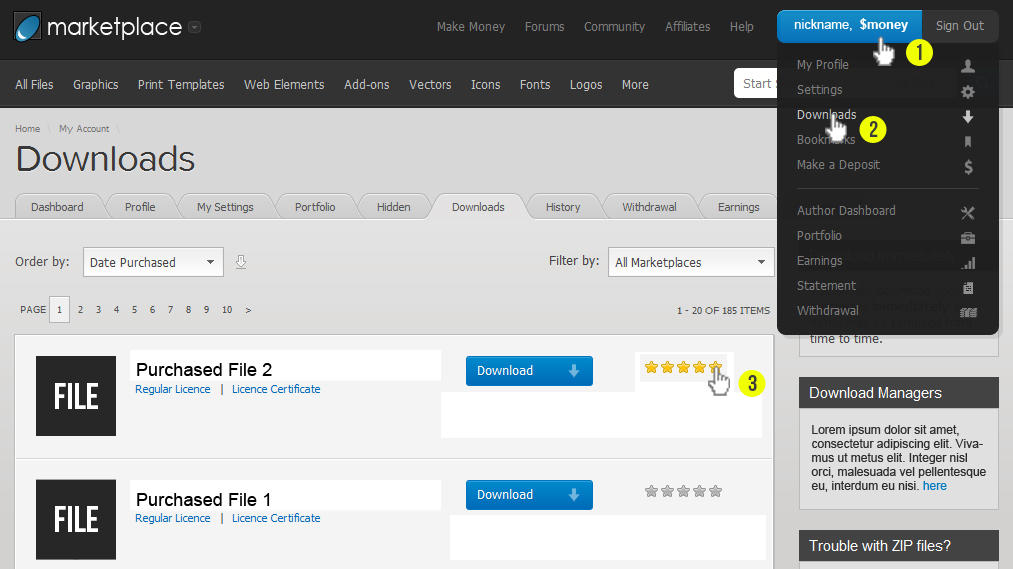
as my UPDATE stated above, I found the rating area….there was no way to post an update to it except to edit the post.
Hi Megatheme,
For Full width slider template, at the start of the page, you have this split second fade in effect, which I think is really nice. Is it possible to apply it to Fixed width template? Can you give me a pointer of which file and what to edit? Thanks so much again for your help.
Hi, we would suggest to hire a developer to help you with.
Hi! Great theme!
The super smooth slider does not work in well in iphone portrait mode. The main image actually disappear under the header. Also, the images look very small on mobile devices.
But main problem is that it does not work at all in iphone portrait mode. Same on your demo site.
Please advise.
Thanks!
Hi, thanks for your feedback. We will take a look at it later.
Would you be willing to modify the theme? little changes nothing big, ill pay extra if the price is right
Sorry we aren’t available for freelance work.
Well i emailed you guys before, asking, before i buy the theme would you be able to modify it, and they said YES, but buy it first then go to the support and they’ll do it for a little extra charge, i have emails to prove it, don’t get me wrong i LOVE the theme and ill find someone that will do it for me, but next time you need to coordinate better between you guys in terms of what you can and can’t do. Thank You!
@ Markhutw
for the magnific-popout lightbox (demo version) you have to create a page (no gallery) and set the page attributes (right sidebar) to gallery and the gallery setting (bottom) to width.
Wouldn’t it be time to have a proper support forum?
It’s getting a bit frustrating finding an answer here (or asking the same questions for the n-th time) and also not to be able to help others.

Hi, we will create it as soon as possible. Please describe your issue.


