38438 comments found.

Just updated to 2.6 it fixed the double post issue thanks!
Quick Question, I have two categories with each having specific blog post. One of them has featured images, one do not. Is there a way to specify lets say categories X on blog page shows featured images when category Z shows up its just the blog post with pictures inside the post? I don’t know if I am making any sense.
Also the ones that have features images some arent high res, So when you click on the post the image is stretched huge in the single blog post. How can i prevent it from stretching the featured image ones i click on the post?
Hey yeaitsedgar!
1. If you don’t specify a featured image for a post it will simply not display and the images inside of the post will show so as long as you haven’t set a read more button prior to them or an auto excerpt.
2. Enter this in your custom css box:
.single .post-featured-img {
   width: auto!important;
}
Cheers
where exactly do i enter this code?
There’s a box called “Custom CSS” In the Salient options panel > General Settings tab 
I went into the general setting in theme and pasted .single .post-featured-img { width: auto!important; } and it didn’t make any difference. I just don’t want the featured image to stretch when you click on an individual post.
Hey again,
sorry – just a little typo in the snippet. Change it to this instead:
.single .post-featured-img img { width: auto!important; }
Cheers
I want to say THANK YOU so much for your support and I will forever be a supporter of ThemeNectar and the outstanding customer service.
I am assuming these featured images are just high resolution? How Can i fix this?
You’re very welcome yeaitsedgar!
Sorry, the snippet should be this to prevent over sizing:
.single .post-featured-img img {
   width: auto!important;
   max-width: 100%!important;
}
Cheers!
I want to use the secondary top, top nav like Hellobar.com. I would like to adjust links to be center justified (like it is on the mobile), center vertical justified, increase font size of the buttons, etc.
This is what I got so far, only the height seems to be working…
#header-secondary-outer {
      height: 38px!important;
      font-size: 14px!important;
      position: center center!important;
   }
Help would be appreciated!
Hey!
Here’s the css that actually kicks in on the responsive layout you’re trying to emulate. You’ll need to place it in the actual stylesheet though than the custom css box since it uses the direct child selector ”>”
#header-secondary-outer nav > ul {
    float: none!important;
    width: 100%;
    text-align: center;
    height: auto!important;
}
#header-secondary-outer nav > ul > li {
    display: inline-block!important;
    float: none!important;
}
Cheers!
Thank you for the update, ThemeNectar!
I’ve just uploaded it via FTP and done a few tests. Everything is working smoothly except for something that relates to the Nectar slider.
Since updating the site, the arrows on Nectar slider are gone. I can see the button overlay, but not the actual < > arrow symbol. Ditto for the ”/” between slide numbers (but the slide numbers do appear). Anyone else with the same problem?
I’ve also just noticed that the search icon on the navigation menu has disappeared… and the Vimeo icon doesn’t show in the footer…
You’re welcome aseachange! Have you cleared your browsers cache?
Cheers
hi themenectar – in functions.php you define NECTAR_FRAMEWORK_DIRECTORY as follows:
define(‘NECTAR_FRAMEWORK_DIRECTORY’, get_template_directory_uri() . ’/nectar/’);
(/nectar/ with a trailing forward slash)
this is referenced in some locations which causes two forward slashes to be echoed, and this causes a problem on some web servers…
line 548:
would you be able to search and replace this? I just fixed my theme manually but would be great to have this in a future update” />
similar problem on line 44 of /nectar/options/defaults.php
Sorry about that episensor! I’ll note to take care of all instances of that
Cheers
thanks – also sent you a private ticket re. the shopping cart links in the main navigation! Cheers. EpiSensor
Thanks, will check it out as soon as time allows
Awesome, looking forward to getting into v2.6 !
Quick question, do you have a recommendation for a stable 3rd party plugin I can create my own short codes with?
Glad to hear FromInfinity!
Actually I have no experience with any plugin to do that since I’ve always created them myself – sorry!
Hey guys,
Salient v2.6 has landed!
This release conquers a lot of outstanding bugs as well as adds some awesome new features I know you’ll enjoy playing with!
I’ve already updated the changelog which can be found here: http://themenectar.com/changelogs/salient.html so refer that for a full list of changes/new additions and feel free to browse the live demo as it’s running the new version – just remember to clear your browsers cache if you notice anything off
The update has already been approved so download and enjoy everyone!
Also, thanks for your patience while I wrapped this up – i’ll be back on the forum tomorrow in full force.
Cheers!
Got the site up everythingdriven.com but everytime i search for something the blog post come up doubled.. why?
Hey yeaitsedgar!
That was a bug of 2.5 – update to 2.6 and it will clear up
Cheers
Hi, i would like to change the size of some form fields (actually the width) and the only thing i found on the internet was about how to change the text length. Also is it even possible to put a form field next to an other instead of an column like form? Thank you in advance for your help.
Regards, Greg
Hey Greg!
yes, you can use columns like this:
<div class="col span_4">[text* your-name /20]</div>
The above example assumes you’re using the contact form 7 inputs, but in any case just place your inputs inside of a div with the classes of “col” and the width you desire e.g. “span_4”.
Cheers
Thanks a lot, it works like a charm!
You’re welcome
Hi, please allow me 2 Questions: 1) Where to translate the Call to Action Footer with WPML? 2) Wich short codes do you use on your demo- homepage for displaying the “coded to Pixel Perfection” and the “Stop blending” Teaser below?
Thanks, best regards,
Hey again meranomaia!
1. You can’t translate that string or others generated through the theme options input fields without going into the themes code and modifying them. Here’s a public article on the topic.
2. The coded to pixel perfection section is an instance of the Nectar Slider – check on the tutorial on using it: https://www.youtube.com/watch?v=FLU9Pxo_RD8 and the blue section below it is just a fullwidth section with a heading tag inside
You can get that setup and all the others seen on the demo by importing the included dummy data file
Cheers!
Thanks a lot! i have overwrited the dummy data and i am not able to see the shortcodes anymore. As to the fullwidth section with a heading tag inside…where to put text there? Anyway, i love the Theme pretty much!
You’re welcome!
1. You’re not able to see the shortcodes anymore? Can you elaborate a little more on this?
2. I’ll just give you an example you can paste into the text tab on your editor to learn from:[full_width_section bg_pos="Left Top" bg_repeat="No-Repeat" text_color="Light" image_url="" top_padding="50" bottom_padding="40" background_color="#2ac4ea"] <h3 class="light" style="text-align: center;">Stop blending in with the rest of the crowd and start leaving your mark on the web.</h3> [/full_width_section]
Cheers
Hello ! Very nice theme ! a few questions please:
1- other code embed video are supported for portfolio lightbox (dailymotion, rutube…)
2- do you plan to integrate rich snippets
3- do you plan to integrate bbPress
4- sticky sidebar works on the blog?
5- possible to change icons social sharing (google+...)
6- possible to integrate the number of views on portfolio and blog posts.
Thanks !
Thanks youyou78
1. Yes, you can embed any video iframe in there.
2. Perhaps, but i’ll probably leave it up to a plugin (many already exist for that)
3. The latest update added basic support for BuddyPress.
4. No, because in most cases it would be too long to fit – this would require custom coding to make it so as of now.
5. Adding additional sharing buttons would require custom scripting to make the share functionality work and get the current share count.
6. Yes, but you’d need a plugin if you can’t code it yourself – there’s nothing built in to assist you with that.
Cheers!
thank you for your answers !
5. pinterest replaced by google+, the option is included in the theme ?
thanks !
Unfortunately not, the only reason I didn’t add G+ as an option was because it seemed impossible to get the current share count where as that data was readily available for the other social networking platforms.
Cheers
Ok I understand. I’ll probably buy 
Best Regards !
Awesome
Cheers!
Hi, I love your theme!
I translated everything into German, but somehow the “read more” button in the blog section doesn’t change. Takes me crazy Any idea what that problem causes? Everything else worked perfectly. Thanks in advance!
Hey vaternam!
Actually i’m not sure why that string wouldn’t be working for you off the top of my head – it’s included in the .po the same as the other strings, you can confirm this by opening the files inside of includes/post-templates and running a search for “read more”.
I assume this is happening on the main blog page?
Found the issue… the entry.php in line 81 says:
echo ‘ Read More ’;
but should say:
echo ‘ ’. __(“Read More”, NECTAR_THEME_NAME) . ‘ ’;
That caused the not translating issue. Maybe you should include that into your next update.
Thanks!
Darn, thanks for mentioning!
Hello,
My client wants to translate his website into multiple languages, could you please tell me how to add WPML support? Current bugs: portfolio, theme settings and slider can’t be translated. Pages, menu’s and blog posts works fine.
Do you think you can add WPML support by doing (small) changes in the theme? If you want, I could send my WPML files to you so you can try out the plugin on your own demo website.
Thanks!
Regards, John
Hey John!
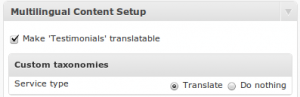
There’s a Multilingual Content Setup section at the bottom of the slider & portfolio post types where you can check the box to “make translatable” http://d2salfytceyqoe.cloudfront.net/wp-content/uploads/2011/05/mcs-for-testimonials-300x97.png
As for the theme options panel – the strings for that should already be in the .po file and ready to translate.
Cheers!
Hi there,
Thank you so much!
About the theme options panel, such things as ‘Footer copyright section text’, and ‘Custom Recent Posts Title’, but also the Call to Action bar, could not be translated yet. WPML doesn’t find strings for that.  Do you know a way how to translate these?
Cheers!
BTW, amazing theme! I’m really love the Nectar slide, menubar, page’s and don’t forget the gray’ish’ background on every page! Well done!
You’re welcome & thanks for the compliments!
I didn’t know what you meant exactly until now – I thought you meant you needed to translate the admin text, not the data from inputs in the admin panel. Unfortunately you can’t translate the strings generated through the theme options input fields without going into the theme’s code and hard coding the strings. Here’s a public article on the topic. I know it’s a nuisance, but unfortunately there’s no other way.
Hey, Can I exchange “Read More” for something else?
And how Can I translate?
Hey luckskywalker,
1. Yes, but you’ll need to modify the files inside of the includes/post-templates folder. Just do a find and replace for “read more”.
2. By using the .po file – you can use plugins right inside of WP to handle that such as http://wordpress.org/plugins/codestyling-localization/ or WPML if you need a multi-lingual setup.
Cheers
I have to change read more to another thing on ALL files?
In each of the files in that folder as they are the formats for each post type.
Cheers
I had one more question. I have uploaded an image at 178 wide x 400 long and the theme stretches it way out. It happened on 2 different portfolio pieces. What can I do to fix this. Thanks
I think I figured it out … or at least I got it to kinda work. It was filling the “div” to 98% with my image and I deleted the width and reuploaded the style.css. Still have the original if that is needed … this was the original .flex-gallery .slides img {width: 99.8%; display: block;} and my remedy is / was .flex-gallery .slides img {display:inline-block;}
Please let me know if there is a better way. Thanks
Hey kweaver192133! Yes, that’s one way to handle it – you could also try something like:
.flex-gallery .slides img {
   width: auto!important;
   margin: 0 auto!important;
}
Cheers!
Why cant I get any video working in the Nectar Sliders????
Hello FanofDesign,
please supply me with your URL so I can check your setup for you and let you know what the problem is.
Thanks
Hi Phil,
Ho do I get the funky icons that you have on the various homepages… They’re usually referenced at your themenectar site: E.g.
http://themenectar.com/demo/salient/wp-content/uploads/2013/09/design.pngI want to use them in image_with_animation shortcode and with more appropriate ones that can be associated with my content.
Thanks
Hey imiweb!
You can find the ones I used on the demo here: http://icomoon.io/
which can all be downloaded as a png in any size
Cheers!
Hey got 1 question, i used a video 1920×526 for the Nectar Slider.how can i adjust the theme for a small height video? How can i remove the excess black space?
Great Theme
Hey PMZ!
The video BG’s need to use a standard 16:9 aspect ratio in order to ensure there are no black bars in any resolution. So just change your size to 1920×1080 or 1280×720 and it will work as the demo.
we used hand brake to custom make our own height. we rather user our smaller video as it shows off more off the site and allows faster loading.
thanks
If you’re going to use a custom aspect ratio, you’ll need to adjust the script a bit. Open up the nectar-slider.js file (located in the js folder) and change these two segments to reflect your new aspect ratio:
vid_w_orig = 1280;
vid_h_orig = 720;
min_w = 1280/720 * ($sliderHeight+20);
Cheers
First off, let me say that I absolutely LOVE this theme! The code is clean and a dream to work with 
I just have two quick questions. First, is there any chance you would consider adding a “related posts” section below individual blog posts, or give me a point in the right direction on how I’d set myself up for success in this effort in terms of matching the theme for a YARPP plugin template or something?
Two, I love how easy it is to have separate categories for the portfolio displayed on separate pages. But I’d love to so easily do the same thing with multiple categories on the blog. So I could create a page using a “blog” page template, and then select which blog categories to display. Is there a way to accomplish showing only select categories of blog posts on a page? If not, any suggestions would be totally appreciated
I’m excited for the upcoming “bug fix” release, though I haven’t noticed any bugs, myself. And I’m even more excited to see what you come up with in the next “new feature” release!
Thanks for the amazing work, and I wish you continued success in your sales!
Oh, I just saw the “blog” shortcode that can be inserted onto a page. That answers question 2 awesome!
Thanks so much adaptivereality, that means a lot!
I’m glad you found the answer to your second question already, but to answer your first – I will add that to the wishlist, but there’s no real quick way for me to explain how to add it yourself. The gist of it would be modifying the single.php file and adding a new query for posts in the same category underneath the content and placing each one in a column size of your choosing depending on how many related posts you query for.
Hope that helps!
Any chance on seeing that feature implemented in a future release of Salient?
Also a small feature request: I want a subtitle in small font that lives below the logo. Just like here: http://blog.bufferapp.comMaybe its a selection check box to activate in the Header Setting, with an input field to enter your text. Its really useful for first time users who jump on a website and have no context for what the site is about.
I tried designing a logo with raster type in it, and it works fine in the desktop version of the website. However it ends up sucking on the mobile version, because its just too teeny-weeny to read.
Hey again!
For now you could always tweak the logo size on mobile by following this: http://themenectar.ticksy.com/ticket/46745/search/
Cheers
Ah, thats cool I like my logo way-big on the mobile ver. Thanks again man!
You’re very welcome!
Hi there,
My client bought this theme, I had to install it on their website. Could you tell me if it’s possible to add a Nectar Slider to the blog page? My client want to interactive the costumer with a couple of slides that are popping up on the blog page. Could you please tell me if that’s possible? Maybe by changing some of the .php? Adding a short code to the blog page didn’t work, seems Salient uses a special template for displaying blogposts. 
I’ll hope you could help, have a great weekend!
Sincerely, John
Hey John!
Yes, and you don’t need to do any extra coding
As long as you’re on v2.5, you’ll have have access to the blog shortcode which can be used to place a full blog where ever you need it. So just create a page, insert your Nectar Slider in and then the blog shortcode underneath. Here’s a page on the demo that shows this setup: http://themenectar.com/demo/salient/home-blog/
Cheers!
Stupid me, you’re completely right. Thanks for your help, enjoy your weekend!
No worries!
Cheers